Ergotron HX vs LX
These are not two tiers of the same arm. One holds 7 to 25 pounds and one holds 20 to 42, which leaves a five-pound overlap — and outside it, the wrong arm does not simply perform worse. It pushes your monitor to the top of its travel and keeps it there.
By Stephen V.Last reviewed
The two published weight windows
Every cell is Ergotron's own published figure, from the sources cited at the bottom of this page. Read the first column before anything else — it decides the purchase on its own.
| # | Arm | Weight window | Screen size | VESA | Lift | Warranty | Cycle figure | Price |
|---|---|---|---|---|---|---|---|---|
| 1 | 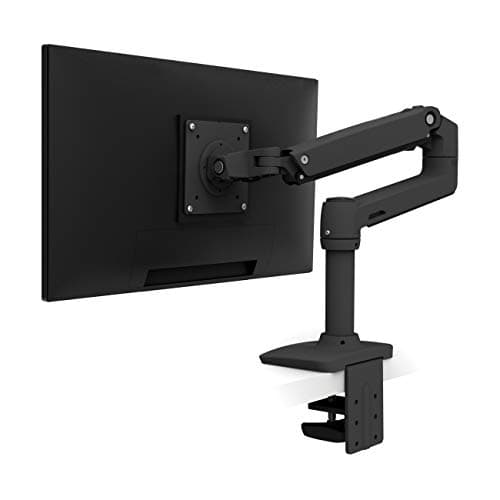 1. Ergotron LX Desk Mount Monitor Arm Monitors under 20 lb, which is most of them
| 7–25 lb | ≤34" | MIS-D 75/100 | 13" | 10 yr | 10,000 (Ergotron's own test) | $190.00$219.00−13% Check Price on Amazon |
| 2 | 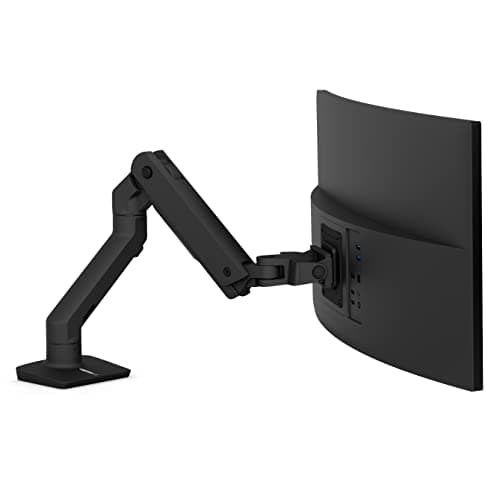 2. Ergotron HX Desk Monitor Arm Panels over 20 lb, and only those
| 20–42 lb | ≤49" | MIS-D/E/F | 11.5" | 10 yr | — (not published) | $329.00 Check Price on Amazon |
The overlap is 20 to 25 lb and nothing else.Outside that five-pound band exactly one of these arms will hold your monitor in position, and the other will not — under its floor a counterbalanced arm rises to the top of its travel, over its ceiling it sinks. The figure to check is your panel’s weight with the stand removed, which is not the number printed on the box. The LX has more lift, not less:13″ against 11.5″, despite being the smaller arm. No clamp thickness window appears herebecause Ergotron does not publish one we can fetch and cite — will a monitor arm fit my desk handles desk fit without inventing a figure.
Prices and stock as of October 18, 2026, from Amazon’s API. They change; we show a live number or none at all. #ad — we earn a commission.
Buy the LX unless your monitor weighs more than 20 pounds without its stand, is wider than 34 inches, or uses a VESA pattern bigger than MIS-D. If it does any of those, the HXis not an upgrade you are treating yourself to — it is the only one of the two that will work.
Here is why that is the whole comparison, in one line of arithmetic.
Two windows, five pounds of overlap
Ergotron publishes a minimum and a maximum for both arms, which already puts it ahead of most of this category:
LX: 7–25 lb. HX: 20–42 lb.
Lay those over each other and the shared band is 20 to 25 lb— five pounds, inside which either arm is rated for your screen. Outside it, one arm is rated and one is not, and “not rated” here does not mean “slightly worse at it”. A counterbalanced arm holds position because its spring tension matches the load. Over the ceiling, the load wins and the monitor sinks. Under the floor, the spring wins and the monitor rises to the top of its travel and stays there, with the tension screw already wound to its stop.
That is the part that catches people out, because the mental model for “too heavy” is obvious and the mental model for “too light” usually is not. We cover the mechanism in gas spring vs mechanical arms, and the symptom in how to fix a sagging monitor arm — which is the same mismatch pointing the other way.
Which side of the line is your monitor on?
Twenty pounds is more monitor than most desks have on them. A typical stripped 27-inch panel sits in single or low double digits; the Dells and ASUS panels we researched for our monitor roundup publish panel-only weights from about 9.9 lb to about 14.8 lb for 27 and 32-inch screens. All of those are inside the LX window and under the HX floor.
The figure you need is the weight with the stand removed, and it is frequently several pounds below the number on the box, which includes a stand you are about to throw in a cupboard. How much does a monitor weigh collects the published panel-only figures we could verify and explains how to weigh yours if the maker does not print one. Do that before you read another spec on either arm.
If the answer lands between 20 and 25 lb — a heavy 38-inch ultrawide, a 40-inch panel, a monitor with a built-in webcam and speaker bar — you are in the overlap and both arms are rated. In that narrow case, buy on the other columns: the LX has more lift and a cycle figure, the HX has more headroom above you and wider VESA support.
What the HX gives you that the LX cannot
Three things, and they are specific rather than general.
1. Screen size to 49″. The LX is rated to 34 inches. If your display is wider than that, the comparison is over regardless of weight.
2. MIS-E and MIS-F.The HX is the only arm across our monitor-arm pages that supports the six-hole MIS-E and the large MIS-F patterns; the LX covers MIS-D at 75×75 and 100×100, which is what nearly every consumer monitor uses. VESA patterns and weight ratings shows how to tell them apart on the back of your own screen.
3. A 42 lb ceiling. Which is enough for essentially any consumer ultrawide, and is the reason the HX appears at the top of our heavy-duty roundup — a short page, because very little else is rated this high.
What it does not give you is longer travel. 11.5″ of lift against the LX’s 13″: the bigger arm moves less, which is worth knowing if the reason you are mounting a screen at all is getting it down to your eye line.
What they share, and the one disclosure that differs
Both carry a 10-yearwarranty published by Ergotron rather than implied by a retailer, which is longer than most of this category and a real part of what you are buying. Neither claims a third-party standard — no UL, ANSI or BIFMA statement appears in the documents we read for either arm.
The difference is a cycle figure. Ergotron publishes 10,000 cyclesof motion for the LX and publishes nothing equivalent for the HX. We label that every time we cite it: it is Ergotron’s own internal test, not an independent certification, so it is a disclosure rather than a proof. But a company printing a durability number for one product and not for its heavier sibling is information, and on two arms with identical warranty terms it is the only thing separating them on longevity.
Before you order either one
Weigh the panel without its stand. Identify the VESA pattern. Then check the desk, which is the step people skip: both arms clamp or grommet-mount to an edge, and the thickness window is the figure Ergotron does not publish anywhere we can fetch and cite. We will not print a number we traced only to retailers, so will a monitor arm fit my desk and clamp vs grommet mounting both handle it the honest way: measure your edge, check the clearance behind it, and know which mounting method your desk actually allows.
If the desk is glass, or the top is thinner or thicker than a clamp expects, that is a separate decision and it comes before the arm — a monitor arm on a glass desk is where we work through what can and cannot be done safely.
What we can’t tell you
We have not mounted either of these arms. Everything above is Ergotron’s own published specification, cited and dated, and the arithmetic of laying two weight windows over each other. We cannot tell you how either arm feels to reposition after two years, whether the HX’s extra mass makes a desk flex, or whether a 10,000-cycle test corresponds to anything in your room. Those need time and a monitor. What the published figures can settle — which arm will physically hold your screen where you put it — is the question most buyers of these two arms get wrong, and it is answerable before you spend anything. Our methodology sets out where our evidence stops.
The picks, in detail
1. Monitors under 20 lb, which is most of them
Ergotron LX Desk Mount Monitor Arm
The right arm for almost every monitor sold: 7 to 25 lb, 13″ of travel, ten years of warranty and a published cycle figure. If your panel weighs under 20 lb — and most do — this is not the cheaper choice, it is the only one of the two that works.
- Weight range
- 7–25 lb
- VESA
- MIS-D 75/100, ≤34"
- Warranty
- 10 yr
Ergotron publishes 7–25 lb for the LX with 13″ of vertical travel, VESA MIS-Dat both 75×75 and 100×100, screens to 34″, and a 10-year warranty.
Read that ceiling against the other arm’s floor and the decision makes itself. A stripped 27-inch panel is typically somewhere in the 8–14 lb range and a 32-inch panel is often 12–18 lb, which is to say: comfortably inside the LX’s window and comfortably belowthe HX’s 20 lb minimum. Weigh yours without the stand before you order either arm — how much a monitor weighs has the published panel-only figures we could find and the method for getting your own.
It is also the only one of the two with a published durability figure: 10,000 cyclesof motion. That is Ergotron’s own internal test rather than a third-party certification, and we say so every time we cite it — but a number that exists for one model and not the other is a fair thing to weigh when both carry the same ten-year term.
The one thing to check at the bottom end is the 7 lb floor, the highest minimum of the counterbalanced arms we rank. A bare 24-inch panel can land at 5–6 lb, and below the floor a gas-spring arm does not hold position: it drifts down.
Good
- 25 lb ceiling — the highest of any arm here, and enough for most 32" panels
- 10-year warranty, published on the product page rather than implied
- 13" of vertical travel
- Ergotron publishes both ends of the weight range, which most brands do not
- MIS-D covers both 75×75 and 100×100, the two patterns nearly every monitor uses
Not so good
- The 7 lb floor is the highest of the three counterbalanced single arms here — a light 24" panel may sit under it
- Ergotron's 10,000-cycle motion test is their own internal test, with no third-party standard cited
- No UL, ANSI or BIFMA claim of any kind — like every arm on this page
Don’t buy it if: your monitor weighs under about 7 lb. A bare 24" panel with the stand removed can land at 5–6 lb, and below the floor a gas-spring arm will not hold position — it drifts down. The LX Pro's 4 lb minimum exists for exactly this case.
$219.00 −13%
Price as of October 18, 2026. #ad — we earn a commission.
Where these numbers came from
2. Panels over 20 lb, and only those
Ergotron HX Desk Monitor Arm
Not an upgrade — a different tool. 20 to 42 lb, screens to 49″, and the only VESA support in our coverage that reaches MIS-E and MIS-F. Below 20 lb it does not sag; the spring wins, the monitor rides to the top of the travel and stays there.
- Weight range
- 20–42 lb
- VESA
- MIS-D/E/F, ≤49"
- Warranty
- 10 yr
The HX exists for a class of display most people do not own. Ergotron publishes 20–42 lb, MIS-D, MIS-E and MIS-F pattern support, screens to 49″, 11.5″ of lift and the same 10-year warranty as the LX.
The number that decides this purchase is not the 42 lb everyone advertises. It is the 20 lb minimum, and the failure mode below it is the opposite of what people expect: a counterbalanced arm under-loaded does not droop, it rises. The spring is stronger than the panel, so the monitor travels to the top of its range and stays there, and winding the tension screw further does nothing because you have already reached its limit. The arm is working correctly. It is simply not an arm for your monitor.
Where it is the only answer: a 42–49-inch panel, a heavy 38-inch ultrawide, or any display using the six-hole MIS-E or the large MIS-F pattern, which the LX does not support at all. VESA patterns and weight ratings explains how to identify which pattern is on the back of your screen before you buy either of these.
Two things Ergotron does not give you here. There is no published cycle-test figurefor the HX, where the LX has one. And there is a near-identical variant — the HX HD Tilt Pivot — whose floor is higher again at 28 lb and whose VESA support is narrower at MIS-D only. If you are ordering an HX, confirm which HX is in the box.
Good
- 42 lb ceiling — enough for essentially any consumer ultrawide
- Supports screens to 49", the widest panels sold
- MIS-D, MIS-E and MIS-F — the only arm across our monitor-arm pages that covers the six-hole MIS-E and the large MIS-F patterns
- 11.5" of lift
- 10-year warranty
Not so good
- 20 lb MINIMUM — it will not hold an ordinary monitor up, at any tension setting
- The separate HX HD Tilt Pivot variant has a HIGHER 28 lb floor and narrower MIS-D-only support
- No third-party standard claimed — no UL, ANSI or BIFMA
- Ergotron publishes no cycle-test figure for the HX
Don’t buy it if: your monitor weighs under 20 lb — which includes most 34" ultrawides. This is the single most important sentence on the page. Below the floor the arm does not sag; it rises, and stays up. Weigh the panel without its stand before you order.
Price as of October 18, 2026. #ad — we earn a commission.
Where these numbers came from
Common questions
Is the Ergotron HX better than the LX?
No — it is rated for different monitors. Ergotron publishes 20–42 lb for the HX and 7–25 lb for the LX, so if your panel weighs 12 lb the HX is not a better arm for it, it is an arm that will push it to the top of the travel and hold it there. The HX is the better arm only for a display over 20 lb, over 34 inches, or using a VESA pattern the LX does not support. For everything else the LX is both cheaper and correct, and it is the one with a published cycle figure behind it.
What happens if my monitor is lighter than the arm's minimum?
The arm rises. A gas-spring arm balances the load with a spring you tension to match it; under-loaded, the spring wins, so the monitor travels up to the end of its range and will not stay where you put it. Winding the tension screw does not fix it once you have reached the screw’s limit. It is the mirror image of the more familiar problem — an arm that sags is overloaded or under-tensioned — and both are a weight-window mismatch rather than a defect. Gas spring vs mechanical arms explains why the mechanism behaves this way.
Which arm do I need for a 34-inch ultrawide?
Weigh it first, because 34-inch ultrawides straddle the boundary. Many come in under 20 lb with the stand off, which puts them inside the LX’s window and under the HX’s floor; heavier models sit the other way. The LX’s screen-size limit is 34″ exactly, so a 34-inch panel is at the edge of its rating on size while usually being comfortable on weight. We rank the whole category, including arms built for wider panels, in the best ultrawide monitor arms.
Do both arms carry the same warranty?
Yes — 10 years on both, published by Ergotron rather than implied by a listing, which is longer than most of this category offers. The difference is the durability figure beside it: the LX publishes a 10,000-cyclemotion test and the HX publishes none. That cycle number is Ergotron’s own internal test and not a third-party certification, so treat it as a disclosure rather than a proof — but one arm disclosing and the other not is worth knowing. Our main monitor arms roundup ranks every arm we cover on the same three published specs.
Sources
Every figure on this page comes from one of these. If a manufacturer doesn’t publish a number, we print “—” rather than estimate it.
- Ergotron HX Desk Monitor Arm (45-475-026) product page — 20–42 lb, MIS-D/E/F, ≤49", 11.5" lift, 10-year warranty — read 2026-07-16
- Ergotron HX Desk Monitor Arm specification sheet (PDF) — read 2026-07-16
- Ergotron LX Desk Monitor Arm (45-241-026) product page — weight range, VESA, lift, warranty — read 2026-07-16
- Ergotron LX Desk Monitor Arm specification sheet (PDF) — read 2026-07-16
Read next
How much does a monitor weigh?
The number this entire comparison turns on — your panel's weight with the stand removed, not the shipping weight.
Ergotron LX vs LX Pro
The other Ergotron pairing whose model names run backwards to the specs: the "Pro" holds three pounds less at the top.
The best heavy-duty monitor arms
If your panel clears 20 lb, this is where the HX's competition is ranked on published weight windows.
The best monitor arms
Where the LX is researched in full against every other arm we cover.
VESA patterns and weight ratings
How to identify the pattern on the back of your screen — the HX is the only arm here that reaches MIS-E and MIS-F.