Ergotron LX vs LX Pro
One of these arms holds 25 lb and one holds 22, and it is not the one the name implies. Both published weight windows, side by side, and the single question that decides which arm you should buy.
By Stephen V.Last reviewed
The two published weight windows
Every cell is Ergotron's own published figure, from the sources cited at the bottom of this page. Read the first two columns together — individually, neither tells you which arm to buy.
| # | Arm | Minimum | Maximum | Screen size | Warranty | Cycle figure | Price |
|---|---|---|---|---|---|---|---|
| 1 | 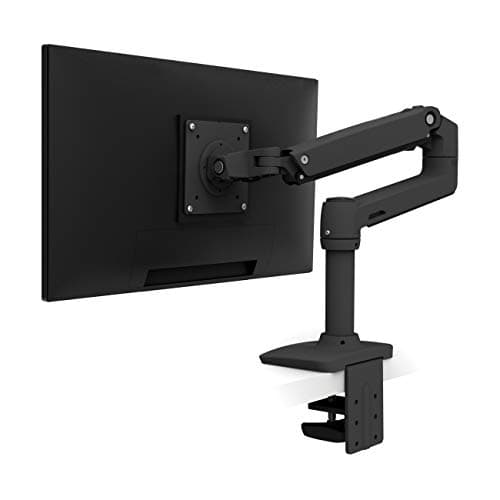 1. Ergotron LX Desk Mount Monitor Arm Monitors over about 15 lb
| 7 lb | 25 lb | ≤34" | 10 yr | 10,000 (Ergotron's own test) | $190.00$219.00−13% Check Price on Amazon |
| 2 | 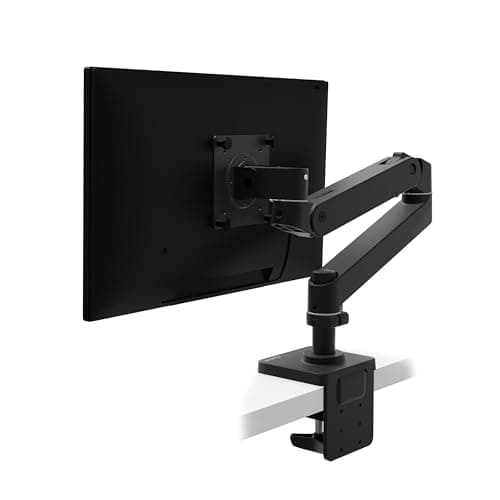 2. Ergotron LX Pro Desk Mount Monitor Arm Monitors under about 7 lb
| 4 lb | 22 lb | ≤34" | 10 yr | — (not published) | $189.00$199.00−5% Check Price on Amazon |
The window runs backwards to the names. The “Pro” holds three pounds less at the top and three pounds more at the bottom. Neither arm is stronger; they are differently ranged, and the right one is decided by your monitor’s weight with the stand removed. The cycle figure is Ergotron’s own internal motion test, not a third-party certification, and it is published for the LX only. No arm we rank carries a UL, ANSI or BIFMA claim of any kind. No clamp thickness window appears here — ergotron.com returns 403 to automated access and the figures circulating for these arms trace to retailers, so we print the desk side of that comparison where we can cite it and send you to the five-check list for the rest.
Prices and stock as of October 18, 2026, from Amazon’s API. They change; we show a live number or none at all. #ad — we earn a commission.
Buy the Ergotron LXif your monitor weighs more than about 7 lb with the stand off — it publishes a 25 lb ceiling, three pounds higher than the “Pro”, and generally costs less. Buy the LX Proonly if your panel is lighter than that: its 4 lb floor is the lowest Ergotron publishes, and below the standard LX’s minimum an arm will not hold position at all.
The model names are actively misleading here, which is the reason this page exists.
The finding: “Pro” means lower, not higher
Ergotron publishes 7–25 lb for the LX and 4–22 lbfor the LX Pro. Put those next to each other and the Pro is not an upgrade in either direction — it is the same window slid three pounds down the scale.
That matters because of how a counterbalanced arm works. It is tensioned against a range, not simply rated to a maximum. Load it above the ceiling and it sags. Load it below the floor and the spring overcomes the monitor: the screen creeps upward, or simply refuses to stay where you leave it. Gas spring vs mechanical is the mechanism in detail.
So the decision is not “how good an arm do I want”. It is “which end of the range is my monitor near” — and the names tell you nothing about that.
The one measurement you need first
The weight of your monitor with the stand removed. Not the shipping weight, not the weight in the spec sheet if that figure includes the base, because the stand can be a meaningful fraction of the total and it is not going on the arm.
How much does a monitor weigh covers where to find the right figure and what the common panel sizes actually come in at. Once you have it, the rule is short: under 7 lb, the Pro. Over 22 lb, the LX. In between, both will hold it and the cheaper one is usually the plain LX.
What is identical, and the one number that is not
Both arms publish a 10-year warranty, both support the VESA MIS-D patterns nearly every monitor uses, and both are specified up to 34-inchscreens. Neither carries a UL, ANSI or BIFMA claim — and nor does any other arm we rank, which is worth knowing before you read a competitor’s certification language too generously.
The asymmetry is the cycle figure. Ergotron publishes a 10,000-cyclemotion test for the LX and publishes no equivalent for the LX Pro. That figure is Ergotron’s own internal test, not an independent certification, and we label it that way everywhere it appears on this site. It is still the only durability number on the table, and a buyer is entitled to notice that the older, cheaper model is the one that has it.
What we can’t tell you
We have not mounted either arm. We cannot tell you how the Pro’s tension screw feels at the bottom of its range, whether either joint loosens after two years of daily adjustment, or how the clamp sits on your particular desk edge — we do not print clamp windows for these arms at all, because Ergotron’s own pages are not readable to us and retailer figures are not manufacturer specifications. Run the five desk-side checks before you order, and see our methodology for where our evidence stops.
The picks, in detail
1. Monitors over about 15 lb
Ergotron LX Desk Mount Monitor Arm
The right arm for most monitors, and the one to buy if yours is heavy: 7 to 25 lb, the widest usable window Ergotron publishes, with 10 years behind it and a cycle figure the Pro does not have.
- Weight range
- 7–25 lb
- VESA
- MIS-D 75/100, ≤34"
- Warranty
- 10 yr
Ergotron publishes 7–25 lb for this arm and 13″of vertical travel. The 25 lb ceiling is three pounds higher than the “Pro” and is enough for most 32-inch panels with the stand removed — which is the weight you should be checking, not the shipping weight on the box.
It also publishes a 10,000-cyclemotion figure, which the LX Pro does not. That is Ergotron’s own internal test rather than a third-party certification, and we say so every time we cite it — but a number that exists for one model and not the other is a fair thing to weigh.
The one thing to check is the floor. 7 lbis the highest minimum of the counterbalanced arms we rank, and a stripped 24-inch panel can land at 5–6 lb. Below the floor a gas-spring arm does not hold position; it drifts down.
Good
- 25 lb ceiling — the highest of any arm here, and enough for most 32" panels
- 10-year warranty, published on the product page rather than implied
- 13" of vertical travel
- Ergotron publishes both ends of the weight range, which most brands do not
- MIS-D covers both 75×75 and 100×100, the two patterns nearly every monitor uses
Not so good
- The 7 lb floor is the highest of the three counterbalanced single arms here — a light 24" panel may sit under it
- Ergotron's 10,000-cycle motion test is their own internal test, with no third-party standard cited
- No UL, ANSI or BIFMA claim of any kind — like every arm on this page
Don’t buy it if: your monitor weighs under about 7 lb. A bare 24" panel with the stand removed can land at 5–6 lb, and below the floor a gas-spring arm will not hold position — it drifts down. The LX Pro's 4 lb minimum exists for exactly this case.
$219.00 −13%
Price as of October 18, 2026. #ad — we earn a commission.
Where these numbers came from
2. Monitors under about 7 lb
Ergotron LX Pro Desk Mount Monitor Arm
Not an upgrade — a different range. The 4 lb floor is the lowest Ergotron publishes, which makes this the right arm for a light panel and the wrong one for a heavy monitor the cheaper LX would hold.
- Weight range
- 4–22 lb
- VESA
- MIS-D, ≤34"
- Warranty
- 10 yr
Worth stating plainly, because the model name works against you: the LX Pro is not a better LX. Ergotron publishes 4–22 lbagainst the LX’s 7–25 lb. The ceiling drops by three pounds. The floor drops by three pounds.
That makes it genuinely the right purchase for one specific case: a light panel — a bare 24-inch monitor, a small portable, anything that falls under the LX’s 7 lb minimum — which the standard LX would not hold in position at all. For that buyer the three pounds lost at the top is irrelevant and the three gained at the bottom is the whole purchase.
Same 10-yearwarranty, same VESA MIS-D pattern support, same ≤34″ screen-size limit. Ergotron publishes no cycle-test figure for this model, and we are not going to guess why.
Good
- 4 lb minimum — the lowest floor of any counterbalanced arm here, by 1 lb
- Same 10-year warranty as the standard LX
- The right answer for a light panel that the standard LX would not hold up
Not so good
- 22 lb ceiling — 3 lb LESS than the cheaper, older LX, despite the "Pro"
- Ergotron publishes no cycle-test figure for this model, unlike the LX
- The name strongly implies a straight upgrade. It is not one.
Don’t buy it if: your monitor is over 22 lb. The plain LX holds 25 and generally costs less — this is the one case where the "Pro" is unambiguously the wrong purchase, and the model name actively works against you.
$199.00 −5%
Price as of October 18, 2026. #ad — we earn a commission.
Where these numbers came from
Common questions
Is the Ergotron LX Pro better than the LX?
No — it is differently ranged, and for a heavy monitor it is worse. Ergotron publishes 4–22 lb for the Pro and 7–25 lb for the standard LX, so the Pro holds three pounds lessat the top. The Pro is the better arm when your panel is light enough to fall under the LX’s 7 lb minimum, where a gas-spring arm will not hold position and drifts down. Everything else — the 10-year warranty, the VESA pattern support, the 34-inch screen limit — is the same.
How do I know which Ergotron arm fits my monitor?
Weigh the monitor with the stand removed, because that is the load the arm carries and it is often several pounds less than the figure on the box. How much does a monitor weigh covers how to find that number, and VESA and weight ratings explains what the rating certifies. Then: under 7 lb, buy the Pro. Over 22 lb, buy the LX. Between 7 and 22 lb, both work and the LX is usually cheaper.
What happens if a monitor is below a gas-spring arm's minimum weight?
It rises on its own, or refuses to stay where you put it. A counterbalanced arm is tensioned against a weight range: too heavy and it sags, too light and the spring wins. Gas spring vs mechanical arms explains the mechanism, and how to fix a sagging monitor arm covers the adjustment screw that handles the top half of the problem. The bottom half is why the LX Pro exists.
Sources
Every figure on this page comes from one of these. If a manufacturer doesn’t publish a number, we print “—” rather than estimate it.
Read next
Ergotron HX vs LX
The other end of the LX range: what changes when the floor moves to 20 lb and the screen limit to 49 inches.
The best monitor arms
Where both of these are researched in full, against Humanscale and Amazon Basics on the same published windows.
How much does a monitor weigh
The one measurement that decides this comparison — taken with the stand off.
VESA and weight ratings
What a published weight range certifies, and what it leaves to you.
Gas spring vs mechanical monitor arms
Why a counterbalanced arm has a minimum weight at all — the fact this whole page turns on.
Will a monitor arm fit my desk
The five checks to run on the desk side before you order either arm.