The best monitor arms for an ultrawide
A short page, honestly. Very few arms are rated to hold a genuinely heavy panel, and the one we can stand behind has a 20 lb floor — which makes it useless for most monitors and the only real option for the rest.
By Stephen V.Last reviewed
Quick picks
Ranked, with the manufacturer’s own longevity figure next to each one. Tap a row to jump to the full write-up.
| # | Product | Best for | Longevity | Price |
|---|---|---|---|---|
| 1 | 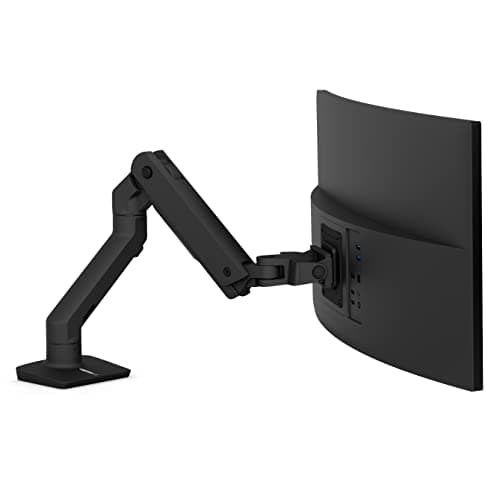 Ergotron HX Desk Monitor Arm One of very few arms rated past 25 lb, and the reason this page is short. The 20 lb floor is not a detail — it is the spec that decides whether you can use this at all. | Genuinely heavy panels | 10 yrWarranty |
Prices as of October 18, 2026, from Amazon’s API. They change; we show a live number or none at all.
This page has one arm on it. That is not an oversight and it is not a soft launch — it is the finding.
Almost nothing in this category is rated to hold a genuinely heavy panel. Most monitor arms top out somewhere between 15 and 25 lb, which comfortably covers ordinary monitors and stops there. Once you need more than 25, the field collapses to a handful of products, and we would rather show you the one we can document at its source than rank four arms and let you discover on arrival that three of them cannot do the job.
The floor, not the ceiling
Every listing for a heavy-duty arm leads with the maximum. Ergotron’s HX holds 42 lb. That is true, it is impressive, and for most readers it is the wrong number to be looking at.
The number that decides whether you can use this arm is the 20 lb minimum, and it is the most extreme example of a problem that runs through this whole hub: counterbalanced arms have a floor as well as a ceiling, and the floor is almost never advertised.
Below it, the arm does not sag — that is the failure people expect, and it is the wrong one. It rises. The spring is stronger than the monitor, so the panel floats to the top of the travel and stays there, and the tension screw is already at its limit. There is no adjustment out of it. The arm is behaving exactly as designed. It is simply not designed for your monitor.
Twenty pounds is heavier than it sounds. A 34″ ultrawide often weighs less than that once the stand is off — which means the arm marketed for ultrawides will not hold a lot of ultrawides up. This is the single thing worth taking away from the page. Weigh your panel, without its stand, before you spend anything.
Two arms called HX
There is a second product in this family and the difference runs opposite to intuition. The HX HD Tilt Pivot variant is rated 28–42 lband is built for curved displays 6–12″ deep. Its floor is eight pounds higherthan the standard HX’s, and its mounting support is narrower— MIS-D only, against the standard HX’s MIS-D, MIS-E and MIS-F.
So the specialized variant is harder to satisfy and fits fewer monitors. If you are shopping on the strength of the family name, that is a genuinely expensive thing not to notice.
Curvature costs capacity
Worth knowing before you assume “ultrawide” just means “wide”: at least one manufacturer publishes different weight limits for flat and curved panels on the same arm.
Humanscale’s capacity sheet gives the M2.1 5–15.5 lb with a flat screen and 5–12.5 lb with a curved one. Three pounds, lost to the shape. The reason is leverage — a curved panel carries more of its mass forward of the mounting plate, which loads the joint harder at the same weight. Most brands do not publish this distinction at all, which does not mean their arms are immune to the physics.
The HX’s 20–42 lb is not published with a curved/flat split, so we have not invented one. Treat the possibility as a reason to leave headroom rather than a number you can look up.
Mounting a 49-inch panel is a different problem
The HX is the only arm across this hub that supports MIS-E and MIS-F as well as MIS-D, and on a page about very large displays that matters more than usual.
Most monitors use MIS-D — a 75×75 or 100×100 four-hole pattern. Big panels increasingly do not. MIS-E is a six-hole interface, and MIS-F moves to 200mm increments. An arm that only speaks MIS-D will not bolt to them without an adapter plate, whatever its weight rating says. This is the most common way a compatibility check goes wrong at this size, and it is covered properly in VESA and weight ratings.
Your desk is the real constraint
Here is the thing people discover after the arm is already clamped on.
An ultrawide needs to sit further backthan a 27″ to keep the whole panel inside a comfortable viewing distance — the edges are further from your eyes than the center, and the wider the screen the more that matters. But a monitor arm extends forwardfrom its clamp at the desk’s back edge. On a shallow desk you can run out of room to push the screen back before you run out of arm.
So the ultrawide question is a desk-depth question before it is an arm question. Settle that first with what size desk do you need, because no arm fixes a desk that is too shallow, and finding out afterwards is an expensive order of operations.
What we did, and what it can't tell you
We have not mounted anything on this arm. We read Ergotron’s own product page and specification sheet, took the three numbers that decide the purchase, and cited them. Where a figure is not published — a cycle test for the HX, a curved-panel derate — we have left it out rather than borrowed one from a neighboring model. Our methodology page sets out the whole procedure.
Which means this page cannot tell you whether 42 lb of monitor on an 11.5″ lift wobbles when you type, or whether the clamp survives being torqued down onto a veneer desktop by someone in a hurry. Those need hands and a heavy monitor. For that half, owner reviews will serve you better than we can.
The picks, in detail
1. Genuinely heavy panels
Ergotron HX Desk Monitor Arm
One of very few arms rated past 25 lb, and the reason this page is short. The 20 lb floor is not a detail — it is the spec that decides whether you can use this at all.
- Weight range
- 20–42 lb
- VESA
- MIS-D/E/F, ≤49"
- Warranty
- 10 yr
The HX is a good arm and this is a short page, and both facts have the same cause: almost nothing is rated to hold this much weight, so there is very little to compare it against.
Start with the number that matters, which is not the 42 lb everyone advertises. It is the 20 lb minimum.
Twenty pounds is a lot of monitor. A 34″ ultrawide frequently comes in under it once the stand is off. And below the floor, a counterbalanced arm does not fail gently — the spring simply wins. The monitor rides up to the top of the travel and stays there, and no amount of turning the tension screw brings it back, because you have already wound it to its limit. The arm is working correctly. It is just not an arm for your monitor.
That is why this entry is ranked first and also carries the bluntest “don’t buy if” on the site. The HX is not a better version of the LX. It is a different tool, for a class of display most people do not own.
The variant that isn't this one
Ergotron also sells an HX HD Tilt Pivot variant, and the specs move in the direction you would not expect. It is 20–42 lb becomes 28–42 lb — the floor goes upby eight pounds — and it is intended for curved displays 6–12″ deep. Its VESA support is also narrower: MIS-D only, where the standard HX covers MIS-D, E and F.
So the more specialized model is harder to satisfy, not easier, and supports fewer mounting patterns. They share a family name and a photograph. Check which one you are ordering.
Good
- 42 lb ceiling — enough for essentially any consumer ultrawide
- Supports screens to 49", the widest panels sold
- MIS-D, MIS-E and MIS-F — the only arm across our monitor-arm pages that covers the six-hole MIS-E and the large MIS-F patterns
- 11.5" of lift
- 10-year warranty
Not so good
- 20 lb MINIMUM — it will not hold an ordinary monitor up, at any tension setting
- The separate HX HD Tilt Pivot variant has a HIGHER 28 lb floor and narrower MIS-D-only support
- No third-party standard claimed — no UL, ANSI or BIFMA
- Ergotron publishes no cycle-test figure for the HX
Don’t buy it if: your monitor weighs under 20 lb — which includes most 34" ultrawides. This is the single most important sentence on the page. Below the floor the arm does not sag; it rises, and stays up. Weigh the panel without its stand before you order.
Price as of October 18, 2026. #ad — we earn a commission.
Where these numbers came from
Common questions
Why is there only one arm on this page?
Because the field is genuinely thin, and padding it would be worse than useless. Very few arms are rated above 25 lb at all — most of the category tops out between 15 and 25, which covers ordinary monitors and stops. We could have listed four arms and let you discover on arrival that three of them cannot hold your panel. A short honest page is more use than a long dishonest one. If we verify another qualifying arm at its source, it gets added here.
Will the Ergotron HX hold my 34-inch ultrawide?
Check the weight, not the diagonal — and check it against the bottom of the range. The HX needs at least 20 lb, and plenty of 34″ ultrawides weigh less than that with the stand removed. If yours does, the HX is the wrong arm: it will ride up and stay up. The figure you want is on your monitor’s spec page as “weight without stand”.
Is the HX HD Tilt Pivot the same arm?
No, and it moves the wrong way for most buyers. The HD Tilt Pivot variant is rated 28–42 lb — the minimum is eight pounds higher— and is meant for curved displays 6–12″ deep. It also supports MIS-D only, where the standard HX covers MIS-D, MIS-E and MIS-F. More specialized, harder to satisfy, fewer patterns. Same family name.
Does a curved screen change the weight rating?
On at least one manufacturer’s published sheet, yes — and it is worth knowing that curvature is treated as a real engineering variable rather than a styling choice. Humanscale publishes separatelimits for flat and curved panels on the same arm: the M2.1 takes 5–15.5 lb flat but only 5–12.5 lb curved. Three pounds of capacity, gone to the shape. A curved panel hangs its mass further forward of the mounting plate, which is more leverage on the same joint.
Will an ultrawide even fit my desk?
That is the constraint people hit after the arm arrives. An ultrawide needs to sit further back than a 27″ to stay inside a comfortable viewing distance, and an arm pushes it forwardoff the clamp, not backward. On a shallow desk the geometry simply does not close. Work out the depth first — what size desk do you need covers it — because a desk that is too shallow is not a problem an arm solves.
Sources
Every figure on this page comes from one of these. If a manufacturer doesn’t publish a number, we print “—” rather than estimate it.
- Ergotron HX Desk Monitor Arm (45-475-026) product page — 20–42 lb, MIS-D/E/F, ≤49", 11.5" lift, 10-year warranty — read 2026-07-16
- Ergotron HX Desk Monitor Arm specification sheet (PDF) — read 2026-07-16
- Humanscale Monitor Arms Weight Capacity (PDF, v20240301) — flat vs curved screen limits published separately — read 2026-07-16
Read next
Ergotron HX vs LX
The HX's 20 lb floor against the LX's 25 lb ceiling - the check to run before you mount an ultrawide.
Can you put a curved monitor on an arm?
Curve does not change the mount — weight and VESA still decide.
The best heavy-duty monitor arms
A 49-inch ultrawide can weigh well past what a standard arm holds — the heavy-duty field, ranked on weight range and VESA fit.
How much does a monitor weigh?
A 49-inch panel is 26.8 lb without its stand — the figure that decides whether an arm can hold an ultrawide.
What size desk do you need
An ultrawide constrains desk depth before it constrains anything else. Check this first.
VESA and weight ratings explained
MIS-E, MIS-F and why a 49-inch panel is a different mounting problem.
Best single monitor arms
If your panel is under 20 lb — which is most of them — you want one of these instead.
Gas spring vs mechanical counterbalance
Why a 20 lb minimum exists at all, and what happens below it.