The best monitor stands and risers
A monitor stand is the cheap, unclamped alternative to an arm: no VESA holes, no continuous adjustment, just a platform that lifts a screen a few fixed inches. We ranked four on the number that decides whether those inches are enough — and found that only one of the four is willing to put all three deciding specs on the page.
By Stephen V.Last reviewed
Quick picks
Ranked, with the manufacturer’s own longevity figure next to each one. Tap a row to jump to the full write-up.
| # | Product | Best for | Longevity | Price |
|---|---|---|---|---|
| 1 | 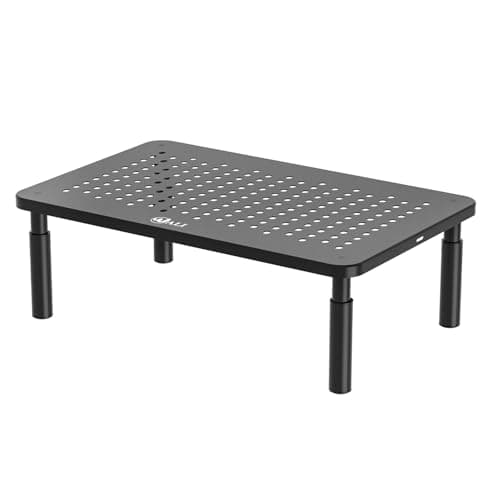 WALI Computer Monitor Stand, 3 Height Adjustable (STT003) The only stand here whose own page states three separate lift heights — 3.9, 4.7 or 5.5 inches — and 5.5″ is the tallest published figure on this page. What WALI won't tell you is how long it's covered: its own warranty page says coverage “varies by product category” and never names this model. | The most published lift for the price | —Warranty | $12.99Amazon $16.99 −24% |
| 2 | 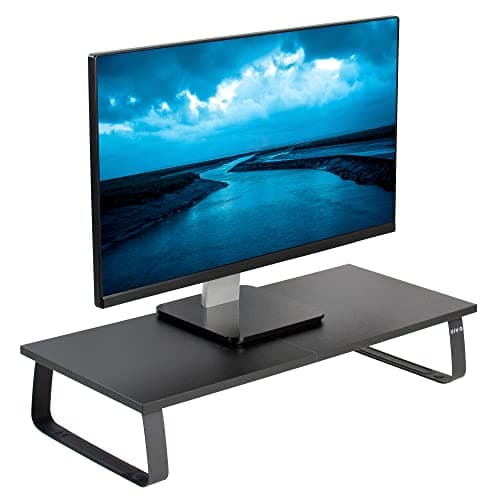 VIVO Monitor and Laptop Stand, 24″ Desktop Riser (STAND-V000D) The only stand here that states all three numbers that decide this purchase, all on one page: 4.6 inches of lift, a 44-pound capacity, and a three-year warranty. The trade is that 4.6″ is fixed, and it is the shortest published lift on this page. | Getting the whole spec sheet in writing | 3 yrWarranty | |
| 3 | 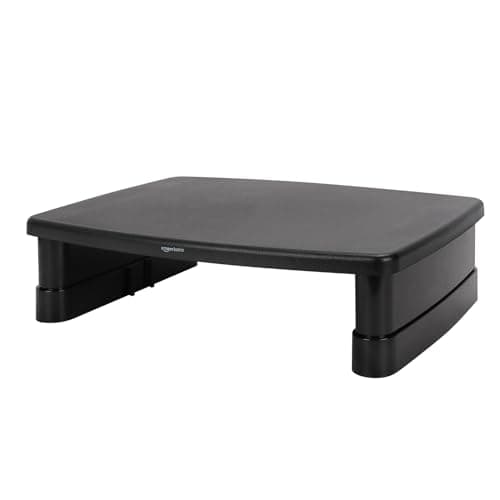 Amazon Basics Height Adjustable Monitor Stand Riser, 3-Level Stackable Design Amazon is the brand behind Amazon Basics, so its own listing counts as the manufacturer's word here: a stated 22 lb capacity and a real one-year warranty. What it never states, at any of its three levels, is how many inches the riser actually lifts. | The cheapest stand with a warranty in writing | 1 yrWarranty | |
| 4 | 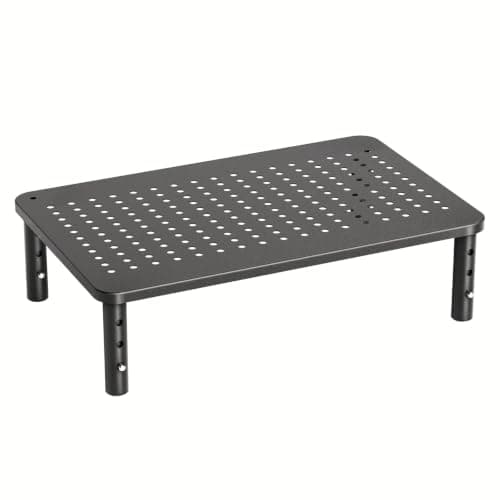 HUANUO 3-Level Adjustable Monitor Riser (HNLL3-0) Five years is the longest warranty on this page, two years past VIVO's three. It's attached to a stand whose own site states neither a lift height for any of its three levels nor a weight capacity of any kind. | The longest warranty, if you don't need the numbers | 5 yrWarranty |
Prices as of Sep 9, 2026, from Amazon’s API. They change; we show a live number or none at all.
A monitor arm can put a screen almost anywhere within reach, tilt it, and pull the desk surface out from underneath it. A monitor stand does none of that. It is a platform, usually metal or dense plastic, that the monitor rests on — no clamp, no drilled VESA holes to check first — and it does exactly one job: lift the screen by a fixed number of inches.
That single job is also the entire case for buying one instead of an arm. A stand is cheaper, it needs no desk clearance behind the monitor, and it works with monitors an arm’s VESA pattern or weight floor would rule out — see VESA and weight ratings for what an arm actually requires. The honest cost is that a stand cannot adjust the way an arm does. Whatever height you buy, or the handful of stepped heights you choose from, is what you get.
So the question this page answers is narrow and specific: of four stands actually available to buy right now, how far does each one say it lifts a screen, how much weight is it rated to hold, and how long is it covered? We read each manufacturer’s own product page rather than a retailer’s paraphrase of it, and where a number wasn’t published, we say so instead of estimating one.
What we ranked on, and why
OSHA’s Computer Workstations eTool sets the target a stand is trying to hit: “The top of the monitor should be at or slightly below eye level”, with the center “15 to 20 degrees below horizontal eye level” and a preferred viewing distance “between 20 and 40 inches”from the eye. None of that tells you how tall a stand needs to be — that depends on your chair, your desk, and your own seated eye line — but it is the fixed target every inch of lift on this page is working toward. The criteria, in order:
- Lift height.The published figure for how far the stand raises whatever sits on it, and whether that figure is a single fixed number or a set of selectable stops. This is the ranking spec — the number a stand exists to provide.
- Weight capacity.The stated maximum load. Since a stand is a static platform rather than a counterbalanced spring, this is a ceiling only — there is no minimum weight the way there is on a gas-spring arm.
- Warranty. The longevity slot, as on every product page on this site. A platform holding up a monitor for years is a simple mechanism, but simple mechanisms still fail, and how long a brand stands behind one is the third number.
What we did not rank on: color, brand name recognition, or how a stand photographs on a desk. Also not ranked: how sturdy one feels under a hand, because none of these have been in our hands, and a “feels solid” verdict from someone who hasn’t held one is an invented verdict.
Fixed, stepped, or silent: three kinds of height on this page
The four stands here don’t just differ in how far they lift a screen — they differ in whether they tell you at all, and in how the height is actually set.
The VIVOis fixed. One height, 4.6″, stated on the product page and unchangeable once assembled. The WALI is stepped: three published stops — 3.9″, 4.7″, 5.5″ — set by moving the legs into a different set of holes. The HUANUO uses the same style of stepped mechanism, three levels, but never states what any of the three levels measures. The Amazon Basics stacks rather than steps, and states nothing about any of its three levels either.
That is a genuine split, and it runs opposite to price. The two stands willing to print a lift figure — WALI and VIVO — sit in the middle of this page’s price range. The two that stay silent on lift are the cheapest (Amazon Basics) and one of the cheapest (HUANUO). Cheaper, here, correlates with less written down, not with less capability — we simply cannot confirm the capability either way.
The split: what each one won't tell you
Line the four Spec Lines up and a pattern appears that this page is built around: only one stand states all three numbers.
VIVO is that one — 4.6″ fixed, 44 lb, three years — and it pays for that completeness with the shortest lift on the page. WALI publishes the tallest lift (5.5″) and the same 44 lb capacity, but its own warranty page explicitly declines to name a term for this model. Between them, that’s two stands and two different gaps, not one stand doing everything right.
The other two both skip the lift figure entirely. Amazon Basics at least states a capacity (22 lb) and a real one-year warranty — Amazon is the brand owner, so that listing counts as the manufacturer’s own word, the same rule that applies to the Amazon Basics arm on our monitor arm page. HUANUO states neither a lift nor a capacity, and offsets that with the longest warranty on this page — five years, two past VIVO’s three — attached to a product you can’t fully specify before buying.
No stand here gets everything wrong, and no stand here gets everything right. Where a manufacturer doesn’t publish a number, the Spec Line shows a dash. Five of the twelve slots on this page are dashes, and every one is a manufacturer’s silence, not ours.
What a stand can't do that an arm can
It is worth being blunt about the ceiling on this whole category, because a stand’s marketing rarely volunteers it. The tallest lift on this page is 5.5″, on one stand, at one setting. A monitor arm moves a screen through a continuous range and tilts it besides — the arms on our own roundup are cited page by page for exactly how far. A stand does neither. It picks one point, or one of a few points, and stops.
That matters most for anyone whose monitor currently sits well below eye level — a low desk, a tall reader, or a monitor with a short built-in stand. A few inches of lift narrows the gap. It does not guarantee it closes it, and none of the four stands here can adjust further if 5.5″ turns out to be short. Work out the actual number you need on the monitor height guide before you buy any of these, because a stand is a one-shot purchase in a way an arm is not.
The other thing a stand can’t do is give the desk back. An arm with a clamp base clears the desk surface under the monitor entirely. Every stand here still occupies a footprint on the desktop — some of it can be reclaimed as storage space underneath, but none of it is returned to open desk the way a clamp mount is.
What the money buys
Not much correlates cleanly with price in this group, and that is itself worth knowing before you spend more. VIVO, the priciest stand here, buys you documentation — every number, on one page — rather than the tallest lift. WALI, in the middle of the range, buys you the actual tallest lift and the same capacity as VIVO, for less money, at the cost of a stated warranty. The two cheapest stands, Amazon Basics and HUANUO, split the remaining honesty between them: Amazon Basics tells you the capacity and the warranty and not the lift; HUANUO tells you only the warranty, and the longest one on the page at that.
So the spend maps to which gap you’re willing to accept, not to a quality tier. Pay for VIVO if not having to guess about anything matters more to you than a taller lift. Pay WALI’s smaller premium over Amazon Basics or HUANUO for the tallest lift and a stated capacity, and accept the warranty is unstated. Or take the cheapest route and accept you won’t know the lift until the box is open.
What we did instead of testing
We have not set a monitor on any of these stands. Nothing here has been loaded to its stated capacity, cycled through its height settings, or left assembled for a year to see whether a leg loosens. What we did was read each manufacturer’s own product page, including WALI’s separate warranty policy page, pull the numbers that decide the purchase, and cite every one with the exact wording used. Where a number wasn’t published — and we tried more than once, including direct attempts to load the fuller Amazon Basics listing — we print a dash rather than fill the gap with a plausible-sounding figure. Our methodology pagesets out why that rule exists and what reading a spec sheet can and can’t tell you.
What that leaves unanswered: whether a stepped stand’s legs loosen after months of repositioning, whether the ABS plastic on the Amazon Basics flexes under a heavy panel well inside its rating, whether a “5-Year Warranty” is easy to actually claim. None of that lives on a spec page, and owner reviews will serve you better than we can there.
How to actually choose
Start with the free part: work out your seated eye line on the monitor height guide, and measure how far below it your monitor currently sits. If the gap is more than roughly five inches, no stand on this page closes it alone, and a monitor armis the honest answer — check when a stand is enough and when it isn’t before you spend either way.
If a fixed lift in the 4–5.5″ range is genuinely enough, pick by which gap you can live with. Want the tallest lift and a stated capacity, and don’t need the warranty in writing? Buy the WALI. Want every number confirmed before you order, and 4.6″ is enough? Buy the VIVO. Want the cheapest option with an actual warranty behind it, and you’re willing to find out the height when it arrives? The Amazon Basicsis the floor. Want the longest cover on the page more than you want to know the lift or capacity in advance? That’s the HUANUO trade.
Whichever you choose, it is a one-shot decision in a way an arm is not — there is no lever to raise it further next year. Measure first.
The picks, in detail
1. The most published lift for the price
WALI Computer Monitor Stand, 3 Height Adjustable (STT003)
The only stand here whose own page states three separate lift heights — 3.9, 4.7 or 5.5 inches — and 5.5″ is the tallest published figure on this page. What WALI won't tell you is how long it's covered: its own warranty page says coverage “varies by product category” and never names this model.
- Lift height
- 3.9–5.5″ (3 settings)
- Weight capacity
- 44 lb
- Warranty
- —
This is the top pick because it is the only stand here that prints a real number for the thing a riser exists to do, and that number is the tallest one on the page.
WALI states it plainly: the STT003 will “raise a computer monitor, notebook, or any device by 3.9 inches, 4.7 inches, or 5.5 inches off the desk”. Three fixed stops, not a continuous range, but three real, published numbers — and the top one, 5.5″, is more lift than anything else on this page states. The capacity is equally direct: 44 lb (20 kg), more than any single monitor on a normal desk will ever ask of it.
The gap is the warranty, and it is worth reading in WALI’s own words rather than assuming the worst. Its Warranty & Returns page says “the warranty period for items varies by product category” and covers items bought through WALI or an authorized reseller — but nowhere does it attach a number of years to this specific model. That is a genuine unknown, not an accusation, and the Spec Line marks it with a dash rather than borrowing a figure from a different WALI product.
Whether 5.5″ is enough for you depends on your own seated eye line, which this stand cannot tell you and OSHA’s guidance can — work it out on the monitor height guide before you buy, because there is no fourth setting above 5.5″ to fall back on.
Good
- Three selectable heights — 3.9″, 4.7″ or 5.5″ — published on WALI's own product page, not estimated from a photo or a listing bullet. The 5.5″ top setting is the tallest lift figure any stand here states
- 44 lb capacity (20 kg), stated directly — more than enough for any single monitor, or a monitor and a laptop stacked on top
- A vented metal platform, which does more for airflow under a laptop than the solid plastic risers here
- Underneath storage at the lower settings, plus rubber pads so it doesn't slide on a hard desktop
- Cheapest of the two stands on this page that actually publish a lift figure
Not so good
- WALI's own Warranty & Returns page states coverage “varies by product category” and applies “to items purchased through WALI or a registered WALI vendor” — but it never names a term for this model, so the Spec Line's third slot is a dash
- 5.5″ at the top setting is still a modest lift; it helps a low seated eye line, it does not solve one on its own
- Height changes by repositioning the legs into a different set of holes, not a lever or a squeeze-release lock — quick, but not something you adjust mid-task
Don’t buy it if: you need a specific, in-writing warranty term before you buy, or your desk is already low enough that 5.5 inches still won't clear your eye line. Check the math on the monitor height guide before you order — this is the ceiling, not a starting point.
$16.99 −24%
Price as of Sep 9, 2026. #ad — we earn a commission.
Where these numbers came from
- WALI Computer Monitor Stand, 3 Height Adjustable (STT003) — WALI's own product page (source of “raise a computer monitor, notebook, or any device by 3.9 inches, 4.7 inches, or 5.5 inches off the desk” and “Maximum support weight up to 44 lbs (20kg)”; the page states no warranty term) — read 2026-07-26
- WALI Warranty & Returns — WALI's own policy page (“the warranty period for items varies by product category”; no term is named for this model) — read 2026-07-26
2. Getting the whole spec sheet in writing
VIVO Monitor and Laptop Stand, 24″ Desktop Riser (STAND-V000D)
The only stand here that states all three numbers that decide this purchase, all on one page: 4.6 inches of lift, a 44-pound capacity, and a three-year warranty. The trade is that 4.6″ is fixed, and it is the shortest published lift on this page.
- Lift height
- 4.6″ (fixed)
- Weight capacity
- 44 lb
- Warranty
- 3 yr
This is the stand to buy if you want the purchase decided by paper rather than by trust. VIVO is the only brand on this page willing to put all three numbers — lift, capacity, warranty — on the same product page.
The stated dimensions are 23.8″ x 10.3″ x 4.6″, and that last figure is the stand’s own height — how far it lifts whatever sits on top, not a separate “screen lift” number. VIVO backs the load rating with an explanation, not just a figure: “the solid steel construction of the footing allows it to support heavier monitors and TV’s” up to 44 lb. And the warranty is stated outright: 3 Year Warranty, printed on the page rather than implied by a retailer.
The honest cost of that completeness is the lift itself. 4.6″ is the shortest figure on this page, and it is fixed — there is no second hole to move the legs into, the way there is on the WALI or the HUANUO below. If 4.6″ already clears your seated eye line per the monitor height guide, this is the stand with nothing left to verify. If it doesn’t, no amount of warranty fixes that.
Good
- VIVO's own product page states all three deciding numbers: a 4.6″ stand height, a 44 lb capacity, and a stated 3 Year Warranty — the only complete Spec Line on this page
- “The solid steel construction of the footing allows it to support heavier monitors and TV's,” VIVO's own stated reason for the 44 lb figure
- A 23.8″ x 10.3″ platform wide enough for the monitor plus a keyboard, or a laptop and its stand side by side
- Anti-slip silicone padding on the platform, VIVO's own listed feature, so a monitor set on top doesn't creep
Not so good
- 4.6″ is both fixed and the shortest lift published on this page — the WALI above it reaches 5.5″ for less money
- No adjustment of any kind: what you measure before ordering is what you get, permanently
- 23.8″ wide footprint is the largest single-monitor stand here and won't fit every desk
Don’t buy it if: you might need more than 4.6 inches, or you want the option to change the height later. There is no second setting on this stand at all — measure your eye line first, because there's nothing to fall back on if 4.6″ turns out to be short.
Price as of Sep 9, 2026. #ad — we earn a commission.
Where these numbers came from
3. The cheapest stand with a warranty in writing
Amazon Basics Height Adjustable Monitor Stand Riser, 3-Level Stackable Design
Amazon is the brand behind Amazon Basics, so its own listing counts as the manufacturer's word here: a stated 22 lb capacity and a real one-year warranty. What it never states, at any of its three levels, is how many inches the riser actually lifts.
- Lift height
- —
- Weight capacity
- 22 lb
- Warranty
- 1 yr
There is a sourcing point worth making before the verdict, because it cuts the opposite way to how it looks at first glance.
Everywhere else on this site, a spec that lives only on an Amazon listing is treated with some suspicion — a retailer describing someone else’s product is not the same as the manufacturer speaking. But Amazon is the brand owner of Amazon Basics. There is no separate manufacturer page being paraphrased here; the listing itself states “Supports up to 22lbs”, and that is a first-party number in exactly the sense the WALI and VIVO figures are. The warranty is the same story: Amazon’s own warranty page states a one-year term covering “defects in materials and workmanship under ordinary consumer use”.
What neither document states, at any point, is a height. The “3-Level Stackable Design” in the product name implies three different lifts, and it may well deliver three different lifts — but no inch figure for any of them appears on the listing, and repeated attempts to pull the fuller product description did not surface one either. That is a real gap, not a rounding error: it is the same number missing from the HUANUO below, and it is the number every other section of this page treats as the whole point of buying a stand.
Buy this one if you already know a modest lift helps you and you want the cheapest way to find out, backed by an actual warranty. If you need to check the height first, the WALI or VIVO above both print one.
Good
- Amazon owns the Amazon Basics brand, so this listing is first-party in the same way the Amazon Basics laptop stand and gas-spring arm are elsewhere on this site — the 22 lb figure is not a retailer's paraphrase of someone else's spec sheet
- A stated Amazon Basics One-Year Limited Warranty — “defects in materials and workmanship under ordinary consumer use for one year” — backed by Amazon's own written terms
- The least expensive way onto this page
- Three stacking levels give some choice in height, even without a stated figure for any of them
Not so good
- No lift figure for any of the three levels, anywhere on the listing — the one number that decides whether it does the job at all
- 22 lb is the lowest stated capacity on this page, though still comfortably above a typical single monitor
- One-year warranty is the shortest stated term here — a third of VIVO's and a fifth of HUANUO's
- ABS plastic construction, not the steel of the WALI or VIVO
Don’t buy it if: you want to know the exact height before it arrives, or your monitor is on the heavy side for a single panel. Neither number is published, so both are a guess until the box is open and the stand is under the screen.
Price as of Sep 9, 2026. #ad — we earn a commission.
Where these numbers came from
- Amazon Basics Height Adjustable Monitor Stand Riser, 3-Level Stackable Design (B00X4SCCFG) — Amazon's own product listing (source of “Supports up to 22lbs”; Amazon is the brand owner of Amazon Basics, so this listing is the manufacturer's spec; no inch figure is stated for any of the 3 levels) — read 2026-07-26
- Amazon Basics One-Year Limited U.S. Warranty — Amazon's own warranty page (“warrants products against defects in materials and workmanship under ordinary consumer use for one year from the date of original retail purchase”) — read 2026-07-26
4. The longest warranty, if you don't need the numbers
HUANUO 3-Level Adjustable Monitor Riser (HNLL3-0)
Five years is the longest warranty on this page, two years past VIVO's three. It's attached to a stand whose own site states neither a lift height for any of its three levels nor a weight capacity of any kind.
- Lift height
- —
- Weight capacity
- —
- Warranty
- 5 yr
This is the longest warranty on the page, and the entry most worth reading past the headline number.
HUANUO states an “Up to 5-Year Warranty”on its own product page — two years past VIVO’s three, and the only figure in double digits of anything on this page’s longevity slot. The same page states the riser’s overall assembled size as 14.57″ x 9.25″ x 5.51″ and that it has 3 adjustable levels.
What it does not do is connect those two facts. Nowhere on HUANUO’s own page is there a per-level lift figure — no statement that level one raises a screen by this many inches and level three by that many. The 5.51″ figure is the product’s overall dimension, not a stated “screen lift”, and treating it as one would be exactly the kind of precision nobody actually published. Weight capacity gets the same silence: no number, anywhere.
That makes this the stand for one specific buyer: someone who wants the longest warranty on the page and is comfortable not knowing, until it arrives, exactly how many inches the middle and top settings add. If you want both the warranty and the number, the WALI above publishes the lift and capacity for a similar price, at the cost of two fewer years of cover. Our methodology pageexplains why we print a dash here rather than borrow HUANUO’s overall dimension as if it were an answer to a different question.
Good
- A stated “Up to 5-Year Warranty” — longer than any other stand on this page, including the fully-documented VIVO
- Alloy steel construction with a vented platform for airflow underneath a laptop
- Three adjustable levels, the same style of mechanism as the WALI above, even though HUANUO does not publish where each level lands
- The least expensive stand on this page
Not so good
- No lift height published for any of the three levels — HUANUO's own product page states only the assembled footprint (14.57 x 9.25 x 5.51 inches), not what each setting raises a screen by
- No weight capacity published anywhere on the manufacturer's page — the only stand here with that gap
- A five-year warranty on a stand where two of the three deciding numbers are unconfirmable loses some of its shine; it is a long promise about a product you can't fully specify before buying
Don’t buy it if: you need to check the lift height or weight capacity before buying — neither is published, so you are trusting the warranty to cover a product you can't fully specify in advance. The WALI above states both of those numbers, for a similar price.
Price as of Sep 9, 2026. #ad — we earn a commission.
Common questions
What's the actual difference between a monitor stand and a monitor arm?
A monitor arm clamps to the desk and moves a screen through a continuous range — up, down, forward, back, and usually tilt — the way the arms in our monitor arm roundup do. A stand is a static platform: the monitor sits on top, at one of a handful of fixed heights, and stays there. No clamp, no VESA pattern to check, and no continuous adjustment once it’s set. That is the whole trade — a stand costs a fraction of an arm and does a fraction of the job. See monitor arm vs. monitor stand for the direct comparison.
How high does a monitor stand actually need to lift the screen?
Enough that the top of the screen lands “at or slightly below eye level”, with the center “15 to 20 degrees below horizontal eye level” and the screen “between 20 and 40 inches” away — OSHA’s published figures. The stands on this page lift somewhere between 3.9″ and 5.5″, depending on the setting. Whether that’s enough depends entirely on your own seated eye line and how low your monitor currently sits, which the monitor height guide walks through before you buy anything.
Does a monitor stand have a minimum weight, the way some monitor arms do?
No, and that is a real structural difference, not a detail. A gas-spring arm pushes back against the monitor with a spring, so it has a floor as well as a ceiling — explained on the monitor arm roundup. A stand is just a platform holding weight up against gravity, the same as a shelf. There is no floor to worry about — only the published maximum, which every stand here states except HUANUO.
Why do two of these stands not publish a lift height at all?
Because HUANUO and Amazon Basics don’t state one on their own product pages. Both sell a stand with multiple adjustable or stackable levels and never print how many inches any single level adds. WALI and VIVO both do — 3.9–5.5″ and 4.6″ fixed, respectively — so we print those. Where a manufacturer doesn’t publish a figure, the Spec Line shows an em-dash instead of a converted guess. Our methodology page explains why an honest gap beats an invented number.
Can a monitor stand replace a monitor arm?
Only if the fixed lift you need is modest and you don’t need tilt, swivel, or the desk space back that clamping a monitor off the surface frees up. A stand adds a few fixed inches and nothing else. If your monitor needs to move through the day, sits well below eye level even with a stand under it, or you want the desk space a clamp base returns, an arm is the right tool — see the best monitor arms and the direct arm-vs-stand comparison.
Which of these four should I actually buy?
If you want the tallest published lift for the money, the WALI STT003reaches 5.5″ and states its 44 lb capacity, at the cost of an unstated warranty. If you want every number on the page in writing and 4.6″ is enough, the VIVO STAND-V000Dis the only complete Spec Line here. If you just want the cheapest stand with a real warranty and don’t need to check the height first, the Amazon Basics riser is the floor. And if a five-year warranty matters more to you than knowing the lift or capacity in advance, that's what the HUANUO trades you.
Sources
Every figure on this page comes from one of these. If a manufacturer doesn’t publish a number, we print “—” rather than estimate it.
- VIVO Monitor and Laptop Stand, 24″ Desktop Riser (STAND-V000D) — VIVO's own product page (source of the 23.8″ x 10.3″ x 4.6″ dimensions, the “up to 44 lbs” capacity from “the solid steel construction of the footing”, the stated “3 Year Warranty”, and the Particle Board / Steel materials) — read 2026-07-26
- WALI Computer Monitor Stand, 3 Height Adjustable (STT003) — WALI's own product page (source of “raise a computer monitor, notebook, or any device by 3.9 inches, 4.7 inches, or 5.5 inches off the desk” and “Maximum support weight up to 44 lbs (20kg)”; the page states no warranty term) — read 2026-07-26
- WALI Warranty & Returns — WALI's own policy page (“the warranty period for items varies by product category”; no term is named for this model) — read 2026-07-26
- HUANUO 3-Level Adjustable Monitor Riser (HNLL3-0) — HUANUO's own product page (source of the “Up to 5-Year Warranty” claim and the 14.57 x 9.25 x 5.51-inch overall dimensions; the page states no per-level lift figure and no weight capacity) — read 2026-07-26
- Amazon Basics Height Adjustable Monitor Stand Riser, 3-Level Stackable Design (B00X4SCCFG) — Amazon's own product listing (source of “Supports up to 22lbs”; Amazon is the brand owner of Amazon Basics, so this listing is the manufacturer's spec; no inch figure is stated for any of the 3 levels) — read 2026-07-26
- Amazon Basics One-Year Limited U.S. Warranty — Amazon's own warranty page (“warrants products against defects in materials and workmanship under ordinary consumer use for one year from the date of original retail purchase”) — read 2026-07-26
- OSHA Computer Workstations eTool — Monitors (“The top of the monitor should be at or slightly below eye level”; “The center of the computer monitor should normally be located 15 to 20 degrees below horizontal eye level”; “Generally, the preferred viewing distance is between 20 and 40 inches”) — read 2026-07-26
Read next
Best monitor arms
The step up from a fixed riser: continuous height, tilt and swivel, for real money. What you get for the price difference.
Monitor arm vs. monitor stand
The direct comparison — when a few fixed inches are enough, and when they aren't.
Monitor height guide
Where the screen should actually end up. Decides whether 4.6 to 5.5 inches of lift clears your eye line at all.
The best laptop stands
The same fixed-lift logic, applied to a laptop screen instead of an external monitor.