Logitech MX Master alternatives
The MX Master is the best-specified mouse we cover on almost everything: 200–8,000 DPI, a 10-million-click rating, 70 days a charge. The one figure Logitech does not publish for it is the angle your hand sits at — honestly, because a sculpted shell does not have one. So these five are ranked on the posture figure their own makers do print, and on what each of them costs you elsewhere.
By Stephen V.Last reviewed
Compare the five
Ranked on the published posture figure — the grip angle for a vertical, the ball diameter for a trackball — then the power interval, then the warranty term. Every cell is the manufacturer's own stated number, cited in the write-up below it. An em-dash means they do not publish it, and on this page the dashes are the point.
| # | Device | Posture figure | Power interval | Durability | Warranty | Price |
|---|---|---|---|---|---|---|
| 1 | 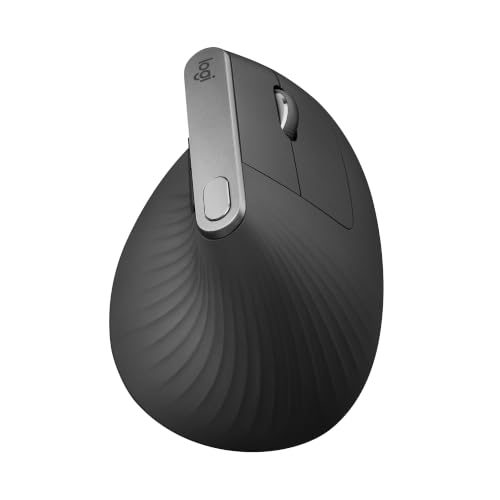 1. Logitech MX Vertical The MX Master's durability rating, at a stated angle
| 57° grip angle | ~4 mo per charge | 10M clicks | 1 yr (US) | |
| 2 | 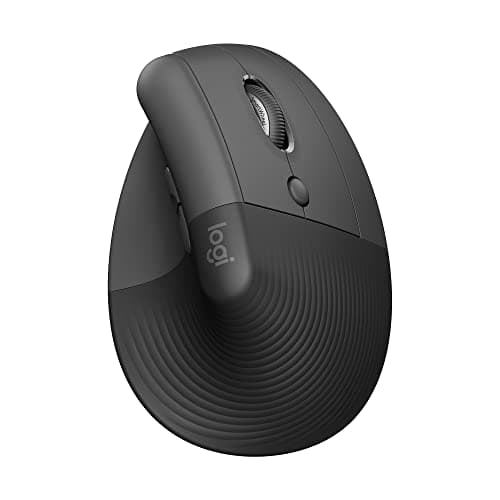 2. Logitech Lift Smaller hands, and never charging anything
| 57° grip angle | 24 mo on one AA | 5M clicks | 1 yr (US) | |
| 3 | 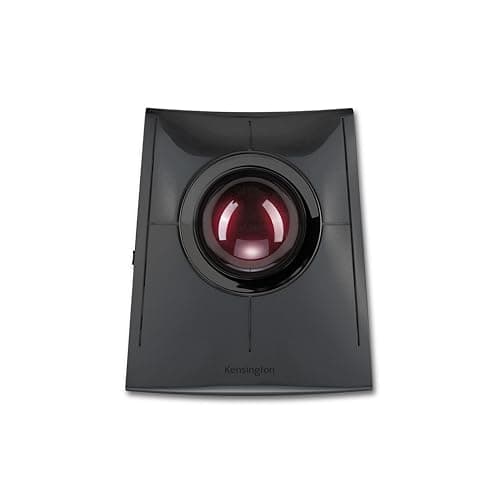 3. Kensington SlimBlade Pro (K72080WW) The most documented alternative, and the hardest to strand
| 55 mm ball | 4 mo per charge, or wired | — | 3 yr | |
| 4 | 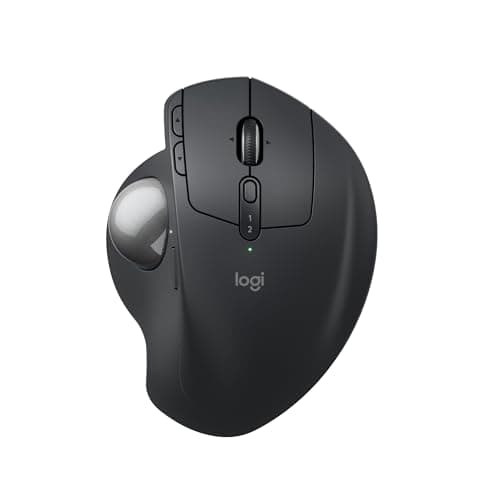 4. Logitech MX Ergo S Staying inside the MX ecosystem
| — (hinge, no degrees) | Up to 120 d per charge | — | 1 yr | |
| 5 | 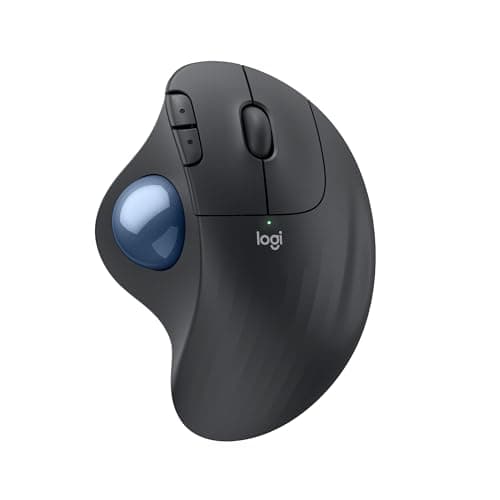 5. Logitech ERGO M575S Budget pick — thumb control on one AA a year and a half
| — (fixed chassis) | Up to 18 mo on one AA | — | 1 yr |
For reference, not as a row: Logitech publishes 200–8,000 DPI for the MX Master 3S, a 10-million-click rating on the main buttons, 70 daysper charge with three hours of use from a one-minute charge, a full per-button durability table — and no grip angle at all. We rank that mouse on the best ergonomic mice and it carries its own buy link there; it is in this note so you can check our picks against it. The posture column is the one to read first, and the dashes in it are honest: a sculpted mouse has no single defined angle, and a trackball maker who will not print the ball diameter has left out the measurement that decides whether the thing fits your hand. Durability is blank for all three trackballsbecause none of the three publishes a click or service-life rating — only the two Logitech mice do, which is why that column separates the top of the page from the bottom. A warranty term is a promise rather than a measurement, but it is the part that is written down, and Kensington’s three years is three times what Logitech publishes for anything on this page. No prices appear in our prose; the live figures and their “as of” date sit under the picks.
Prices and stock as of November 18, 2026, from Amazon’s API. They change; we show a live number or none at all. #ad — we earn a commission.
Buy the Logitech MX Verticalif you want the MX Master’s level of documentation with a hand angle attached: Logitech publishes 57° for it and the same 10-million-click rating. The Lift is the same published angle in a smaller shell that runs 24 months on one AA. If the problem is that your hand travels rather than how it sits, the Kensington SlimBlade Pro publishes a 55 mm ball and a 3-year warranty, the MX Ergo Skeeps you inside Logitech’s software with a thumb ball, and our budget pick, the ERGO M575S, does the same posture for the least money on up to 18 months of one AA.
Which brings us to the figure this page turns on, and it is a figure that does not exist.
The finding: the MX Master has no published angle, and that is honest
Search for an ergonomic alternative to the MX Master and you will find comparison tables giving it a grip angle. Some say 20°. Some say 30°. They derived it from a photograph, or from each other.
Logitech publishes no grip angle for the MX Master 3S. Not a low one, not a hedged one — none, on either the specification page or the business datasheet. And that is consistent rather than evasive: the MX Master is a sculptedmouse, not a vertical one. A sculpted shell does not hold your hand at a single defined angle in the way a 57° vertical shell does, so there is no honest number to print. Logitech prints none. We print a dash.
That matters here because it is the whole reason this page exists. If you are cross-shopping the MX Master, you are usually doing it for one of two reasons: it is expensive, or your wrist hurts. For the first, plenty of mice are cheaper. For the second, the useful question is not “which mouse is better” but “which maker will tell me where my hand ends up” — and in this category, very few will.
So that is the ranking spec: the published posture figure. For a vertical mouse that is the grip angle in degrees. For a trackball it is the ball diameter, because the ball is what your hand sits on and a 40 mm ball and a 55 mm ball are different objects to use. Then the power interval, because a device you have to think about charging is a device you will stop using. Then the warranty term, which is our third Spec Line slot everywhere on this site: the number that speaks to year three.
What the MX Master publishes, and what it does not
We have not used one. What we have is Logitech’s own specification page and the MX Master 3S for Business datasheet, cited at the bottom of this page, and on everything except the angle they are unusually complete for the category.
200–8,000 DPI, the widest published range of anything we cover, with Logitech stating that it tracks on glass. A 10-million-clickrating on the main buttons, published as part of a per-button durability table rather than as a single headline figure — which is more disclosure than any trackball on this page offers. 70 days per charge, and three hours of use from a one-minute charge. Easy-Switch across three machines. On US consumer stock the warranty is 1 year, the same term the MX Vertical and both Logitech trackballs carry here, and a third of Kensington’s.
One more thing we say out loud because most roundups will not: the 3S is the previous generation. Logitech shipped the MX Master 4in October 2025, and the 3S is the older flagship still sold alongside it. The newer mouse does not change this page’s argument, because Logitech publishes no grip angle for it either — same sculpted shape, same absent figure.
How we ranked the alternatives
1. The published posture figure. An angle in degrees, or a ball diameter in millimeters. Two of these five publish an angle; one publishes a ball; two publish neither, and both of those are Logitech trackballs, which is worth knowing before you assume the premium brand documents the most.
2. The power interval.Not a sustainability point — a usability one. The spread here is enormous: 70 days for the MX Master, about four months for the MX Vertical, up to 120 days for the MX Ergo S, and then 18 and 24 months for the two devices that run on a single AA. If you have ever had a mouse die mid-meeting, that column is not trivia.
3. The warranty term, and any durability rating behind it. Only the two Logitech mice publish a click rating at all (10 million and 5 million). None of the three trackballs does, from either brand. What the trackballs give you instead is a promise: one year from Logitech, three from Kensington.
What we did not rank on: how any of these feels. We have not held them. Feel is the thing a spec sheet cannot reach, and “comfortable in the hand” from someone who has not had it in their hand is the exact sentence this site exists to not write. Our methodology says where the published-spec evidence stops.
Check three things about your own hand first
An alternative that fails any one of these is the wrong alternative regardless of what it publishes, and all three are checkable in a few minutes without buying anything.
Your hand length, and the MX Master’s size.The MX Master is a large mouse — the heaviest device in our mice roundup at 141 g — and so is the MX Vertical, at 120 mm long. If the MX Master felt like too much mouse, the Lift is the same published 57° in a shell Logitech states is for smaller hands. The best ergonomic mice for small hands and for large hands split the same field by fit rather than by brand.
How much free desk you have beside the keyboard.A 55 mm finger ball wants real estate and a two-handed posture; a thumb ball wants almost none and keeps one hand on the keyboard. This is the single thing that decides which of the three trackballs here suits you, and Kensington does not publish the SlimBlade Pro’s footprint, so measure the space you have before you choose. How to organize your desk is the wider version of that problem.
Whether the mouse is actually the cause. Wrist pain at a desk is frequently a height problem wearing a mouse costume: if the work surface is too high, the forearm angles up and the wrist extends no matter what you are holding. Wrist and keyboard position and how to prevent wrist pain when typing cover the free fixes, and the desk height calculator gives you the number for your own body. Try those before spending anything; a new mouse on a desk that is two inches too tall is an expensive way to keep the same problem.
What we can’t tell you
We have not used any of these five, or an MX Master. We cannot tell you whether the MX Ergo S’s hinge holds its angle in year four, whether Kensington’s three-year term is easier to claim on than Logitech’s one, or how a 55 mm ball feels after a full working day. Those need hands and years. What this page is: every posture, power and warranty figure these makers publish, ranked on the one the MX Master is cross-shopped for, with the gaps printed as gaps.
The picks, in detail
1. The MX Master's durability rating, at a stated angle
Logitech MX Vertical
The alternative that answers the MX Master on the one figure Logitech will not print for it: a published 57° grip angle, from the same brand, on the same software, with the same 10-million-click rating.
- Grip angle
- 57°
- DPI
- 400–4000
- Battery / warranty
- 4 mo charge / 1 yr
First, because it is the only mouse here that is both the same brandas the MX Master and a documented answer to the thing the MX Master does not document. Logitech’s datasheet describes “a natural handshake position with its unique 57°vertical angle”. That is a geometric fact about an object: published, specific, and checkable against your own hand before you spend anything.
It also matches the MX Master on the number that speaks to year three. Both are rated at 10 million clickson the main buttons — same brand, same datasheet format, same figure — and the MX Vertical adds an MTTF of over 150,000 hours, which almost nobody in this category publishes at all. If what you liked about the MX Master was that Logitech actually prints a durability table, this is the vertical mouse that prints the same one.
What you give up is the sensor and the scroll wheel. The MX Master publishes 200–8,000 DPI; this publishes 400–4,000, which is half the ceiling and a floor twice as high. You also go from 70 days per charge to about four months of a different kind — and on US consumer stock the warranty is one year, the same term Logitech gives the MX Master here.
One number not to buy it for: the famous “10% less muscular strain” line. Logitech’s own footnote reads, in its entirety, “As compared with a traditional non-vertical mouse” — no study, no method, no sample size. The 57° is the reason this ranks first. The best vertical mice is where that angle is set against the rest of the vertical field.
Good
- 57° vertical angle is published on Logitech's own datasheet — a real geometric spec you can check against your own hand
- 10 million click service life, double the Lift's 5 million and the highest here
- Logitech publishes an MTTF figure (>150K hours) — almost nobody in this category publishes reliability at all
- 400–4000 DPI adjustable, with nominal values (1000 and 1600) stated separately
- Rechargeable via USB-C, ~4 months per charge
Not so good
- The headline '10% less muscular strain' claim has no named study, method or sample size behind it — Logitech's own footnote says only 'As compared with a traditional non-vertical mouse'
- The datasheet's flat '10%' and the press release's 'up to 10 percent' are different claims, and 'muscular strain' vs 'muscular activity' are different constructs
- US warranty is 1 year; the same datasheet gives EMEA and Japan 2 years for the identical mouse
- Large — at 120mm long it does not suit smaller hands, which is what the Lift exists for
- Right-handed only; no left-handed version
Don’t buy it if: you have small hands, or you are buying because of the 10% figure. On the first: the Lift is the same 57° geometry in a smaller shell and is the better fit. On the second: that number is Logitech's own unpublished marketing claim, and if it is doing the persuading then you are being persuaded by something nobody can check.
$119.99 −41%
Price as of November 18, 2026. #ad — we earn a commission.
Where these numbers came from
- Logitech MX Vertical Advanced Ergonomic Mouse — official B2B datasheet (PDF; source of the 57° angle, 400–4000 DPI, 10 million click service life, 4-month charge, and the '10%' claim with its single footnote) — read 2026-07-16
- Logitech press release, 20 August 2018 — 'Logitech Goes Vertical With Its Most Advanced Ergonomic Mouse' (the 'up to 10 percent' / 'muscular activity' wording, which differs from the datasheet's) — read 2026-07-16
- Logitech Limited Hardware Warranty terms — read 2026-07-16
2. Smaller hands, and never charging anything
Logitech Lift
The same published 57° geometry in a shell Logitech states is built for smaller hands, and it never needs charging: 24 months on one AA. Half the MX Master's click rating.
- Grip angle
- 57°
- DPI
- 400–4000
- Battery / warranty
- 24 mo battery / 1 yr
Second, and for a specific reason: the MX Master is a largemouse. It is the heaviest thing in our mice roundup at 141 g, and plenty of people cross-shopping it are doing so because it does not fit them. The Lift is Logitech’s own answer to that — the identical published 57°angle (“Hand placement at an optimal 57° angle for comfort”) in a shell the company describes as “ideal for smaller hands”.
The power story is the other reason to prefer it, and it is the quiet one. The Lift runs 24 months on a single AA. The MX Master wants a USB-C charge every 70 days, the MX Vertical every four months. Two years of not thinking about it is a genuine quality-of-life difference that nobody markets hard, because “rechargeable” sounds more premium than “replaceable battery”.
The trade is durability and switching. Logitech rates the Lift at 5 million clicks against the MX Master’s 10 million— same company, same document template, half the number — and there is no Easy-Switch here, so you pair to one machine at a time rather than hopping between three. If you move between a work laptop and a desktop all day, that is the MX Master feature you will miss first.
One warranty trap worth being precise about: the Lift for Businessdatasheet states a flat “2-year hardware limited warranty”, but that document describes the business SKU. The consumer listing we link gets one year. Anyone lifting “2 years” off that datasheet and printing it against the consumer mouse has published a wrong number in good faith.
Good
- Identical published 57° angle to the MX Vertical, in a shell Logitech states is designed for smaller hands
- 24-month battery life on a single AA — no charging, ever, in normal use
- Left-handed version genuinely exists (910-006492 / 910-006495), which is rare in this category
- Logitech publishes per-button click ratings, not just one headline number
- Lighter than the MX Vertical at 125g
Not so good
- 5 million click service life — half the MX Vertical's 10 million, on the same brand's own datasheet
- The datasheet says '2-year hardware limited warranty', but that is the BUSINESS SKU. The consumer ASIN gets 1 year
- No battery indicator, per Logitech's own spec table
- No Easy-Switch — you pair to one machine at a time
- The 'Ergo certified' line names no certifier, only 'criteria set out by leading ergonomists'
Don’t buy it if: you have large hands, or you want the longest-lived switches. The MX Vertical is bigger and rated for twice the clicks. The Lift is the fit answer, not the durability answer.
$79.99 −23%
Price as of November 18, 2026. #ad — we earn a commission.
Where these numbers came from
- Logitech Lift for Business Vertical Ergonomic Mouse — official B2B datasheet (PDF; source of the 57° angle, 5 million click service life, 24-month battery life, and the 2-year business warranty figure) — read 2026-07-16
- Logitech Support — LIFT Vertical Ergonomic Mouse specification (400–4,000 DPI; per-button click ratings) — read 2026-07-16
3. The most documented alternative, and the hardest to strand
Kensington SlimBlade Pro (K72080WW)
The only pick here that publishes the figure its own class turns on — a 55 mm ball — and the only one with three times the MX Master's warranty term plus a wired mode when the battery dies.
- Ball
- 55 mm
- Connection
- BT LE / 2.4GHz / wired
- Warranty
- 3 yr
Third, and the first pick that changes the question rather than the angle. A trackball does not sit your hand at a better angle; it stops your hand traveling at all. The device stays put and the cursor moves under your fingers, which is a different answer to the same complaint and the reason people who try one rarely go back.
It is here, and ahead of the two Logitech trackballs below, because of what Kensington prints. The 55 mm ball diameteris published — the one measurement that defines the product class, and the one neither Logitech trackball will state. The warranty is a limited 3 years, three times the term Logitech publishes for the MX Master or for either of its own trackballs. And it has three connection modes, including wired USB-C, so a flat battery is a cable across the desk rather than an afternoon without a cursor.
The gaps are real and they are Kensington’s own: no published DPI figure anywhere on the product page, and no published device dimensions, which matters for a 55 mm ball that needs genuine desk area beside the keyboard. The MX Master publishes both of those and more.
Understand the posture before you buy it, because this is the most common way the category disappoints people: a 55 mm finger ball is a two-handed working position — one hand on the ball, one on the keyboard — which is the opposite of what the thumb balls below are for. Ergonomic mouse vs trackball is the honest comparison of the two ideas before you commit to either.
Good
- Publishes a 55 mm ball diameter — the number that defines the whole product class, and one of the two Logitechs on this page publishes it
- Three connection modes: Bluetooth LE, a 2.4 GHz nano receiver, and a wired USB-C connection, so a dead battery is an inconvenience rather than a stoppage
- Limited 3-year warranty, three times the term either Logitech publishes
- Four physical buttons plus four combo-button sets, all reassignable in KensingtonWorks
- Kensington states 4 months of use per charge, and the charge port is USB-C rather than a proprietary connector
Not so good
- No DPI figure is published anywhere on Kensington's product page — the Orbit below publishes four DPI levels and the cheaper Expert publishes one, so this is a gap in Kensington's own documentation rather than an industry norm
- No device dimensions published either, which matters for a 55 mm ball that needs real desk area next to the keyboard
- The battery is sealed and rechargeable, so year four is Kensington's problem to have solved, not yours to fix with a AA
- Tied for the most expensive trackball on this page
- A 55 mm finger ball is a two-handed working posture in practice — one hand on the ball, one on the keyboard — which is the opposite of what the thumb balls below are for
Don’t buy it if: you want to keep your hand on the keyboard's home row and move the cursor with a thumb. That is a genuinely different way of working, it is not worse, and this page ranks two Logitech trackballs built for it. Buying a 55 mm finger ball to use like a thumb ball is the most common way this category disappoints people.
$119.99 −8%
Price as of November 18, 2026. #ad — we earn a commission.
Where these numbers came from
4. Staying inside the MX ecosystem
Logitech MX Ergo S
The closest thing to an MX Master that is not shaped like one: same brand, same software, same Easy-Switch habit, with a thumb ball instead of a traveling hand. Logitech publishes neither the ball size nor the hinge angle.
- Ball
- —
- Connection
- BT LE + Logi Bolt
- Warranty
- 1 yr
If what you actually want is an MX Master that does not drag your hand across the desk, this is the device. It is the same family: Logi Options+, Easy-Switch across machines, Logi Bolt or Bluetooth LE, USB-C charging, a thumb cluster where your thumb already is. For a lot of MX Master shoppers that continuity matters more than any single figure.
What Logitech publishes about it is genuinely detailed in every dimension except the two that define a trackball: 132.5 × 99.8 × 51.4 mm, 164 g bare or 259 g with the metal plate fitted, more than 10 G of acceleration, over 20 IPS, a 125 Hz report rate, and up to 120 days per chargewith a one-minute charge giving a full day of use — the best answer to a flat battery short of a cable.
Then it stops. No ball diameter.And no angle for the adjustable hinge: the support pages list the bare feature “Adjustable angle” and leave it there, while the previous generation’s business datasheet stated 0°/20°. A newer product documenting less than the older one is a pattern worth naming rather than smoothing over, and it is why this sits behind the Kensington on our ranking spec rather than ahead of it.
The warranty is the other honest mark: 1 year, the same term as the MX Master and a third of Kensington’s. It is also the heaviest device on this page with the plate in, at 259 g, which is the opposite of what some people cross-shopping a 141 g mouse are looking for.
Good
- Thumb-operated: the hand stays on the keyboard side of the desk and the wrist does not travel, which is the whole reason this shape exists
- The fullest general specification here — 132.5 × 99.8 × 51.4 mm, 164 g bare or 259 g with the metal plate, > 10 G acceleration, > 20 IPS, 125 Hz report rate
- Up to 120 days per charge, and Logitech publishes a 1-minute charge for a full day of use — the best answer to a flat battery short of a cable
- An adjustable hinge, so the chassis tilts rather than sitting flat
- Charges over USB-C and pairs by Bluetooth LE or Logi Bolt, so it does not need a spare USB-A port
Not so good
- Logitech publishes no trackball diameter for it — on a trackball, that is the one measurement a buyer cannot infer from anything else
- Logitech publishes no angle for the adjustable hinge either: the support pages list the bare feature “Adjustable angle”, while the previous generation's business datasheet stated 0°/20°. The newer product documents less than the older one
- 1 year limited hardware warranty — a third of what every Kensington here states
- Sealed rechargeable battery, and at 259 g with the plate fitted it is the heaviest thing on this page
- Tied for most expensive here while publishing less about the ball than a trackball costing under half as much
Don’t buy it if: you want to know how big the ball is before you commit. That sounds glib and it is not: thumb balls vary enough between models that people who like one dislike another, and Logitech does not give you the number to compare with. If that matters to you, both 55 mm Kensingtons above tell you exactly what you are getting.
Price as of November 18, 2026. #ad — we earn a commission.
Where these numbers came from
- Logitech Support — Specification, MX Ergo S: “Logitech Advanced Optical Tracking”; 132.5 × 99.8 × 51.4 mm (5.22 × 3.93 × 2.02 in); 164 g without the metal plate, 259 g with it; “Lithium Rechargeable Battery 500mAh”, “Up to 120 days on a single full charge; 1-min charge for 24-hour of use”; Bluetooth Low Energy and Logi Bolt receiver; max acceleration > 10 G; max speed > 20 IPS; report rate 125 Hz. NO trackball diameter and NO hinge angle appear anywhere on the page — read 2026-08-12
- Logitech Support — Warranty, MX Ergo S: “1 year limited hardware warranty” — read 2026-08-12
- Logitech Support — Getting Started, MX Ergo S: the adjustable hinge is listed in the product overview as the bare feature “Adjustable angle”, with no degree figure given — read 2026-08-12
5. Budget pick — thumb control on one AA a year and a half
Logitech ERGO M575S
Budget pick. The cheapest way out of a traveling hand from a maker that documents its products, with the longest published power interval here by a distance: one AA, up to 18 months.
- Ball
- —
- Connection
- BT LE + Logi Bolt
- Warranty
- 1 yr
This is the budget pick and the sane first step if you are not sure the shape is for you. One standard AA, up to 18 months, published by Logitech on both the Bolt receiver and Bluetooth. Nothing else here comes close on interval, and the cell costs a couple of dollars when it finally goes. For a device you are buying partly to find out whether you get on with it, low commitment is a feature.
It also publishes a proper 100–2,000 DPIrange — which the MX Ergo S above does not — plus 134 × 100 × 48 mm and 145 g, the lightest thing on this page. Spec sheet for spec sheet it is better documented than the trackball costing twice as much, with the same hole in it: no ball diameter.
What you give up against the MX Master is most of the hardware. No 8,000 DPI sensor, no MagSpeed wheel, no horizontal scroll, far fewer buttons, and a fixed chassis angle where the MX Ergo S has a hinge. What you keep is the posture: the hand stays planted, the thumb moves, and the forearm barely travels. If the reason you are reading this page is a wrist that aches by mid-afternoon, that is the part that matters, and this is the cheapest honest version of it.
Good
- Up to 18 months on a single AA on either radio — the longest published power interval here, and the battery is replaceable
- Publishes a clean adjustable DPI range, 100–2,000, which the MX Ergo S above and the SlimBlade Pro do not
- Published dimensions and weight: 134 × 100 × 48 mm and 145 g, the lightest device on this page
- Bluetooth LE or the bundled Logi Bolt receiver, so it pairs with a laptop that has no spare port
- One of the two cheapest picks here, while publishing more of its own specification than one of the two dearest
Not so good
- No published trackball diameter, the same hole as the MX Ergo S — and on the entry model there is no premium to excuse it
- 1 year limited hardware warranty
- No tilt hinge: the chassis angle is fixed, which is the main thing the MX Ergo S adds over it
- No wired mode, so pairing and power both depend on the radio and the AA
- Fewer buttons and no scroll ring — this is the plainest control layout on the page
Don’t buy it if: you already know you want the tilt. The hinge is the MX Ergo S's actual differentiator over this one, and no amount of software makes a fixed chassis adjustable. Equally, if you have never used a thumb ball, this is the sane place to find out whether you like the posture before spending twice as much on the same idea.
$49.99 −20%
Price as of November 18, 2026. #ad — we earn a commission.
Where these numbers came from
- Logitech Support — Specification, ERGO M575S: “Logitech Advanced Optical Tracking”; “100 – 2,000 DPI (Adjustable in Logi Options+)”; 134 × 100 × 48 mm (5.2 × 3.9 × 1.8 in); 145 g; “1 Standard AA battery”, “Up to 18 Months on a single AA with the included Logi Bolt USB receiver and up to 18 months using Bluetooth Low Energy”. No trackball diameter is published — read 2026-08-12
- Logitech Support — Warranty, ERGO M575S: “1 year limited hardware warranty” — read 2026-08-12
Common questions
What is the Logitech MX Master actually known for?
Three published things, and one absence. The sensor: 200–8,000 DPI, by far the widest range of anything we cover, and Logitech states that it tracks on glass. The durability table: a 10-million-click rating on the main buttons, published per button rather than as one headline figure. The battery: 70 days per charge, with three hours of use from a one-minute charge. The absence is the grip angle, and it is the honest kind: the MX Master is a sculpted mouse rather than a vertical one, so there is no single defined angle to print. Logitech prints none, and neither do we.
Is there a cheaper mouse as good as the MX Master 3S?
Not a question a spec sheet can settle, and we have not held any of these. What can be compared is what each maker publishes, and there the answer splits by what you are buying. On hand position, both the MX Vertical and the Liftpublish a 57° angle the MX Master cannot, for less money. On documentation and warranty, the Kensington SlimBlade Pro publishes its ball diameter and a three-year term. On the sensor, the scroll wheel and the button count, nothing on this page is close to the MX Master — which is a fair description of what the money buys.
Should I buy the MX Master 4 instead of the 3S?
That is a real question and it is worth being straight about: the MX Master 3S is the previous generation. Logitech shipped the MX Master 4in October 2025, and the 3S is now the older flagship still sold alongside it, usually for less. The newer mouse does not change the argument on this page — Logitech publishes no grip angle for it either, because it is the same sculpted shape — so if you want the current generation, buy it and know you are paying for a haptic scroll wheel rather than a better wrist angle. Every figure we print for the 3S was read from the 3S’s own datasheet; we are not going to reprint them under a different model name.
Vertical mouse or trackball as an MX Master replacement?
They solve different halves of the same complaint. A vertical mouse changes the angle of your forearm but your hand still travels across the desk; a trackballleaves the angle roughly conventional but stops the hand traveling at all. If your desk is shallow or your mousing arm is reaching, the trackball is the bigger change. If your wrist is the part that aches, the 57° shells are the ones with a published figure behind them. Ergonomic mouse vs trackball goes through both mechanisms properly, and how to choose an ergonomic mouse starts from your own hand and desk rather than from a product.
Do you still recommend the MX Master 3S?
Yes — it is ranked on the best ergonomic mice for the published reasons above, and it is a pick on our large-hands page. This page exists because “something like an MX Master, but easier on my wrist” is a real thing people search for, and the useful answer is not “buy it anyway.” It is: here is what Logitech puts in writing about that mouse, and here is which alternatives put a posture figure in writing.
Sources
Every figure on this page comes from one of these. If a manufacturer doesn’t publish a number, we print “—” rather than estimate it.
- Logitech Support — MX Master 3S specification (200–8,000 DPI; 10 million click rating; note that NO grip angle is published) — read 2026-07-16
- Logitech MX Master 3S for Business — official datasheet (PDF) — read 2026-07-16
- Logitech MX Vertical Advanced Ergonomic Mouse — official B2B datasheet (PDF; source of the 57° angle, 400–4000 DPI, 10 million click service life, 4-month charge, and the '10%' claim with its single footnote) — read 2026-07-16
- Logitech press release, 20 August 2018 — 'Logitech Goes Vertical With Its Most Advanced Ergonomic Mouse' (the 'up to 10 percent' / 'muscular activity' wording, which differs from the datasheet's) — read 2026-07-16
- Logitech Limited Hardware Warranty terms — read 2026-07-16
- Logitech Lift for Business Vertical Ergonomic Mouse — official B2B datasheet (PDF; source of the 57° angle, 5 million click service life, 24-month battery life, and the 2-year business warranty figure) — read 2026-07-16
- Logitech Support — LIFT Vertical Ergonomic Mouse specification (400–4,000 DPI; per-button click ratings) — read 2026-07-16
- Kensington SlimBlade Pro Trackball (K72080WW) product page — 55 mm trackball diameter, “4 individual buttons + 4 sets of combo buttons”, “Bluetooth LE, 2.4GHz Wireless Nano Receiver or Wired Connection”, “Rechargeable battery provides 4 months battery life with single charge via USB-C port”, 128-bit AES encryption, “Limited 3-year warranty”. No DPI figure and no device dimensions are published on the page — read 2026-08-12
- Logitech Support — Specification, MX Ergo S: “Logitech Advanced Optical Tracking”; 132.5 × 99.8 × 51.4 mm (5.22 × 3.93 × 2.02 in); 164 g without the metal plate, 259 g with it; “Lithium Rechargeable Battery 500mAh”, “Up to 120 days on a single full charge; 1-min charge for 24-hour of use”; Bluetooth Low Energy and Logi Bolt receiver; max acceleration > 10 G; max speed > 20 IPS; report rate 125 Hz. NO trackball diameter and NO hinge angle appear anywhere on the page — read 2026-08-12
- Logitech Support — Warranty, MX Ergo S: “1 year limited hardware warranty” — read 2026-08-12
- Logitech Support — Getting Started, MX Ergo S: the adjustable hinge is listed in the product overview as the bare feature “Adjustable angle”, with no degree figure given — read 2026-08-12
- Logitech Support — Specification, ERGO M575S: “Logitech Advanced Optical Tracking”; “100 – 2,000 DPI (Adjustable in Logi Options+)”; 134 × 100 × 48 mm (5.2 × 3.9 × 1.8 in); 145 g; “1 Standard AA battery”, “Up to 18 Months on a single AA with the included Logi Bolt USB receiver and up to 18 months using Bluetooth Low Energy”. No trackball diameter is published — read 2026-08-12
- Logitech Support — Warranty, ERGO M575S: “1 year limited hardware warranty” — read 2026-08-12
Read next
The best ergonomic mice
Where the MX Master 3S is ranked and researched in full, against the verticals that publish an angle.
The best vertical mice
The two 57° picks here set against the rest of the vertical field, ranked on grip angle alone.
The best trackball mice
The three trackballs here in their own class, ranked on the ball diameter their makers do or do not publish.
Ergonomic mouse vs trackball
Which of the two ideas on this page is the bigger change for your desk, before you pick a model.