The best trackball mice
A trackball is defined by one measurement above all others: how big the ball is. One of the two major makers publishes it on every model. The other publishes it on none of them — and that is where this ranking starts.
By Stephen V.Last reviewed
Quick picks
Ranked, with the manufacturer’s own longevity figure next to each one. Tap a row to jump to the full write-up.
| # | Product | Best for | Longevity | Price |
|---|---|---|---|---|
| 1 | 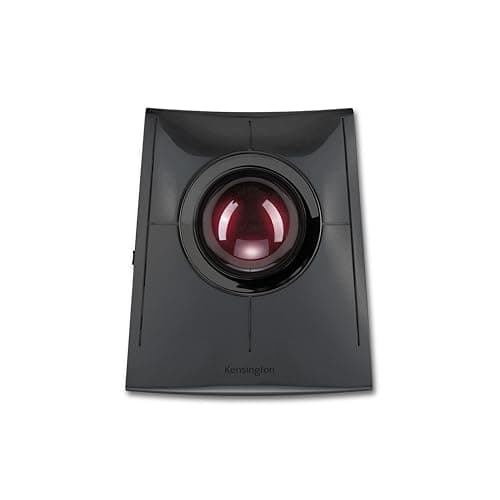 Kensington SlimBlade Pro (K72080WW) The only trackball here that publishes its ball diameter, offers a wired connection as well as two wireless modes, and carries a three-year warranty. It is also the only one that still works with a flat battery, because you can plug it in. | The most documented, and the hardest to strand | 3 yrWarranty | $109.99Amazon $119.99 −8% |
| 2 | 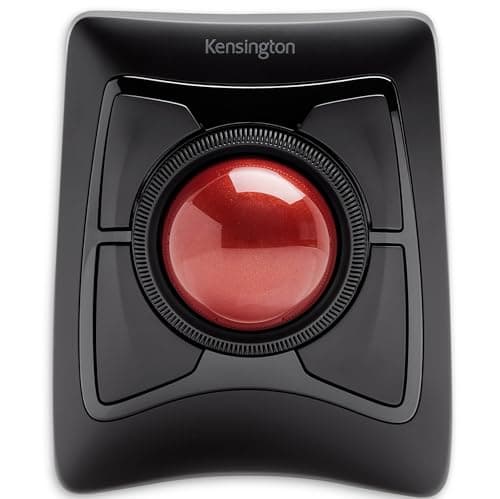 Kensington Expert Mouse Wireless (K72359WW) The same 55 mm ball as the pick above, a published DPI figure the pick above lacks, and a AA battery you can replace yourself in year five. What it gives up is the wired fallback. | A replaceable battery and a published DPI | 3 yrWarranty | |
| 3 | 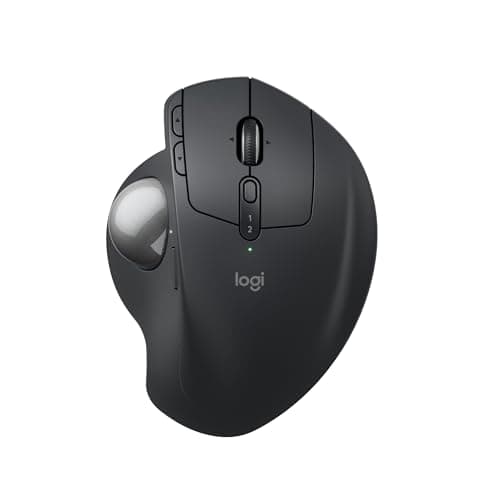 Logitech MX Ergo S The most thoroughly specified device on this page in every dimension except the two that define a trackball: Logitech publishes millimeters, grams, acceleration and report rate, and neither the ball's diameter nor the hinge's angle. | Thumb control, and a spec sheet with one hole in it | 1 yrWarranty | $99.99Amazon $119.99 −17% |
| 4 | 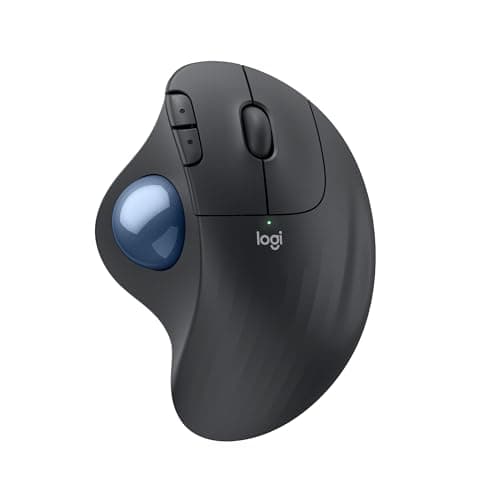 Logitech ERGO M575S The cheapest way into thumb control from a manufacturer that documents its products, with the longest battery interval on the page by a distance: one AA, up to 18 months, published. | Thumb control on one AA a year and a half | 1 yrWarranty | $39.99Amazon $49.99 −20% |
| 5 | 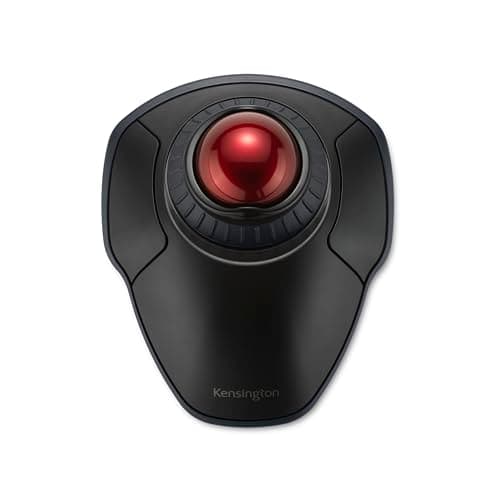 Kensington Orbit Wireless with Scroll Ring (K70990WW) A 40 mm finger ball with four selectable DPI levels, an ambidextrous shell and Kensington's three-year term, at the lowest price here. It also publishes the least of any Kensington on this page. | Smaller hands, smaller desks, either hand | 3 yrWarranty |
Prices as of October 18, 2026, from Amazon’s API. They change; we show a live number or none at all.
A trackball takes the one thing a mouse does — slide across a desk — and deletes it. The device stays put; the ball moves. That change does two measurable things: it removes the reaching motion your arm makes all day, and it makes the pointer independent of how much free desk you have. Everything else about the category is preference.
Which makes the shopping problem unusual. There is no equivalent of a chair’s seat-height range or a monitor arm’s weight window here — no single number that tells you whether the thing fits you. The closest thing is the diameter of the ball, because that decides whether you work it with a thumb, two fingertips or a whole hand.
Only one of the two big makers publishes that number
Kensington prints a trackball diameter on every product page in this roundup: 55 mm on the SlimBlade Pro and the Expert Mouse Wireless, 40 mm on the Orbit Wireless. Logitech prints it on neither the MX Ergo S nor the ERGO M575S. Both Logitech Specification pages were read on 12 August 2026 and both are otherwise detailed — the MX Ergo S page publishes its dimensions to a tenth of a millimeter, two weights depending on whether the metal base plate is fitted, maximum acceleration, maximum speed and radio report rates. It just never says how big the ball is.
So the BALL slot in two of the five Spec Lines below is a dash. That is not an oversight on our part and we are not going to fill it from a review site with a ruler. A number in a specification table reads as a fact forever after, whatever caveat sat next to it when it was typed.
What we ranked on
Four things, in this order, all of them published by the manufacturer or marked absent:
1. The ball diameter. The defining measurement of the category, and the one that decides whether the device suits your hand. Published by three of the five.
2. How many ways it connects.Wireless is the norm here, so the interesting question is what happens when the power runs out. One trackball on this page — the SlimBlade Pro — also runs on a cable. That is the difference between an interruption and a stoppage.
3. The warranty term. Our third Spec Line slot is always the longevity figure, and for input devices the published warranty is the only one that exists. It splits perfectly by brand here: three years from Kensington on all three of theirs, one year from Logitech on both of theirs.
4. What powers it, and whether you can replace that yourself. Two of these take a standard AA. Two are sealed rechargeables. One does not say. On a three-year horizon this is not a footnote — a sealed cell eventually decides when the device retires.
What we did not rank on: comfort, ball feel, bearing smoothness, or how any of these behave after a year of use. We have not held them. Anyone publishing a score for those things has either tested for years or is guessing, and there is no way for you to tell which from the page.
Thumb or finger comes before any of that
The two Logitechs are thumb-operated; the three Kensingtons are finger-operated. That is not a quality gap, it is a fork, and it decides your shortlist before a single specification does. Kensington makes both styles and their own comparison refuses to pick a winner: “It depends on personal preference. Thumb-operated models are more compact and one-handed, while finger-operated ones offer central ball control and symmetrical designs.”
In practice: a thumb ball leaves your hand where it already sits and occupies about the footprint of a mouse that never moves. A finger ball is a larger instrument, worked with two or three fingers, and it wants desk area next to the keyboard rather than in front of it. If you want the thumb posture, the ranking below is short — it is the MX Ergo S and the ERGO M575S, and the order between them is the tilt hinge and the buttons.
Where OSHA is actually useful here
OSHA’s computer-workstation guidance on pointing devices is about placement and fit, not products: “Position the pointer/mouse to allow you to maintain a straight, neutral wrist posture”, “Select a pointing device designed to fit the hand that will normally operate it”, “Keep the pointer/mouse close to the keyboard”, “Alternate hands with which you operate the pointer/mouse” and “Use keyboard short cuts to reduce extended use”.
Two of those bear directly on this page. “Sized to fit the hand” is the published ball diameter, which is why we rank on it. And “alternate hands” is only practical on a symmetrical device — the Orbit Wireless is published as ambidextrous, while a thumb ball is one-handed by design. None of this is a health claim, from OSHA or from us: it is geometry, and the honest ceiling of what a specification can tell you. Get the desk geometry rightfirst — height, chair, monitor, keyboard — because no pointing device compensates for a desk that is two inches too tall.
The cheap end is missing on purpose
Search this category and most of what comes back sits well below the cheapest pick here, from brands whose entire specification lives in their own Amazon listing: Nulea, ProtoArc, TECKNET and a rotating cast of others. They are real products and some are certainly fine. They are not ranked here because there is no manufacturer document to check a ball diameter, a DPI figure or a warranty term against, and a roundup that prints unverifiable figures is just a list of guesses with pictures.
The cheapest picks below — the Orbit Wireless and the ERGO M575S — are roughly half the price of the two dearest, and both come from makers who publish and stand behind a term. That is the floor we will go to.
What we can’t tell you
Whether you will like it. Trackballs have a genuine adjustment period, the ball feel differs between models in ways no spec sheet captures, and the bearings are the part most likely to annoy you in year two. We have not rolled any of these for a week, let alone three years, and we will not pretend otherwise.
What we can do is read five specification pages properly and report that the defining measurement of the category is published by one manufacturer and not the other, that exactly one of these still works with a flat battery, and that the warranty terms differ by a factor of three between two brands sold side by side at the same price. See our methodology for what that is worth and what it is not.
The picks, in detail
1. The most documented, and the hardest to strand
Kensington SlimBlade Pro (K72080WW)
The only trackball here that publishes its ball diameter, offers a wired connection as well as two wireless modes, and carries a three-year warranty. It is also the only one that still works with a flat battery, because you can plug it in.
- Ball
- 55 mm
- Connection
- BT LE / 2.4GHz / wired
- Warranty
- 3 yr
Ranked first because it documents the most and strands you the least. Kensington publishes the ball diameter (55 mm), the button count, the charge interval, the connection options and a three-year warranty term — and of the five trackballs here it is the only one that will run on a cable when the battery is flat.
That last point is worth more than it sounds. Every other trackball on this page has exactly one answer to a dead battery: swap the AA, or stop and charge. The SlimBlade Pro has a wired mode, so the failure state is a cable across the desk rather than an afternoon without a cursor. On a site whose whole thesis is what a thing is like in year three, a device with a fallback beats a device without one.
The honest gap is DPI. Kensington prints one for the Expert and four levels for the Orbit, and prints none at all here — on its most expensive trackball. If cursor speed per inch of ball travel is the thing you care about most, the cheaper Kensingtons below are better documented than this one, which is not a sentence we expected to write. See our methodology for why we rank on published, checkable figures rather than on price.
Good
- Publishes a 55 mm ball diameter — the number that defines the whole product class, and one of the two Logitechs on this page publishes it
- Three connection modes: Bluetooth LE, a 2.4 GHz nano receiver, and a wired USB-C connection, so a dead battery is an inconvenience rather than a stoppage
- Limited 3-year warranty, three times the term either Logitech publishes
- Four physical buttons plus four combo-button sets, all reassignable in KensingtonWorks
- Kensington states 4 months of use per charge, and the charge port is USB-C rather than a proprietary connector
Not so good
- No DPI figure is published anywhere on Kensington's product page — the Orbit below publishes four DPI levels and the cheaper Expert publishes one, so this is a gap in Kensington's own documentation rather than an industry norm
- No device dimensions published either, which matters for a 55 mm ball that needs real desk area next to the keyboard
- The battery is sealed and rechargeable, so year four is Kensington's problem to have solved, not yours to fix with a AA
- Tied for the most expensive trackball on this page
- A 55 mm finger ball is a two-handed working posture in practice — one hand on the ball, one on the keyboard — which is the opposite of what the thumb balls below are for
Don’t buy it if: you want to keep your hand on the keyboard's home row and move the cursor with a thumb. That is a genuinely different way of working, it is not worse, and this page ranks two Logitech trackballs built for it. Buying a 55 mm finger ball to use like a thumb ball is the most common way this category disappoints people.
$119.99 −8%
Price as of October 18, 2026. #ad — we earn a commission.
Where these numbers came from
2. A replaceable battery and a published DPI
Kensington Expert Mouse Wireless (K72359WW)
The same 55 mm ball as the pick above, a published DPI figure the pick above lacks, and a AA battery you can replace yourself in year five. What it gives up is the wired fallback.
- Ball
- 55 mm
- Connection
- BT LE + 2.4GHz
- Warranty
- 3 yr
This is the trackball most people picture when they picture a trackball: a big 55 mm ball sitting in a scroll ring, worked with the fingers rather than the thumb. Kensington publishes the diameter, the DPI, the button count and the warranty term, which puts it ahead of either Logitech on documentation and level with the SlimBlade Pro on everything except connection options.
The reason it is second rather than first is one specification and one practicality. The specification is the connection list: two wireless modes and no cable. The practicality is the battery — and here the trade actually runs the other way. A AA is the most repairable power source on this page. Sealed lithium cells decide when a device retires; a AA lets you decide. If your buying horizon is genuinely three years and beyond, that is a real argument for this chair of the two, and it is why the gap between first and second here is narrow.
The 400 DPI figure deserves a straight reading rather than a shrug. Low DPI means more ball movement per pixel, which is precision at the cost of travel. On a single 24″ or 27″ screen that is pleasant. Across an ultrawide or a dual-monitor setup it is work. Kensington publishes the number, so you can decide before buying instead of after — which is the entire reason we rank published figures.
Good
- 55 mm finger-operated ball, published by Kensington, with the scroll ring the range is known for
- Publishes a DPI figure — 400 — which the more expensive SlimBlade Pro does not
- Runs on a AA battery: the one power source on this page you can replace at a supermarket rather than replace the product over
- Dual wireless — 2.4 GHz nano receiver and Bluetooth LE — with auto wake/sleep
- Limited 3-year warranty, matching the rest of the Kensington range here
Not so good
- No wired mode at all, so a flat AA at 9am is a trip to the drawer rather than a cable
- 400 DPI is a low published figure and it is a single value, not a range — across a wide or multi-monitor desktop that is a lot of ball travel per screen inch
- Kensington publishes no device dimensions, and this is the largest-footprint shape in the range
- The AA sits inside the body, so the chassis is heavier than the rechargeable picks here
Don’t buy it if: you move a cursor across two or three large screens all day. At a published 400 DPI you will be lifting and re-rolling the ball far more than on the Orbit's 1,600 setting or the M575S's 2,000 ceiling. It is a precision figure before it is a speed figure, and precision is not what a three-monitor desk is short of.
Price as of October 18, 2026. #ad — we earn a commission.
Where these numbers came from
3. Thumb control, and a spec sheet with one hole in it
Logitech MX Ergo S
The most thoroughly specified device on this page in every dimension except the two that define a trackball: Logitech publishes millimeters, grams, acceleration and report rate, and neither the ball's diameter nor the hinge's angle.
- Ball
- —
- Connection
- BT LE + Logi Bolt
- Warranty
- 1 yr
Rank this one on fit, not on the table. A thumb trackball answers a different question from a finger trackball: your hand stays planted, the cursor moves under a thumb that never leaves the device, and the forearm barely travels at all. Kensington's own comparison declines to call either style better — “It depends on personal preference”— and we are not going to overrule the people who make both.
What lands it third is what Logitech chooses to publish. The Specification page is genuinely detailed: dimensions to a tenth of a millimeter, two weights depending on whether the metal plate is fitted, maximum acceleration, maximum speed, report rates for both radios. Then it stops exactly where a trackball starts. No ball diameter. No hinge angle in degrees — the support pages list “Adjustable angle” as a feature and leave it there, while the previous MX Ergo's business datasheet put the hinge at 0°/20° (cited on our ergonomic mouse versus trackball page). A newer product with a thinner spec sheet is a pattern worth naming rather than smoothing over.
The warranty is the other honest mark against it. One year is Logitech's published term across both trackballs here, against three from Kensington on all three of theirs. That is a comparison of promises rather than of durability — nobody has run these units for three years — but the promise is the part that is written down, and it is the part you can hold someone to.
Good
- Thumb-operated: the hand stays on the keyboard side of the desk and the wrist does not travel, which is the whole reason this shape exists
- The fullest general specification here — 132.5 × 99.8 × 51.4 mm, 164 g bare or 259 g with the metal plate, > 10 G acceleration, > 20 IPS, 125 Hz report rate
- Up to 120 days per charge, and Logitech publishes a 1-minute charge for a full day of use — the best answer to a flat battery short of a cable
- An adjustable hinge, so the chassis tilts rather than sitting flat
- Charges over USB-C and pairs by Bluetooth LE or Logi Bolt, so it does not need a spare USB-A port
Not so good
- Logitech publishes no trackball diameter for it — on a trackball, that is the one measurement a buyer cannot infer from anything else
- Logitech publishes no angle for the adjustable hinge either: the support pages list the bare feature “Adjustable angle”, while the previous generation's business datasheet stated 0°/20°. The newer product documents less than the older one
- 1 year limited hardware warranty — a third of what every Kensington here states
- Sealed rechargeable battery, and at 259 g with the plate fitted it is the heaviest thing on this page
- Tied for most expensive here while publishing less about the ball than a trackball costing under half as much
Don’t buy it if: you want to know how big the ball is before you commit. That sounds glib and it is not: thumb balls vary enough between models that people who like one dislike another, and Logitech does not give you the number to compare with. If that matters to you, both 55 mm Kensingtons above tell you exactly what you are getting.
$119.99 −17%
Price as of October 18, 2026. #ad — we earn a commission.
Where these numbers came from
- Logitech Support — Specification, MX Ergo S: “Logitech Advanced Optical Tracking”; 132.5 × 99.8 × 51.4 mm (5.22 × 3.93 × 2.02 in); 164 g without the metal plate, 259 g with it; “Lithium Rechargeable Battery 500mAh”, “Up to 120 days on a single full charge; 1-min charge for 24-hour of use”; Bluetooth Low Energy and Logi Bolt receiver; max acceleration > 10 G; max speed > 20 IPS; report rate 125 Hz. NO trackball diameter and NO hinge angle appear anywhere on the page — read 2026-08-12
- Logitech Support — Warranty, MX Ergo S: “1 year limited hardware warranty” — read 2026-08-12
- Logitech Support — Getting Started, MX Ergo S: the adjustable hinge is listed in the product overview as the bare feature “Adjustable angle”, with no degree figure given — read 2026-08-12
4. Thumb control on one AA a year and a half
Logitech ERGO M575S
The cheapest way into thumb control from a manufacturer that documents its products, with the longest battery interval on the page by a distance: one AA, up to 18 months, published.
- Ball
- —
- Connection
- BT LE + Logi Bolt
- Warranty
- 1 yr
This is the trackball we would point most curious first-timers at, and the reason is the battery line. One standard AA, up to 18 months, published by Logitech on both the Bolt receiver and Bluetooth. Nothing else here comes close on interval, and the cell costs a couple of dollars when it finally goes. For a device you are buying partly to find out whether you get on with the shape, low commitment is a feature.
It also publishes a proper DPI range — 100 to 2,000, adjustable in Logitech's software — which is more than either of the two most expensive picks on this page manage. Add published dimensions and a published weight and the M575S ends up being, spec sheet for spec sheet, one of the better-documented devices here. The gap is the same one Logitech leaves on the MX Ergo S: no ball diameter, on a trackball.
What you give up against the MX Ergo S is the hinge and the button count. What you give up against the Kensingtons is two years of warranty and any way to check the ball size. What you keep is the posture — hand still, thumb moving — for the least money on this page from a maker whose documents you can actually read. If you are still deciding between this and a conventional shape, our ergonomic mice roundup covers the vertical and sculpted alternatives.
Good
- Up to 18 months on a single AA on either radio — the longest published power interval here, and the battery is replaceable
- Publishes a clean adjustable DPI range, 100–2,000, which the MX Ergo S above and the SlimBlade Pro do not
- Published dimensions and weight: 134 × 100 × 48 mm and 145 g, the lightest device on this page
- Bluetooth LE or the bundled Logi Bolt receiver, so it pairs with a laptop that has no spare port
- One of the two cheapest picks here, while publishing more of its own specification than one of the two dearest
Not so good
- No published trackball diameter, the same hole as the MX Ergo S — and on the entry model there is no premium to excuse it
- 1 year limited hardware warranty
- No tilt hinge: the chassis angle is fixed, which is the main thing the MX Ergo S adds over it
- No wired mode, so pairing and power both depend on the radio and the AA
- Fewer buttons and no scroll ring — this is the plainest control layout on the page
Don’t buy it if: you already know you want the tilt. The hinge is the MX Ergo S's actual differentiator over this one, and no amount of software makes a fixed chassis adjustable. Equally, if you have never used a thumb ball, this is the sane place to find out whether you like the posture before spending twice as much on the same idea.
$49.99 −20%
Price as of October 18, 2026. #ad — we earn a commission.
Where these numbers came from
- Logitech Support — Specification, ERGO M575S: “Logitech Advanced Optical Tracking”; “100 – 2,000 DPI (Adjustable in Logi Options+)”; 134 × 100 × 48 mm (5.2 × 3.9 × 1.8 in); 145 g; “1 Standard AA battery”, “Up to 18 Months on a single AA with the included Logi Bolt USB receiver and up to 18 months using Bluetooth Low Energy”. No trackball diameter is published — read 2026-08-12
- Logitech Support — Warranty, ERGO M575S: “1 year limited hardware warranty” — read 2026-08-12
5. Smaller hands, smaller desks, either hand
Kensington Orbit Wireless with Scroll Ring (K70990WW)
A 40 mm finger ball with four selectable DPI levels, an ambidextrous shell and Kensington's three-year term, at the lowest price here. It also publishes the least of any Kensington on this page.
- Ball
- 40 mm
- Connection
- BT LE + 2.4GHz
- Warranty
- 3 yr
Last on documentation, not on value. The Orbit Wireless publishes the number that matters most in this category — a 40 mm ball — along with four DPI levels, an ambidextrous shell and the same three-year term as the two Kensingtons above it, at the lowest price on the page. Then it goes quiet: no button count, no battery type, no battery life, no dimensions.
It is the natural pick for two readers. The first has small hands or a shallow desk, where a 55 mm ball plus a keyboard plus a desk padstops fitting. The second is left-handed, or wants to alternate — OSHA's pointer/mouse guidance includes “Alternate hands with which you operate the pointer/mouse”, and a symmetrical ball is the only shape here that makes that practical. Both Logitechs are thumb-shaped and therefore one-handed by design, as Kensington's own comparison acknowledges.
Treat the missing battery specification as the price of the price. It is the cheapest legitimate way into finger-ball control from a maker that stands behind a product for three years, and the specification it does publish is the one you cannot work out by looking at the box.
Good
- 40 mm ball — published, and the only alternative here to the 55 mm shapes, which is a genuine fit difference rather than a cost saving
- Four selectable DPI levels (400, 800, 1,200 and 1,600), the widest published cursor-speed choice on this page
- Ambidextrous, so it is the easiest pick to follow OSHA's “alternate hands” line with
- Limited 3-year warranty at the lowest price on the page
- Dual wireless: 2.4 GHz and Bluetooth LE
Not so good
- Kensington publishes no button count for it, which is an odd omission on a device whose buttons are reassignable in software
- No published battery type and no published battery life — the only pick here where you cannot find out what powers it before it arrives
- No wired mode
- No published dimensions
- The 40 mm ball is a smaller target than the 55 mm shapes above; that is the point of it, but it is a real trade in fine positioning
Don’t buy it if: you want the biggest ball you can get. A 40 mm ball is a different instrument from a 55 mm one, not a discounted version of it — more finger movement per pixel, less palm involvement. If a large ball is what drew you to trackballs, this is not that, and the two Kensingtons above are.
Price as of October 18, 2026. #ad — we earn a commission.
Where these numbers came from
Common questions
Thumb-operated or finger-operated — which should I buy?
Kensington makes both and will not call it: their own comparison says “It depends on personal preference. Thumb-operated models are more compact and one-handed, while finger-operated ones offer central ball control and symmetrical designs.” The practical split is desk space and hand travel. A thumb ball keeps your hand where it already is and needs about as much room as a mouse that never moves. A finger ball is a bigger instrument you work with two or three fingers, usually alongside the keyboard rather than in front of it. If you are not sure, the ERGO M575S is the cheapest honest way to test the thumb posture and the Orbit Wireless is the cheapest way to test the finger one.
Will a trackball fix my wrist pain?
We cannot tell you that, and nobody selling one should either. What can be said is geometry: a trackball does not slide, so the hand and forearm stop making the repeated reaching movement a mouse requires. OSHA's pointer guidance is about posture and placement rather than products — “Position the pointer/mouse to allow you to maintain a straight, neutral wrist posture”, “Select a pointing device designed to fit the hand that will normally operate it” and “Keep the pointer/mouse close to the keyboard”. If you are in pain, that is a conversation with a clinician, not with a page that has a buy button on it. Our wrist pain page sets out what the free geometry fixes are, and they come first.
Why is the ball diameter blank for both Logitech picks?
Because Logitech does not publish it. Both support Specification pages were read on 12 August 2026: the MX Ergo S page gives dimensions to a tenth of a millimeter, two weights, acceleration, speed and report rate, and no ball diameter; the ERGO M575S page gives dimensions, weight, DPI range and battery life, and no ball diameter. Kensington publishes 55 mm or 40 mm on every trackball here. We print a dash rather than a figure from a review site, because a measured guess in a specification table is indistinguishable from a fact once it is typeset.
Which of these still works when the battery dies?
Only the SlimBlade Pro, which has a wired mode alongside its two wireless ones. The Expert Wireless and the ERGO M575S take a replaceable AA, so recovery is a battery swap — and Logitech publishes up to 18 months per AA on the M575S, the longest interval here. The MX Ergo S and the SlimBlade Pro are sealed rechargeables; Logitech publishes a 1-minute charge for a day of use on the MX Ergo S, which is the next best thing to a cable. The Orbit Wireless is the only pick where the maker publishes no battery information at all.
Do Kensington's three-year warranties mean those trackballs last longer?
It means Kensington commits to three years and Logitech commits to one. All three Kensingtons here state “Limited 3-year warranty” on their own product pages; both Logitechs state “1 year limited hardware warranty”on theirs. That is a difference in published promises, not a measurement of anything — we have not run any of these units for three years and neither has anyone who is telling you they know. The warranty is in the third Spec Line slot because it is the longevity figure that is actually written down, which is exactly its limit as evidence.
Why are the cheap trackballs on Amazon not on this list?
The category has a long tail of very cheap listings — Nulea, ProtoArc, TECKNET and others — that are real, purchasable products. They are not here because their specifications exist only in their own Amazon listing copy: no manufacturer specification page to check a ball diameter, a DPI figure or a warranty term against. Ranking them would mean printing figures we cannot verify, which is the one thing this site does not do. It is the same rule that keeps the most-recommended under-desk cable tray off our cable management roundup.
Sources
Every figure on this page comes from one of these. If a manufacturer doesn’t publish a number, we print “—” rather than estimate it.
- Kensington SlimBlade Pro Trackball (K72080WW) product page — 55 mm trackball diameter, “4 individual buttons + 4 sets of combo buttons”, “Bluetooth LE, 2.4GHz Wireless Nano Receiver or Wired Connection”, “Rechargeable battery provides 4 months battery life with single charge via USB-C port”, 128-bit AES encryption, “Limited 3-year warranty”. No DPI figure and no device dimensions are published on the page — read 2026-08-12
- Kensington Expert Mouse Wireless Trackball (K72359WW) product page — “Trackball Diameter (mm): 55”, “400” DPI, “Number of Buttons: 4” with customizable buttons, scroll ring, finger-operated, “2.4GHz USB Receiver, Bluetooth LE”, AA battery with auto wake/sleep, “Limited 3-year warranty”. No device dimensions are published — read 2026-08-12
- Logitech Support — Specification, MX Ergo S: “Logitech Advanced Optical Tracking”; 132.5 × 99.8 × 51.4 mm (5.22 × 3.93 × 2.02 in); 164 g without the metal plate, 259 g with it; “Lithium Rechargeable Battery 500mAh”, “Up to 120 days on a single full charge; 1-min charge for 24-hour of use”; Bluetooth Low Energy and Logi Bolt receiver; max acceleration > 10 G; max speed > 20 IPS; report rate 125 Hz. NO trackball diameter and NO hinge angle appear anywhere on the page — read 2026-08-12
- Logitech Support — Warranty, MX Ergo S: “1 year limited hardware warranty” — read 2026-08-12
- Logitech Support — Getting Started, MX Ergo S: the adjustable hinge is listed in the product overview as the bare feature “Adjustable angle”, with no degree figure given — read 2026-08-12
- Logitech Support — Specification, ERGO M575S: “Logitech Advanced Optical Tracking”; “100 – 2,000 DPI (Adjustable in Logi Options+)”; 134 × 100 × 48 mm (5.2 × 3.9 × 1.8 in); 145 g; “1 Standard AA battery”, “Up to 18 Months on a single AA with the included Logi Bolt USB receiver and up to 18 months using Bluetooth Low Energy”. No trackball diameter is published — read 2026-08-12
- Logitech Support — Warranty, ERGO M575S: “1 year limited hardware warranty” — read 2026-08-12
- Kensington Orbit Wireless Trackball with Scroll Ring (K70990WW) product page — “Trackball Diameter (mm): 40”, finger-operated, ambidextrous, four DPI levels (400, 800, 1,200, 1,600), dual wireless (2.4 GHz and Bluetooth LE), “Limited 3-year warranty”. Button count, battery type and battery life are not published on the page — read 2026-08-12
- Kensington — “Are Thumb-Operated Trackballs Faster?”: “It depends on personal preference. Thumb-operated models are more compact and one-handed, while finger-operated ones offer central ball control and symmetrical designs.” The article makes no direct speed or precision claim either way — read 2026-08-12
- OSHA — Computer Workstations eTool, Pointer/Mouse: “Position the pointer/mouse to allow you to maintain a straight, neutral wrist posture”; “Select a pointing device designed to fit the hand that will normally operate it”; “Keep the pointer/mouse close to the keyboard”; “Alternate hands with which you operate the pointer/mouse”; “Use keyboard short cuts to reduce extended use” — read 2026-08-12
Read next
The best ergonomic mice for small hands
Why the 40 mm Orbit is the sideways answer to a small hand, and what a trackball removes that a smaller mouse cannot.
Ergonomic mouse vs trackball
Read this first if you have not decided. It compares the two mechanisms — and audits the manufacturer comfort claims on both sides.
The best ergonomic mice
If a vertical or sculpted mouse is the better answer for your hand, this is where we rank those on published specs.
How to choose an ergonomic mouse
Hand size, grip style and the order to decide them in — the fit questions no spec sheet answers for you.
Wrist and keyboard position
The free geometry fixes that outrank any input device, and the OSHA wording this category gets measured against.
How to prevent wrist pain when typing
Where a pointing device sits in the list of things to change — which is further down than the marketing suggests.
Wired vs wireless keyboard and mouse
The battery-and-radio trade in general terms, since four of the five trackballs here have no cable at all.
The best desk pads
A 55 mm finger ball needs surface next to the keyboard — this is what goes under it.
Our methodology
Why a blank Spec Line slot is a feature: what we publish, what we refuse to estimate, and how each number is sourced.