The best vertical mice
A vertical mouse rotates your forearm out of palm-down into a handshake position, and the angle it rotates to is the entire product. Two of the three we stock publish that angle — the same 57 degrees — and the third publishes nothing, which is most of what you need to know to choose between them.
By Stephen V.Last reviewed
Compare the three
Ranked on the published grip angle, because that is the whole product. Every cell is the manufacturer's own stated number, cited in the write-up below it. An em-dash means they do not publish it — and on this page that is the most important cell in the table.
| # | Mouse | Grip angle | Shell | Click rating | Power | Price |
|---|---|---|---|---|---|---|
| 1 | 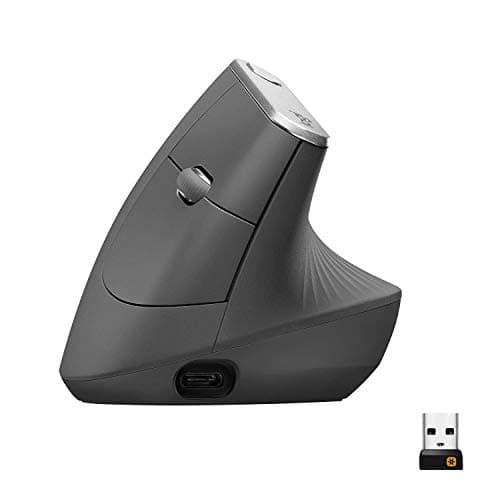 1. Logitech MX Vertical Larger hands, and the longest-lived switches
| 57° | 120 mm, right-hand only | 10 M | USB-C, ~4 mo | |
| 2 | 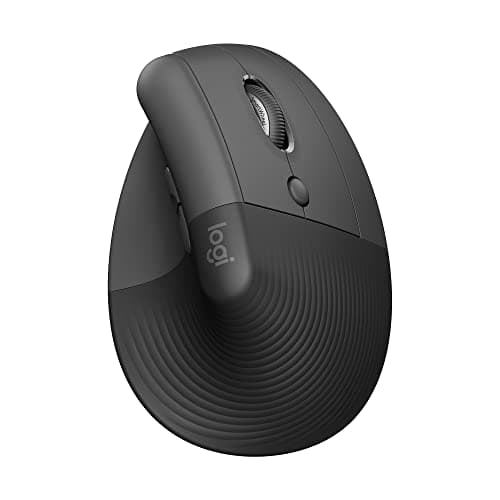 2. Logitech Lift Smaller hands, either hand, and never charging
| 57° | Smaller; left-hand SKU exists | 5 M | 1 AA, 24 mo | |
| 3 | 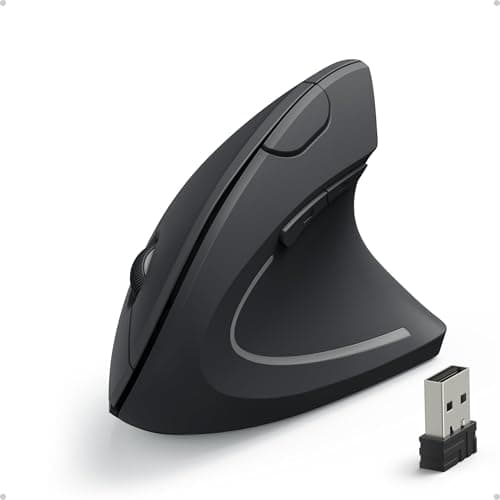 3. Anker 2.4G Wireless Vertical Ergonomic Optical Mouse Budget pick — finding out if vertical suits you
| — | — | — | 2 AAA |
The blank angle cell is the finding. A vertical mouse is defined by how far it rotates your forearm, and Anker publishes no grip anglefor its mouse anywhere on its own product page. The 90° figure repeated across the internet has no Anker source, so it does not appear here — in this table or in the prose. The two Logitechs publish the same 57°, which means the choice between them is not geometry at all: it is shell size, click life and how you want to power it. Click ratings are Logitech’s own figuresfrom its datasheets, and the Lift’s 5 M is published per button rather than as one headline number. One warranty caveat the table cannot hold:the Lift’s datasheet states 2 years, but that is the business SKU — the consumer listing gets 1 year, as does the MX Vertical in the US, where the identical mouse gets 2 years in EMEA and Japan.
Prices and stock as of November 8, 2026, from Amazon’s API. They change; we show a live number or none at all. #ad — we earn a commission.
Buy the Logitech MX Vertical if your hands are average-to-large and you want the most documented vertical mouse there is: a published 57° grip angle, a 10 million click service life and a published MTTF above 150,000 hours. Buy the Logitech Lift if your hands are smaller, if you are left-handed, or if you would rather never charge anything — it is the same published 57° in a smaller shell, with 24 months on a single AA and a genuine left-handed SKU. The budget pick is the Anker vertical mouse: the cheapest way to discover whether this shape suits your wrist, with the honest catch that Anker publishes no grip angle at all.
That is the page. Here is why the angle is the only sensible thing to rank these on, and why one of the three cannot be ranked on it.
The finding: one number defines the category, and one maker won’t state it
A vertical mouse is not a mouse with a different shell. It is a device that holds your forearm in a different rotation: palm facing sideways, in a handshake position, rather than palm down. How farit rotates is therefore the entire product — it is the difference between a mild tilt and a genuinely upright grip, and it is the thing you either get on with or do not.
Logitech publishes that figure. 57°, on its own datasheet, for both the MX Vertical and the Lift — a part-way rotation rather than a full 90°, and a number you can hold your own hand against before you buy. Anker does not publish it, for the mouse we rank third. We went looking on their own product page and there is no angle on it. The 90° figure you will find repeated across the internet has no Anker source, so it does not appear on this page in any form, and we are not going to launder somebody else’s guess into a specification.
That is the whole ranking. The two mice that publish the defining figure come first; the one that does not comes last and is recommended for a narrower reason.
How we ranked them
1. Published grip angle. For the reason above. An unpublished angle on a vertical mouse is like an unpublished height range on a sit-stand desk: the one figure the category exists to vary.
2. Shell size and handedness.Second because once the angle is identical, fit is what is left. The MX Vertical is 120 mm and right-handed only; Logitech states the Lift’s shell is built for smaller hands and publishes left-handed part numbers for it. Our two hand-size pages, large hands and small hands, go into that properly.
3. Published click rating. The longevity slot, and a real spread: 10 million against 5 million against no figure at all. On a device with one moving part you press all day, a published switch rating is the closest thing to a durability claim anyone offers.
The claim we are not using as evidence
You cannot read about the MX Vertical without meeting the line about “10% less muscular strain”, so it is worth saying plainly why it appears nowhere in our reasoning. There is no named study behind it, no stated method and no sample size. Logitech’s own footnote says only “as compared with a traditional non-vertical mouse,” its datasheet states a flat 10% while its press release says “up to 10 percent,” and “muscular strain” and “muscular activity” are not the same construct.
None of that makes the mouse worse. It makes the claim uncheckable, and an uncheckable claim is not a reason to buy anything. Set it aside entirely and the published angle, the click rating and the MTTF still put this mouse first — which is the test any marketing line should have to pass.
What a vertical mouse does and does not do
It changes one thing: forearm rotation. Your palm faces in rather than down, and the muscles that hold it there are different ones. That is geometry, and it is all this page claims — no vertical mouse on this page treats, prevents or cures anything, no manufacturer here publishes a clinical result anyone can check, and nobody writing this is qualified to tell you otherwise.
What it does notchange is how far your hand travels. You still sweep the device across the desk, still reach, still drag. If that motion is the one that bothers you, a vertical mouse is the wrong tool and a trackball is the right one, because a trackball stays put — ergonomic mouse vs trackball is the honest comparison, and it is worth reading before you spend anything here.
What we can’t tell you
We have not used any of these three. We cannot tell you whether 57° suits your wrist, how the MX Vertical’s switches feel at five million clicks, whether the Lift’s AA really lasts two years in your use, or what angle the Anker actually is — because nobody outside Anker knows that last one. What this page is, is every figure the three makers publish, ranked on the one that defines the category, with the gaps printed as gaps. Our methodology says exactly where that stops.
The picks, in detail
1. Larger hands, and the longest-lived switches
Logitech MX Vertical
The vertical geometry done properly: a published 57° grip angle, a 10-million-click service life — double anything else here — and a published MTTF figure almost nobody in this category states at all.
- Grip angle
- 57°
- DPI
- 400–4000
- Battery / warranty
- 4 mo charge / 1 yr
This is first because it publishes the most about the one thing that makes a vertical mouse a vertical mouse. Logitech states 57°on its own datasheet — a real geometric figure you can hold your own hand against — along with a 10 million clickservice life, which is double the Lift’s and the highest in this category in our registry, and an MTTF above 150,000 hours. Publishing a reliability figure at all is rare enough here to be worth saying out loud. DPI is adjustable 400–4000, and it charges over USB-C at roughly four months a charge.
Two honest limits and one claim to ignore. It is large— 120 mm long, which does not suit smaller hands, and is exactly why the Lift below exists — and it is right-handed only, with no left-handed version. The claim to ignore is the famous “10% less muscular strain” line: there is no named study, method or sample size behind it, and Logitech’s own datasheet and press release word it differently from each other. Set it aside entirely and the published angle, click rating and MTTF still make this the pick.
Good
- 57° vertical angle is published on Logitech's own datasheet — a real geometric spec you can check against your own hand
- 10 million click service life, double the Lift's 5 million and the highest here
- Logitech publishes an MTTF figure (>150K hours) — almost nobody in this category publishes reliability at all
- 400–4000 DPI adjustable, with nominal values (1000 and 1600) stated separately
- Rechargeable via USB-C, ~4 months per charge
Not so good
- The headline '10% less muscular strain' claim has no named study, method or sample size behind it — Logitech's own footnote says only 'As compared with a traditional non-vertical mouse'
- The datasheet's flat '10%' and the press release's 'up to 10 percent' are different claims, and 'muscular strain' vs 'muscular activity' are different constructs
- US warranty is 1 year; the same datasheet gives EMEA and Japan 2 years for the identical mouse
- Large — at 120mm long it does not suit smaller hands, which is what the Lift exists for
- Right-handed only; no left-handed version
Don’t buy it if: you have small hands, or you are buying because of the 10% figure. On the first: the Lift is the same 57° geometry in a smaller shell and is the better fit. On the second: that number is Logitech's own unpublished marketing claim, and if it is doing the persuading then you are being persuaded by something nobody can check.
$119.99 −38%
Price as of November 8, 2026. #ad — we earn a commission.
Where these numbers came from
- Logitech MX Vertical Advanced Ergonomic Mouse — official B2B datasheet (PDF; source of the 57° angle, 400–4000 DPI, 10 million click service life, 4-month charge, and the '10%' claim with its single footnote) — read 2026-07-16
- Logitech press release, 20 August 2018 — 'Logitech Goes Vertical With Its Most Advanced Ergonomic Mouse' (the 'up to 10 percent' / 'muscular activity' wording, which differs from the datasheet's) — read 2026-07-16
- Logitech Limited Hardware Warranty terms — read 2026-07-16
2. Smaller hands, either hand, and never charging
Logitech Lift
The same published 57° geometry in a shell Logitech states is designed for smaller hands, with 24 months on one AA instead of a charger — and a left-handed version that genuinely exists.
- Grip angle
- 57°
- DPI
- 400–4000
- Battery / warranty
- 24 mo battery / 1 yr
Second, and for a lot of people the better buy, because the angle is identical. Logitech publishes the same 57° grip angle and the same 400–4000 DPI range in a smaller shell it states is designed for smaller hands, at 125 g. It runs 24 months on a single AA— no charging, ever, in normal use — and a genuine left-handed version exists (910-006492 / 910-006495), which is rare enough in this category to be the deciding factor on its own.
The trades are durability and paperwork. The click rating is 5 million, half the MX Vertical’s, on the same brand’s own datasheet. And read the warranty carefully: the datasheet’s “2-year hardware limited warranty” is the business SKU — the consumer listing gets 1 year. There is also no battery indicator, per Logitech’s own spec table, and no Easy-Switch, so you pair to one machine at a time. If your hands are large, the MX Vertical above is the fit answer; ergonomic mice for small hands is the full version of that question.
Good
- Identical published 57° angle to the MX Vertical, in a shell Logitech states is designed for smaller hands
- 24-month battery life on a single AA — no charging, ever, in normal use
- Left-handed version genuinely exists (910-006492 / 910-006495), which is rare in this category
- Logitech publishes per-button click ratings, not just one headline number
- Lighter than the MX Vertical at 125g
Not so good
- 5 million click service life — half the MX Vertical's 10 million, on the same brand's own datasheet
- The datasheet says '2-year hardware limited warranty', but that is the BUSINESS SKU. The consumer ASIN gets 1 year
- No battery indicator, per Logitech's own spec table
- No Easy-Switch — you pair to one machine at a time
- The 'Ergo certified' line names no certifier, only 'criteria set out by leading ergonomists'
Don’t buy it if: you have large hands, or you want the longest-lived switches. The MX Vertical is bigger and rated for twice the clicks. The Lift is the fit answer, not the durability answer.
$79.99 −23%
Price as of November 8, 2026. #ad — we earn a commission.
Where these numbers came from
- Logitech Lift for Business Vertical Ergonomic Mouse — official B2B datasheet (PDF; source of the 57° angle, 5 million click service life, 24-month battery life, and the 2-year business warranty figure) — read 2026-07-16
- Logitech Support — LIFT Vertical Ergonomic Mouse specification (400–4,000 DPI; per-button click ratings) — read 2026-07-16
3. Budget pick — finding out if vertical suits you
Anker 2.4G Wireless Vertical Ergonomic Optical Mouse
Budget pick. The cheapest vertical shape in our registry by a wide margin, and the only one whose maker will not state the angle that defines it — so you can compare the price and not the geometry.
- Grip angle
- —
- DPI
- 800/1200/1600
- Battery / warranty
- 18 mo warranty
This is the budget pick, and it is worth being exact about what it is for: answering the prior question cheaply. Vertical is a shape people either take to in an afternoon or never, and spending the least to find out is a sound plan. Anker publishes three switchable DPI steps on its own page — 800/1200/1600— runs on two AAAs with nothing to charge, and its 18-monthwarranty is longer than Logitech’s one-year US consumer term on either mouse above it.
Now the reason it is ranked last on a page that ranks grip angle: Anker publishes no grip angle at all.We checked their own product page. The 90° figure you will find repeated across the internet has no Anker source, so we do not print it — and that leaves the single defining specification of the product blank. There is no published click or service-life rating either, so nothing to compare against the 10M and 5M figures above, and the 1600 DPIceiling is a fraction of the Logitechs’ 4000. It may well be a perfectly good mouse. It is an unspecified one, and on this page that is what decides the order.
Good
- By far the cheapest way to find out whether vertical geometry suits you at all
- Three switchable DPI steps (800/1200/1600) are published on Anker's own page
- Runs on 2 AAA batteries — nothing to charge
- 18-month warranty is longer than Logitech's 1-year US consumer term
Not so good
- Anker publishes NO grip angle. The '90°' figure repeated across the internet has no Anker source — we checked their own product page
- 1600 DPI ceiling is a fifth of the MX Master 3S's 8000
- No click/service life rating published, so there is no way to compare durability with the Logitechs' 5M and 10M
- Anker's own product page says only 'Hassle-Free Warranty' with no duration printed on it
- Batteries not included, per Anker's own package contents
Don’t buy it if: you want to know what you are buying. Anker publishes an ergonomic-design claim and three DPI steps and essentially nothing else — no angle, no click rating, no battery life. It may well be a fine mouse. It is an unspecified one.
Price as of November 8, 2026. #ad — we earn a commission.
Common questions
What angle should a vertical mouse be?
There is no established correct figure, and anyone quoting one is quoting a brand. What can be said precisely is what is published: Logitech states 57°for both the MX Vertical and the Lift, which is a part-way rotation rather than a fully upright 90° handshake, and it is the only grip angle any maker in our registry publishes. A fully vertical shape is a bigger change in forearm rotation and a bigger adjustment; a shallower one is closer to a conventional mouse. Which suits you is a fit question, not a spec question — how to choose an ergonomic mouse starts from your hand. Nobody here is a clinician, and if your wrist hurts that is a conversation for one.
Is the Logitech Lift or the MX Vertical better?
They publish the same57° angle, so this is not a geometry decision — it is three other things. Hand size: the MX Vertical is 120 mm and Logitech states the Lift’s shell is designed for smaller hands. Durability: the MX Vertical publishes 10 million clicks against the Lift’s 5 million. Power: the MX Vertical charges over USB-C roughly every four months, the Lift runs 24 months on one AAand never needs charging. And one decider that trumps all of it — the Lift exists in a left-handed version and the MX Vertical does not. Ergonomic mice for large hands and for small hands are the fit pages.
Are cheap vertical mice any good?
The honest answer is that you cannot tell from the paperwork, which is itself the point. The cheap vertical in our registry publishes three DPI steps and an 18-month warranty, and no grip angle, no click rating and no service life. So the shape may suit you perfectly and the switches may last a decade — there is simply no published figure to check either against. What a cheap vertical is genuinely good for is answering the question before it: whether rotating your forearm into a handshake position suits you at all. If it does, the two mice that publish their geometry are the upgrade, and ergonomic mice under $50 is where the cheap one sits against the other budget postures.
Is a vertical mouse better than a trackball?
Neither is better; they fix different motions. A vertical mouse keeps the sweeping motion across the desk and changes the rotation of your forearm. A trackball keeps your hand still and removes the sweeping entirely, so the cursor moves without the device moving. If reaching and dragging is what bothers you, a trackball addresses it and a vertical mouse does not; if the palm-down twist is what bothers you, it is the other way around. Ergonomic mouse vs trackball is the full comparison, and the trackball roundup is the other half of the catalogue.
Sources
Every figure on this page comes from one of these. If a manufacturer doesn’t publish a number, we print “—” rather than estimate it.
- Logitech MX Vertical Advanced Ergonomic Mouse — official B2B datasheet (PDF; source of the 57° angle, 400–4000 DPI, 10 million click service life, 4-month charge, and the '10%' claim with its single footnote) — read 2026-07-16
- Logitech press release, 20 August 2018 — 'Logitech Goes Vertical With Its Most Advanced Ergonomic Mouse' (the 'up to 10 percent' / 'muscular activity' wording, which differs from the datasheet's) — read 2026-07-16
- Logitech Limited Hardware Warranty terms — read 2026-07-16
- Logitech Lift for Business Vertical Ergonomic Mouse — official B2B datasheet (PDF; source of the 57° angle, 5 million click service life, 24-month battery life, and the 2-year business warranty figure) — read 2026-07-16
- Logitech Support — LIFT Vertical Ergonomic Mouse specification (400–4,000 DPI; per-button click ratings) — read 2026-07-16
- Anker 2.4G Wireless Vertical Ergonomic Optical Mouse — Anker's own product page (800/1200/1600 DPI; 'Hassle-Free Warranty' with no duration stated on the page; NO grip angle published anywhere on it) — read 2026-07-16
Read next
The best ergonomic mice
The parent roundup — the same three verticals ranked alongside a conventional-shaped premium mouse.
Ergonomic mouse vs trackball
The decision before this one: whether you want to change your forearm's rotation or stop your hand moving at all.
The best ergonomic mice under $50
Where the budget vertical here sits against the two trackball postures at the same money.
How to choose an ergonomic mouse
Starts from your hand and the motion that bothers you, rather than from the catalogue.