The best ergonomic mice
We have not held any of these. What we have done is read the manufacturers' own datasheets — which is how we found that the most-quoted number in the category has a footnote naming no study, no method and no sample size.
By Stephen V.Last reviewed
Quick picks
Ranked, with the manufacturer’s own longevity figure next to each one. Tap a row to jump to the full write-up.
| # | Product | Best for | Longevity | Price |
|---|---|---|---|---|
| 1 | 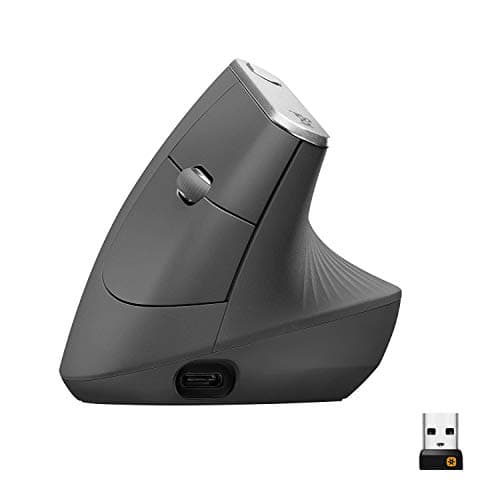 Logitech MX Vertical The 57° angle is a published, checkable fact and the 10-million-click service life is the best here. The famous '10% less muscular strain' is Logitech's own unpublished study — ignore it and the mouse is still the pick. | The vertical geometry, done properly | 4 mo charge / 1 yrBattery / warranty | |
| 2 | 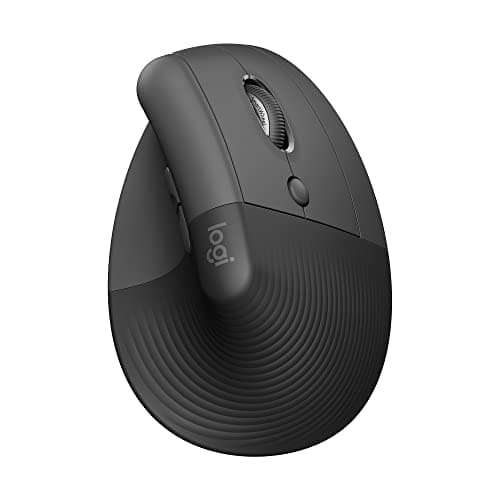 Logitech Lift The same published 57° geometry as the MX Vertical in a smaller shell, with a two-year battery instead of a charger. Half the click rating, and a warranty that shrinks when you buy it as a consumer. | Smaller hands, and never charging anything | 24 mo battery / 1 yrBattery / warranty | $66.50Amazon $79.99 −17% |
| 3 | 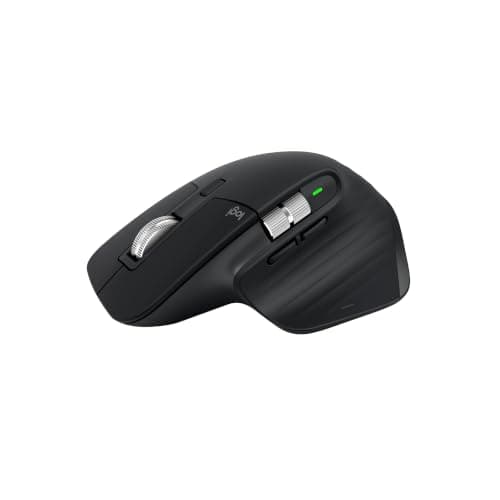 Logitech MX Master 3S The best-specified mouse here on everything except the one number this page is about: Logitech publishes no grip angle for it, because it is sculpted rather than vertical. That dash is honest. | People who want the sensor, not the angle | 70 d charge / 1 yrBattery / warranty | $79.99Amazon $99.99 −20% |
| 4 | 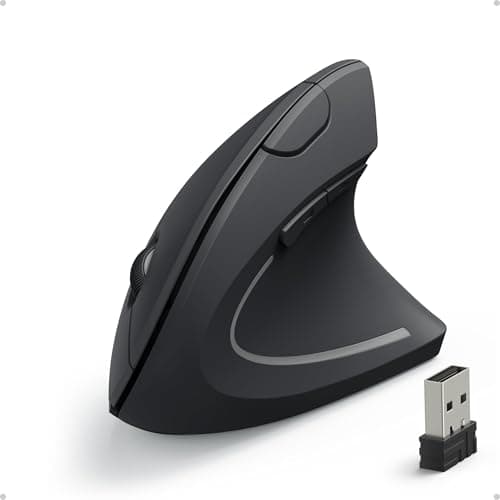 Anker 2.4G Wireless Vertical Ergonomic Optical Mouse A fraction of the price of the Logitechs and it is genuinely vertical. What you give up is every number that would let you compare it to them — starting with the angle. | Trying vertical cheaply | 18 mo warrantyBattery / warranty | $19.98Amazon $29.99 −33% |
Prices as of October 18, 2026, from Amazon’s API. They change; we show a live number or none at all.
There is one number in this category that everybody knows. Logitech’s MX Vertical “reduces muscular strain by 10%”. It is in the listing copy, the reviews, the comparison tables, the YouTube scripts. It is the single most repeated claim about ergonomic mice on the internet.
We went and read the datasheet it comes from. Here is what is actually behind it.
The 10% claim, traced
Logitech’s own MX Vertical datasheet lists, under Product Benefits: “Ergonomic design reduces muscular strain by 10%”, with a superscript 1. Turn to the footnotes and number 1 reads, in full:
“As compared with a traditional non-vertical mouse.”
That is the whole footnote. It tells you what the comparison group was and nothing else. No study is named. No method. No sample size. No publication, no journal, no peer review, no date. We read all five footnotes on the document; the other four cover software requirements, battery variance and Linux support. None of them names a study either.
So the 10% is Logitech’s own unpublished research about Logitech’s own product, and Logitech is not hiding that — they simply never claimed otherwise. The datasheet is what it is. The problem is what happens to the number after it leaves the datasheet.
Where it drifts
Read Logitech’s 2018 press release next to the datasheet and two things have moved.
The press release says MX Vertical is designed “to reduce muscular activity by up to 10 percent compared to a standard mouse”. The datasheet says it “reduces muscular strain by 10%”.
First drift: “up to 10 percent” became a flat “10%”.Those are not the same claim. “Up to” is a ceiling — it is satisfied by 2%. The datasheet asserts the ceiling as the result.
Second drift, and the more interesting one: “muscular activity” became “muscular strain”.Those are different constructs. Muscular activity is a measurable electrical quantity. “Strain” is a considerably fuzzier idea, and it sounds a great deal more like something you would feel. One is a measurement; the other is an experience. The word that reaches the customer is the second one.
The press release also calls the mouse “Scientifically tested and ergonomist approved”. Which ergonomist? It does not say. Not in the press release, not on the datasheet.
The ergonomist who is not the source
This part matters, because the internet has quietly repaired Logitech’s provenance problem on Logitech’s behalf.
If you dig into coverage of this mouse you will eventually find an ergonomist’s name attached to it — Jeanne Iverson, of VSI Risk Management & Ergonomics. And you will find that name presented, in various places, as though it were the source of the 10% figure. It is not.
The Iverson name attaches to a different finding: a study of around 51 people reporting on their own discomfort. Self-reported discomfort is not the same measurement as muscular activity, and a different measurement cannot be the source of the 10%. That work appears in press coverage. It does not appear on Logitech’s datasheet at all.
Splice the two together and you have produced something Logitech never claimed: an independent, named, credentialed ergonomist standing behind the 10% figure. That is manufactured provenance. Logitech asserted a number from their own unpublished testing and footnoted only the comparison group; they did not attribute it to an outside expert. When third parties do it for them, the claim acquires an authority its own author never gave it — and that is worse than the original thinly-sourced claim, because it looks solved.
What is solid: 57 degrees
None of the above makes the MX Vertical a bad mouse. It ranks first here. The reason is that its other headline number is real.
57°is a published geometric fact, stated on Logitech’s own datasheets for both the MX Vertical and the Lift. It describes the shape of an object. You do not have to trust anyone’s study to evaluate it — hold your hand at 57° from the desk and you can feel exactly what it does to your forearm. That is what a spec looks like, and it is the difference between a claim about geometry and a claim about your body.
The same goes for durability. 10 million clicks of stated service life on the MX Vertical against 5 millionon the Lift is a real, published, checkable difference between two mice from the same company — and it is the sort of number that decides whether a thing is still working in year four. It is also, tellingly, the number nobody quotes.
The other footnote worth reading
While we were in the datasheet, one more claim is worth pulling out, because it shows the pattern is not a one-off.
Under the same Product Benefits list: “Best-in-class 4000 DPI high-precision sensor results in 4x less hand movement”, superscript 2. Footnote 2 reads: “As compared with a traditional mouse with 1000 DPI sensor.”
Read those together and the claim dissolves into arithmetic. 4000 DPI against 1000 DPI is four times the counts per inch, so covering the same on-screen distance takes a quarter of the desk movement. That is not a finding about hands — it is division. It is true in the same way that a car with twice the top speed takes half the time is true, and it tells you nothing about whether 4000 DPI is better for you, or whether you would ever run the sensor at its ceiling. Most people do not; the datasheet itself lists the nominal values as 1000 and 1600 dpi.
Notice the shape it shares with the 10%: a specific-sounding multiple, a footnote that defines only the comparison group, and a phrase (“less hand movement”) that sounds like it was observed in people when it was calculated on paper. The footnotes on this datasheet are doing more work than the claims are.
What we did instead of testing
We have not held any of these mice. No lab, no measurements, no hands. What we did was read each manufacturer’s own datasheet or support specification, pull the three numbers that decide the purchase, and cite every one so you can check us. Our methodology pagesets out exactly how that works and what it cannot tell you — which, for mice, is a lot. Whether a shell suits your hand is not knowable from a datasheet, and for that half, owner reviews are more use than we are.
Where a manufacturer does not publish a number, the Spec Line shows “—”. There are two on this page and both are deliberate. Logitech publishes no grip angle for the sculpted MX Master 3S, which is correct of them. Anker publishes no grip angle for its vertical mouse anywhere on its own site — despite a “90°” figure that has spread across the internet with no Anker source behind it. We could have printed 90° and nobody would have queried it. That is precisely the reason not to.
How to actually choose
Decide first whether you want vertical geometry at all — that is the real fork, and the 10% figure should play no part in it. If you do, the question is hand size: MX Vertical for larger hands and the best click rating here, Lift for smaller hands and a battery you replace every two years instead of a cable you plug in quarterly. Both publish the same 57°.
If you are not sure vertical suits you, the Anker costs a fraction of either and answers that question honestly, as long as you accept that almost nothing about it is specified.
And if what you actually want is a superb conventional mouse, the MX Master 3S has the best sensor on this page by a wide margin and makes no vertical claims at all.
One last thing, and it is the most useful sentence here: a mouse cannot fix a desk at the wrong height. If your surface is above your seated elbow height — and for the median adult, a standard 29″ desk is — then your shoulder is doing the work no mouse shell can undo. Run the desk height calculator and read wrist and keyboard position before you spend anything here. Both are free, and both outrank every product on this page.
The picks, in detail
1. The vertical geometry, done properly
Logitech MX Vertical
The 57° angle is a published, checkable fact and the 10-million-click service life is the best here. The famous '10% less muscular strain' is Logitech's own unpublished study — ignore it and the mouse is still the pick.
- Grip angle
- 57°
- DPI
- 400–4000
- Battery / warranty
- 4 mo charge / 1 yr
Two numbers on this mouse, and they could not be less alike.
The first is 57°. Logitech’s datasheet describes “a natural handshake position with its unique 57° vertical angle”, and that is a geometric fact about an object. It is published, it is specific, you can hold your hand at 57° and see what it does. Nothing about it requires you to trust Logitech. It is the reason this mouse ranks first.
The second is 10%, and it is doing something entirely different. “Ergonomic design reduces muscular strain by 10%”, says the same datasheet, with a superscript footnote. Here is that footnote, in its entirety: “As compared with a traditional non-vertical mouse.” That is all of it. Compared with a non-vertical mouse — measured how, by whom, on how many people, published where? The document does not say. We read all five of its footnotes; not one names a study.
The durability figure is the one worth actually weighing. 10 million clicksof stated service life, against the Lift’s 5 million — same brand, same document format, twice the rating. That is a real published difference between two products you might otherwise think were the same mouse in different sizes. Logitech also publishes an MTTF of over 150,000 hours, which is more reliability disclosure than anyone else in this roundup offers.
Buy it for the angle and the click rating. Both are checkable. The 10% is not, and the mouse does not need it.
Good
- 57° vertical angle is published on Logitech's own datasheet — a real geometric spec you can check against your own hand
- 10 million click service life, double the Lift's 5 million and the highest here
- Logitech publishes an MTTF figure (>150K hours) — almost nobody in this category publishes reliability at all
- 400–4000 DPI adjustable, with nominal values (1000 and 1600) stated separately
- Rechargeable via USB-C, ~4 months per charge
Not so good
- The headline '10% less muscular strain' claim has no named study, method or sample size behind it — Logitech's own footnote says only 'As compared with a traditional non-vertical mouse'
- The datasheet's flat '10%' and the press release's 'up to 10 percent' are different claims, and 'muscular strain' vs 'muscular activity' are different constructs
- US warranty is 1 year; the same datasheet gives EMEA and Japan 2 years for the identical mouse
- Large — at 120mm long it does not suit smaller hands, which is what the Lift exists for
- Right-handed only; no left-handed version
Don’t buy it if: you have small hands, or you are buying because of the 10% figure. On the first: the Lift is the same 57° geometry in a smaller shell and is the better fit. On the second: that number is Logitech's own unpublished marketing claim, and if it is doing the persuading then you are being persuaded by something nobody can check.
Amazon isn’t showing a buyable offer for this one right now.
Price as of October 18, 2026. #ad — we earn a commission.
Where these numbers came from
- Logitech MX Vertical Advanced Ergonomic Mouse — official B2B datasheet (PDF; source of the 57° angle, 400–4000 DPI, 10 million click service life, 4-month charge, and the '10%' claim with its single footnote) — read 2026-07-16
- Logitech press release, 20 August 2018 — 'Logitech Goes Vertical With Its Most Advanced Ergonomic Mouse' (the 'up to 10 percent' / 'muscular activity' wording, which differs from the datasheet's) — read 2026-07-16
- Logitech Limited Hardware Warranty terms — read 2026-07-16
2. Smaller hands, and never charging anything
Logitech Lift
The same published 57° geometry as the MX Vertical in a smaller shell, with a two-year battery instead of a charger. Half the click rating, and a warranty that shrinks when you buy it as a consumer.
- Grip angle
- 57°
- DPI
- 400–4000
- Battery / warranty
- 24 mo battery / 1 yr
The Lift is the MX Vertical’s geometry for people the MX Vertical does not fit. Logitech publishes the same figure — “Hand placement at an optimal 57° angle for comfort” — in a shell it describes as “ideal for smaller hands”. If the angle is what you are buying, this is the same purchase in a different size.
Two things separate them, and both are on Logitech’s own documents. The Lift runs 24 months on one AAwhere the MX Vertical wants a USB-C charge every four months — a genuine quality-of-life difference that nobody markets hard because “rechargeable” sounds more premium than “disposable battery”. And the Lift’s service life is 5 million clicksagainst the MX Vertical’s 10 million. Same company, same datasheet template, half the rating.
Now the warranty trap, and it is worth being precise about because copying the datasheet would get you it wrong. The Lift for Business datasheet states, flatly, “2-year hardware limited warranty” — no regional asterisk. But that document describes the businessSKU. The consumer ASIN we link gets one year. Compare it with the MX Vertical datasheet, which spells the split out honestly: “U.S. & AP 1 year / EMEA & Japan 2 years”. Same manufacturer, two documents, two levels of disclosure. Anyone lifting “2 years” off the Lift datasheet and printing it against the consumer mouse has published a wrong number in good faith.
One more thing worth noticing. The Lift datasheet says “Ergo certified — Lift was designed, developed, tested and approved according to criteria set out by leading ergonomists.” Which ergonomists? It does not say. Hold that sentence next to the Logitech K860 keyboard, where the same company names an actual external certifier. They can do it. Here, they did not.
Good
- Identical published 57° angle to the MX Vertical, in a shell Logitech states is designed for smaller hands
- 24-month battery life on a single AA — no charging, ever, in normal use
- Left-handed version genuinely exists (910-006492 / 910-006495), which is rare in this category
- Logitech publishes per-button click ratings, not just one headline number
- Lighter than the MX Vertical at 125g
Not so good
- 5 million click service life — half the MX Vertical's 10 million, on the same brand's own datasheet
- The datasheet says '2-year hardware limited warranty', but that is the BUSINESS SKU. The consumer ASIN gets 1 year
- No battery indicator, per Logitech's own spec table
- No Easy-Switch — you pair to one machine at a time
- The 'Ergo certified' line names no certifier, only 'criteria set out by leading ergonomists'
Don’t buy it if: you have large hands, or you want the longest-lived switches. The MX Vertical is bigger and rated for twice the clicks. The Lift is the fit answer, not the durability answer.
$79.99 −17%
Price as of October 18, 2026. #ad — we earn a commission.
Where these numbers came from
- Logitech Lift for Business Vertical Ergonomic Mouse — official B2B datasheet (PDF; source of the 57° angle, 5 million click service life, 24-month battery life, and the 2-year business warranty figure) — read 2026-07-16
- Logitech Support — LIFT Vertical Ergonomic Mouse specification (400–4,000 DPI; per-button click ratings) — read 2026-07-16
3. People who want the sensor, not the angle
Logitech MX Master 3S
The best-specified mouse here on everything except the one number this page is about: Logitech publishes no grip angle for it, because it is sculpted rather than vertical. That dash is honest.
- Grip angle
- —
- DPI
- 200–8000
- Battery / warranty
- 70 d charge / 1 yr
The dash in the first slot is the most useful thing on this entry, so let us explain it rather than fill it.
Logitech does not publish a grip angle for the MX Master 3S. Not a low one, not a hedged one — none. That is consistent rather than evasive: the MX Master is a sculptedmouse, not a vertical one, and a sculpted shell does not hold your hand at a single defined angle in the way a 57° vertical shell does. There is no honest number to print, so Logitech prints none, and neither do we.
You will find sites that give this mouse an angle anyway. They derived it from a photograph or from each other. We are not going to, because a fabricated number sitting next to Logitech’s real 57° would make both look equally solid, and they are not remotely.
What Logitech does publish here is excellent: 200–8000 DPI, the widest range on this page by a distance, a 10 million clickrating matching the MX Vertical’s, and 70 days a charge. If your problem is a sensor that will not track on your desk, this is the answer on this page. If your problem is the angle of your wrist, it is not.
One thing worth saying plainly, because most roundups will not: this is the previous generation. Logitech released the MX Master 4in October 2025, and the 3S is now the older model still being sold alongside it, at a lower price. We have left the 3S here on purpose rather than swapped it in a hurry. The newer mouse does not change the argument on this page — Logitech publishes no grip angle for it either, because it is the same sculpted shape — and every figure above was read from the 3S’s own datasheet, so reprinting them under a different model name would be exactly the sloppiness this site exists to avoid. If you want the current generation, buy the 4 and know you are paying for a haptic scroll wheel, not for a better wrist angle.
Good
- 200–8000 DPI — by far the widest published range here, and it tracks on glass
- 10 million click rating on the main buttons, matching the MX Vertical
- 70 days per charge, and 3 hours of use from a one-minute charge
- Logitech publishes a full per-button durability table rather than one headline figure
Not so good
- No published grip angle — Logitech states none for a sculpted mouse, so the Spec Line shows a dash
- It is the previous generation. Logitech shipped the MX Master 4 in October 2025, so this is the older flagship still sold alongside it, not the current one
- It is not a vertical mouse and does not claim to be. If you came here for the 57° geometry, this is the wrong product
- US consumer warranty 1 year, where the B2B datasheet for the same mouse says 2
- Heaviest here at 141g
Don’t buy it if: you specifically want vertical geometry. This is a conventional sculpted mouse with an excellent sensor, and it is on this list because people cross-shop it with the MX Vertical — not because it is the same kind of object.
$99.99 −20%
Price as of October 18, 2026. #ad — we earn a commission.
Where these numbers came from
4. Trying vertical cheaply
Anker 2.4G Wireless Vertical Ergonomic Optical Mouse
A fraction of the price of the Logitechs and it is genuinely vertical. What you give up is every number that would let you compare it to them — starting with the angle.
- Grip angle
- —
- DPI
- 800/1200/1600
- Battery / warranty
- 18 mo warranty
Search this mouse and you will be told it holds your hand at 90°. That figure is on review sites, in listing copy, in comparison tables. It is not on Anker’s product page. We went and read it: Anker publishes no grip angle at all, in degrees or otherwise, for this mouse. What they publish is prose — “Scientific ergonomic design encourages healthy neutral ‘handshake’ wrist and arm positions” — and prose is not a spec.
So the slot says “—”. Somebody, somewhere, measured a photo or guessed, and the number got copied until it looked like a specification. That is exactly how a fabricated figure enters the record, and it is why this site prints dashes instead of plausible numbers.
The gap runs deeper than the angle. Anker publishes no click rating, so the Logitechs’ 5 and 10 million have nothing to be compared against. No battery life. Even the warranty is prose on their own page: “Hassle-Free Warranty”, with the 18-month duration living in Anker’s warranty documentation rather than on the product.
It is ranked last for that reason and not because it is bad — we have not touched it, and at this price it is a genuinely sensible way to discover whether vertical suits you before spending several times more. Just be clear about the trade: you are buying an object we can tell you almost nothing verifiable about.
Good
- By far the cheapest way to find out whether vertical geometry suits you at all
- Three switchable DPI steps (800/1200/1600) are published on Anker's own page
- Runs on 2 AAA batteries — nothing to charge
- 18-month warranty is longer than Logitech's 1-year US consumer term
Not so good
- Anker publishes NO grip angle. The '90°' figure repeated across the internet has no Anker source — we checked their own product page
- 1600 DPI ceiling is a fifth of the MX Master 3S's 8000
- No click/service life rating published, so there is no way to compare durability with the Logitechs' 5M and 10M
- Anker's own product page says only 'Hassle-Free Warranty' with no duration printed on it
- Batteries not included, per Anker's own package contents
Don’t buy it if: you want to know what you are buying. Anker publishes an ergonomic-design claim and three DPI steps and essentially nothing else — no angle, no click rating, no battery life. It may well be a fine mouse. It is an unspecified one.
$29.99 −33%
Price as of October 18, 2026. #ad — we earn a commission.
Common questions
Do vertical mice actually reduce strain?
We cannot tell you that, and we would be careful with any page that does. The most-cited evidence is Logitech’s own claim that the MX Vertical “reduces muscular strain by 10%” — and the only footnote attached to it on their datasheet reads, in full, “As compared with a traditional non-vertical mouse.” No study is named, no method, no sample size, and it is not peer-reviewed. What is solid is the geometry: a 57° shell holds your forearm in a different rotation than a flat mouse does. Whether that feels better to you is a question about you, and the cheap Anker answers it for a fraction of the outlay.
What angle should an ergonomic mouse be?
There is no standard answer, and that is the honest state of it. The two Logitech verticals here both publish 57°, which is the only manufacturer figure in this roundup you can actually check. Anker publishes nothing. Logitech publishes nothing for the sculpted MX Master 3S either, correctly — a sculpted mouse does not hold your hand at a defined angle. Unlike desk height, where a real standard exists, no standards body specifies a mouse grip angle at all.
Is the Logitech MX Vertical worth it over the Lift?
They publish the same57° angle, so you are not buying geometry — you are buying size and durability. The MX Vertical is larger (120mm long) and rated for 10 million clicks; the Lift is built for smaller hands and rated for 5 million. The Lift also runs 24 months on an AA where the MX Vertical needs charging quarterly. If your hand fits the Lift, the Lift is the more convenient mouse and the MX Vertical is the longer-lived one.
Why is there a dash instead of an angle for two of these?
Because their manufacturers do not publish one, and we will not invent it. Logitech publishes no grip angle for the MX Master 3S, which is consistent — it is a sculpted mouse, not a vertical one, so there is no single defined angle to state. Anker publishes no angle for its vertical mouse anywhere on its own product page, despite a “90°” figure circulating widely online with no Anker source behind it. A dash is what an honest gap looks like. Our methodology page explains why we would rather print one than a guess.
Does a 1-year or 2-year warranty apply to these?
Depends where you are and which SKU you buy, and this catches people out. Logitech’s MX Vertical datasheet states it plainly: “U.S. & AP 1 year / EMEA & Japan 2 years” — same mouse, different term by region. The Lift and MX Master 3S business datasheets say 2 years with no regional note, but the consumer ASINs on this page get 1 year in the US. Anyone quoting a Logitech B2B datasheet at you about a consumer mouse is quoting the wrong document.
Sources
Every figure on this page comes from one of these. If a manufacturer doesn’t publish a number, we print “—” rather than estimate it.
- Logitech MX Vertical Advanced Ergonomic Mouse — official B2B datasheet (PDF; source of the 57° angle, 400–4000 DPI, 10 million click service life, 4-month charge, and the '10%' claim with its single footnote) — read 2026-07-16
- Logitech press release, 20 August 2018 — 'Logitech Goes Vertical With Its Most Advanced Ergonomic Mouse' (the 'up to 10 percent' / 'muscular activity' wording, which differs from the datasheet's) — read 2026-07-16
- Logitech Limited Hardware Warranty terms — read 2026-07-16
- Logitech Lift for Business Vertical Ergonomic Mouse — official B2B datasheet (PDF; source of the 57° angle, 5 million click service life, 24-month battery life, and the 2-year business warranty figure) — read 2026-07-16
- Logitech Support — LIFT Vertical Ergonomic Mouse specification (400–4,000 DPI; per-button click ratings) — read 2026-07-16
- Logitech Support — MX Master 3S specification (200–8,000 DPI; 10 million click rating; note that NO grip angle is published) — read 2026-07-16
- Logitech MX Master 3S for Business — official datasheet (PDF) — read 2026-07-16
- Anker 2.4G Wireless Vertical Ergonomic Optical Mouse — Anker's own product page (800/1200/1600 DPI; 'Hassle-Free Warranty' with no duration stated on the page; NO grip angle published anywhere on it) — read 2026-07-16
Read next
The best ergonomic mice for small hands
The Lift is the only mouse here whose maker publishes its dimensions — 108 x 70 x 71 mm — and the only one with a published hand-size statement.
How to choose an ergonomic mouse
The criteria behind this ranking — grip, size, shape and connection — to match a mouse to your hand.
The best trackball mice
If the hand should stop sliding altogether, these are the trackballs ranked on published ball diameter, connection modes and warranty.
Ergonomic mouse vs trackball
The other way to move a cursor — a trackball keeps the whole arm still. How the two compare.
The best desk pads
The continuous surface a mouse actually glides on — a comfort/finish upgrade, ranked on size and material.
Wrist and keyboard position
The mouse is half the problem. This is the other half, and it is free to fix.
The best ergonomic keyboards
Where one product does carry a real third-party ergonomic certification.
The ergonomic desk setup
Input devices are step four. Three things should be right before them.
Desk height calculator
A mouse cannot fix a surface at the wrong height. Start here instead.
Black Friday & Cyber Monday home office deals
The MX Vertical's dated Amazon discounts were in spring, not November — why watching the button beats waiting.
Best home office gifts under $150
The MX Vertical or the Lift as a gift: hand size and handedness decide it.