The best ergonomic mice for small hands
Every ergonomic mouse is sold on a shape, and almost none is sold with a size. Of everything we rank, exactly one publishes its physical dimensions and exactly one publishes a sentence about whose hand it fits — and they are the same product. Here is how to buy in a category that will not tell you this.
By Stephen V.Last reviewed
What each maker publishes about size
This is the shortest useful table on the site, and the emptiness is the finding. One product publishes dimensions. One publishes a sentence about hand size. They are the same product.
| # | Device | Published size | Maker's hand-size wording | Shape | Warranty | Price |
|---|---|---|---|---|---|---|
| 1 | 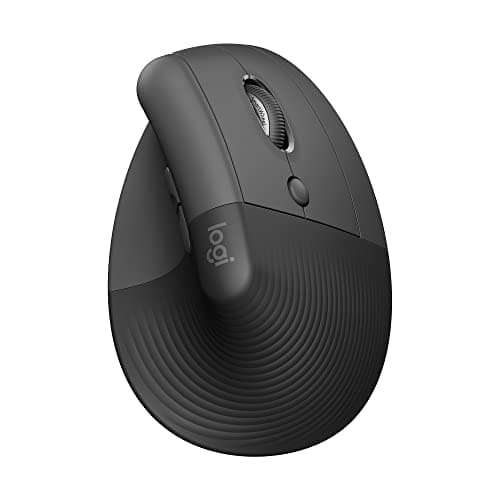 1. Logitech Lift The only mouse here with published millimetres
| 108 × 70 × 71 mm, 124 g | “Small to medium hands” | Vertical, 57° | 1 yr | $66.50$79.99−17% Check Price on Amazon |
| 2 | 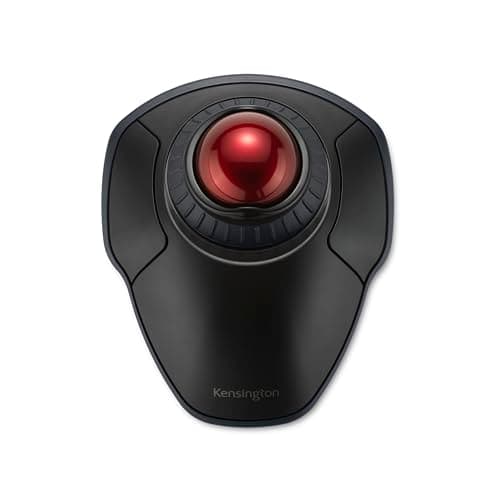 2. Kensington Orbit Wireless with Scroll Ring (K70990WW) A smaller ball, and either hand
| 40 mm ball | — | Finger trackball | 3 yr | |
| 3 | 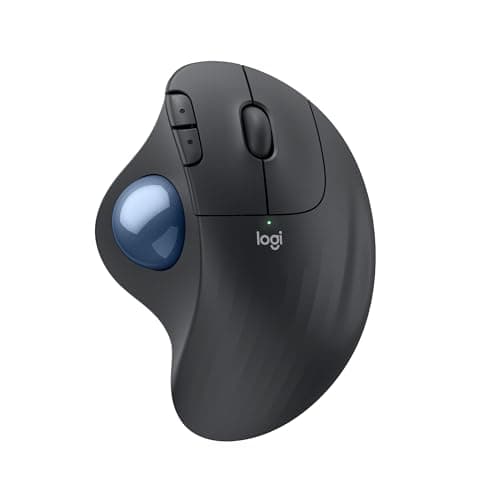 3. Logitech ERGO M575S A still hand and almost no desk travel
| — | — | Thumb trackball | 1 yr | |
| 4 | 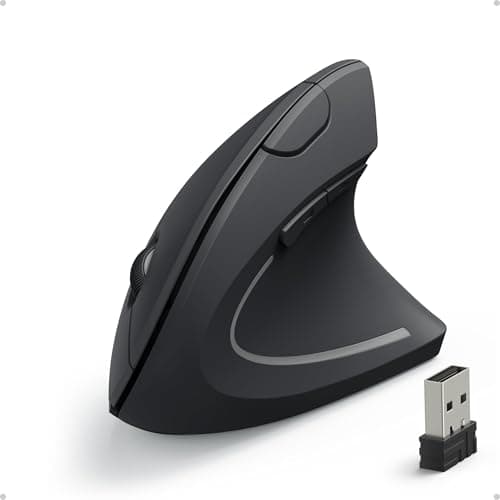 4. Anker 2.4G Wireless Vertical Ergonomic Optical Mouse Testing the vertical idea cheaply
| — | — | Vertical, angle not published | 18 mo |
The dashes are the reason this page exists. Kensington publishes a ball diameter and no shell dimension; Logitech publishes dimensions for the Lift and, on the same site, none for the MX Vertical or the M575S; Anker publishes neither a size nor even a grip angle. There is no hand-length or palm-width spec anywhere in this category, from anybody, at any price — so the one quoted sentence in column two is the closest thing to a fit statement that exists, and it is marketing copy rather than a measurement. Figures for the trackballs are the ones cited on the trackball roundup; figures for the two mice on the ergonomic mice roundup, with the Lift’s dimensions added from Logitech’s own specification page.
Prices and stock as of October 18, 2026, from Amazon’s API. They change; we show a live number or none at all. #ad — we earn a commission.
The short answer: the Logitech Lift, because it is the only ergonomic mouse in our coverage whose maker publishes its dimensions — 108 × 70 × 71 mm at 124 g — and the only one with a published statement about whose hand it fits. If your problem is reach and travel rather than grip, the Kensington Orbit with its published 40 mm ball stops the hand moving at all, is ambidextrous, and carries a three-year warranty.
The spec this entire category refuses to publish
Ergonomic mice are sold on shape. Fifty-seven degrees. Vertical grip. Sculpted. What almost none of them is sold on is size — and size is the variable that decides whether a shape works for you.
We went looking for it across every pointing device we rank. There is no hand-length figure, no palm-width figure, no glove sizing, no small/medium/large option, from anyone, at any price. Kensington publishes a ball diameter but no shell dimension. Anker publishes DPI and a warranty but not even a grip angle. Logitech publishes a service-life figure in millions of clicks for a mouse whose physical size it does not state — on the MX Vertical and the M575S, the dimensions are simply absent from its own pages.
The exception is the Lift, and it is exactly one product. Its specification page gives height 108 mm, width 70 mm, depth 71 mm, weight 124 g. That is enough to settle the question with a ruler and the mouse already on your desk, which is more than this category normally allows anyone to do.
What to look for, in order
First, a published dimension. Not because millimetres tell you how a mouse feels, but because they are the only claim you can verify. A shape described as ergonomic with no size attached is an unfalsifiable statement.
Second, how much the hand has to move. This is the part people under-weight. A mouse that fits perfectly still has to be gripped and dragged across a desk; a trackball does not move at all. If your complaint is that your hand is tired rather than cramped, reducing travel beats reducing size.
Third, whether the device is handed. A thumb trackball puts one digit in charge of the pointer, and a thumb module positioned for a larger hand is the single most common source of complaint about them. An ambidextrous finger ball sidesteps that and is the only option at all for a left-handed user.
Fourth, the longevity figure. As everywhere on this site, the third column is the one that survives the purchase. Kensington’s 3-year term on the cheapest trackball here is three times Logitech’s consumer year, and Anker’s 18 months on the cheapest item on the page is longer than both of Logitech’s.
Two sizes of one shape, in Logitech’s own words
The clearest size evidence in this category is not a number at all. It is two sentences on two Logitech product pages about the same design.
The Lift: “A great fit for small to medium hands.” The MX Vertical: “great for large to medium hands.” Same 57° grip angle, same 400–4000 DPI sensor range, two shells, and a manufacturer telling you plainly which is which.
Treat that for what it is: marketing copy, not a measurement, and the reason the Lift still ranks on its millimetres rather than on the sentence. But a maker who offers one shape in two sizes and says which is the smaller one has given you more than anybody else in this category has, and it is worth taking.
Why a trackball is the sideways answer
If the real complaint behind “my mouse is too big” is that your hand aches by the afternoon, the shape that helps most may not be a smaller mouse. It may be a device that does not travel.
A trackball stays in one place and the pointer is driven by a ball — which removes grip force, desk travel and the shoulder movement that comes with reaching for a mouse repeatedly, and makes shell size much less consequential because you are resting on the device rather than wrapping around it. The published size figure that matters becomes the ball: 40 mm on the Orbit against 55 mm on the two bigger Kensingtons.
The cost is a learning curve of a few days and, on a thumb trackball, a handedness constraint. OSHA’s own guidance on pointing devices, cited on the trackball roundup, treats varying the input device as the useful intervention rather than declaring one geometry correct — which is roughly where we land too.
What we can’t tell you
We have not measured anyone’s hand, and we have not held these four devices against a range of hands to find out where each stops working. There is no study we can point you at that maps hand dimensions to mouse dimensions, and if there were, three of these four products publish no dimensions to map.
What this page can honestly do is narrower. It tells you the one product whose size you can check, quotes the one hand-size sentence any manufacturer here publishes, names the one ball diameter that is smaller than the alternatives, and is explicit that everything else in the category is a shape with no size attached. The rest — whether 57° suits you, whether you get on with a ball — is a return window, not a specification, and we would rather say so than invent a fit chart.
The picks, in detail
1. The only mouse here with published millimetres
Logitech Lift
The only mouse in our coverage whose maker publishes physical dimensions — 108 × 70 × 71 mm at 124 g — and the only one with a published hand-size statement: Logitech's own page calls it "a great fit for small to medium hands". Everything else in this category leaves you guessing.
- Grip angle
- 57°
- DPI
- 400–4000
- Battery / warranty
- 24 mo battery / 1 yr
It ranks first because it is the only pick on this page you can check against your own hand before buying. Logitech’s support specification publishes 108 mm high, 70 mm wide, 71 mm deep, 124 g. Put a ruler next to the mouse you currently use and you have an answer in thirty seconds, which is not possible for any other product here.
And Logitech publishes the fit statement as well. Its own product page calls the Lift “a great fit for small to medium hands” — and describes the larger MX Vertical, which is the same 57° shape in a bigger shell, as “great for large to medium hands”. Two sentences from the same manufacturer about two sizes of the same design is the clearest size signal in this entire category.
The rest is the spec it shares with the roundup: 57° grip angle, 400–4000 DPI, a 24-month battery on one AA so there is nothing to charge, and a 5-million-click service life. The warranty is the weak column at 1 year consumer, and “small to medium hands” is a marketing sentence rather than a measurement — it is the millimetres above it that let you verify anything.
Good
- Identical published 57° angle to the MX Vertical, in a shell Logitech states is designed for smaller hands
- 24-month battery life on a single AA — no charging, ever, in normal use
- Left-handed version genuinely exists (910-006492 / 910-006495), which is rare in this category
- Logitech publishes per-button click ratings, not just one headline number
- Lighter than the MX Vertical at 125g
Not so good
- 5 million click service life — half the MX Vertical's 10 million, on the same brand's own datasheet
- The datasheet says '2-year hardware limited warranty', but that is the BUSINESS SKU. The consumer ASIN gets 1 year
- No battery indicator, per Logitech's own spec table
- No Easy-Switch — you pair to one machine at a time
- The 'Ergo certified' line names no certifier, only 'criteria set out by leading ergonomists'
Don’t buy it if: you have large hands, or you want the longest-lived switches. The MX Vertical is bigger and rated for twice the clicks. The Lift is the fit answer, not the durability answer.
$79.99 −17%
Price as of October 18, 2026. #ad — we earn a commission.
Where these numbers came from
- Logitech Lift for Business Vertical Ergonomic Mouse — official B2B datasheet (PDF; source of the 57° angle, 5 million click service life, 24-month battery life, and the 2-year business warranty figure) — read 2026-07-16
- Logitech Support — LIFT Vertical Ergonomic Mouse specification (400–4,000 DPI; per-button click ratings) — read 2026-07-16
- Logitech Support — LIFT Vertical Ergonomic Mouse specification (source of the published physical dimensions: height 108 mm / 4.2 in, width 70 mm / 2.7 in, depth 71 mm / 2.7 in, weight 124 g — the only mouse in our coverage whose maker publishes dimensions) — read 2026-10-17
- Logitech Lift Vertical Ergonomic Mouse — Logitech's own US product page (source of the quoted hand-size wording, “A great fit for small to medium hands”; no dimensions or weight are published on this page) — read 2026-10-17
- Logitech MX Vertical Ergonomic Mouse — Logitech's own US product page (cited for contrast: the larger sibling of the same 57° shape is described as “great for large to medium hands”; no dimensions are published on this page either) — read 2026-10-17
2. A smaller ball, and either hand
Kensington Orbit Wireless with Scroll Ring (K70990WW)
A 40 mm finger ball instead of the 55 mm ones Kensington puts on its bigger trackballs, in an ambidextrous shell, with a three-year warranty at the lowest price of any trackball we rank. The hand barely moves at all.
- Ball
- 40 mm
- Connection
- BT LE + 2.4GHz
- Warranty
- 3 yr
The second answer to a small hand is a device the hand does not have to move. A trackball stays put and your fingers move the ball — which takes the shell size question off the table, because you are no longer gripping and dragging an object sized for somebody else.
Kensington publishes “Trackball Diameter (mm): 40” for this one, against the 55 mm balls on the SlimBlade Pro and the Expert Mouse. That is a real published figure and a genuinely smaller one. It is also ambidextrous, which matters more than it sounds here: the thumb trackballs further down this page are handed, and a smaller hand plus a thumb module sized for a larger one is the combination that produces thumb ache.
Four selectable DPI levels (400, 800, 1200, 1600), dual wireless, and Kensington’s 3-year term — the longest warranty on this page by a distance. What Kensington does not publish is a shell dimension, a button count, a battery type or a battery life, so a 40 mm ball is the only size figure you get.
Good
- 40 mm ball — published, and the only alternative here to the 55 mm shapes, which is a genuine fit difference rather than a cost saving
- Four selectable DPI levels (400, 800, 1,200 and 1,600), the widest published cursor-speed choice on this page
- Ambidextrous, so it is the easiest pick to follow OSHA's “alternate hands” line with
- Limited 3-year warranty at the lowest price on the page
- Dual wireless: 2.4 GHz and Bluetooth LE
Not so good
- Kensington publishes no button count for it, which is an odd omission on a device whose buttons are reassignable in software
- No published battery type and no published battery life — the only pick here where you cannot find out what powers it before it arrives
- No wired mode
- No published dimensions
- The 40 mm ball is a smaller target than the 55 mm shapes above; that is the point of it, but it is a real trade in fine positioning
Don’t buy it if: you want the biggest ball you can get. A 40 mm ball is a different instrument from a 55 mm one, not a discounted version of it — more finger movement per pixel, less palm involvement. If a large ball is what drew you to trackballs, this is not that, and the two Kensingtons above are.
Price as of October 18, 2026. #ad — we earn a commission.
Where these numbers came from
3. A still hand and almost no desk travel
Logitech ERGO M575S
Thumb control on one AA for about a year and a half, with the hand resting still. The right shape for a small hand that wants a trackball rather than a mouse — provided you are right-handed, because it is not ambidextrous.
- Ball
- —
- Connection
- BT LE + Logi Bolt
- Warranty
- 1 yr
The thumb-trackball argument for a small hand is that the device never moves and neither does your wrist — the pointer is driven by one digit, and the amount of travel a pointing device demands is the thing shell size is a proxy for in the first place.
It is the easiest device on this page to live with day to day: Bluetooth LE plus Logi Bolt, and a battery life measured in months on a single AA rather than a charge cycle you have to remember. There is nothing to plug in and nothing to run flat mid-call.
Two real limits. Logitech publishes no ball diameter for it — the dash in the table is not an oversight — and the warranty is 1 year against Kensington’s three. It is also right-handed only, so it is out entirely for a left-handed user, where the ambidextrous Orbit is the pick.
Good
- Up to 18 months on a single AA on either radio — the longest published power interval here, and the battery is replaceable
- Publishes a clean adjustable DPI range, 100–2,000, which the MX Ergo S above and the SlimBlade Pro do not
- Published dimensions and weight: 134 × 100 × 48 mm and 145 g, the lightest device on this page
- Bluetooth LE or the bundled Logi Bolt receiver, so it pairs with a laptop that has no spare port
- One of the two cheapest picks here, while publishing more of its own specification than one of the two dearest
Not so good
- No published trackball diameter, the same hole as the MX Ergo S — and on the entry model there is no premium to excuse it
- 1 year limited hardware warranty
- No tilt hinge: the chassis angle is fixed, which is the main thing the MX Ergo S adds over it
- No wired mode, so pairing and power both depend on the radio and the AA
- Fewer buttons and no scroll ring — this is the plainest control layout on the page
Don’t buy it if: you already know you want the tilt. The hinge is the MX Ergo S's actual differentiator over this one, and no amount of software makes a fixed chassis adjustable. Equally, if you have never used a thumb ball, this is the sane place to find out whether you like the posture before spending twice as much on the same idea.
$49.99 −20%
Price as of October 18, 2026. #ad — we earn a commission.
Where these numbers came from
- Logitech Support — Specification, ERGO M575S: “Logitech Advanced Optical Tracking”; “100 – 2,000 DPI (Adjustable in Logi Options+)”; 134 × 100 × 48 mm (5.2 × 3.9 × 1.8 in); 145 g; “1 Standard AA battery”, “Up to 18 Months on a single AA with the included Logi Bolt USB receiver and up to 18 months using Bluetooth Low Energy”. No trackball diameter is published — read 2026-08-12
- Logitech Support — Warranty, ERGO M575S: “1 year limited hardware warranty” — read 2026-08-12
4. Testing the vertical idea cheaply
Anker 2.4G Wireless Vertical Ergonomic Optical Mouse
The cheapest way to find out whether a vertical grip suits your hand at all, before spending Lift money on the idea. It publishes less than anything else here, and the price is the reason it is on the page.
- Grip angle
- —
- DPI
- 800/1200/1600
- Battery / warranty
- 18 mo warranty
A vertical mouse is a different hand position, not just a different size, and some people hate it. This is the option that lets you find that out for a small fraction of the Lift, which is a legitimate reason to buy a product even when its spec sheet is thin.
What Anker publishes is 800 / 1200 / 1600 DPI and an 18-month warranty — longer than Logitech’s consumer year, which is worth noting on the cheapest item here.
What it does not publish is anything about size or shape: no grip angle anywhere on Anker’s own product page, no dimensions, no weight, no hand-size statement. So it cannot tell you whether it fits a small hand, and neither can we. It is on this page as the cheap experiment, ranked last for exactly that reason.
Good
- By far the cheapest way to find out whether vertical geometry suits you at all
- Three switchable DPI steps (800/1200/1600) are published on Anker's own page
- Runs on 2 AAA batteries — nothing to charge
- 18-month warranty is longer than Logitech's 1-year US consumer term
Not so good
- Anker publishes NO grip angle. The '90°' figure repeated across the internet has no Anker source — we checked their own product page
- 1600 DPI ceiling is a fifth of the MX Master 3S's 8000
- No click/service life rating published, so there is no way to compare durability with the Logitechs' 5M and 10M
- Anker's own product page says only 'Hassle-Free Warranty' with no duration printed on it
- Batteries not included, per Anker's own package contents
Don’t buy it if: you want to know what you are buying. Anker publishes an ergonomic-design claim and three DPI steps and essentially nothing else — no angle, no click rating, no battery life. It may well be a fine mouse. It is an unspecified one.
$29.99 −33%
Price as of October 18, 2026. #ad — we earn a commission.
Common questions
How do I know if a mouse is too big for my hand?
Measure the mouse you already use, decide whether it is too big, and shop on the difference — because that is the only method available in a category that publishes almost no dimensions. The Lift is 108 mm long, 70 mm wide and 71 mm tall; if your current mouse is longer or wider than that and your hand ends up stretched across it, the Lift is smaller. If your current mouse is already smaller than that, the honest answer is that a vertical mouse will feel bigger regardless, because it is tall rather than long. The two signs worth watching for in your own hand are a thumb that has to reach backwards to the side buttons and a palm that never touches the shell.
Is a vertical mouse or a trackball better for a small hand?
They solve different halves of the problem. A vertical mouse changes the position of your hand — the Lift’s 57° puts your forearm closer to neutral rather than rolled flat — but you still grip and move the whole device. A trackball changes the amount of movement: the body stays put and one or two digits do the work, which takes shell size largely out of the equation. If your complaint is wrist rotation, go vertical. If it is reach, travel or shoulder, go trackball. Our ergonomic mouse vs trackball page sets the trade out in full.
Does Logitech make a smaller version of the MX Vertical?
Effectively, yes — and Logitech says so in its own words. The Lift and the MX Vertical share the same published 57° grip angle and the same 400–4000 DPI range, and Logitech’s product pages describe the Lift as “a great fit for small to medium hands” and the MX Vertical as “great for large to medium hands”. That is the same shape offered in two sizes. The differences beyond size are real: the MX Vertical is rechargeable with a 4-month charge, the Lift runs 24 months on an AA, and the MX Vertical publishes a 10-million-click service life against the Lift’s 5 million.
Why does a 40 mm trackball suit a smaller hand better than a 55 mm one?
Because the ball is what your fingers have to span and spin, and 40 mm is a published 15 mm smaller than the 55 mm balls Kensington puts on the SlimBlade Pro and the Expert Mouse. That is the whole claim — a smaller sphere needs less finger spread to control. What it is not is a statement about the shell, which Kensington does not publish for any of its trackballs, or a claim that a smaller ball is more precise. The larger balls carry more momentum and some people strongly prefer them; the trackball roundup ranks all five on what each publishes.
Are there ergonomic mice made specifically for women's hands?
Marketing in this category sometimes implies it; the spec sheets never say it, and we are not going to infer a hand size from a buyer’s demographics. The useful framing is the one the products themselves support: hands vary in length and span, exactly one manufacturer in our coverage publishes a dimension you can hold a ruler against, and exactly one publishes a sentence about which hands a shape suits. Buy on those two things, plus a shape that reduces how much of the hand has to move, and ignore anything else the box tells you.
Sources
Every figure on this page comes from one of these. If a manufacturer doesn’t publish a number, we print “—” rather than estimate it.
- Logitech Lift for Business Vertical Ergonomic Mouse — official B2B datasheet (PDF; source of the 57° angle, 5 million click service life, 24-month battery life, and the 2-year business warranty figure) — read 2026-07-16
- Logitech Support — LIFT Vertical Ergonomic Mouse specification (400–4,000 DPI; per-button click ratings) — read 2026-07-16
- Logitech Support — LIFT Vertical Ergonomic Mouse specification (source of the published physical dimensions: height 108 mm / 4.2 in, width 70 mm / 2.7 in, depth 71 mm / 2.7 in, weight 124 g — the only mouse in our coverage whose maker publishes dimensions) — read 2026-10-17
- Logitech Lift Vertical Ergonomic Mouse — Logitech's own US product page (source of the quoted hand-size wording, “A great fit for small to medium hands”; no dimensions or weight are published on this page) — read 2026-10-17
- Logitech MX Vertical Ergonomic Mouse — Logitech's own US product page (cited for contrast: the larger sibling of the same 57° shape is described as “great for large to medium hands”; no dimensions are published on this page either) — read 2026-10-17
- Kensington Orbit Wireless Trackball with Scroll Ring (K70990WW) product page — “Trackball Diameter (mm): 40”, finger-operated, ambidextrous, four DPI levels (400, 800, 1,200, 1,600), dual wireless (2.4 GHz and Bluetooth LE), “Limited 3-year warranty”. Button count, battery type and battery life are not published on the page — read 2026-08-12
- Logitech Support — Specification, ERGO M575S: “Logitech Advanced Optical Tracking”; “100 – 2,000 DPI (Adjustable in Logi Options+)”; 134 × 100 × 48 mm (5.2 × 3.9 × 1.8 in); 145 g; “1 Standard AA battery”, “Up to 18 Months on a single AA with the included Logi Bolt USB receiver and up to 18 months using Bluetooth Low Energy”. No trackball diameter is published — read 2026-08-12
- Logitech Support — Warranty, ERGO M575S: “1 year limited hardware warranty” — read 2026-08-12
- Anker 2.4G Wireless Vertical Ergonomic Optical Mouse — Anker's own product page (800/1200/1600 DPI; 'Hassle-Free Warranty' with no duration stated on the page; NO grip angle published anywhere on it) — read 2026-07-16
Read next
The best ergonomic mice
The full ranking on grip angle and published click life, where the Lift and the Anker are researched in detail.
The best trackball mice
Where the 40 mm and 55 mm ball figures come from, and the two Kensingtons this page does not pick.
How to choose an ergonomic mouse
The decision order behind this page — travel, grip, then size — before you get as far as a model.
Ergonomic mouse vs trackball
The real fork on this page: change your hand's position, or stop moving it.
How to prevent wrist pain when typing
If the pain is in the wrist rather than the hand, the keyboard and its height may be the bigger lever.
The best wrist rests
Including the mouse-hand version, which changes how much of the hand bears weight.