The best ergonomic mice for large hands
Nobody publishes a hand-size chart for a mouse. What a few makers do publish is millimeters — and one of them says in its own words which of its shapes is for a large hand. Here is every device in our coverage whose size you can actually check, ranked for a bigger hand.
By Stephen V.Last reviewed
What each maker publishes about size
Five devices, five first-party spec documents, and exactly one maker anywhere in this category willing to write down whose hand a shape suits. Read column one as the only part you can verify with a ruler.
| # | Device | Published size | Maker's hand-size wording | Shape | Warranty | Price |
|---|---|---|---|---|---|---|
| 1 | 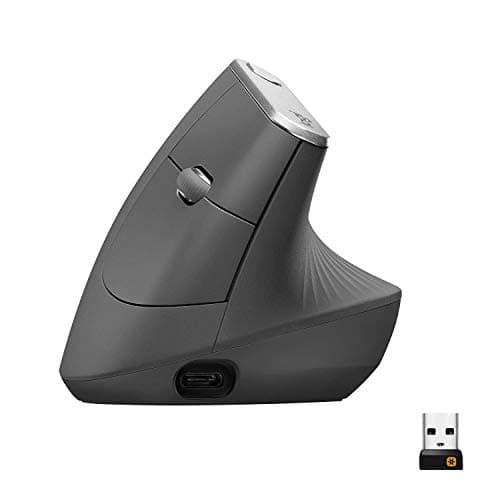 1. Logitech MX Vertical A published size and a published fit statement
| 78.5 × 79 × 120 mm, 135 g | “Great for large to medium hands” | Vertical, 57° | 1 yr (US) | |
| 2 | 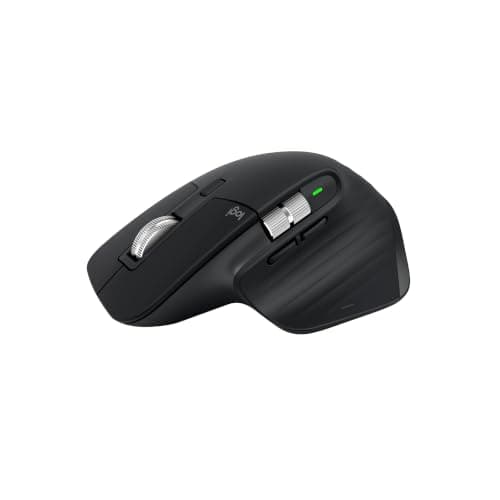 2. Logitech MX Master 3S A big palm-grip footprint, in published millimeters
| 124.9 × 84.3 × 51 mm, 141 g | — | Sculpted, no angle published | 1 yr (US) | |
| 3 | 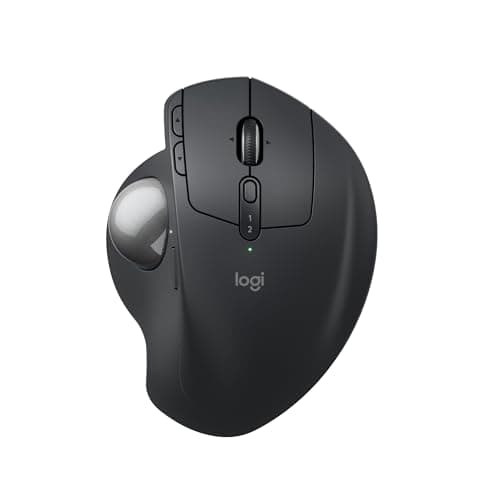 3. Logitech MX Ergo S Resting a big hand and not moving it
| 132.5 × 99.8 × 51.4 mm, 164 g | — | Thumb trackball, ball not published | 1 yr | $116.99 Check Price on Amazon |
| 4 | 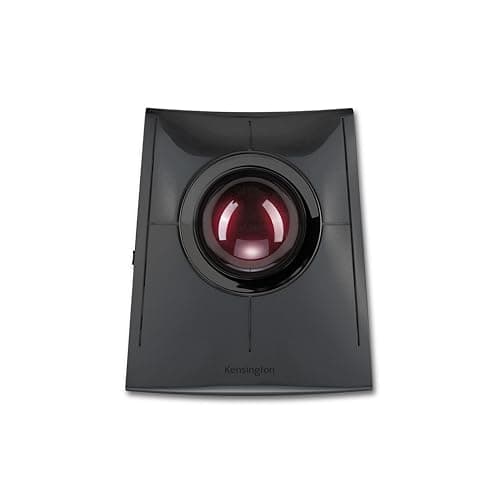 4. Kensington SlimBlade Pro (K72080WW) The biggest published ball, and the longest warranty
| 55 mm ball; shell not published | — | Finger trackball | 3 yr | |
| 5 | 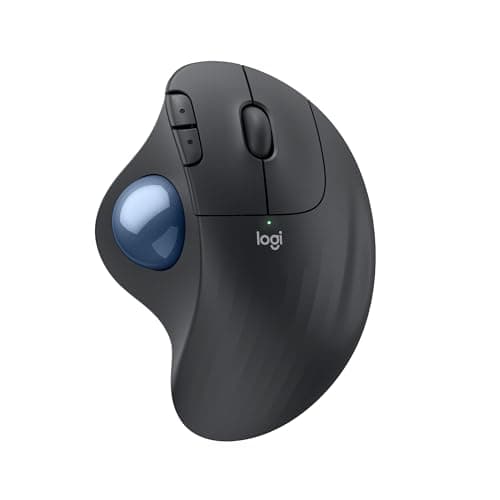 5. Logitech ERGO M575S The most published shell per dollar
| 134 × 100 × 48 mm, 145 g | — | Thumb trackball, ball not published | 1 yr |
Two warnings about column one. First, Logitech’s own documents disagree about the axes: the MX Vertical datasheet calls 120 mm the length, while Logitech’s shop page calls the same 120 mm figure the height. The numbers match; the labels do not, so compare magnitudes rather than trusting the letter in front of them. Second, a larger published shell is not automatically a better fit — a trackball’s footprint is something you rest on, while a mouse’s is something you grip and drag. There is still no hand-length or palm-width spec anywhere in this category, from anybody, at any price. Figures for the trackballs are the ones cited on the trackball roundup; the two mice are cited from Logitech’s datasheet and support specification pages, read for this page.
Prices and stock as of November 8, 2026, from Amazon’s API. They change; we show a live number or none at all. #ad — we earn a commission.
The short answer: the Logitech MX Vertical, because its maker publishes both the size — 78.5 × 79 × 120 mm at 135 g — and a sentence naming the hand, calling it “great for large to medium hands”. If your hand simply wants more shell to lie on rather than a different wrist angle, the MX Master 3S publishes the largest conventional footprint here at 124.9 × 84.3 mm, and the two trackballs below it are larger still.
The spec this category almost never publishes
Ergonomic mice are sold on shape — vertical, sculpted, fifty-seven degrees. What most of them are not sold on is size, which is the variable that decides whether a shape works for your hand at all.
We went looking across every pointing device we rank. There is no hand-length figure, no palm-width figure, no glove sizing and no small/medium/large option, from anyone, at any price. Kensington publishes a trackball diameter on every product page and no shell dimension on any of them. Anker publishes DPI and a warranty and not even a grip angle.
What does exist — and it is more than the small-hands case has to work with — is five first-party spec documents that print real millimeters. Logitech publishes dimensions for the MX Vertical, the MX Master 3S, the MX Ergo S and the ERGO M575S. Kensington publishes the ball. That is the entire evidence base for this page, and everything ranked below is ranked on it.
What to look for, in order
First, a published dimension. Not because millimeters tell you how a mouse feels, but because they are the only claim you can verify against the mouse already on your desk. A shape described as ergonomic with no size attached is an unfalsifiable statement.
Second, what the extra size is for. This is the step people skip, and it decides which half of this page you want. A larger mouse gives a long hand something to rest on while it still grips and drags the device. A larger trackball gives it something to rest on and removes the dragging entirely. Those are different problems: if your fingers claw over a small shell, buy a bigger mouse; if your hand and shoulder are tired by mid-afternoon, buy something that does not travel.
Third, whether the device is handed.Both Logitech verticals and both thumb trackballs here are right-handed only. A thumb module positioned for somebody else’s hand is the most common complaint about this category, and a left-handed buyer is down to symmetrical finger trackballs — where, inconveniently, the ambidextrous one our small-hands page picks carries the 40 mm ball rather than the 55 mm one.
Fourth, the longevity figure. As everywhere on this site, the third Spec Line slot is the one that survives the purchase. Kensington states a 3-yearterm on the SlimBlade Pro against Logitech’s 1-yearUS consumer warranty on everything else here — and Logitech’s own datasheet gives the MX Vertical two years in EMEA and Japan for the identical mouse, which tells you the hardware is not the variable.
“Large to medium hands”, in Logitech’s own words
The clearest size evidence in this entire category is not a number. It is two sentences on two Logitech product pages about the same design in two shells.
The MX Vertical: “MX Vertical is great for large to medium hands.” The Lift: a fit for “small to medium hands”. Same published 57° grip angle, same 400–4000 DPI range, two sizes, and the manufacturer telling you plainly which is the bigger one.
Treat it for what it is: marketing copy rather than a measurement, which is why the MX Vertical still ranks on its millimeters and its click rating instead of on the sentence. But a maker who offers one shape in two sizes and says which is which has given you more than anybody else in this category has.
Why the two biggest published shells are trackballs
If you rank every device in our coverage by the footprint its maker prints, the winners are not mice. The ERGO M575S is 134 × 100 mm. The MX Ergo S is 132.5 × 99.8 mm. The largest conventional mouse, the MX Master 3S, is 124.9 × 84.3 mm— narrower across the hand than either.
That is not a coincidence of design taste. A mouse has to be light enough and small enough to drag around a desk all day; a trackball never moves, so its body can be as wide as the hand that sits on it. For a large hand that is exactly the right trade, and it is the single most useful thing the published numbers reveal about this category.
The catch is what a trackball asks of you in return: a few days of relearning, a thumb that does more work on the two Logitechs, and no published shell size at all from Kensington. The trackball roundup ranks all five on what each maker publishes, including the two we do not pick here.
What OSHA actually says about fit
There is one authority worth quoting on this, and it is refreshingly plain. OSHA’s computer-workstations guidance on the pointer and mouse says to “select a pointing device designed to fit the hand that will normally operate it”, to position it so you can “maintain a straight, neutral wrist posture”, to keep it close to the keyboard, and to “alternate hands” where you can.
Read that carefully and it is a fit-and-position instruction, not a product recommendation — and the awkward part is that OSHA asks for a device that fits your hand in a market that will not tell you which hand its devices fit. The practical consequence for a large hand is to weigh the one published hand-size sentence, then the published millimeters, then how close the device sits to your keyboard, and to buy where the return window is generous. Keyboard distance is its own subject, and we cover it on wrist and keyboard position.
What we can’t tell you
We have not measured anyone’s hand, and we have not held these five devices against a range of hands to find where each stops working. There is no study we can point you at that maps hand dimensions onto mouse dimensions, and if one existed, the Kensingtons publish no shell dimension to map.
What this page can honestly do is narrower, and it is the thing the rest of this category refuses to do at all: list every device whose size its maker actually prints, quote the one hand-size sentence any manufacturer here publishes, say which published footprint is biggest in which direction, and be explicit that a 15 mm bigger ball is a ball diameter and nothing more. Whether 57°suits your wrist, or whether you will get on with a thumb ball, is a return window rather than a specification — and we would rather say so than invent a fit chart.
The picks, in detail
1. A published size and a published fit statement
Logitech MX Vertical
The only device in our coverage with a published size and a maker's sentence naming a large hand: 78.5 × 79 × 120 mm at 135 g on Logitech's datasheet, and "great for large to medium hands" on Logitech's own shop page. Ten million clicks is the best service life here.
- Grip angle
- 57°
- DPI
- 400–4000
- Battery / warranty
- 4 mo charge / 1 yr
It ranks first for the same reason the Lift ranks first on the small-hands page: it is the pick you can check against your own hand before you spend anything. Logitech’s datasheet publishes 78.5 mm H × 79 mm W × 120 mm L at 135 g. Lay a ruler beside the mouse you use now and the question answers itself.
Then Logitech goes further and says it in words. Its own US product page states that “MX Vertical is great for large to medium hands” — and describes the smaller Lift, which is the same 57° shape in a smaller shell, as a fit for “small to medium hands”. One manufacturer, one design, two sizes, and a sentence telling you which is which. Nobody else in this category offers that at all.
The durability column is the other reason it wins. 10 million clicksof stated service life against the Lift’s 5 million, and an MTTF figure of over 150,000 hours— more reliability disclosure than anyone else here publishes. The shape is tall rather than long, which is worth knowing: at 120 mm it is shorter front to back than the MX Master 3S below it, and taller than anything else on the page.
Two honest catches. The US warranty is 1 year, where Logitech’s own datasheet gives EMEA and Japan two years for the identical mouse. And the famous “reduces muscular strain by 10%” headline has no named study behind it — the datasheet’s entire footnote reads “As compared with a traditional non-vertical mouse”. Buy it for the millimeters and the click rating, both of which you can check.
Good
- 57° vertical angle is published on Logitech's own datasheet — a real geometric spec you can check against your own hand
- 10 million click service life, double the Lift's 5 million and the highest here
- Logitech publishes an MTTF figure (>150K hours) — almost nobody in this category publishes reliability at all
- 400–4000 DPI adjustable, with nominal values (1000 and 1600) stated separately
- Rechargeable via USB-C, ~4 months per charge
Not so good
- The headline '10% less muscular strain' claim has no named study, method or sample size behind it — Logitech's own footnote says only 'As compared with a traditional non-vertical mouse'
- The datasheet's flat '10%' and the press release's 'up to 10 percent' are different claims, and 'muscular strain' vs 'muscular activity' are different constructs
- US warranty is 1 year; the same datasheet gives EMEA and Japan 2 years for the identical mouse
- Large — at 120mm long it does not suit smaller hands, which is what the Lift exists for
- Right-handed only; no left-handed version
Don’t buy it if: you have small hands, or you are buying because of the 10% figure. On the first: the Lift is the same 57° geometry in a smaller shell and is the better fit. On the second: that number is Logitech's own unpublished marketing claim, and if it is doing the persuading then you are being persuaded by something nobody can check.
$119.99 −38%
Price as of November 8, 2026. #ad — we earn a commission.
Where these numbers came from
- Logitech MX Vertical Advanced Ergonomic Mouse — official B2B datasheet (PDF; source of the 57° angle, 400–4000 DPI, 10 million click service life, 4-month charge, and the '10%' claim with its single footnote) — read 2026-07-16
- Logitech press release, 20 August 2018 — 'Logitech Goes Vertical With Its Most Advanced Ergonomic Mouse' (the 'up to 10 percent' / 'muscular activity' wording, which differs from the datasheet's) — read 2026-07-16
- Logitech Limited Hardware Warranty terms — read 2026-07-16
- Logitech MX Vertical Advanced Ergonomic Mouse — official B2B datasheet (PDF; source of the published physical size: “Product Dimensions 78.5 mm H x 79 mm W x 120 mm L”, “Product Weight 135 g”, alongside the 10 million click service life and MTTF > 150K hours) — read 2026-10-24
- Logitech MX Vertical Ergonomic Mouse — Logitech's own US product page (source of the quoted hand-size wording, “MX Vertical is great for large to medium hands”; this page labels the 120 mm figure as height where the datasheet calls it length, and publishes no weight) — read 2026-10-24
2. A big palm-grip footprint, in published millimeters
Logitech MX Master 3S
The largest published footprint of any conventional mouse we rank — 124.9 × 84.3 mm at 141 g — for a hand that wants to lie across a mouse rather than stand it on edge. Logitech publishes no grip angle for it, because it does not have one to publish.
- Grip angle
- —
- DPI
- 200–8000
- Battery / warranty
- 70 d charge / 1 yr
A large hand does not automatically want a vertical mouse. Plenty of people with long fingers have no complaint about wrist rotation at all — their complaint is that a normal mouse is too small to rest on, so the hand arches over it and the fingers claw. The answer to that is a bigger shell, and this is the biggest conventional one in our coverage whose size is actually published: 124.9 mm high, 84.3 mm wide, 51 mm deep, 141 g, on Logitech’s own specification page.
It is also the most capable sensor here — 200–8,000 DPI, which matters if you run a 4K or ultrawide screen and want to cross it without three swipes — and it carries the same 10-million-click button rating as the MX Vertical.
What it is not is an ergonomic geometry claim. Logitech publishes no grip angle for it, and we are not going to derive one: it is a sculpted mouse that keeps your palm roughly flat, which is precisely the position a vertical mouse exists to change. If your reason for shopping is wrist rotation, the MX Vertical above is the pick and this is not.
Note also that the 3S is now the previous generation. Logitech shipped the MX Master 4 in October 2025, and it is the current flagship. We still rank the 3S because it is cheaper, still sold, and the figures above are published for it — if you want the 4, read its own specification page rather than assuming these numbers carry over.
Good
- 200–8000 DPI — by far the widest published range here, and it tracks on glass
- 10 million click rating on the main buttons, matching the MX Vertical
- 70 days per charge, and 3 hours of use from a one-minute charge
- Logitech publishes a full per-button durability table rather than one headline figure
Not so good
- No published grip angle — Logitech states none for a sculpted mouse, so the Spec Line shows a dash
- It is the previous generation. Logitech shipped the MX Master 4 in October 2025, so this is the older flagship still sold alongside it, not the current one
- It is not a vertical mouse and does not claim to be. If you came here for the 57° geometry, this is the wrong product
- US consumer warranty 1 year, where the B2B datasheet for the same mouse says 2
- Heaviest here at 141g
Don’t buy it if: you specifically want vertical geometry. This is a conventional sculpted mouse with an excellent sensor, and it is on this list because people cross-shop it with the MX Vertical — not because it is the same kind of object.
$99.99 −15%
Price as of November 8, 2026. #ad — we earn a commission.
Where these numbers came from
- Logitech Support — MX Master 3S specification (200–8,000 DPI; 10 million click rating; note that NO grip angle is published) — read 2026-07-16
- Logitech MX Master 3S for Business — official datasheet (PDF) — read 2026-07-16
- Logitech Support — Specification, MX Master 3S (source of the published physical size: height “4.92 in (124.9 mm)”, width “3.32 in (84.3 mm)”, depth “2.01 in (51 mm)”, weight “4.97 oz (141 g)”, with 200–8,000 DPI and the 10-million-click button rating; no grip angle and no hand-size statement appear anywhere on the page) — read 2026-10-24
3. Resting a big hand and not moving it
Logitech MX Ergo S
132.5 × 99.8 mm and 164 g of published shell — a device a large hand rests on rather than wraps around, with the hinge that tilts the whole thing. Logitech publishes neither the ball diameter nor the hinge angle, and the dashes are real.
- Ball
- —
- Connection
- BT LE + Logi Bolt
- Warranty
- 1 yr
Here is where the published numbers get genuinely surprising. The biggest shells in our coverage are not mice at all — they are trackballs. Logitech publishes 132.5 × 99.8 × 51.4 mm and 164 g for this one (259 g with the metal weight plate fitted), which is wider across the hand than any mouse on this page.
That matters more than it sounds for a large hand. A trackball is a device you rest on: the body never travels, your thumb drives the pointer, and the amount of shell under your palm is the whole comfort story. A shell this size gives a long hand somewhere to land instead of hanging off the back edge.
Battery is the easy part — Logitech states up to 120 dayson a full charge, with a one-minute charge good for a day — and the hinge lets you tilt the whole unit rather than just your wrist.
Two published gaps, stated plainly because they are the kind of thing other sites fill in. Logitech publishes no ball diameter and no hinge angle for the S: the previous-generation MX Ergo’s datasheet gave 0°/20° for the hinge, but that is a different document about a different model number and we will not carry it across. The warranty is 1 year, where every Kensington on this page states three.
Good
- Thumb-operated: the hand stays on the keyboard side of the desk and the wrist does not travel, which is the whole reason this shape exists
- The fullest general specification here — 132.5 × 99.8 × 51.4 mm, 164 g bare or 259 g with the metal plate, > 10 G acceleration, > 20 IPS, 125 Hz report rate
- Up to 120 days per charge, and Logitech publishes a 1-minute charge for a full day of use — the best answer to a flat battery short of a cable
- An adjustable hinge, so the chassis tilts rather than sitting flat
- Charges over USB-C and pairs by Bluetooth LE or Logi Bolt, so it does not need a spare USB-A port
Not so good
- Logitech publishes no trackball diameter for it — on a trackball, that is the one measurement a buyer cannot infer from anything else
- Logitech publishes no angle for the adjustable hinge either: the support pages list the bare feature “Adjustable angle”, while the previous generation's business datasheet stated 0°/20°. The newer product documents less than the older one
- 1 year limited hardware warranty — a third of what every Kensington here states
- Sealed rechargeable battery, and at 259 g with the plate fitted it is the heaviest thing on this page
- Tied for most expensive here while publishing less about the ball than a trackball costing under half as much
Don’t buy it if: you want to know how big the ball is before you commit. That sounds glib and it is not: thumb balls vary enough between models that people who like one dislike another, and Logitech does not give you the number to compare with. If that matters to you, both 55 mm Kensingtons above tell you exactly what you are getting.
Price as of November 8, 2026. #ad — we earn a commission.
Where these numbers came from
- Logitech Support — Specification, MX Ergo S: “Logitech Advanced Optical Tracking”; 132.5 × 99.8 × 51.4 mm (5.22 × 3.93 × 2.02 in); 164 g without the metal plate, 259 g with it; “Lithium Rechargeable Battery 500mAh”, “Up to 120 days on a single full charge; 1-min charge for 24-hour of use”; Bluetooth Low Energy and Logi Bolt receiver; max acceleration > 10 G; max speed > 20 IPS; report rate 125 Hz. NO trackball diameter and NO hinge angle appear anywhere on the page — read 2026-08-12
- Logitech Support — Warranty, MX Ergo S: “1 year limited hardware warranty” — read 2026-08-12
- Logitech Support — Getting Started, MX Ergo S: the adjustable hinge is listed in the product overview as the bare feature “Adjustable angle”, with no degree figure given — read 2026-08-12
4. The biggest published ball, and the longest warranty
Kensington SlimBlade Pro (K72080WW)
The 55 mm ball — Kensington's big one, against the 40 mm on the Orbit — with four months of battery and a published three-year warranty. Kensington publishes no shell dimension at all, so the ball is the only size figure you get.
- Ball
- 55 mm
- Connection
- BT LE / 2.4GHz / wired
- Warranty
- 3 yr
If a large hand’s real complaint is that small controls feel fiddly, the ball is the control. Kensington publishes “Trackball Diameter (mm): 55” for this one and for the Expert Mouse Wireless, against 40 mmon the Orbit that the small-hands page picks. That is a real published 15 mm, and a bigger sphere needs a wider finger spread to spin — which is an advantage rather than a problem when your fingers are long.
It is also the only pick here whose maker commits to more than a single year: “Limited 3-year warranty”, three times Logitech’s consumer year, on a device with a rechargeable battery Kensington rates at four months per charge and three ways to connect (Bluetooth LE, a 2.4 GHz receiver, or wired).
The honest limits: Kensington publishes no device dimensions for any of its trackballs, so you cannot check the shell against your hand the way you can with the Logitechs — only the ball. It publishes no DPI figure for the SlimBlade Pro either. And a finger trackball is a different motor skill from a mouse; give it a week before you judge it.
Good
- Publishes a 55 mm ball diameter — the number that defines the whole product class, and one of the two Logitechs on this page publishes it
- Three connection modes: Bluetooth LE, a 2.4 GHz nano receiver, and a wired USB-C connection, so a dead battery is an inconvenience rather than a stoppage
- Limited 3-year warranty, three times the term either Logitech publishes
- Four physical buttons plus four combo-button sets, all reassignable in KensingtonWorks
- Kensington states 4 months of use per charge, and the charge port is USB-C rather than a proprietary connector
Not so good
- No DPI figure is published anywhere on Kensington's product page — the Orbit below publishes four DPI levels and the cheaper Expert publishes one, so this is a gap in Kensington's own documentation rather than an industry norm
- No device dimensions published either, which matters for a 55 mm ball that needs real desk area next to the keyboard
- The battery is sealed and rechargeable, so year four is Kensington's problem to have solved, not yours to fix with a AA
- Tied for the most expensive trackball on this page
- A 55 mm finger ball is a two-handed working posture in practice — one hand on the ball, one on the keyboard — which is the opposite of what the thumb balls below are for
Don’t buy it if: you want to keep your hand on the keyboard's home row and move the cursor with a thumb. That is a genuinely different way of working, it is not worse, and this page ranks two Logitech trackballs built for it. Buying a 55 mm finger ball to use like a thumb ball is the most common way this category disappoints people.
$119.99 −8%
Price as of November 8, 2026. #ad — we earn a commission.
Where these numbers came from
5. The most published shell per dollar
Logitech ERGO M575S
The largest published footprint on this page — 134 × 100 mm at 145 g — and the cheapest pick on it, running 18 months on one AA. Right-handed only, with no ball diameter published.
- Ball
- —
- Connection
- BT LE + Logi Bolt
- Warranty
- 1 yr
Measured on what their makers actually print, this is the biggest device we rank: 134 × 100 × 48 mm at 145 g, published by Logitech. It is also the cheapest thing on the page, which makes it the low-risk way to find out whether a large hand prefers resting on a shell to gripping one.
The practical case for it is the battery. One standard AA, and Logitech states up to 18 monthson it — nothing to charge, nothing to run flat in the middle of a call, which is a real difference from every rechargeable device above it.
It gives up the MX Ergo S’s tilt hinge and metal plate, Logitech publishes no ball diameter for it either, and the warranty is 1 year. It is right-handed only, like both Logitech verticals — if you are left-handed, the symmetrical Kensington finger trackballs on the trackball roundup are the options in our coverage, and the ambidextrous Orbit the small-hands page picks carries the 40 mm ball rather than the 55 mm one.
Good
- Up to 18 months on a single AA on either radio — the longest published power interval here, and the battery is replaceable
- Publishes a clean adjustable DPI range, 100–2,000, which the MX Ergo S above and the SlimBlade Pro do not
- Published dimensions and weight: 134 × 100 × 48 mm and 145 g, the lightest device on this page
- Bluetooth LE or the bundled Logi Bolt receiver, so it pairs with a laptop that has no spare port
- One of the two cheapest picks here, while publishing more of its own specification than one of the two dearest
Not so good
- No published trackball diameter, the same hole as the MX Ergo S — and on the entry model there is no premium to excuse it
- 1 year limited hardware warranty
- No tilt hinge: the chassis angle is fixed, which is the main thing the MX Ergo S adds over it
- No wired mode, so pairing and power both depend on the radio and the AA
- Fewer buttons and no scroll ring — this is the plainest control layout on the page
Don’t buy it if: you already know you want the tilt. The hinge is the MX Ergo S's actual differentiator over this one, and no amount of software makes a fixed chassis adjustable. Equally, if you have never used a thumb ball, this is the sane place to find out whether you like the posture before spending twice as much on the same idea.
$49.99 −20%
Price as of November 8, 2026. #ad — we earn a commission.
Where these numbers came from
- Logitech Support — Specification, ERGO M575S: “Logitech Advanced Optical Tracking”; “100 – 2,000 DPI (Adjustable in Logi Options+)”; 134 × 100 × 48 mm (5.2 × 3.9 × 1.8 in); 145 g; “1 Standard AA battery”, “Up to 18 Months on a single AA with the included Logi Bolt USB receiver and up to 18 months using Bluetooth Low Energy”. No trackball diameter is published — read 2026-08-12
- Logitech Support — Warranty, ERGO M575S: “1 year limited hardware warranty” — read 2026-08-12
Common questions
How do I know whether a mouse is big enough for my hand?
Measure the mouse you already own, decide what is wrong with it, and shop on the difference — because no manufacturer publishes a hand-size chart to shop against. Then use the published numbers in the table above. If your current mouse is shorter than 124.9 mm and your fingertips hang over the front buttons, the MX Master 3S is longer. If the issue is that your palm never touches anything, look at the two trackballs, whose published shells are wider than any mouse here. The two signs worth watching in your own hand are fingers that curl past the front edge and a palm that floats above the shell all day.
Which is actually bigger, the MX Vertical or the MX Master 3S?
They are big in different directions, which is why both are on this page. The MX Master 3S has the larger footprint — 124.9 mm by 84.3 mm, so more shell under a long hand — while the MX Vertical is the taller object, standing the hand up at a published 57° with its 120 mm dimension running up rather than back. If your complaint is that your hand has nowhere to rest, the 3S is bigger in the way you care about. If your complaint is that your forearm feels twisted flat, the Vertical is the one, and its size is beside the point.
Should a large hand use a trackball instead of a mouse?
It is worth considering, and the published numbers are the reason: the two largest shells in our coverage are trackballs, not mice — 134 × 100 mm for the ERGO M575S and 132.5 × 99.8 mmfor the MX Ergo S. A trackball is a device you rest on rather than grip, so a bigger shell is simply more support. It also removes desk travel entirely, which is a separate benefit from size. The costs are a learning week, handedness on a thumb ball, and — on the Kensingtons — no published shell dimension at all. Our ergonomic mouse vs trackball page sets out the whole trade.
Is the MX Master 4 a better buy than the 3S for a large hand?
We cannot tell you that from published figures, and we are not going to guess. Logitech shipped the MX Master 4 in October 2025 and it is the current flagship; the 3S we rank here is the previous generation, still sold and cheaper. Every number in the table above is published for the 3S: its dimensions, its 200–8,000 DPI and its 10-million-click rating. The 4 adds hardware the 3S does not have, so none of those figures can be assumed to carry over — read Logitech’s own specification page for the 4 before you pay the difference.
Does any manufacturer publish a hand size a mouse is designed for?
One sentence, from one manufacturer, about two products: Logitech calls the MX Vertical “great for large to medium hands” and the smaller Lift a fit for “small to medium hands”. That is the whole of it. There is no hand-length figure, no palm-width figure, no glove sizing and no small/medium/large option anywhere in the category. Kensington publishes a ball diameter and no shell dimension; Anker publishes neither a size nor even a grip angle. So treat that one sentence as the marketing copy it is, use the millimeters for anything you want to verify, and buy where returns are easy.
Will a bigger mouse stop my hand aching?
We do not know, and we are not qualified to say. Stephen reads spec sheets and standards documents — he is not a clinician, and this page makes no health claim in any tense. What we can report is what OSHA publishes about pointing devices: “Select a pointing device designed to fit the hand that will normally operate it”, position it so the wrist stays straight and neutral, keep it close to the keyboard, and alternate hands where you can. That is guidance about fit and position, not a promise about pain. If something hurts persistently, the person to see has a license.
Sources
Every figure on this page comes from one of these. If a manufacturer doesn’t publish a number, we print “—” rather than estimate it.
- Logitech MX Vertical Advanced Ergonomic Mouse — official B2B datasheet (PDF; source of the 57° angle, 400–4000 DPI, 10 million click service life, 4-month charge, and the '10%' claim with its single footnote) — read 2026-07-16
- Logitech press release, 20 August 2018 — 'Logitech Goes Vertical With Its Most Advanced Ergonomic Mouse' (the 'up to 10 percent' / 'muscular activity' wording, which differs from the datasheet's) — read 2026-07-16
- Logitech Limited Hardware Warranty terms — read 2026-07-16
- Logitech MX Vertical Advanced Ergonomic Mouse — official B2B datasheet (PDF; source of the published physical size: “Product Dimensions 78.5 mm H x 79 mm W x 120 mm L”, “Product Weight 135 g”, alongside the 10 million click service life and MTTF > 150K hours) — read 2026-10-24
- Logitech MX Vertical Ergonomic Mouse — Logitech's own US product page (source of the quoted hand-size wording, “MX Vertical is great for large to medium hands”; this page labels the 120 mm figure as height where the datasheet calls it length, and publishes no weight) — read 2026-10-24
- Logitech Support — MX Master 3S specification (200–8,000 DPI; 10 million click rating; note that NO grip angle is published) — read 2026-07-16
- Logitech MX Master 3S for Business — official datasheet (PDF) — read 2026-07-16
- Logitech Support — Specification, MX Master 3S (source of the published physical size: height “4.92 in (124.9 mm)”, width “3.32 in (84.3 mm)”, depth “2.01 in (51 mm)”, weight “4.97 oz (141 g)”, with 200–8,000 DPI and the 10-million-click button rating; no grip angle and no hand-size statement appear anywhere on the page) — read 2026-10-24
- Logitech Support — Specification, MX Ergo S: “Logitech Advanced Optical Tracking”; 132.5 × 99.8 × 51.4 mm (5.22 × 3.93 × 2.02 in); 164 g without the metal plate, 259 g with it; “Lithium Rechargeable Battery 500mAh”, “Up to 120 days on a single full charge; 1-min charge for 24-hour of use”; Bluetooth Low Energy and Logi Bolt receiver; max acceleration > 10 G; max speed > 20 IPS; report rate 125 Hz. NO trackball diameter and NO hinge angle appear anywhere on the page — read 2026-08-12
- Logitech Support — Warranty, MX Ergo S: “1 year limited hardware warranty” — read 2026-08-12
- Logitech Support — Getting Started, MX Ergo S: the adjustable hinge is listed in the product overview as the bare feature “Adjustable angle”, with no degree figure given — read 2026-08-12
- Kensington SlimBlade Pro Trackball (K72080WW) product page — 55 mm trackball diameter, “4 individual buttons + 4 sets of combo buttons”, “Bluetooth LE, 2.4GHz Wireless Nano Receiver or Wired Connection”, “Rechargeable battery provides 4 months battery life with single charge via USB-C port”, 128-bit AES encryption, “Limited 3-year warranty”. No DPI figure and no device dimensions are published on the page — read 2026-08-12
- Logitech Support — Specification, ERGO M575S: “Logitech Advanced Optical Tracking”; “100 – 2,000 DPI (Adjustable in Logi Options+)”; 134 × 100 × 48 mm (5.2 × 3.9 × 1.8 in); 145 g; “1 Standard AA battery”, “Up to 18 Months on a single AA with the included Logi Bolt USB receiver and up to 18 months using Bluetooth Low Energy”. No trackball diameter is published — read 2026-08-12
- Logitech Support — Warranty, ERGO M575S: “1 year limited hardware warranty” — read 2026-08-12
- OSHA — Computer Workstations eTool, Pointer/Mouse: “Select a pointing device designed to fit the hand that will normally operate it”; “Position the pointer/mouse to allow you to maintain a straight, neutral wrist posture”; “Alternate hands with which you operate the pointer/mouse” (read for the trackball roundup on the date shown and quoted unchanged here) — read 2026-08-12
Read next
The best ergonomic mice
The full ranking on grip angle and published click life, where the MX Vertical and the MX Master 3S are researched in detail.
The best ergonomic mice for small hands
The other half of this page: the same Logitech shape in its smaller shell, and the 40 mm ball instead of the 55 mm one.
The best trackball mice
Where the 55 mm ball and the two largest published shells on this page come from, with all five trackballs ranked.
How to choose an ergonomic mouse
The decision order behind this page — travel, grip, then size — before you get as far as a model.
Ergonomic mouse vs trackball
The fork this page keeps arriving at: change your hand's angle, or stop moving it across the desk.
The best wrist rests
A big hand on a flat mouse often wants support behind it — including the mouse-hand version.