Do you need a wrist rest?
The honest answer is: maybe, and it matters far more how you use one than whether you own one. Used wrong, a wrist rest causes the very thing people buy it to prevent.
By Stephen V.Last reviewed
A wrist rest is one of the most-bought and most-misused desk accessories on the internet. People buy it expecting it to protect their wrists, then use it in the one way that can quietly work against them — as a ledge to plant their wrists on and type from. The pad is not the problem. How you use it is the whole question, and it is worth getting right before you decide whether you even need one.
The short version, straight from the guidance we cite: the goal is a neutral, straight wrist while you type, a wrist rest is a place to park your hands in the pauses rather than press on while typing, and if your keyboard is at the wrong height no pad will save you. Everything below is that idea, sourced and unpacked.
What a wrist rest is actually for
Start with the name, because it misleads. A “wrist rest” is really a rest in the sense of a break, not a support you lean on continuously. OSHA could not be clearer: “your hands should move freely and be elevated above the wrist/palm rest while typing.”While your fingers are actually moving over the keys, the pad should have nothing on it. It comes into play in the pauses — reading, thinking, on a call — when you set your hands down. And even then OSHA is specific about where the contact should be: “when resting, the pad should contact the heel or palm of your hand, not your wrist.”
That one distinction — palm and heel of the hand, not the wrist; between bursts, not during them — is the difference between a helpful accessory and a harmful habit. A rest used as OSHA describes gives your hands somewhere soft to land in the gaps. A rest used as a pivot, with the wrist pressed down and bent up to reach the keys, is a small pressure applied for thousands of hours.
Neutral wrist is the real goal
The thing you are actually chasing is not a product; it is a posture. Both OSHA and CCOHS describe it the same way. OSHA: “your wrists should be straight and in-line with your forearms,” and “wrists should not bend up or down or to either side during keyboard use.” CCOHS: “the wrist is aligned straight with the forearm – it is not bent or extended in any direction.” That straight, in-line wrist is the target. A wrist rest either helps you hold it or quietly undermines it, depending on how you use the pad.
Crucially, CCOHS also says “do not rest your wrists on the desk surface… the pressure on the wrist may contribute to contact stress injuries.”A wrist rest can be a softer, rounded alternative to a hard desk edge for the moments you do set your hands down — which is a real benefit — but it does not change the rule that while you type, the wrist should be floating straight, not pressed onto anything.
The wrong way to use one
Here is the failure mode, because it is so common. You put the wrist rest in front of the keyboard, drop your wrists onto it, and type with your hands anchored there. Because the keys are slightly higher than the pad, your wrists cock upward to reach them — the exact “bend up”OSHA warns against — and the soft underside of each wrist presses into the pad for the entire working day. You have taken the two things the guidance tells you to avoid, a bent wrist and steady contact pressure, and built them into your typing position.
Done right, the pad is nearly untouched while you work. Your hands hover, wrists straight, and the rest is just there for when you stop. If you find yourself leaning on it constantly, that is usually a sign the keyboard is too high or too far away, not a sign you need a firmer pad. The full layout the rest belongs inside is in wrist and keyboard position.
Keyboard height and negative tilt matter more
Most of the time, a wrist rest is being asked to fix a problem that lives one level up: the keyboard is too high. OSHA wants the keyboard placed so your “forearms approximately parallel with the floor” with “elbows… about the same height as the keyboard.” If the board sits above that line, your wrists bend up no matter what pad you add, and a rest just holds the bent wrist in place more comfortably.
Two things fix the cause rather than the symptom. The first is height: drop the keyboard so it is at or just below elbow level, which on many desks means an under-desk keyboard trayor simply lowering the desk. The second is tilt. Most keyboards have little flip-out feet at the back that raise the rear edge — the opposite of what your wrists want, because it tips the keys up toward you. A flat board, or a slight negative tilt where the back edge sits lower than the front, keeps the wrist straighter. Fold those feet down, not up. Get the height and tilt right and you may find you do not want a wrist rest at all, because there is no gap for it to bridge.
Gel, foam and palm support — what to look for
If you do want one, the filling matters less than the shape. Gel is springy and cool but can feel slick, and a very soft gel lets the heel of your hand sink and slide around. Memory foam is warmer and cradles more, but it compresses over months and eventually goes flat. Both are fine; neither is a magic upgrade.
OSHA’s actual criteria are about form, not filling: provide a support that is “fairly soft and rounded to minimize pressure on the wrist,” and make it “at least 1.5 inches (3.8 cm) deep.” A soft, rounded front edge spreads the contact instead of digging a line across your hand; enough depth means the whole heel of your hand is supported rather than balanced on a narrow bar. A hard, thin, sharp-edged wrist bar is the worst of both worlds. For many people a large, soft desk paddoes the parking job more kindly than a dedicated wrist rest, because there is no hard edge to press against at all — and it keeps the whole area, mouse included, on one gentle surface.
So — do you need one?
Work through it in order. If your keyboard is at the right height and your wrists already float straight and in-line while you type, you do not need a wrist rest; you might still like one as a soft place to set your hands in the pauses, and that is a fine reason to own one. If your wrists bend up to reach the keys, do not buy a pad — lower the keyboard and flatten the tilt first, because a rest will only make the bent posture more comfortable to hold. And if you do get one, pick something soft, rounded and deep enough, keep your hands elevated above it while typing, and let it contact the heel of your palm, not the wrist, when you stop. Used that way it is a small, genuine comfort. Used as a ledge to type from, it is the accessory most likely to cause the exact thing you bought it to prevent. If discomfort is what sent you here in the first place, the wider set of fixes is in how to prevent wrist pain when typing.
The small stuff that finishes the job
Inexpensive parts that make the main purchase work properly. They are not picks and they are not ranked — each one is here because this page describes the job it does, and each carries the same published-spec treatment as everything else we link.
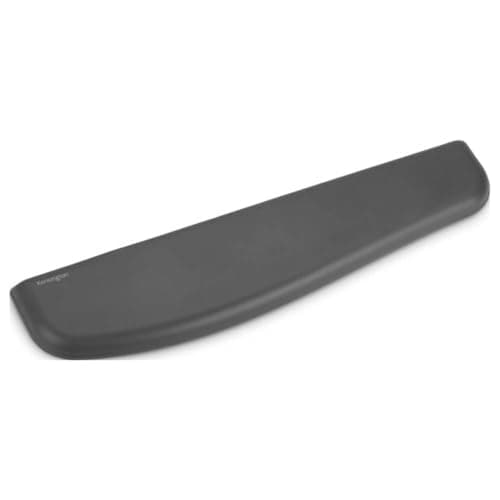
Kensington ErgoSoft Wrist Rest (K52799WW)
If you have decided you want one: gel-cushioned, built for keyboards with a 10-20 mm front height, and carrying a published 2-year warranty. Kensington does not publish its depth, so check it against OSHA's 1.5 in minimum yourself.
Prices as of Sep 14, 2026, from Amazon’s API. They change; we show a live number or none at all. Why these are affiliate links.
Common questions
Do I actually need a wrist rest?
Not necessarily. OSHA treats a wrist/palm support as optional — “if used” it should be part of a well-set-up workstation, not a required part of one. The thing you actually need is a neutral wrist: “straight and in-line with your forearms.” If your keyboard is at the right height and your wrists already float straight while you type, a rest is a comfort item, not a fix. If your wrists bend up to reach the keys, the answer is to lower the keyboard, not to prop the problem up with a pad.
Are you supposed to rest your wrists on a wrist rest while typing?
No — and this is the single most misunderstood thing about them. OSHA is explicit that “your hands should move freely and be elevated above the wrist/palm rest while typing,” and that the pad is for “resting” between bursts, when it should “contact the heel or palm of your hand, not your wrist.” A rest is a place to park your hands in the pauses, not a ledge to plant your wrists on and pivot from. Pressing a bent wrist into a pad all day is exactly the contact pressure you are trying to avoid.
Can a wrist rest cause wrist pain instead of preventing it?
Used the wrong way, yes. If you anchor your wrists on the pad and type from there, you tend to bend the wrist up toward the keys and press the soft underside into a surface for hours. CCOHS warns that resting the wrists and leaning on them “may contribute to contact stress injuries.” The pad itself is not the problem; using it as a pivot instead of a between-tasks rest is. We go deeper into the causes in how to prevent wrist pain when typing.
Gel or foam wrist rest: which is better?
Neither is clearly better; they fail differently. Gel is cool and springy but can feel slick and, if soft, lets the heel of your hand sink and drift. Memory foam is warmer and more supportive but slowly compresses over months. OSHA’s guidance is about shape, not filling: a support that is “fairly soft and rounded to minimize pressure on the wrist,” at least “1.5 inches (3.8 cm) deep.” A soft, rounded front edge matters more than gel versus foam. A padded desk pad often does the same job more gently than a hard-edged wrist bar.
Does a mechanical keyboard need a wrist rest?
A taller keyboard raises where your fingers sit, so if the keys are high your wrists bend up more to reach them — and a rest is often used to bridge that gap. But the cleaner fix is the keyboard and its height, not a pad to prop against. A lower-profile board, or a negative tilt that drops the back edge, keeps the wrist straighter to begin with. We cover boards that help in the best ergonomic keyboards.
Sources
Every figure on this page comes from one of these. If a manufacturer doesn’t publish a number, we print “—” rather than estimate it.
- OSHA — Computer Workstations eTool, Wrist/Palm Support — "Your hands should move freely and be elevated above the wrist/palm rest while typing"; "When resting, the pad should contact the heel or palm of your hand, not your wrist"; "The support should be at least 1.5 inches (3.8 cm) deep"; "If used, wrist/palm rests should be part of an ergonomically-coordinated computer workstation" — read 2026-07-31
- OSHA — Computer Workstations eTool, Keyboard/Input Device — "Your wrists should be straight and in-line with your forearms"; "wrists should not bend up or down or to either side during keyboard use"; keyboard placed so "forearms approximately parallel with the floor" — read 2026-07-31
- CCOHS — Office Ergonomics: Keyboard Selection and Use — "The wrist is aligned straight with the forearm - it is not bent or extended in any direction"; "Do not rest your wrists on the desk surface. The pressure on the wrist may contribute to contact stress injuries" — read 2026-07-31
Read next
The best wrist rests
If you have decided you want one: five ranked on published depth and height, the two figures OSHA tells you to check.
Wrist rest vs ergonomic keyboard
How the pad compares with a split keyboard for a neutral wrist.
Wrist and keyboard position
The full picture a wrist rest fits into: where the keyboard and your hands should actually sit.
How to prevent wrist pain when typing
If the reason you're asking is discomfort, start here — a rest is one small piece of the answer.
The best desk pads
A soft, large desk pad is a gentler place to park your hands than a hard wrist bar for many people.
The best ergonomic keyboards
A lower or tented board keeps the wrist straight to begin with, which is the real fix a rest only patches.