The best ergonomic mice under $50
Inside this budget the choice is not which mouse is better — it is which posture you want. A thumb ball stops your hand moving, a finger ball does the same for either hand, and a vertical grip rotates your forearm instead. We ranked the three in our registry on how much of its own specification each maker is willing to publish.
By Stephen V.Last reviewed
Compare the three
Three postures, not three grades of one product. Every cell is the manufacturer's own stated number, cited in the write-up below it — an em-dash means they do not publish it, and on this page the dashes are the story.
| # | Device | Posture | Cursor speed | Power | Warranty | Price |
|---|---|---|---|---|---|---|
| 1 | 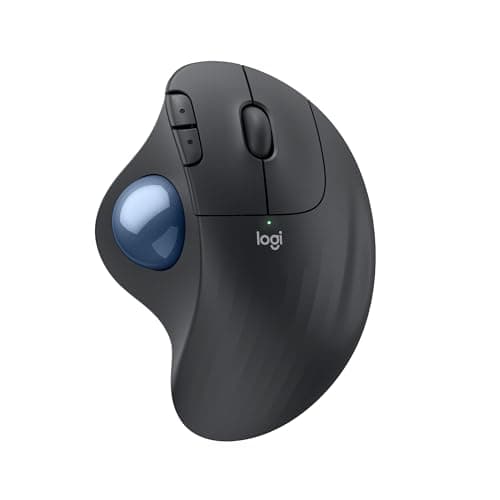 1. Logitech ERGO M575S The most published specs in the band
| Thumb ball | 100–2,000 DPI | 1 AA, up to 18 mo | 1 yr | |
| 2 | 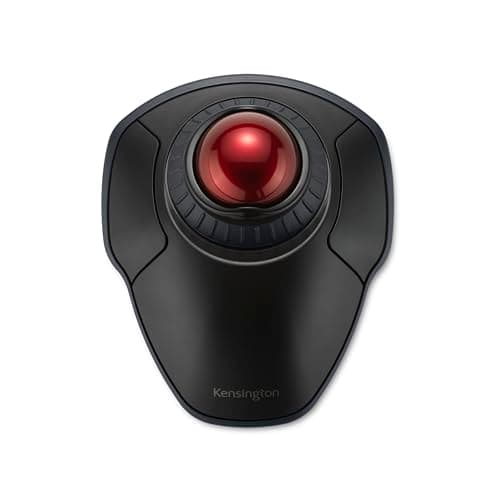 2. Kensington Orbit Wireless with Scroll Ring (K70990WW) Either hand, and the longest warranty here
| Finger ball, 40 mm | 400/800/1,200/1,600 | — | 3 yr | |
| 3 | 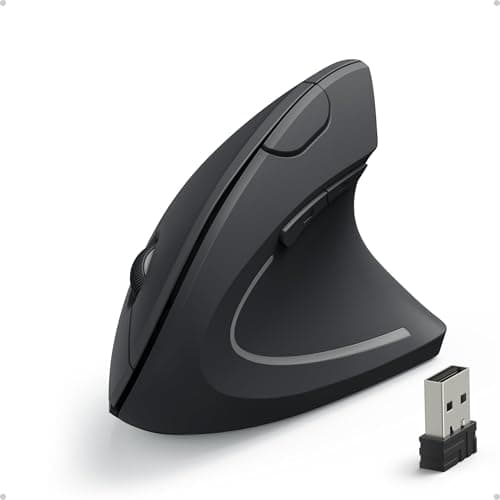 3. Anker 2.4G Wireless Vertical Ergonomic Optical Mouse Budget pick — trying a vertical grip cheaply
| Vertical grip, angle — | 800/1,200/1,600 | 2 AAA | 18 mo |
The dashes are the finding. Kensington publishes no battery type and no battery life for the Orbit, which is the one thing you cannot discover before it arrives. Anker publishes no grip angle— the single specification that defines a vertical mouse — and the 90° figure repeated across the internet appears nowhere on Anker’s own page. “Posture” is not a spec, it is what the shape does to your hand, and it is the first column because it is the actual decision: these three are not interchangeable. Cursor speed is DPI, which is a preference rather than a quality figure — a lower ceiling only matters on a very large or very high-resolution screen. The band was checked against our live price layer, dated under the picks; prose here carries no dollar figures.
Prices and stock as of November 8, 2026, from Amazon’s API. They change; we show a live number or none at all. #ad — we earn a commission.
Buy the Logitech ERGO M575S if you want the most documented pointing device inside this budget: a published 100–2,000 DPI range, published dimensions and weight, and up to 18 months on a single replaceable AA. It is for anyone who wants to stop sweeping their whole forearm across the desk to move a cursor. Buy the Kensington Orbit Wirelessinstead for the longest warranty in the band — 3 years — a published 40 mm ball, and an ambidextrous shell you can move between hands. And the budget pick is the Anker vertical mouse: the cheapest way to find out whether a vertical grip suits your wrist, bought knowing that Anker publishes no grip angle at all.
That is the page. The reason it is not a ranking of three similar mice is that these are not three similar mice.
The finding: under $50 you are choosing a posture, not a grade
Price bands in most categories hold the product constant and vary the quality. This one does not. The three devices in our registry that resolve under this ceiling are a thumb ball, a finger ball and a vertical grip, and they do three unrelated things to your hand:
- The thumb ball stops the device moving. Your hand and forearm stay planted and your thumb does the travelling, so the sweeping motion across the desk disappears entirely.
- The finger balldoes the same thing with the index and middle fingers on a larger target, in a shell that works in either hand — which is the only way to follow OSHA’s own suggestion of alternating hands.
- The vertical grip keeps the sweeping motion and changes the rotation instead: your palm faces sideways, in a handshake position, rather than down.
Nobody switches between those casually. Picking the wrong one is a drawer-ornament, and picking it cheaply is the sane way to find out — how to choose an ergonomic mouse starts from your hand rather than from the catalogue. One honest framing before any of it: this page describes what each shape does to posture, the way OSHA’s own computer-workstation material frames hand and wrist position. It is not medical advice and none of these devices treats anything.
How we ranked them
1. How much of its own specification the maker publishes. At this price that is the only thing that genuinely separates them, because the honest comparison is between what each company is willing to write down. Logitech publishes a DPI range, dimensions, weight and a battery interval; Kensington publishes a ball diameter, four DPI steps and a warranty but no battery figure at all; Anker publishes three DPI steps and does not state the angle that defines its own product category.
2. Warranty term.The longevity slot, and the one place the ranking inverts: Kensington’s 3 yearsis the longest here, Anker’s 18 monthsis longer than Logitech’s 1 year, and the best-documented device on the page has the shortest cover on it. Both facts are worth knowing and neither cancels the other.
3. What the shape actually is.Ranked last only because it is not a tiebreaker — it is the first decision, and no amount of published specification makes a thumb ball into a vertical mouse.
What a trackball under $50 gives up
Two specific things, both visible in the comparison. The tilt hinge: the dearer Logitech MX Ergo S can be angled, and the M575S’s chassis is fixed — that hinge is the real differentiator between the two, and software cannot add it. And the ball size: the 55 mm finger balls in our registry sit above this band, and a 40 mm ball is a genuinely different instrument, asking more finger movement per pixel with less of the palm involved.
What you do notgive up is the posture itself, the wireless radios, or in the Kensington’s case the warranty. That is the reason this band is worth a page: the trackball roundup shows the whole ladder, and the bottom two rungs are not consolation prizes.
What we can’t tell you
We have not used any of these three. We cannot tell you how the M575S’s bearings feel after a year, whether the Orbit’s unspecified batteries last a month or a year, what the Anker’s unpublished grip angle actually is, or whether any of these shapes will suit your hand — which is the only question that matters and the one nobody can answer for you from a spec sheet. What we have done is collect every figure the three makers publish and point out, clearly, where they stopped writing. Our methodology is explicit about where that evidence ends.
The picks, in detail
1. The most published specs in the band
Logitech ERGO M575S
The most documented device under this ceiling: a published 100–2,000 DPI range, published dimensions and weight, and up to 18 months on a single replaceable AA. A thumb ball means your hand stops moving at all.
- Ball
- —
- Connection
- BT LE + Logi Bolt
- Warranty
- 1 yr
This is first because it is the only device in the band whose maker tells you most of what you are buying. Logitech publishes an adjustable 100–2,000 DPIrange, real dimensions and weight — 134 × 100 × 48 mm, 145 g — and up to 18 months on one AA on either radio, which is the longest published power interval of any pointing device we rank at any price. It connects over Bluetooth LE or the bundled Logi Bolt receiver, so it pairs with a laptop that has no spare port.
What a thumb ball actually changes is bigger than any spec: the device does not move, so your forearm does not sweep the desk to move the cursor. That is a different posture from a mouse, not a better mouse — ergonomic mouse vs trackball is the honest version of the comparison. The published gaps: no trackball diameter anywhere, a 1-yearwarranty against Kensington’s three, no tilt hinge, and no wired mode. The tilt is what the dearer MX Ergo S adds, and it sits above this band.
Good
- Up to 18 months on a single AA on either radio — the longest published power interval here, and the battery is replaceable
- Publishes a clean adjustable DPI range, 100–2,000, which the MX Ergo S above and the SlimBlade Pro do not
- Published dimensions and weight: 134 × 100 × 48 mm and 145 g, the lightest device on this page
- Bluetooth LE or the bundled Logi Bolt receiver, so it pairs with a laptop that has no spare port
- One of the two cheapest picks here, while publishing more of its own specification than one of the two dearest
Not so good
- No published trackball diameter, the same hole as the MX Ergo S — and on the entry model there is no premium to excuse it
- 1 year limited hardware warranty
- No tilt hinge: the chassis angle is fixed, which is the main thing the MX Ergo S adds over it
- No wired mode, so pairing and power both depend on the radio and the AA
- Fewer buttons and no scroll ring — this is the plainest control layout on the page
Don’t buy it if: you already know you want the tilt. The hinge is the MX Ergo S's actual differentiator over this one, and no amount of software makes a fixed chassis adjustable. Equally, if you have never used a thumb ball, this is the sane place to find out whether you like the posture before spending twice as much on the same idea.
$49.99 −20%
Price as of November 8, 2026. #ad — we earn a commission.
Where these numbers came from
- Logitech Support — Specification, ERGO M575S: “Logitech Advanced Optical Tracking”; “100 – 2,000 DPI (Adjustable in Logi Options+)”; 134 × 100 × 48 mm (5.2 × 3.9 × 1.8 in); 145 g; “1 Standard AA battery”, “Up to 18 Months on a single AA with the included Logi Bolt USB receiver and up to 18 months using Bluetooth Low Energy”. No trackball diameter is published — read 2026-08-12
- Logitech Support — Warranty, ERGO M575S: “1 year limited hardware warranty” — read 2026-08-12
2. Either hand, and the longest warranty here
Kensington Orbit Wireless with Scroll Ring (K70990WW)
A published 40 mm finger ball, four selectable DPI steps and a three-year warranty — the longest term in the band — in an ambidextrous shell you can swap between hands.
- Ball
- 40 mm
- Connection
- BT LE + 2.4GHz
- Warranty
- 3 yr
Second, and the pick if the warranty or the hand-swapping matters most. Kensington publishes 3 years, three times Logitech’s term, a 40 mm ball, and four selectable DPI levels(400, 800, 1,200 and 1,600) — the widest published cursor-speed choice of any trackball we rank. It is ambidextrous, which makes it the easiest device here to follow OSHA’s own suggestion of alternating hands with, and it runs on 2.4 GHz or Bluetooth LE.
Two real trades. A 40 mm ball is a different instrument from the 55 mm shapes above this band, not a discounted one: more finger travel per pixel, less palm involved. And Kensington publishes no battery type, no battery life and no dimensions for it, which is the odd gap in an otherwise well-documented range — you cannot find out what powers it until it arrives.
Good
- 40 mm ball — published, and the only alternative here to the 55 mm shapes, which is a genuine fit difference rather than a cost saving
- Four selectable DPI levels (400, 800, 1,200 and 1,600), the widest published cursor-speed choice on this page
- Ambidextrous, so it is the easiest pick to follow OSHA's “alternate hands” line with
- Limited 3-year warranty at the lowest price on the page
- Dual wireless: 2.4 GHz and Bluetooth LE
Not so good
- Kensington publishes no button count for it, which is an odd omission on a device whose buttons are reassignable in software
- No published battery type and no published battery life — the only pick here where you cannot find out what powers it before it arrives
- No wired mode
- No published dimensions
- The 40 mm ball is a smaller target than the 55 mm shapes above; that is the point of it, but it is a real trade in fine positioning
Don’t buy it if: you want the biggest ball you can get. A 40 mm ball is a different instrument from a 55 mm one, not a discounted version of it — more finger movement per pixel, less palm involvement. If a large ball is what drew you to trackballs, this is not that, and the two Kensingtons above are.
$49.99 −5%
Price as of November 8, 2026. #ad — we earn a commission.
Where these numbers came from
3. Budget pick — trying a vertical grip cheaply
Anker 2.4G Wireless Vertical Ergonomic Optical Mouse
Budget pick. The cheapest way in our registry to find out whether a vertical grip suits your wrist at all — and the honest catch is that Anker publishes almost nothing about it, starting with the angle.
- Grip angle
- —
- DPI
- 800/1200/1600
- Battery / warranty
- 18 mo warranty
This is the budget pick, and the reason to buy it is a question rather than a product: does holding your hand sideways, in a handshake position, suit your wrist? A vertical mouse is the one shape here that changes forearm rotation rather than hand travel, and it is the shape people either take to immediately or not at all. Finding that out for the least money is a sound plan, and this is the cheapest way to do it. Anker publishes three switchable DPI steps on its own page — 800/1200/1600— it runs on two AAAs with nothing to charge, and its 18-monthwarranty is longer than Logitech’s one-year US consumer term.
Now the gap, because it is the whole reason this is third. Anker publishes no grip angle.The 90° figure repeated all over the internet has no source on Anker’s own product page, and the angle is the single defining specification of a vertical mouse. There is no published click or service-life rating either, so there is no way to compare its durability with the Logitechs’ stated 5M and 10M figures, and the 1600 DPI ceiling is a fifth of the MX Master 3S’s. If the vertical grip turns out to suit you, the two Logitech verticals above this band publish their angles — our vertical mouse roundup ranks all three together.
Good
- By far the cheapest way to find out whether vertical geometry suits you at all
- Three switchable DPI steps (800/1200/1600) are published on Anker's own page
- Runs on 2 AAA batteries — nothing to charge
- 18-month warranty is longer than Logitech's 1-year US consumer term
Not so good
- Anker publishes NO grip angle. The '90°' figure repeated across the internet has no Anker source — we checked their own product page
- 1600 DPI ceiling is a fifth of the MX Master 3S's 8000
- No click/service life rating published, so there is no way to compare durability with the Logitechs' 5M and 10M
- Anker's own product page says only 'Hassle-Free Warranty' with no duration printed on it
- Batteries not included, per Anker's own package contents
Don’t buy it if: you want to know what you are buying. Anker publishes an ergonomic-design claim and three DPI steps and essentially nothing else — no angle, no click rating, no battery life. It may well be a fine mouse. It is an unspecified one.
Price as of November 8, 2026. #ad — we earn a commission.
Common questions
Is an ergonomic mouse under $50 worth buying?
It depends entirely on what you expect it to be. If you expect a cheaper MX Master, no — the published ceilings, click ratings and documentation are not there. If you expect to change your hand’s posture, yes, because posture is the thing these devices actually change and it does not cost more at a higher price. All three here are genuinely different shapes from a conventional mouse, and two of the three publish more of their own specification than at least one device costing twice as much. Our main ergonomic mouse roundup is where to see what the extra money buys.
Which is better under $50, a trackball or a vertical mouse?
They solve two different things, so the honest answer is to pick the problem first. A trackballstops the device moving at all, which takes the sweeping forearm motion out of using a cursor — that is the one to try if reaching and dragging across the desk is what bothers you. A vertical mousekeeps the sweeping motion but rotates your forearm out of a palm-down position into a handshake position — that is the one to try if the twist is what bothers you. Ergonomic mouse vs trackball walks through both, and how to choose an ergonomic mouse starts from your hand rather than the catalogue. Nobody here is a clinician, and if a setup leaves you in pain that is a conversation for one.
Does a cheap vertical mouse work as well as a Logitech MX Vertical?
On the one figure that defines the shape, you cannot tell — and that is the problem. Anker publishes no grip angle at all for the mouse on this page, where Logitech publishes a figure for both of its verticals. So you can compare the price and you cannot compare the geometry, which is the entire product. What the cheap one is good for is answering the prior question: whether a vertical grip suits your wrist in the first place. If it does, the devices that publish their angles are above this band, and our vertical mouse roundup ranks all three on exactly that figure.
Can you get a wireless ergonomic mouse under $50?
All three on this page are wireless, and they power themselves three different ways. The Logitech publishes up to 18 months on a single AA over either Bluetooth LE or its Logi Bolt receiver. The Anker runs on two AAAcells, not included per Anker’s own package contents. Kensington publishes no battery figure of any kind for the Orbit, on either of its two radios, which is the single biggest documentation gap in this band. None of the three offers a wired fallback, so if you want the option of plugging in, wired vs wireless is worth reading first.
Sources
Every figure on this page comes from one of these. If a manufacturer doesn’t publish a number, we print “—” rather than estimate it.
- Logitech Support — Specification, ERGO M575S: “Logitech Advanced Optical Tracking”; “100 – 2,000 DPI (Adjustable in Logi Options+)”; 134 × 100 × 48 mm (5.2 × 3.9 × 1.8 in); 145 g; “1 Standard AA battery”, “Up to 18 Months on a single AA with the included Logi Bolt USB receiver and up to 18 months using Bluetooth Low Energy”. No trackball diameter is published — read 2026-08-12
- Logitech Support — Warranty, ERGO M575S: “1 year limited hardware warranty” — read 2026-08-12
- Kensington Orbit Wireless Trackball with Scroll Ring (K70990WW) product page — “Trackball Diameter (mm): 40”, finger-operated, ambidextrous, four DPI levels (400, 800, 1,200, 1,600), dual wireless (2.4 GHz and Bluetooth LE), “Limited 3-year warranty”. Button count, battery type and battery life are not published on the page — read 2026-08-12
- Anker 2.4G Wireless Vertical Ergonomic Optical Mouse — Anker's own product page (800/1200/1600 DPI; 'Hassle-Free Warranty' with no duration stated on the page; NO grip angle published anywhere on it) — read 2026-07-16
Read next
The best ergonomic mice
The unbounded roundup — read it to see which published figures appear once you spend above this band.
The best trackball mice
Two of the three picks here are trackballs; this is where both are researched in full against the larger 55 mm shapes.
Ergonomic mouse vs trackball
The decision this page's ranking assumes you have already made: whether you want the device to move or stay put.
The best vertical mice
If the budget pick's vertical grip suits you, this ranks all three verticals we stock on the angle Anker will not publish.