The best gifts for someone who works from a laptop
A laptop's screen and keyboard are locked together at one height, and that height is wrong for both. The gifts that fix it come in a set — a stand, then a keyboard and mouse — and this page walks a gifter through the set in order, using products already ranked on this site on their published numbers.
By Stephen V.Last reviewed
Quick picks
Ranked, with the manufacturer’s own longevity figure next to each one. Tap a row to jump to the full write-up.
| # | Product | Best for | Longevity | Price |
|---|---|---|---|---|
| 1 | 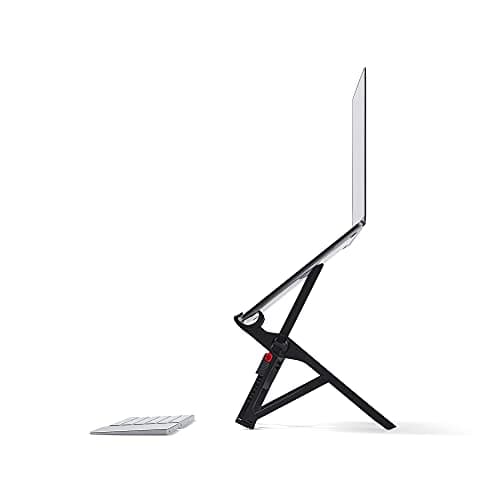 Roost V3 Laptop Stand The stand that gets a laptop screen all the way to eye level — 6.5 to 12.5 inches across seven stops — and folds into a bag at six ounces. For a laptop worker who moves between tables, this is the gift. | A laptop that travels | —Warranty | |
| 2 | 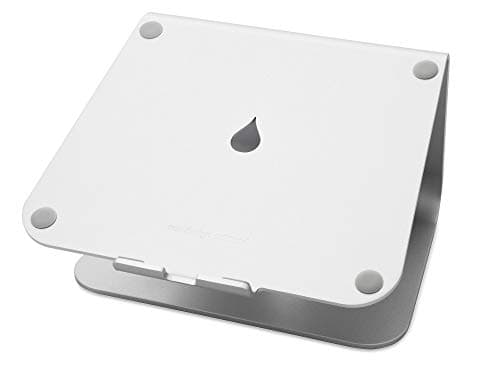 Rain Design mStand Laptop Stand (10032) One piece of aluminum, no hinges, a fixed 5.9-inch lift and a wide base that does not rock. The stand for a laptop that has become a desktop computer in all but name. | A laptop that lives on one desk | —Warranty | |
| 3 | 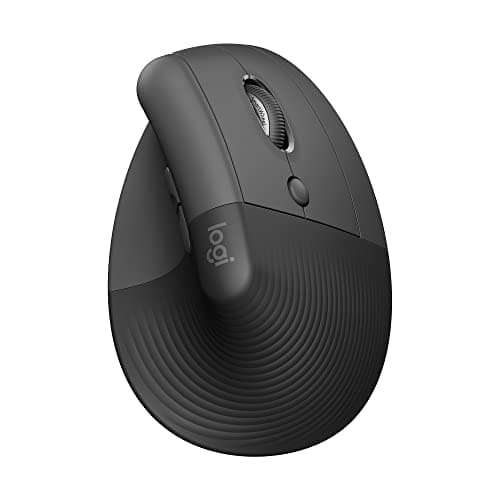 Logitech Lift The mouse for a laptop bag: the same published 57-degree vertical geometry as the bigger MX Vertical, in a smaller shell, running two years on a single AA with nothing to charge. It also comes in a genuine left-handed version. | Small hands, and never charging anything | 24 mo battery / 1 yrBattery / warranty | $64.99Amazon $79.99 −19% |
| 4 | 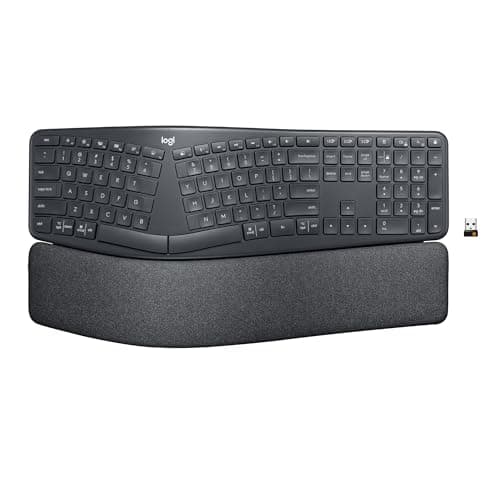 Logitech Ergo K860 The keyboard that turns a raised laptop into a proper workstation on a permanent desk, with published negative-tilt angles and the only named ergonomic certification on this site. Not for the bag. | The permanent-desk laptop worker | 24 mo battery / 1 yrBattery / warranty | |
| 5 | 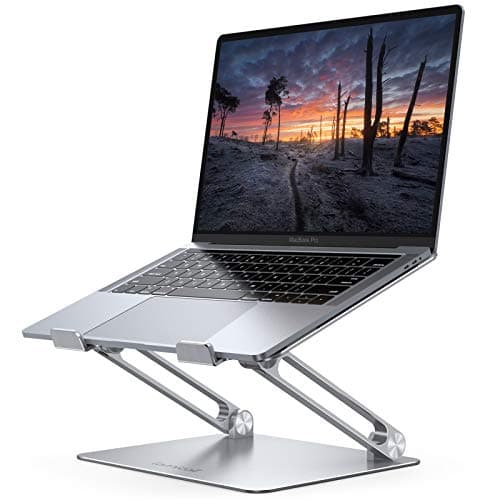 Lamicall Adjustable Aluminum Laptop Stand The stand for a big laptop on a budget: aluminum, folds flat, takes screens up to 17.3 inches, and carries a one-year warranty the pricier stands do not. What it will not tell you is how high it lifts. | A 16- or 17-inch laptop | 1 yrWarranty |
Prices as of Sep 13, 2026, from Amazon’s API. They change; we show a live number or none at all.
If the person you are buying for does most of their work on a laptop — at a kitchen table, on a couch, or at a desk with the laptop simply sitting on it — you are buying for the most common bad setup there is, and also the easiest one to improve. A laptop’s screen and keyboard are fixed at one height. OSHA’s workstation guidance puts the top of the screen at or slightly below eye level and the keyboard at or below elbow height, and no laptop can do both at once. Raise it and the keyboard is wrong; leave it and the screen is.
The fix is a set, and the gifts on this page are that set in order: a stand to raise the screen, then a keyboard and a mouse so the hands can stay where they were. Every product is already ranked on this site on its published numbers, with the same sources; we have re-explained each one for someone buying it as a present. No prices appear in the text — the button by each pick shows the live figure from Amazon’s data, or nothing at all if it is stale.
Start with the stand, and ask one question
Does the laptop move? That single question decides between the two stands at the top of this page. The Roost is the one we know of that reaches genuine eye level and fits in a bag, for a recipient who works from three tables a week. The mStand is a fixed block of aluminum for a laptop that has quietly become a desktop computer, with nothing on it to wear out. For a 16- or 17-inch laptop, the Lamicall is the one sized for it, at the cost of not knowing how high it lifts.
Then the keyboard and mouse, or the stand does nothing
This is the line to write on the card. A raised laptop is a raised keyboard, and typing on one is worse than typing flat. The recipient needs a separate keyboard and mouse the day the stand arrives. Any pair will do the geometric job; the two here are the ones our mouse and keyboardpages rank on published numbers. The Lift is the mouse for a bag — light, no charger, a left-handed version. The K860 is the keyboard for a permanent desk only, and only for someone who has asked for a split layout; for anyone else, a flat compact keyboard they choose themselves is the better present.
What to check before you buy
Screen size — the Amazon Basics stand on our roundup caps at 15.6 inches and the Lamicall goes to 17.3. Whether the laptop travels — Roost versus mStand. Hand size and handedness for the mouse. And whether they already own an external keyboard and mouse, which decides whether the stand is a complete gift or half of one. Our laptop workstation guide is the page to send with any of these — it starts with the free adjustments and puts the purchases in order.
The picks, in detail
1. A laptop that travels
Roost V3 Laptop Stand
The stand that gets a laptop screen all the way to eye level — 6.5 to 12.5 inches across seven stops — and folds into a bag at six ounces. For a laptop worker who moves between tables, this is the gift.
- Screen lift
- 6.5–12.5″
- Fits up to
- Any size
- Warranty
- —
The problem with working from a laptop is built into the object: the screen and the keyboard are bolted together, so the screen sits far below the eye-level target in OSHA’s workstation guidance, and raising it lifts the keyboard out of reach. A stand fixes the screen half. Most stands lift a few inches and stop; the Roost is the one on our page that climbs high enough for the top of a 13-inch screen to meet a seated eyeline, and it does it while weighing six ounces and folding to the size of an umbrella. Roost publishes a 90-day money-back guarantee rather than a warranty term, which our record prints as a dash.
Good
- 12.5″ at the top setting is the only lift on this page that gets a laptop screen into OSHA's at-or-slightly-below eye-level band for a seated adult — the actual ergonomic target, reached rather than approached
- Seven selectable heights, so you set it to your eye line instead of accepting a fixed rise
- 6 oz and folds to 1″ x 1.5″ x 13″ — it lives in a laptop bag, which is the entire reason to pay Roost money over the mStand
- Self-adjusting grips take “all makes and models”, Roost's own claim, so there is no size chart to check
- Sets up in seconds with no tools, and the folding structure is rigid once locked — not the wobble most travel stands settle into
Not so good
- It is roughly twice the price of the mStand and several times the budget stands here, and most of that premium buys portability you only use if you travel
- Roost publishes a “90 Day Money-Back Guarantee” but no warranty length on the product page. A return window is not longevity cover, and the Spec Line marks the warranty slot with a dash for that reason
- Fiberglass-reinforced construction with hinges and grips, not the single aluminum billet of the mStand — more parts, and the folding joint is the thing that takes the wear
- It supports the laptop's back edge rather than cradling the whole footprint, so a very front-heavy laptop is worth a check at the tallest, steepest settings
- Like every stand here it demands an external keyboard and mouse, and at 12.5″ that is not optional — you physically cannot reach the built-in keyboard
Don’t buy it if: their laptop lives on one desk and never leaves it. You would be paying for a folding mechanism they never fold; the mStand below is more rigid for less. And no stand helps until there is a separate keyboard and mouse in front of it.
Price as of Sep 13, 2026. #ad — we earn a commission.
Where these numbers came from
2. A laptop that lives on one desk
Rain Design mStand Laptop Stand (10032)
One piece of aluminum, no hinges, a fixed 5.9-inch lift and a wide base that does not rock. The stand for a laptop that has become a desktop computer in all but name.
- Screen lift
- 5.9″ (fixed)
- Fits up to
- 16″
- Warranty
- —
If the recipient’s laptop sits in the same spot every day with a keyboard in front of it, this is the more honest gift than the Roost: there is nothing on it to loosen, crack or wear, and it will look the same in year five as in week one. Rain Design states it takes a 16-inch MacBook Pro, and the open frame lets air move under the machine. The number to be clear about is the lift — 5.9 inches, fixed — which is enough to make a large laptop or a laptop beside an external monitor comfortable, and not enough to put a small laptop’s screen at eye level on its own. Rain Design publishes no warranty term on its page, so the longevity case rests on the aluminum.
Good
- One piece of extruded aluminum — no hinge to loosen, no plate to crack, nothing that wears. In a category full of folding mechanisms, that is the whole longevity argument
- The open frame lifts the laptop's base 5.9″ and lets air move underneath, which is more than a laptop lying flat on a desk gets
- A genuinely wide 10″ x 7.5″ base, so it does not rock when you type on the keyboard in front of it — Rain Design's own point about stability, and it holds up
- Rain Design states it is “big enough for the 16″ MacBook Pro”, so it takes a large laptop where the budget stands here cap out lower
- The fixed height is a feature on a shared or permanent desk: there is nothing to knock out of adjustment, and it looks the same in year five as in week one
Not so good
- 5.9″ is fixed and modest. For a 13–14″ laptop the top of the screen still lands well below OSHA's at-or-near eye-level target for most seated adults — it improves the neck angle without solving it
- You cannot use the laptop's own keyboard at this height, so budget for an external keyboard and mouse. That is true of every stand here, but this one gives you no say in the height
- 3 lb and a 10″ footprint. This is desk furniture, not something you throw in a bag — the Roost below exists for that
- Rain Design publishes no warranty term on the product page (retailers list one year), so the longevity case rests on the aluminum rather than a stated promise, and the Spec Line says so with a dash
Don’t buy it if: they need eye level from a small laptop, or they move around. A fixed 5.9 inches improves the neck angle without solving it for a 13-inch screen, and at three pounds it is furniture, not luggage. The Roost is the answer for both.
Price as of Sep 13, 2026. #ad — we earn a commission.
Where these numbers came from
3. Small hands, and never charging anything
Logitech Lift
The mouse for a laptop bag: the same published 57-degree vertical geometry as the bigger MX Vertical, in a smaller shell, running two years on a single AA with nothing to charge. It also comes in a genuine left-handed version.
- Grip angle
- 57°
- DPI
- 400–4000
- Battery / warranty
- 24 mo battery / 1 yr
Once the screen is up, the laptop’s trackpad is in the wrong place and a separate mouse stops being optional. For a laptop worker specifically, the Lift beats its bigger sibling on the things that matter in a bag: it is lighter, it runs two years on one AA battery so there is no cable to forget, and it publishes the same 57-degree angle Logitech states for the MX Vertical. It is also one of the very few vertical mice with a real left-handed version, which our mouse page notes is rare. The trade is a click rating half the MX Vertical’s and a one-year consumer warranty.
Good
- Identical published 57° angle to the MX Vertical, in a shell Logitech states is designed for smaller hands
- 24-month battery life on a single AA — no charging, ever, in normal use
- Left-handed version genuinely exists (910-006492 / 910-006495), which is rare in this category
- Logitech publishes per-button click ratings, not just one headline number
- Lighter than the MX Vertical at 125g
Not so good
- 5 million click service life — half the MX Vertical's 10 million, on the same brand's own datasheet
- The datasheet says '2-year hardware limited warranty', but that is the BUSINESS SKU. The consumer ASIN gets 1 year
- No battery indicator, per Logitech's own spec table
- No Easy-Switch — you pair to one machine at a time
- The 'Ergo certified' line names no certifier, only 'criteria set out by leading ergonomists'
Don’t buy it if: they have large hands. The Lift is Logitech's own answer for smaller hands; the MX Vertical is the bigger shell and is rated for twice the clicks. Check the hand before the mouse.
$79.99 −19%
Price as of Sep 13, 2026. #ad — we earn a commission.
Where these numbers came from
- Logitech Lift for Business Vertical Ergonomic Mouse — official B2B datasheet (PDF; source of the 57° angle, 5 million click service life, 24-month battery life, and the 2-year business warranty figure) — read 2026-07-16
- Logitech Support — LIFT Vertical Ergonomic Mouse specification (400–4,000 DPI; per-button click ratings) — read 2026-07-16
4. The permanent-desk laptop worker
Logitech Ergo K860
The keyboard that turns a raised laptop into a proper workstation on a permanent desk, with published negative-tilt angles and the only named ergonomic certification on this site. Not for the bag.
- Tilt / split
- 0°, −4°, −7°
- Geometry
- 3-layer pillowed rest
- Battery / warranty
- 24 mo battery / 1 yr
This is the pick for one specific recipient: the person whose laptop has become a desktop, on a stand, at one desk, every day. For them, the keyboard is now the thing their hands touch for eight hours, and the K860 is the one on our short keyboard page that publishes its tilt angles — zero, minus four and minus seven degrees — and carries an ergonomic certification with a certifier’s name on it. Say on the card that there is a relearning period. And do not give it to someone who packs up every evening: it is large, it does not fold, and our keyboard page is honest that most of the portable category publishes too little to rank.
Good
- 'Certified ergonomic by United States Ergonomics™' — a NAMED external certifier, which is rarer in this category than you would think
- Publishes actual negative-tilt leg angles: 0°, −4° and −7°, so you can pick the geometry rather than guess at it
- Negative tilt is the direction OSHA's 'straight, in-line and roughly parallel to the floor' wording implies — very few keyboards offer it at all
- 24-month battery life on 2 AAA cells
- Integrated 3-layer pillowed wrist rest, not a removable afterthought
Not so good
- The split/tenting angle of the keyframe is NOT published in degrees — Logitech gives the tilt leg angles and nothing for the curve itself
- Logitech's B2B datasheet says 2-year warranty; the consumer ASIN gets 1 year in the US
- 'Certified ergonomic' names a certifier but publishes no criteria, threshold or method
- Fixed split — the halves do not separate, so it will not solve a shoulder-width problem the way the Kinesis can
- Large footprint; the integrated rest means it takes the desk space it takes
Don’t buy it if: they work from different tables, or they have not asked for a split keyboard. This is a full-size desk keyboard with a relearning period; a laptop worker on the move needs something flat and small, and this is neither.
Price as of Sep 13, 2026. #ad — we earn a commission.
Where these numbers came from
- Logitech ERGO K860 for Business — Logitech's own product page (source of 'Certified ergonomic by United States Ergonomics™', the 0°/−4°/−7° tilt leg angles, 24-month battery life, and the 2-year BUSINESS warranty figure) — read 2026-07-16
- Logitech ERGO K860 Wireless Split Keyboard — consumer product page — read 2026-07-16
- Logitech Limited Hardware Warranty terms (the consumer term that applies to the ASIN we link, not the datasheet's business figure) — read 2026-07-16
5. A 16- or 17-inch laptop
Lamicall Adjustable Aluminum Laptop Stand
The stand for a big laptop on a budget: aluminum, folds flat, takes screens up to 17.3 inches, and carries a one-year warranty the pricier stands do not. What it will not tell you is how high it lifts.
- Screen lift
- —
- Fits up to
- 17.3″
- Warranty
- 1 yr
Two things put the Lamicall on this page: it takes the largest laptops of anything we rank, and it is the cheapest stand here with a written one-year warranty. For a recipient with a 16- or 17-inch machine — a work-issued workstation laptop, say — the two premium stands may simply be the wrong size, and this one is not. The honesty note is the missing number: Lamicall sells the stand on being adjustable and ergonomic and never prints a single height. It will raise the screen; by how much, you find out when the box is open.
Good
- Fits laptops up to 17.3″ — the largest capacity on this page, above even the mStand's 16″, so it takes a 17″ desktop-replacement laptop the others do not state they will
- The angle adjusts (Lamicall's page: 90° across four working modes), so you can flatten it to type on in a pinch or tilt it up to read
- Aluminum and folds flat into a drawer, which the fixed mStand does not do
- A stated one-year warranty — which, oddly, is more than either premium stand here publishes
- The cheapest way onto an aluminum, angle-adjustable stand rather than a bent-wire riser
Not so good
- Lamicall publishes no lift figure anywhere. The height the screen actually reaches is the number that decides whether a stand fixes your neck, and it is precisely the one missing from the spec block — so the first Spec Line slot is a dash
- No published load capacity either, so a heavy 17″ laptop is a leap of faith rather than a checked number
- “Adjustable” here means the angle, not a set of locked, repeatable heights the way the Roost's seven settings are
- Folding aluminum with hinges is more to loosen over the years than the mStand's single billet — the warranty is doing real work here
Don’t buy it if: the exact screen height is the point. Lamicall publishes no lift figure, so you cannot check where the screen ends up before it arrives. If height is what you are buying, the Roost and the mStand both print the number.
Price as of Sep 13, 2026. #ad — we earn a commission.
Where these numbers came from
Common questions
What is the best gift for someone who works on a laptop all day?
A laptop stand, because the single biggest problem in a laptop setup is a screen that sits far too low, and a stand is the cheap fix. The Roost if they move around, the mStand if they do not. The one thing to know before buying: a stand only works once there is a separate keyboard and mouse in front of it, so if they do not own those, that is the companion gift. Our laptop workstation guide covers the whole sequence.
Do they need a separate keyboard if I give them a stand?
Yes. Raising the screen raises the laptop’s own keyboard with it, above the elbow-height target in OSHA’s guidance, and typing on a raised laptop is worse for the wrists than typing on a flat one. Any external keyboard and mouse solves it; the ones on this page are the documented ergonomic versions. If the budget is for one thing, give the stand and say on the card what it needs.
Roost or mStand — which one?
Roost if the laptop moves, mStand if it does not. The Roost reaches eye level and folds into a bag, and you pay for both. The mStand is a single piece of aluminum with a fixed lift and nothing to wear out, for less. Our laptop stand roundup ranks all four on how far they actually publish lifting the screen.
Is a monitor a better gift than a stand?
Often, but it is a different budget and a different conversation. An external monitor at the right height solves the screen problem completely and leaves the laptop as a second screen. We do not rank monitors on this site; our external-monitor guide walks through when it is worth it. A stand is the gift that fits the desk they have now.
Have you tested these?
No. Nothing on this site has been handled by us. Every figure is the manufacturer’s own published number, cited on the product record, and where a maker does not publish one — the Lamicall’s lift height, for instance — we print a dash rather than guess. The methodology page explains why.
Sources
Every figure on this page comes from one of these. If a manufacturer doesn’t publish a number, we print “—” rather than estimate it.
- OSHA Computer Workstations eTool — Monitors (top of the screen at or slightly below eye level; the reason a laptop's fixed screen height is the problem this page is built around) — read 2026-09-13
- OSHA Computer Workstations eTool — Keyboards (keyboard at or below elbow height; the reason a raised laptop needs a separate keyboard) — read 2026-09-13
Read next
How to set up a laptop workstation
The full sequence the gifts on this page slot into — free adjustments first.
Best laptop stands
All four stands ranked on published screen lift, including the two here.
The best home office gifts, by recipient
The full guide organized by who you're buying for.
Black Friday & Cyber Monday home office deals
Which of these brands has a documented sale history — worth checking before November.