The best home office gifts under $150
The tier where you can give the properly documented version of something instead of the trial version. A light bar that publishes its numbers, the vertical mouse people keep, a laptop stand that actually reaches eye level. Every pick is already ranked on this site; this page re-explains each one for the person buying it.
By Stephen V.Last reviewed
Quick picks
Ranked, with the manufacturer’s own longevity figure next to each one. Tap a row to jump to the full write-up.
| # | Product | Best for | Longevity | Price |
|---|---|---|---|---|
| 1 | 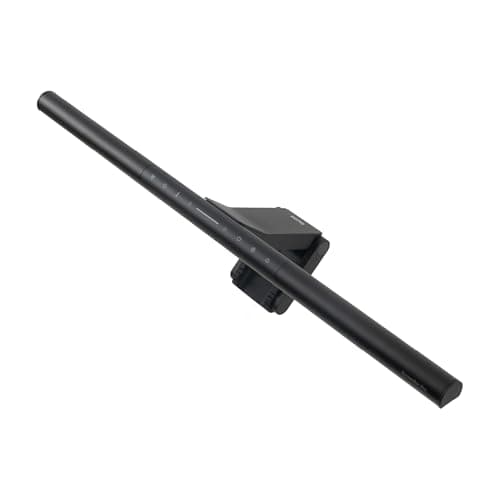 BenQ ScreenBar Pro The gift most people on this site would pick if they could only give one thing: a lamp that clips to the top of the monitor, lights the desk without glare on the screen, and takes no desk space. BenQ publishes every number that matters for it. | Almost anyone with a desktop monitor | 50,000 hrRated life | |
| 2 | 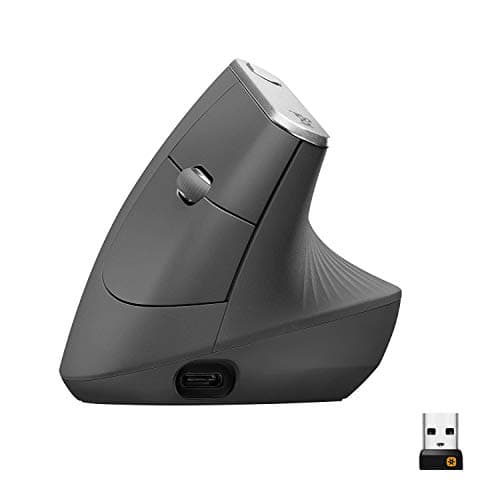 Logitech MX Vertical The vertical mouse done properly — a published 57-degree angle, a 10-million-click service life, and a maker that documents its products. The kind of thing nobody buys for themselves and everybody keeps. | Someone who has mentioned their wrist | 4 mo charge / 1 yrBattery / warranty | $77.95Amazon $119.99 −35% |
| 3 | 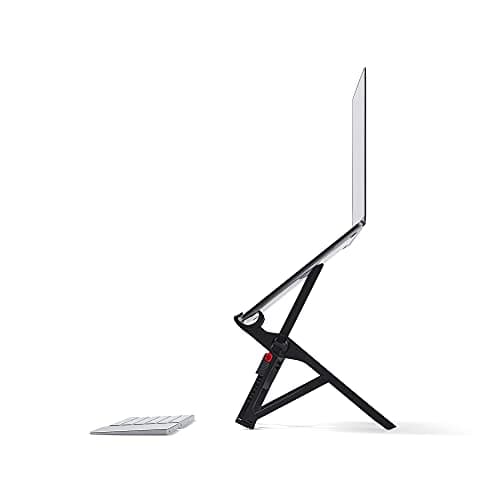 Roost V3 Laptop Stand The only laptop stand on our page that actually reaches eye level — 6.5 to 12.5 inches across seven stops — and it folds to the size of an umbrella. The gift for someone whose office moves. | A laptop worker who changes desks | —Warranty | |
| 4 | 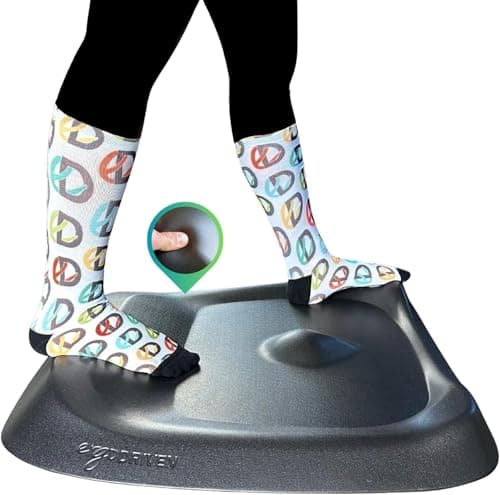 Topo Standing Desk Mat by Ergodriven The standing mat that is not flat. A built-in terrain of ridges and a raised edge gives feet somewhere to go, which is the actual mechanism behind why standing mats help — for someone who really does stand. | A committed standing-desk user | 16 yrWarranty | |
| 5 | 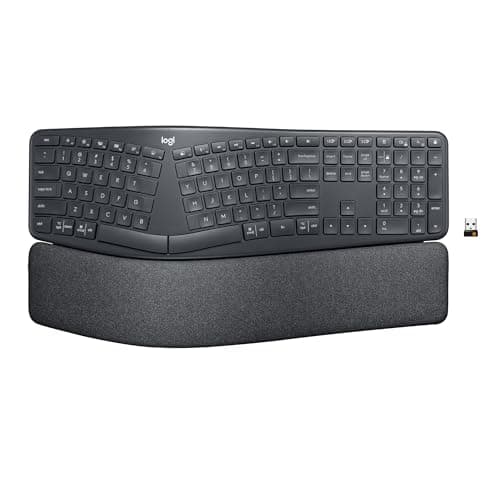 Logitech Ergo K860 A curved, split-layout keyboard with real negative-tilt angles and the only named third-party ergonomic certification on this site. A bigger adjustment than a new mouse — say so on the card. | Someone ready to relearn how they type | 24 mo battery / 1 yrBattery / warranty | |
| 6 | 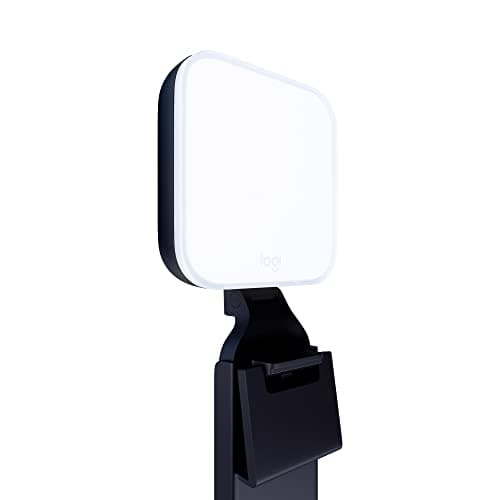 Logitech Litra Glow A small, soft light that clips to the top of a monitor and stops the recipient being a silhouette on every call. Dim by studio standards, which in a small dark room is exactly the point. | Someone on calls in a dim room | —Warranty | $59.99Amazon $69.99 −14% |
Prices as of Sep 13, 2026, from Amazon’s API. They change; we show a live number or none at all.
Under $150 is where the honest version of a category becomes affordable. At the cheaper tiers on this site we point at trial versions — the light bar whose spec sheet contradicts itself, the vertical mouse that publishes no angle — because at that price finding out whether someone likes an idea is the point. Here you can give the settled answer: the bar whose maker publishes its color rendering, the mouse whose click life is a stated number, the laptop stand that reaches eye level rather than gesturing at it.
Every pick is already ranked on this site with the same published figures and the same sources; we have rewritten the explanation for a buyer who has not read the category. The tier is a guide: each pick sat under $150 in Amazon’s price data when we wrote this, and the button beside each one shows the live figure from that data or nothing at all. We do not print prices in the text.
The one to give if you only give one
The BenQ ScreenBar Pro. It suits nearly everyone with a desktop monitor, it is used every working hour, and it is the kind of object people put off buying for themselves indefinitely because a desk lamp seems to do the job. It does not: a lamp on the desk reflects in the screen or lights the wrong thing. A bar on top of the monitor lights the keyboard and the desk with nothing on the screen. Our lamp-versus-light-bar comparison covers the difference if you want the reasoning.
For a complaint you have heard
If the recipient has mentioned their wrist, the MX Vertical is the answer, with the Lift as the smaller-hand or left-handed alternative. If they have mentioned their feet or their back after standing, the Topo mat is the considered version of a standing mat rather than the cheap one. If they have mentioned being a silhouette on calls, the Litra Glow is the small, gentle fix for a dim room. None of these is a medical device, and we do not describe any of them that way — they change geometry or light, and that is all we claim.
For the person whose office moves
The Roost is the only laptop stand we know of at this price that both folds into a bag and reaches eye level, and for someone who works from three different tables in a week it is the difference between a stand that gets used and one that stays home. Pair it, or plan for the recipient to pair it, with a separate keyboard and mouse; our laptop-worker gift guide is built around exactly that set.
What to check before you buy
Desktop monitor or laptop — the light bar needs a monitor to clip to. Hand size and handedness — that decides between the two Logitech mice. Whether they actually stand at their desk — that decides whether the Topo is a gift or an expensive rug. And for the keyboard, whether they have asked for one; it is the only pick here we would not give unprompted. If you want to spend more, the splurge page is where the chair and the desk live.
The picks, in detail
1. Almost anyone with a desktop monitor
BenQ ScreenBar Pro
The gift most people on this site would pick if they could only give one thing: a lamp that clips to the top of the monitor, lights the desk without glare on the screen, and takes no desk space. BenQ publishes every number that matters for it.
- Color temp
- 2700–6500K
- CRI
- Ra≥95
- Rated life
- 50,000 hr
A monitor light bar is the rare desk object that is both genuinely useful and genuinely pleasant to receive. It sits on the top edge of the screen and throws light down onto the keyboard and desk with the beam angled so none of it lands on the screen, which is the thing a desk lamp cannot do. The ScreenBar Pro is the BenQ we point most people at: the same published light output as the pricier Halo 2, a color-rendering figure BenQ actually states, and a 50,000-hour rated life. The Halo 2, on our splurge page, adds a backlight behind the monitor and not much else.
Good
- Publishes the same >1000 lux at 50cm as the Halo 2, at 8.5W
- Eight color-temperature segments across 2700–6500K
- Motion sensor and auto-dimming
- Explicitly named in BenQ's 50,000 hr FAQ list, which the Halo 2 is not
Not so good
- Touch controls on the bar mean reaching over the desk
- No backlight
- Like every BenQ here, the rated-life figure cites no standard at all
Don’t buy it if: they work on a laptop with no external monitor — there is nothing for it to clip to — or their room is already flooded with daylight. A light bar solves screen-versus-room contrast; in a bright room there is no contrast to solve.
Price as of Sep 13, 2026. #ad — we earn a commission.
Where these numbers came from
- BenQ ScreenBar Pro specification page — read 2026-07-16
- BenQ FAQ — color temperature range of ScreenBar Pro — read 2026-07-16
2. Someone who has mentioned their wrist
Logitech MX Vertical
The vertical mouse done properly — a published 57-degree angle, a 10-million-click service life, and a maker that documents its products. The kind of thing nobody buys for themselves and everybody keeps.
- Grip angle
- 57°
- DPI
- 400–4000
- Battery / warranty
- 4 mo charge / 1 yr
If the recipient has ever mentioned their wrist at the end of a day, this is the gift, with one honesty note attached. A vertical mouse changes the angle of the forearm rather than putting the rotation through the wrist — that is the mechanism, and it is real. Logitech’s famous “10% less muscular strain” figure, on the other hand, comes from an unpublished in-house study, and our mouse page says so rather than repeating it. Ignore that number and the MX Vertical is still the pick: it publishes its angle, its click life and even a reliability figure, which almost nobody in the category does. Four months per charge over USB-C; one-year US warranty.
Good
- 57° vertical angle is published on Logitech's own datasheet — a real geometric spec you can check against your own hand
- 10 million click service life, double the Lift's 5 million and the highest here
- Logitech publishes an MTTF figure (>150K hours) — almost nobody in this category publishes reliability at all
- 400–4000 DPI adjustable, with nominal values (1000 and 1600) stated separately
- Rechargeable via USB-C, ~4 months per charge
Not so good
- The headline '10% less muscular strain' claim has no named study, method or sample size behind it — Logitech's own footnote says only 'As compared with a traditional non-vertical mouse'
- The datasheet's flat '10%' and the press release's 'up to 10 percent' are different claims, and 'muscular strain' vs 'muscular activity' are different constructs
- US warranty is 1 year; the same datasheet gives EMEA and Japan 2 years for the identical mouse
- Large — at 120mm long it does not suit smaller hands, which is what the Lift exists for
- Right-handed only; no left-handed version
Don’t buy it if: they have small hands or mouse left-handed. This is a large, right-hand-only shell; the Logitech Lift is the same 57-degree geometry in a smaller body with a genuine left-handed version, and it costs less.
$119.99 −35%
Price as of Sep 13, 2026. #ad — we earn a commission.
Where these numbers came from
- Logitech MX Vertical Advanced Ergonomic Mouse — official B2B datasheet (PDF; source of the 57° angle, 400–4000 DPI, 10 million click service life, 4-month charge, and the '10%' claim with its single footnote) — read 2026-07-16
- Logitech press release, 20 August 2018 — 'Logitech Goes Vertical With Its Most Advanced Ergonomic Mouse' (the 'up to 10 percent' / 'muscular activity' wording, which differs from the datasheet's) — read 2026-07-16
- Logitech Limited Hardware Warranty terms — read 2026-07-16
3. A laptop worker who changes desks
Roost V3 Laptop Stand
The only laptop stand on our page that actually reaches eye level — 6.5 to 12.5 inches across seven stops — and it folds to the size of an umbrella. The gift for someone whose office moves.
- Screen lift
- 6.5–12.5″
- Fits up to
- Any size
- Warranty
- —
Most laptop stands raise the screen a few inches and call it done. The Roost is different in the one way that matters: it climbs high enough that the top of a laptop screen can reach eye level for a seated adult, and it weighs six ounces and folds into a bag. For someone who works from a kitchen table on Monday and a co-working space on Tuesday, that is the difference between a stand they use and one they leave at home. Roost publishes a 90-day money-back guarantee where a warranty term should be, which we print as a dash rather than round up. And the rule from every laptop stand applies: it needs a separate keyboard and mouse to be worth anything.
Good
- 12.5″ at the top setting is the only lift on this page that gets a laptop screen into OSHA's at-or-slightly-below eye-level band for a seated adult — the actual ergonomic target, reached rather than approached
- Seven selectable heights, so you set it to your eye line instead of accepting a fixed rise
- 6 oz and folds to 1″ x 1.5″ x 13″ — it lives in a laptop bag, which is the entire reason to pay Roost money over the mStand
- Self-adjusting grips take “all makes and models”, Roost's own claim, so there is no size chart to check
- Sets up in seconds with no tools, and the folding structure is rigid once locked — not the wobble most travel stands settle into
Not so good
- It is roughly twice the price of the mStand and several times the budget stands here, and most of that premium buys portability you only use if you travel
- Roost publishes a “90 Day Money-Back Guarantee” but no warranty length on the product page. A return window is not longevity cover, and the Spec Line marks the warranty slot with a dash for that reason
- Fiberglass-reinforced construction with hinges and grips, not the single aluminum billet of the mStand — more parts, and the folding joint is the thing that takes the wear
- It supports the laptop's back edge rather than cradling the whole footprint, so a very front-heavy laptop is worth a check at the tallest, steepest settings
- Like every stand here it demands an external keyboard and mouse, and at 12.5″ that is not optional — you physically cannot reach the built-in keyboard
Don’t buy it if: their laptop never leaves one desk. The whole premium here is portability and eye-level height; on a permanent desk the fixed aluminum mStand, on our under-$50 page, is more rigid for less money.
Price as of Sep 13, 2026. #ad — we earn a commission.
Where these numbers came from
4. A committed standing-desk user
Topo Standing Desk Mat by Ergodriven
The standing mat that is not flat. A built-in terrain of ridges and a raised edge gives feet somewhere to go, which is the actual mechanism behind why standing mats help — for someone who really does stand.
- Thickness
- 0.85″–2.7″ (terrain)
- Size
- 29″ x 26.25″
- Warranty
- 16 yr
Flat anti-fatigue mats cushion. The Topo does something else: it molds a raised, uneven surface into the mat so that the feet keep shifting position through the day, which is what the research on standing actually points at — small, constant movement rather than a softer floor. That makes it the standing-desk gift for someone who has already proven to themselves that they stand, and a poor first gift for someone who has not. Ergodriven publishes the dimensions and a long warranty term, though its own site cannot quite agree with itself on the number, which our mat page records honestly.
Good
- The only mat on this page with engineered terrain rather than a flat top — Ergodriven's own description of raised zones built to keep your feet shifting position instead of settling flat and still
- Published dimensions are exact and specific: 29″ wide x 26.25″ deep, 2.7″ at the tallest terrain point, 0.85″ in the flat neutral zone — a real number you can check, not a marketing adjective
- 100% polyurethane foam that Ergodriven states has no PFAs, PVC, plasticizers (like phthalates), or added flame retardants
- A 90-day free-returns window plus, per the product badge and FAQ, a stated 16-year warranty against manufacturing defects — the longest term claimed by any mat on this page, using the figure printed twice rather than the one printed once
- 8 lb and a single molded piece, with nothing to curl at the edges the way thinner foam mats eventually do
Not so good
- It costs roughly two to three times what the flat foam mats on this page cost, for a terrain design that the closest matching independent research studied conceptually but did not test against this specific product
- Ergodriven's own site is not internally consistent about its warranty: the product badge and the FAQ answer both say a “16 Year Warranty” / “16-year warranty against manufacturing defects”, but the site's own footer trust badge separately says “7 Year Warranty on every Topo Mat”. We used the figure stated twice, in the more specific location — but a manufacturer contradicting itself on its own warranty is worth knowing before you buy
- The terrain that makes it interesting also makes it a worse fit for anything that needs a flat surface underfoot — a rolling chair mat or a treadmill base is the wrong use case entirely
- At 29″ x 26.25″ it has a smaller footprint than the budget mats here, which suits one person standing in roughly one spot rather than a wide side-to-side range
Don’t buy it if: you are not certain they stand at their desk for real stretches of the day. The Topo costs two to three times a flat mat and its whole premium is the terrain; for an occasional stander a flat mat does the job.
Price as of Sep 13, 2026. #ad — we earn a commission.
Where these numbers came from
- Ergodriven Topo standing desk mat — Ergodriven's own product page (source of the 29″ x 26.25″ footprint, the 2.7″ terrain-peak height, the 0.85″ neutral-area thickness, the 8 lb weight, and the 100% polyurethane, no-PFAs/no-PVC/no-phthalate construction; the same page states both a “16 Year Warranty” badge/FAQ answer and, separately, a “7 Year Warranty” footer badge) — read 2026-07-26
- Ergodriven — “9 Reasons Topo is a Must-Have for Standing Desks” (Ergodriven's own description of the mat's “calculated terrain” and why the surface is deliberately not flat) — read 2026-07-26
5. Someone ready to relearn how they type
Logitech Ergo K860
A curved, split-layout keyboard with real negative-tilt angles and the only named third-party ergonomic certification on this site. A bigger adjustment than a new mouse — say so on the card.
- Tilt / split
- 0°, −4°, −7°
- Geometry
- 3-layer pillowed rest
- Battery / warranty
- 24 mo battery / 1 yr
This is the most considered gift on the page and the one we would most want you to check before buying. The K860’s curve and pillowed wrist rest change the angle of the hands and forearms, and Logitech publishes the numbers behind it — three tilt settings at zero, minus four and minus seven degrees, and an ergonomic certification with an organization’s name on it, which nothing else on this site carries. What it does not publish is the split angle everyone assumes it has, and what it cannot do is put the two halves genuinely apart. Two years on a pair of AAA batteries; one-year warranty. Our keyboard page is short because most of the category will not publish enough to compare.
Good
- 'Certified ergonomic by United States Ergonomics™' — a NAMED external certifier, which is rarer in this category than you would think
- Publishes actual negative-tilt leg angles: 0°, −4° and −7°, so you can pick the geometry rather than guess at it
- Negative tilt is the direction OSHA's 'straight, in-line and roughly parallel to the floor' wording implies — very few keyboards offer it at all
- 24-month battery life on 2 AAA cells
- Integrated 3-layer pillowed wrist rest, not a removable afterthought
Not so good
- The split/tenting angle of the keyframe is NOT published in degrees — Logitech gives the tilt leg angles and nothing for the curve itself
- Logitech's B2B datasheet says 2-year warranty; the consumer ASIN gets 1 year in the US
- 'Certified ergonomic' names a certifier but publishes no criteria, threshold or method
- Fixed split — the halves do not separate, so it will not solve a shoulder-width problem the way the Kinesis can
- Large footprint; the integrated rest means it takes the desk space it takes
Don’t buy it if: they have never used a split keyboard and have not asked for one. There is a genuine relearning period, and a keyboard someone did not choose is the easiest gift on this page to leave in the box. Ask first.
Price as of Sep 13, 2026. #ad — we earn a commission.
Where these numbers came from
- Logitech ERGO K860 for Business — Logitech's own product page (source of 'Certified ergonomic by United States Ergonomics™', the 0°/−4°/−7° tilt leg angles, 24-month battery life, and the 2-year BUSINESS warranty figure) — read 2026-07-16
- Logitech ERGO K860 Wireless Split Keyboard — consumer product page — read 2026-07-16
- Logitech Limited Hardware Warranty terms (the consumer term that applies to the ASIN we link, not the datasheet's business figure) — read 2026-07-16
6. Someone on calls in a dim room
Logitech Litra Glow
A small, soft light that clips to the top of a monitor and stops the recipient being a silhouette on every call. Dim by studio standards, which in a small dark room is exactly the point.
- Max output
- 250 lm
- Color temp
- 2700–6500K
- Warranty
- —
If most of the recipient’s day is spent facing a camera, what they notice is light, not geometry, and a lamp aimed at the face does more for how someone looks on a call than any webcam upgrade. The Litra Glow is the smallest and cheapest light on our roundup from a maker with a real specification page: a published 250 lumens and a 2700 to 6500K color range, on a clip that sits on the top edge of the monitor. That output is low — the dimmest on the page by a factor of four or more — which is the whole trade. In a dim room it is enough. Logitech publishes no warranty term for it.
Good
- 250 lm from a bus-powered USB connection — no wall socket, no power brick, one cable
- Reaches 2700K, warmer than either Elgato here, which is what you want if every other light in the room is a warm bulb
- CRI 93 published on Logitech's own specification page rather than in listing copy
- The monitor mount telescopes 4 inches vertically, extends 2 inches horizontally and swivels 360 degrees, so it can be aimed rather than just perched
- 99 g for the light itself — the least intrusive object in this roundup
Not so good
- 250 lm is a sixth of the Neewer's published flux and a quarter of the Key Light Neo's best case. In a room with daylight in it, that is not a key light, it is a fill
- Tops out at 6500K, so against a bright north-facing window it cannot match the color of the light already on your face
- No warranty term published on Logitech's product or specification pages, and no rated life
- No illuminance figure at any distance
- The monitor mount is the only mount — there is no stand in the box if your screen edge is already occupied
Don’t buy it if: their desk faces a window or their room is bright by day. This is the dimmest light on our video-call page by a wide margin; a light that loses to the window changes nothing. The Neewer on that page is the bright-room answer.
$69.99 −14%
Price as of Sep 13, 2026. #ad — we earn a commission.
Where these numbers came from
Common questions
What is the best home office gift for around $100?
A monitor light bar, for almost anyone with a desktop monitor. It is useful every working hour, takes no desk space, and is the kind of object people rarely buy for themselves. The BenQ ScreenBar Pro is the one on our light-bar page that publishes all three numbers we rank on. For someone who has mentioned their wrist, the Logitech MX Vertical is the other strong answer at this price.
Will these still be under $150 when I buy?
We cannot promise that. Each pick sat under the line in Amazon’s price data when we wrote the page, and the button on each row shows the live price from the same feed — or no number if the data is more than 48 hours old. Prices in this tier move more than the cheap end does, especially around November, which is what our Black Friday hub is for.
MX Vertical or Logitech Lift — which one should I give?
Same published 57-degree geometry, two different shells. The MX Vertical is larger, right-hand only, and rated for twice the clicks; the Lift is built for smaller hands, comes in a genuine left-handed version, and runs two years on one AA battery. If you know their hand size or handedness, that decides it. Our mouse page has both.
Is an ergonomic keyboard a safe gift?
Less safe than anything else on this page. A split or curved keyboard changes how someone types, there is a relearning period, and a keyboard the recipient did not choose is easy to leave in the box. We would only give one to someone who has said they want to try it. Everything else here can be given blind with reasonable confidence.
Have you used any of these?
No. We have not handled any product on this site, and we say so on every page. Every figure comes from the manufacturer’s own published specification, cited on the product record, and where a number is not published we print a dash. The methodology page explains why.
Read next
The best splurge home office gifts
The tier above — the chair, the arm with a ten-year warranty, the desk.
Best home office gifts under $50
The tier below, where the first real fixes start.
The best home office gifts, by recipient
The full guide organized by who you're buying for.
Black Friday & Cyber Monday home office deals
Which of these categories historically discounts in November, and which rarely does.