Ergotron LX vs Amazon Basics monitor arm
Two single gas-spring arms, an eight-fold price gap, and the same two VESA patterns. Compared only on what Ergotron and Amazon actually publish — which includes one number where the cheap arm wins outright, and it is the number most buyers never check.
By Stephen V.Last reviewed
Quick picks
Ranked, with the manufacturer’s own longevity figure next to each one. Tap a row to jump to the full write-up.
| # | Product | Best for | Longevity | Price |
|---|---|---|---|---|
| 1 | 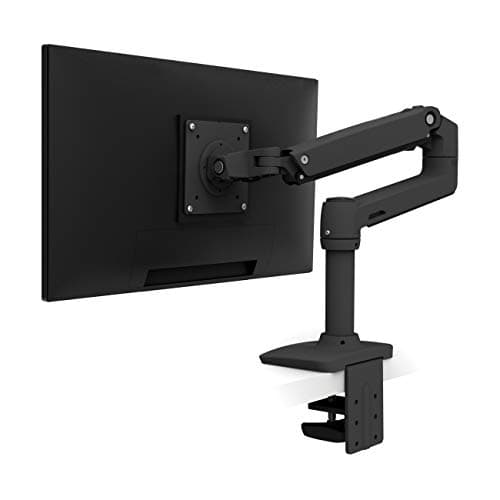 Ergotron LX Desk Mount Monitor Arm Buy this one if your monitor is heavy, big, or you intend to keep the arm: it is the only one of the two rated past 15.4 lb or past 27 inches, and it is warranted for ten years instead of one. | Heavy or large screens, kept for years | 10 yrWarranty | $190.00Amazon $219.00 −13% |
| 2 | 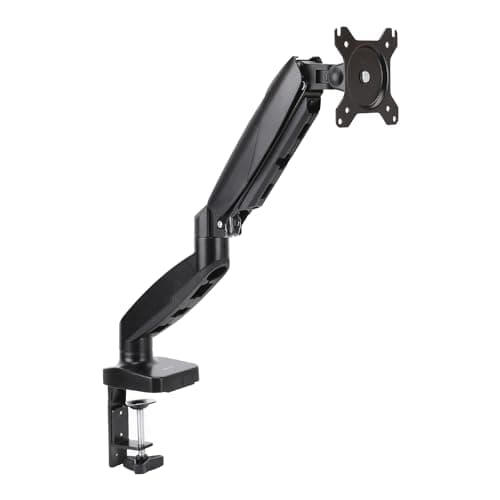 Amazon Basics Gas Spring Single Monitor Arm Buy this one if your monitor is light. Its published floor is 4.4 lb against the Ergotron's 7 — which makes the cheaper arm the better fit for a bare 24-inch panel, not merely the cheaper option. | Light 24-inch panels | 1 yrWarranty |
Prices as of October 18, 2026, from Amazon’s API. They change; we show a live number or none at all.
These two arms look like the same product photographed twice. Both are single gas-spring desk mounts, both clamp to a desk edge, both take the same two VESA patterns, and both promise to get a screen off its stand and up to eye level. One costs roughly eight times the other.
So this page does one thing: it puts the two makers’ published figures side by side and works out what the money is actually buying. We have not held either arm. Everything below is what Ergotron and Amazon print about their own products, and the one place where the answer is not the one the price tag suggests.
The short answer
Weigh your monitor without its stand, then read across.
Under about 7 lb:the Amazon Basics arm, whose published floor is 4.4 lb. The Ergotron LX does not start until 7, and a counterbalanced arm below its minimum does not hold position — it drifts down and you spend the next three years pushing the screen back up.
Between 7 and 15.4 lb:both are rated for the job, and the decision becomes warranty and screen size rather than fit. That is the band most 27″ monitors sit in, and it is where the eight-fold price gap is a genuine judgment call rather than a spec question.
Over 15.4 lb, or a screen bigger than 27″:the Ergotron, because the Amazon Basics arm is not rated that far. This is not a “probably fine” margin. Hanging a 20 lb panel off an arm rated to 15.4 is outside what the maker will stand behind, and the failure is your monitor on the desk.
What each maker publishes
Five figures decide this, and both companies publish four of them.
Weight range.Ergotron: 7–25 lb. Amazon Basics: 4.4–15.4 lb. Both print both ends, which is more than several arms costing far more manage — the budget tier in particular loves to publish a maximum and stay silent about the minimum, which we take apart on the budget arms page.
Screen size.Ergotron: up to 34″. Amazon Basics: 15–27″. Size and weight are separate limits and a screen has to satisfy both.
VESA pattern.Effectively a tie. Ergotron publishes MIS-D 75/100 and Amazon publishes 75×75 and 100×100 — the same two hole patterns nearly every desktop monitor uses. If your monitor has no VESA holes at all, neither arm helps and the adapter question comes first.
Vertical travel.Ergotron publishes 13″. Amazon publishes nothing. That is the one specification where the gap is not a smaller number but an absent one, and it matters because travel is what lets you set the top of the screen at or slightly below eye level — OSHA’s guidance and the entire reason to buy an arm.
Warranty. Ergotron: 10 years. Amazon Basics: 1 year. This is the widest gap between the two, wider proportionally than the price gap is in the other direction.
The one spec where the cheap arm wins
Here is the part that surprises people, and it is the reason this page exists rather than a paragraph in the roundup.
The Amazon Basics arm has the lower weight floor: 4.4 lb against the Ergotron’s 7.On a gas-spring arm the floor is not a formality. Below it the spring has more lift than the screen has weight, so the monitor rises on its own or refuses to stay down — the same failure as sag, in the other direction.
And 24″ panels genuinely land in that gap. Strip the stand off a modern 24″ monitor and 5–6 lb is an ordinary result; we collected published panel-only weights by size on how much does a monitor weigh. So for a large share of the people searching this comparison, the $30 arm is not the compromise — it is the arm that fits, and the expensive one is the arm that does not.
We would rather say that plainly than sell up. If you want Ergotron’s warranty and a light screen, the answer is neither arm on this page: the LX Pro publishes a 4 lb floor, and it is ranked on the main roundup for exactly that case.
Where the numbers come from, and why that differs by brand
The sourcing on this pairing is unusual enough to be worth a paragraph, because it cuts against the reflex.
Ergotronpublishes a full spec sheet and a product page, and both are cited below. The wrinkle is mechanical rather than editorial: ergotron.com returns a 403 to automated access on every path, including the CDN that hosts its own PDFs. The figures here come from our Phase 0 reads, recorded in our research notes; the URLs are live and correct for a human with a browser. What it means practically is that we cannot re-check Ergotron’s numbers on a schedule the way we re-check most brands.
Amazon Basicslooks like the weaker case and is not. Everywhere else on this site a specification that exists only on an Amazon listing is treated with suspicion, because a retailer describing someone else’s product is not the manufacturer speaking — we have caught retailer listings contradicting manufacturers repeatedly. But Amazon ownsthe Amazon Basics brand. There is no separate manufacturer page being paraphrased, so the listing is the first-party spec sheet, and 4.4–15.4 lb is a manufacturer-published range in the same sense Ergotron’s 7–25 is.
The useful lesson: “where did this number come from” beats “what kind of site is it on”. Here the answer happens to favor the cheap arm.
What eight times the price does not buy
A short list, because this is where comparisons usually start inventing things.
It does not buy a third-party safety mark. Neither arm carries one. Ergotron’s frequently-quoted 10,000-cycle figure is Ergotron’s own internal test, tied to no published standard; Amazon claims no cycle test at all. That is not an accusation against either — internal testing is normal, and no arm we have looked at in this category carries a UL, ANSI or BIFMA claim.
It does not buy a wider range at the light end, as above.
And it does not buy anything we can tell you about feel, finish, joint stiffness or how either arm behaves after two years of being nudged twice a day. We have not touched them. Anyone publishing a confident verdict on those things has either lived with both for years or is guessing, and from the page you cannot tell which.
The warranty argument, honestly
Ten years against one is the strongest single argument for the Ergotron, and it deserves to be made properly rather than waved at.
The realistic failure mode for a gas-spring arm is not a snapped joint on day three. It is the spring gradually losing lift, so the monitor that used to stay where you put it starts creeping down over a working day. That is a years-in problem, which is precisely the window a one-year term does not cover and a ten-year term does. If you plan to keep the arm across two or three monitors, the warranty is the thing you are actually buying.
The counter-argument is arithmetic. At an eighth of the price, the cheap arm can be replaced several times inside the Ergotron’s warranty period and still cost less — as long as your monitor stays inside the smaller envelope, and as long as you are willing to do the swap. Neither position is wrong. What would be wrong is pretending the ten-year term is free.
Two things that decide it before either spec does
Your desk.Both arms are edge-clamp or grommet mounts, and the binding constraint is usually the desk rather than the arm: a top that is too thick, a frame rail in the way, a drawer under the edge, or a glass surface that should not be clamped at all. Measure first — will a monitor arm fit my desk is the five-minute version, and the glass-desk page exists because that answer is often no.
Whether you need an arm at all. If all you want is a screen four inches higher and you are not short of desk depth, a fixed riser costs a fraction of either of these and needs no VESA holes and no clamp. We put the two side by side on monitor arm vs monitor stand. Buying an arm to do a stand’s job is the most common way money gets wasted in this category.
What we can’t tell you
Whether the cheap arm is secretly the expensive one. It is the most repeated claim about this pairing, and nothing either company publishes settles it — so we do not repeat it. What we can say is narrower and checkable: the two arms do not share a weight range, a screen-size limit, a travel figure or a warranty term, and those are the four things a buyer actually has to match to their own monitor.
We also cannot tell you which one will still feel solid in 2029. Nobody can, and the warranty terms are the closest thing to an answer that exists in writing. Our methodology sets out what that is worth and where it stops.
The picks, in detail
1. Heavy or large screens, kept for years
Ergotron LX Desk Mount Monitor Arm
Buy this one if your monitor is heavy, big, or you intend to keep the arm: it is the only one of the two rated past 15.4 lb or past 27 inches, and it is warranted for ten years instead of one.
- Weight range
- 7–25 lb
- VESA
- MIS-D 75/100, ≤34"
- Warranty
- 10 yr
What the extra money buys, stated precisely: the top of the weight window (25 lb against 15.4), the screen-size ceiling (34″ against 27″), a published travel figure (13″ against none), and ten years of warranty against one.
What it does not buy, as far as anyone can demonstrate from published material, is a wider usable range at the light end. The LX starts at 7 lb. The cheap arm starts at 4.4. If your monitor is light, the expensive arm is the one that does not fit, and no amount of engineering reputation changes a published minimum.
Good
- 25 lb ceiling against the Amazon Basics arm's 15.4 lb — the difference between holding a 32" panel and not
- Rated for screens up to 34", where the cheaper arm stops at 27"
- Publishes 13" of vertical travel; Amazon publishes no travel figure at all
- 10-year warranty against 1 — and gas-spring sag is exactly the slow failure a long warranty is for
- Publishes both ends of its weight range, which most of this category does not
Not so good
- The 7 lb floor is its real limitation: a stripped 24" panel can land below it, and under the floor a gas-spring arm drifts down rather than holding
- Roughly eight times the price of the Amazon Basics arm for a job both are rated to do in the 7–15.4 lb overlap
- The often-quoted 10,000-cycle test is Ergotron's own internal test, tied to no published standard
- Ergotron's website returns 403 to automated access, so we cannot re-verify its published figures on a schedule the way we can with most brands
- Stock was thin when we checked on 17 August 2026 — the Creators API reported "Only 3 left in stock"
Don’t buy it if: your monitor weighs under about 7 lb. Paying eight times more for an arm that cannot hold your screen at the height you set is the worst outcome available here, and it is a real risk with a bare 24" panel.
$219.00 −13%
Price as of October 18, 2026. #ad — we earn a commission.
Where these numbers came from
2. Light 24-inch panels
Amazon Basics Gas Spring Single Monitor Arm
Buy this one if your monitor is light. Its published floor is 4.4 lb against the Ergotron's 7 — which makes the cheaper arm the better fit for a bare 24-inch panel, not merely the cheaper option.
- Weight range
- 4.4–15.4 lb
- VESA
- 75/100, 15–27"
- Warranty
- 1 yr
The interesting thing about this arm is not that it is cheap. It is that it publishes a lower minimum than the arm costing eight times more, and the minimum is the spec that decides whether a counterbalanced arm holds your screen where you put it.
There is also a sourcing point worth being clear about, because it runs the opposite way to how it looks. Everywhere else on this site, a figure that exists only on an Amazon listing is treated with suspicion — a retailer describing someone else’s product is not the manufacturer speaking. Here Amazon isthe brand owner. There is no separate manufacturer page being summarized, so the 4.4–15.4 lb range is a first-party number in the same sense Ergotron’s figures are.
What that does not fix is the warranty, and the warranty is the honest reason to spend more.
Good
- 4.4 lb published floor — lower than the Ergotron's 7 lb, and the reason it is the right arm for a light screen
- Publishes both ends of the weight range, which several arms costing five times more do not
- Amazon owns the brand, so the listing is a first-party spec sheet rather than a retailer's paraphrase
- VESA 75×75 and 100×100, the same two patterns the Ergotron covers
- Roughly an eighth of the Ergotron's price, which changes what a failure in year three actually costs you
Not so good
- 1-year warranty against Ergotron's 10 — the single widest gap between these two arms
- 15.4 lb ceiling and a 27" screen limit: a 32" panel or a 34" ultrawide is outside its rating, not merely a stretch
- No vertical travel figure published anywhere, so you cannot check the height range before buying
- No cycle test and no third-party standard claimed — though neither does the Ergotron have a third-party mark
- Nothing is published about who manufactures it, so the widely repeated claim that it is an Ergotron in different packaging is not something we can confirm
Don’t buy it if: your monitor is over 15.4 lb or larger than 27 inches, or you want the arm to outlive the monitor. One year of warranty on a gas spring is a real limitation, not a technicality — sag is the failure mode this category actually has.
Price as of October 18, 2026. #ad — we earn a commission.
Where these numbers came from
Common questions
Is the Amazon Basics arm just an Ergotron with different packaging?
We cannot tell you that it is, and we are not going to imply it. It is the most repeated claim about this pairing, and neither company publishes anything that settles it: Amazon names no manufacturer on the listing, and Ergotron makes no statement about it on any page we can read. What we can compare is what each publishes about its own arm — and on those figures the two are plainly not the same product, because they do not share a weight range, a screen-size limit or a warranty term. If they were the same arm underneath, the published envelopes would not differ by 10 lb at the top and 2.6 lb at the bottom.
How do I find out what my monitor weighs?
Look up the panel weight without the stand— that is the figure the arm carries, and it is usually several pounds lower than the number on the box. Most makers publish it as “panel only” or “monitor only” in the spec sheet. We collected real published weights by screen size on how much does a monitor weigh, including the 24″ figures that fall under the Ergotron’s 7 lb floor. If you already own the monitor, take the stand off and put it on a kitchen scale — it is a two-minute job and it is the only number this decision turns on.
Will either of them hold a 34-inch ultrawide?
Only the Ergotron is rated that far: it publishes support for screens up to 34″ within its 7–25 lb window, while the Amazon Basics arm stops at 27″ and 15.4 lb. Note that both limits matter independently — a 34″ ultrawide that weighs 26 lb is outside the LX’s rating too, and the leverage of a very wide panel is its own problem. If that is your screen, start from the ultrawide arms instead of stretching either of these.
Is a 10-year warranty worth eight times the price?
That is an arithmetic question you can answer yourself, and the answer changes with the price gap rather than with the brands. A gas spring losing its lift is the realistic failure for this kind of arm, and it tends to happen years in — which is precisely the period one year of cover does not reach. Against that: at the cheap arm’s price you could replace it several times over within the Ergotron’s warranty period and still be ahead, provided your monitor stays inside the smaller envelope. What tips it is not the warranty alone, it is the warranty plus the wider weight and size range.
Will either arm fit my desk?
Both are C-clamp or grommet mounts and both need a desk edge that is actually clampable — the constraint is the desk, not the arm. Check the top thickness and whether there is a frame rail or a drawer in the way before you order either. We work through the measurements on will a monitor arm fit my desk, and if your desk is glass, read the glass-desk page first — that is a genuine no for a lot of tops.
What if my monitor is under 7 lb but I still want the Ergotron build?
Then the arm you want is the LX Pro, not the LX. It publishes a 4 lb floor — lower than either arm on this page — in exchange for a lower ceiling, which is the opposite trade to the one the name implies. We set both out in the monitor arm roundup, where the LX Pro is ranked on exactly that basis.
Sources
Every figure on this page comes from one of these. If a manufacturer doesn’t publish a number, we print “—” rather than estimate it.
- Ergotron LX Desk Monitor Arm (45-241-026) product page — 7–25 lb weight range, VESA MIS-D 75/100, screens up to 34", 13" of vertical travel, 10-year warranty — read 2026-07-16
- Ergotron LX Desk Monitor Arm specification sheet (PDF) — read 2026-07-16
- Amazon Basics Gas Spring Single Monitor Arm (B0CQXMT3QC) — “Supports 4.4–15.4 lbs”, “Fits 15–27 Inch Monitors”, “VESA 75x75/100x100”. Amazon is the brand owner, so this listing is the manufacturer's own specification rather than a retailer describing someone else's product — read 2026-08-17
- OSHA — Computer Workstations eTool, Monitors: “the top of the monitor should be at or slightly below eye level”; preferred viewing distance “between 20 and 40 inches” — read 2026-08-17
Read next
The best monitor arms
The full field these two come from — six arms ranked on published weight range, VESA fit and warranty.
The best budget monitor arms
If the Amazon Basics arm is the direction you are heading, these are the other sub-$45 arms and what they publish.
How much does a monitor weigh?
Real published panel weights by size — the number this entire comparison turns on, and why it is the weight WITHOUT the stand.
VESA patterns and weight ratings explained
What MIS-D 75/100 means, and why a weight range has two ends that both matter.
Gas spring vs mechanical monitor arms
Both arms here are gas springs. This is what that mechanism does well, and how it fails.
Will a monitor arm fit my desk?
Clamp depth, grommet holes and the desk-side checks to run before ordering either of these.
How to choose a monitor arm
The general version of this decision, in the order the specs should be checked.
Our methodology
Why we compare published figures rather than hands-on impressions, and what that is and is not worth.