The best desks for dual monitors
Width gets two screens side by side, depth gets them back to arm's length, and top thickness decides whether the monitor arm clamp closes at all. Those three are published; we ranked on them in that order, and the spread in the third one is wider than anyone expects.
By Stephen V.Last reviewed
Compare the four desks
The published figures a two-monitor setup turns on, side by side. Every cell is the manufacturer's own number for the exact configuration we link, cited in the write-up below.
| # | Desk | Surface (W × D) | Top thickness | Height range | Capacity | Warranty | Price |
|---|---|---|---|---|---|---|---|
| 1 | 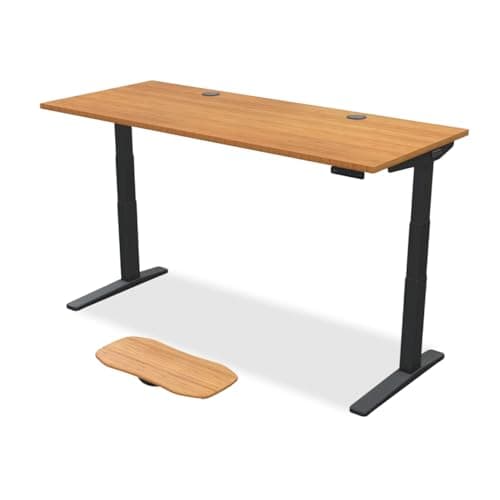 1. UPLIFT V3 2-Leg Bamboo Standing Desk, 72 × 30 Two separate arms, with room between them
| 72 × 30" | 1" | 21.6–47.7" | 355 lb | 15 yr | |
| 2 | 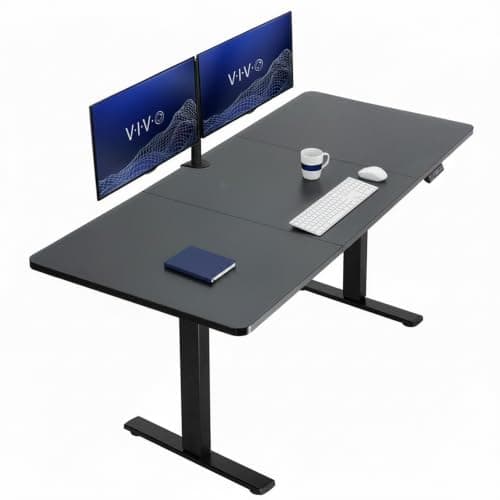 2. VIVO 1B Series 71″ × 30″ Electric Desk Maximum width per dollar
| 70.9 × 29.5" | 1" | 29.2–48.4" | 220 lb | 3 yr | |
| 3 | 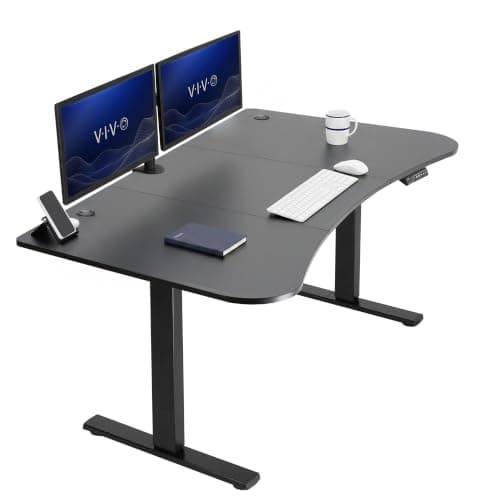 3. VIVO 63 × 32 in Standing Desk (DESK-KIT-1B1B) Depth, and the curved front edge
| 63.1 × 31.5" | 0.75" | 29–48.2" | 220 lb | 3 yr | |
| 4 | 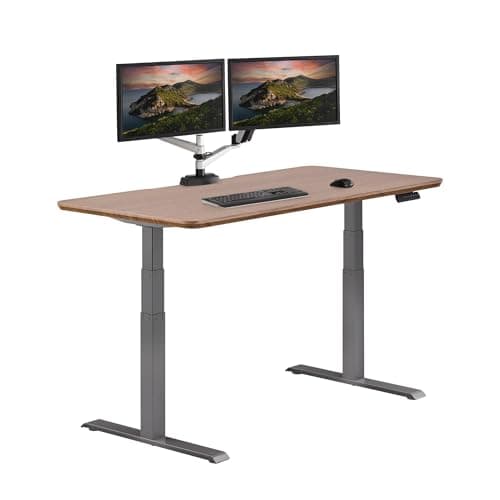 4. Vari Electric Standing Desk 60×30 A laminate top and lifetime coverage
| 60 × 30" | 1.25" | 25–50.5" | 200 lb | Lifetime |
Top thickness is the column to read twice. A monitor arm clamp has a minimum thickness as well as a maximum, and the published spread here is 0.75″ to 1.25″ — a two-thirds difference between the thinnest and the thickest. We do not print clamp windows on this site, because the arms we rank publish them in documents we cannot always read at source; read your arm’s own figure against these. The VIVO 63 is curved: VIVO publishes 31.5″ of depth with 28″ at the center, so the deepest part is at the corners. Dates: surface, thickness and warranty figures were read at each manufacturer on 2026-10-10; the UPLIFT frame height and 355 lb capacity are from UPLIFT’s own PDFs as read 2026-07-16, because those documents do not render reliably to automated access. Nobody publishes the clear span between the legs, the crossbar position, or the rear-edge clearance behind the lip — three figures a clamp actually depends on.
Prices and stock as of October 18, 2026, from Amazon’s API. They change; we show a live number or none at all. #ad — we earn a commission.
Nearly every “best desk for dual monitors” list is a list of wide desks. Width matters, but it is not the specification that most often ruins the setup after delivery.
That one is top thickness. Two monitors on a desk almost always means at least one clamp, and a clamp works inside a window: too thin and the jaw has nothing to bite, too thick and it will not close. The four desks on this page publish tops of 0.75″, 1″, 1″ and 1.25″ — a two-thirds spread between the extremes, on desks that look identical in a photograph.
So this page ranks on the three published numbers a two-screen setup actually turns on, in order: how much surface width there is, how much depth, and how thick the top is. Every figure was read at the manufacturer and is cited at the bottom with its date. Capacity comes fourth, and the reason it comes fourth is one of the more useful things here.
What we ranked on, and why
Four criteria, in this order, and the order is the argument.
1. Published surface width. Two screens need to sit side by side without overlapping, and their mounts need rear edge. The published widths here run from 60″ to 72″. This is first because it is the constraint you cannot work around after the desk arrives — everything else has a workaround and width does not.
2. Published depth. OSHA’s own computer-workstation guidance puts a monitor about an arm’s length away with the top of the screen at or below eye level. Two angled panels eat depth faster than one, and the published figures here are 29.5″, 30″, 30″ and 31.5″. Shallow is what produces the too-close V that your neck pays for.
3. Published top thickness. The clamp constraint, and the spec nobody checks. 0.75″ to 1.25″ across this page.
4. Published capacity — and it is fourth on purpose. The range here is 200 lb to 355 lb. Two monitors with their stands removed, plus two arms, are tens of pounds, not hundreds. Ranking capacity above width on a dual-monitor page would push you toward the expensive desk for a reason that does not exist.
The third slot of every Spec Line on this site is the longevity number, and on this page it is the warranty: three years, three years, fifteen years and lifetime, which is the widest spread of any column here. What we did not rank on: finish names, “gaming desk” styling, or how a desk photographs with two screens on it. We have not assembled, loaded or mounted anything to any of these; our methodology is candid about what reading a spec sheet does and does not buy you.
The finding: two monitors is a clamp problem before it is a size problem
Here is the sequence that goes wrong. Someone buys a wide desk for two screens, buys two arms, and discovers on assembly day that one of three things is true: the top is too thin for the clamp to grip, the top is too thick for the clamp to close, or there is a frame rail, a crossbar or a cable tray immediately behind the edge where the jaw needs to go.
None of those is a width problem, and width is the only thing the listing told them about.
The published thicknesses on this page are worth reading as a group:
- VIVO 63 × 32 — 0.75″. The thinnest here. Thin tops are the ones at risk of falling under a clamp’s minimum.
- VIVO 71 × 30 — 1″ and UPLIFT bamboo — 1″. The middle of the category and the least likely to argue with anything.
- Vari 60 × 30 — 1.25″. The thickest here, and the one to check against a clamp’s stated maximum.
We deliberately do not print clamp windows on this site. The arms we rank publish them, but ergotron.com returns a block to automated access and the figures circulating for other models trace to retailers rather than to the manufacturer, so clamp vs grommet and will a monitor arm fit my desk both handle it qualitatively on purpose. What we can do is print the desk’s own published figure, which you can then check against whatever your arm states. That is thirty seconds of work and it is the difference between mounting two screens on a Saturday and repacking a box.
If your top is outside your arm’s window, the answer is usually a grommet mountrather than a different desk — the same hardware bolted through a hole instead of clamped to an edge. Which is a quiet argument for buying a desk with grommets in the first place, and one reason the UPLIFT configuration we link is the one that includes them.
Width: what the arrangement actually needs
The width you need is set by the mount, not by the diagonal of the screens.
One dual armclamps once, usually at the center rear, and spreads two screens from that single point. It needs enough top for the panels to swing and enough edge in the middle for one jaw. A 60″ desk is plausible for two 24-inch screens on a dual arm; a 70″ one is comfortable.
Two single armsis a different purchase. Each one needs its own stretch of rear edge, the two mounts must clear each other, and the screens need room to be angled independently — which is the whole reason people choose two singles over a dual, as that comparison sets out. This is the arrangement the 72″ UPLIFT top is for.
Note what no manufacturer here publishes: the clear span between the legs. The headline width is the top. What a clamp needs is edge without a frame behind it, and none of UPLIFT, VIVO or Vari states where their crossbars and rails sit on these configurations. A wider desk gives you more candidate mounting points, which is the practical reason width still earns the top slot even when a dual arm only needs one clamp.
Depth, and the thing a monitor arm does to it
Depth is the dimension people notice last and regret first. Two screens angled inward sit closer to you than one screen square to you, and OSHA’s arm’s-length guidance gets hard to satisfy fast on a shallow top.
The published figures here are 29.5″ (VIVO 71), 30″ (UPLIFT and Vari) and 31.5″ (VIVO 63, with 28″ at the center of its curved front). That is a 2″ spread, and 2″ of viewing distance is more than it sounds when the screens are already as far back as the desk allows.
The bigger lever is the mount. A factory stand puts a screen’s base on the desk, which means the panel sits forward of the rear edge by the depth of that base. An arm puts the panel over the rear edge, or past it. In practice, an arm buys you several inches of effective depth on a desk you already own, which is why we treat the arm as the first purchase rather than the second for anyone running two screens on a 24-to-30-inch desk.
Capacity: the spec this page deliberately ranks last
The published spread here is 200 lb to 355 lb, and the honest answer is that a dual-monitor setup does not get near the bottom of that range. Panels with their stands removed are light — the published figures are on how much does a monitor weigh — and two arms add single-digit pounds each.
Capacity starts to matter for a different buyer: the one whose desk also holds a tower, a printer, a dock, a pair of speakers and a monitor riser, and who intends to raise all of it twice a day. That is the person the 355 lb UPLIFT frame is built for, and it is also the person our capacity guide is written for. If your desk is two screens, a keyboard and a mug, the 200 lb frame with the lifetime warranty is not the compromise it looks like in a spec table.
What nobody in this category publishes
The clear span between the legs. Four desks, no figure. It is the dimension that decides where a clamp can go and whether a center-mounted dual arm has a rail in its way.
Rear-edge clearance. How much vertical room there is behind the lip before you hit a frame, a tray or a drawer. Nobody states it, and it is the second of the five checks on will a monitor arm fit my desk for exactly that reason.
Grommet positions and diameters. UPLIFT publishes that its tops are available with or without grommet holes and sells grommet hardware; the configuration-level detail of where the holes are and how wide they bore is not something any of these four publishes in the content we read. If you are planning a grommet mount rather than a clamp, that is a question for the seller before you order.
Top load at a point. Frame capacity is published; what a particle-board or bamboo top will tolerate under the few square inches of a clamp jaw, indefinitely, is not. It is the reason the material line matters as much as the thickness line.
Who we left off, and why
Branch is the absence worth explaining. Its Duo sits on our other desk roundups on figures we read at Branch on 2026-07-16, and on 2026-10-10 the Duo product page would not serve its specification table to automated access at all. We have no published width, depth or thickness for it — the exact three specs this page ranks on. The figures circulating for that desk trace to retailers and review sites, not to Branch, which is why its lift speed and noise numbers already stay off our pages.
FlexiSpot is off this page for the reason it is off every page here: 403 on every spec path we have tried, on both its .com and .co.uk sites, and the figures in circulation conflict with each other.
The gaming-desk tier — the 63-inch carbon-fiber- wrap tops sold specifically for two monitors — is off as a group. Almost none of those brands publishes a top thickness, which is the spec this page exists to compare, and several publish no dimensions beyond the headline size.
What we can’t tell you
We have not built any of these desks, clamped an arm to any of these tops, or lived with two screens on one. We cannot tell you whether the VIVO’s particle-board top dents under a clamp after two years, whether the Vari’s laminate edge chips, how much either desk wobbles with 40 lb of monitors cantilevered off the back at full standing height, or whether the UPLIFT’s bamboo marks where the jaw bears. Those need hands and time, and owner reviews will serve you better there than we can.
What we can do is put the published numbers side by side: 60″ to 72″ of width, 29.5″ to 31.5″ of depth, 0.75″ to 1.25″ of top, 200 lb to 355 lb of frame, and three years to lifetime of warranty. Each one is a manufacturer figure with a link and a date under it.
How to actually choose
Decide the mount first. If it is two single arms, buy width: the UPLIFT 72 × 30has the most rear edge here, a 1″ top in the middle of the clamp range, and grommets and a wire tray in the box.
If it is one dual arm and the budget is the binding constraint, the VIVO 71 × 30gives you within an inch of that width and the same published 1″ top for a fraction of the money. Accept the particle board and the three-year warranty knowingly rather than by surprise.
If your problem is that the screens are too close rather than too crowded, buy depth: the VIVO 63 × 32publishes the deepest surface on this page. Check its 0.75″ top against your arm’s published minimum before you order, because that is the one number on this page most likely to catch someone out.
And if you want the desk to outlive the monitors, the Vari 60 × 30is the lifetime-warranty option with the thickest top and the widest height range — a 60-inch desk that suits two screens on a dual arm, and does not suit two separate clamps at all. Whichever you pick, read the five checks before the arm ships, and plan four cables across the back, not two.
The picks, in detail
1. Two separate arms, with room between them
UPLIFT V3 2-Leg Bamboo Standing Desk, 72 × 30
The widest published surface here at 72 inches, on a 1-inch bamboo top with a 15-year warranty and grommets in the listing. If two monitors on two separate arms is the plan, this is the desk that has room for both clamps and the cables they drag with them.
- Surface
- 72 × 30"
- Top thickness
- 1"
- Warranty
- 15 yr
Two monitors are not really a size problem, they are a clamp problem, and this is the desk that solves the clamp version.
A pair of single arms wants two separate stretches of rear edge, far enough apart that the screens can sit side by side without the mounts fighting each other, and each one with space behind the lip for a jaw to close. UPLIFT publishes 72″ × 30″ as a standard bamboo size, which is a foot more edge than the narrowest desk here and the most room on this page for that arrangement. If you are running two single arms rather than one dual arm, that is the whole argument.
The 1″ published thickness is the other reason it is first. A clamp has a window with a floor and a ceiling — too thin and the jaw cannot grip, too thick and it will not close — and 1″ sits in the middle of the three figures on this page. Check your arm’s published range against it; our five-check list is the order to do it in.
What you should not buy it for is capacity. The 355 lb frame rating is real, published and the highest here, and two 27-inch panels with two arms do not come close to needing it.
Good
- UPLIFT publishes 72" x 30" as a standard rectangular bamboo size — a foot wider than the Vari here and the most clamp room on this page
- The desktop thickness is published as "Bamboo 1"", in the middle of the spread on this page and the least likely of the three figures here to argue with a clamp at either end of its window
- The frame is published at 355 lb lifting capacity including the desktop — the highest on this page by 135 lb, and the only figure here that covers two arms, two large panels and a dock without thinking about it
- 15-year warranty on UPLIFT's own warranty page, extendable to 25 years at purchase, and the desktop page states the 15-year term as well
- The Amazon listing we link is the configuration with wire grommets and a wire tray, which is the difference between a cable plan and a cable problem on a desk this wide
- Bamboo with a UV-cured finish rather than particle board, which is the material difference between this and the two VIVO tops here
Not so good
- The most expensive desk on this page by a wide margin, and the gap is not explained by a dual-monitor requirement — a 220 lb capacity already covers two monitors and two arms
- 30 in of depth, which is the published class standard here but 1.5 in shallower than the cheapest desk on this page
- UPLIFT does not publish the clear span between the legs or the crossbar position, so the width available for a center-rear clamp is not a number you can check before ordering
- Bamboo is a wood surface: it takes marks, and a monitor arm clamp bears on a small area of it. Our standing-desk pages make the same point about every solid top
- The frame figures here are our dated 2026-07-16 reads of UPLIFT's own PDFs rather than a live 2026-10-10 read, because those documents do not render reliably to automated access
Don’t buy it if: your two monitors are going on one dual arm with a single center clamp. That setup needs width for the screens, not width for two clamps, and the VIVO 71 below gives you 70.9 in of top for a fraction of this price.
Price as of October 18, 2026. #ad — we earn a commission.
Where these numbers came from
- UPLIFT Desk bamboo desktops page — source of the "Bamboo 1"" thickness, the 42" x 30" / 48" x 30" / 60" x 30" / 72" x 30" rectangular sizes, the UV-cured finish, the grommet and power-grommet options, and the 15-year warranty on the desktop — read 2026-10-10
- UPLIFT V3 2-Leg Standing Desk Frame specification sheet (PDF, FV3-200C) — the 21.6-47.7 in frame height range and the 355 lb lifting capacity including the desktop — read 2026-07-16
- UPLIFT desk frame comparison chart (PDF) — V3 2-Leg column, including the ANSI/BIFMA G1-2013 statement — read 2026-07-16
- UPLIFT Desk warranty — 15 years, extendable to 25 at purchase — read 2026-07-16
2. Maximum width per dollar
VIVO 1B Series 71″ × 30″ Electric Desk
70.9 inches of published width and a 1-inch top, at a fraction of the price of the UPLIFT. The trade is the material and the warranty: particle board, three years, and a 220 lb frame.
- Surface
- 70.9 × 29.5"
- Top thickness
- 1"
- Warranty
- 3 yr
On the spec this page ranks on, the VIVO is within an inch of the winner and a long way under it on price: 70.9″ × 29.5″, published, with a 1″ top.
That combination is the reason it is second rather than fourth. Two monitors need width before they need anything else, a 1″ top is the least troublesome thickness for a clamp of the three here, and VIVO charges a fraction of what the bamboo desk costs for both.
The honest counterweight is in the material line and the warranty. “Particle Board, Steel” is what VIVO publishes, and a particle-board top is not what you want under a clamp if you intend to keep the desk a decade; three years of cover is the shortest term on this page. Those are published facts rather than our opinion, and they are the trade you are making.
Good
- VIVO publishes "70.9" x 29.5"" — within an inch of the UPLIFT's width for a small fraction of the price, and the best width-per-dollar figure on this page
- The desktop thickness is published as "1"", the same figure as the UPLIFT bamboo top and comfortably inside the window most clamps quote
- "220 lbs" published weight capacity, which is more than a dual-monitor setup asks of a frame even with two arms and a dock on it
- A published height range of "29.2" to 48.4"", so it is a genuine sit-stand desk rather than a fixed-height slab
- VIVO publishes its materials plainly as "Particle Board, Steel" rather than describing a finish and leaving you to guess
Not so good
- "Particle Board, Steel" is the honest material statement and also the limitation: a particle-board top under a point load like a clamp is not the same proposition as bamboo or laminate over a denser core
- Three years of warranty against UPLIFT's fifteen and Vari's lifetime term — the shortest coverage on this page
- 29.5" of depth, the shallowest published surface here, which is the dimension that decides whether two screens can sit at arm's length
- A 29.2 in floor height, which is the highest floor on this page — fine standing, poor for a shorter person sitting, as our standing-desk roundup explains at length
- No published clear span between legs, and no published grommet positions or diameters
Don’t buy it if: the desk has to carry two arms clamped at the outer edges for years. Particle board is the cheapest thing on this page for a reason, and a clamp concentrates its load on a few square inches of top — if that worries you, the bamboo UPLIFT or the 1.25 in laminate Vari are the two tops here that are not particle board.
Price as of October 18, 2026. #ad — we earn a commission.
3. Depth, and the curved front edge
VIVO 63 × 32 in Standing Desk (DESK-KIT-1B1B)
The deepest published surface on this page at 31.5 inches, which is the dimension that lets two screens sit back at arm's length. It is also the thinnest top here at 0.75 inches, so check your arm's clamp window before you order.
- Surface
- 63.1 × 31.5"
- Top thickness
- 0.75"
- Warranty
- 3 yr
Depth is the quieter half of the dual-monitor problem, and this is the desk that answers it. OSHA’s own workstation guidance puts a monitor about an arm’s lengthaway with the top of the screen at or below eye level, and on a shallow desk two screens physically cannot get that far back — which is why people end up with the pair pushed into a shallow V, too close, with their neck doing the work.
VIVO publishes 31.5″of depth here, two inches more than its own 71-inch desk, with a curved front that is itself part of the published dimension: 28″ at the center. That shape takes depth away where your keyboard sits and leaves it at the corners, which is exactly backwards from what you want for screens — so read the two numbers together rather than only the big one.
The specification to check before you order is the 0.75″top. A clamp needs a minimum thickness to bite as well as a maximum it can open to, and this is the thinnest top on the page by a quarter of an inch. We do not print clamp windows on this site — the arms we rank publish them in documents we cannot always read at source, and the clamp-versus-grommet page explains why we keep that qualitative. Read your arm’s own figure and compare it with the 0.75″ that VIVO prints.
Good
- The deepest published top here: "63.1" x 31.5" (28" at center)" — two inches more depth than the VIVO 71 and 1.5 in more than the UPLIFT or Vari
- The curved front edge is in the published dimension (28" at the center), so the shape is a specification rather than a photograph — it pulls the keyboard edge toward you while leaving the corners for the screens
- The cheapest desk on this page, and the only one under $300 at the time of writing
- A published "<50dB" operating noise figure and a "25mm/s" lift speed — two numbers most desks in this price class do not publish at all
- "220 lbs" published capacity, the same figure as the VIVO 71 and enough for two monitors on arms
Not so good
- The thinnest top on this page at a published "0.75"". Clamps have a minimum thickness as well as a maximum, and a three-quarter-inch top is close enough to the floor of that window to be worth checking against your specific arm before you buy
- Single-motor frame, where the premium desks here are dual-motor — fewer moving parts, but the published lift speed of 25mm/s is modest
- 63.1" of width is eight inches less than the VIVO 71 and nine less than the UPLIFT, so the depth advantage costs you edge for a second clamp
- "Particle Board, Steel" again, with the same clamp-load caveat as the VIVO above
- Three-year warranty, and a 29 in floor height that is too tall for a shorter person to sit at comfortably
Don’t buy it if: you are mounting two separate arms. Width is the spec that arrangement needs and this is the narrowest electric desk here; the depth advantage is aimed at the person running one dual arm, or a single arm plus a laptop, and wanting both screens further back.
Price as of October 18, 2026. #ad — we earn a commission.
Where these numbers came from
4. A laminate top and lifetime coverage
Vari Electric Standing Desk 60×30
The thickest top here at a published 1.25 inches, on a laminate surface with a lifetime warranty. It is also the narrowest desk on this page and the lowest-rated frame, which is the trade for the coverage.
- Surface
- 60 × 30"
- Top thickness
- 1.25"
- Warranty
- Lifetime
The Vari is the desk on this page you would buy for reasons other than the dual-monitor brief, and it is worth knowing which of those reasons survive contact with it.
The warranty does. A published lifetime, non-transferable warranty against defects in material or workmanship is the longest term we have found on any desk, and Vari backs it with a product-by-product duration list rather than one headline. The height range does too: 25–50.5″ is both the lowest floor and the highest ceiling here, which is the spread our standing-desk roundup ranks desks on. That 50.5″ ceiling is also the most headroom here for anyone standing on something: a walking pad adds four to six inches of deck, and it comes off the top of the range.
What does not survive is the width. Sixty inches is a foot less rear edge than the UPLIFT, and for the specific job of mounting two screens that is the number that decides it. The 1.25″ top is the other thing to check: it is the thickest on this page, and thick tops are the ones that run out of clamp travel rather than grip.
Good
- A published "Lifetime, non-transferable warranty against defects in material or workmanship" — the longest term on this page and the longest on any desk we rank
- The thickest published top here at "1.25" desktop thickness", on a "durable laminate" surface rather than exposed particle board
- The tallest published maximum height on this page: "25-50.5"", which matters if you stand on anything — including a walking pad
- The lowest published floor height of the four at 25 in, so it is the only desk here a shorter person can sit at properly
- Vari publishes a product-by-product warranty duration list rather than a single marketing claim, which is unusual and checkable
Not so good
- 60" of width is the narrowest on this page — a foot less than the UPLIFT. For two monitors on two separate arms that is the binding constraint, not the warranty
- "200lb" published capacity, the lowest here. Still more than a dual-monitor setup needs, but it is the figure to watch if a dock, a printer and a tower end up on the same top
- At 1.25 in the top is the thickest on this page, which pushes toward the ceiling of what some clamps will close on — check the arm's published maximum rather than assuming
- The published mounting space quoted on Vari's own page is narrower than the full desk width, so the usable rear edge is not the 60 in headline
- No published grommets in the specification content we read, on a desk where two monitors mean at least four cables crossing the back
Don’t buy it if: width is what you came for. This is a 60-inch desk with the best warranty on the page, and a dual-monitor buyer who needs 70 inches of rear edge cannot buy coverage instead of inches.
Price as of October 18, 2026. #ad — we earn a commission.
Where these numbers came from
- Vari Electric Standing Desk 60x30 (FD-ESD6030) product page — source of the 60" x 30" desktop, the "1.25" desktop thickness", the "25-50.5"" height range, the "200lb" weight capacity, the durable laminate top and the "Lifetime, non-transferable warranty against defects in material or workmanship" — read 2026-10-10
- Vari warranty policy — product-by-product duration list — read 2026-07-16
Common questions
How wide does a desk need to be for two monitors?
It depends less on the monitors than on how they are mounted, which is why we rank the published width rather than quote a single number. Two screens on one dual arm need width for the panels and one stretch of rear edge in the middle. Two screens on two single armsneed two separate stretches of edge, far enough apart that the mounts clear each other — and that is the setup the 72″ desk on this page exists for. Our full sizing guide works it through, deliberately comparatively rather than with an invented figure, and dual arm vs two single arms covers which of the two you should be planning for.
Why does desk top thickness matter for dual monitors?
Because a monitor arm mounts to the desk, not to the room, and a clamp only works inside a window of edge thicknesses — too thin and the jaw cannot get a purchase, too thick and it will not close. Two monitors usually mean two clamps or one wide one, so the issue doubles. The published spread on this page is 0.75″ to 1.25″, which is a two-thirds difference. We print the desk side of that comparison because we can cite it at the manufacturer; will a monitor arm fit my desk is the five-check list for the arm side, and clamp vs grommet explains the alternative if your top is outside the window.
Does a dual-monitor desk need a high weight capacity?
Almost certainly not, and we are ranking capacity fourth on this page for exactly that reason. The published spread here is 200 lb to 355 lb. Two 27-inch panels with their stands removed, on two arms, are tens of pounds — see how much does a monitor weigh for the published figures — so even the lowest-rated frame on this page has a large margin. Capacity starts to matter when the same top is also carrying a tower, a printer, a dock and a pair of bookshelf speakers. If that is your desk, the 355 lb UPLIFT frame is the one with room; if it is two screens and a keyboard, you are paying for headroom you will not use.
Is 30 inches of depth enough for two monitors?
For most people and most screen sizes, yes — and depth is the constraint that bites quietly. OSHA’s workstation guidance puts a monitor roughly an arm’s length away with the top of the screen at or below eye level, and the deeper the desk, the easier both of those are to satisfy with two panels angled toward you. Three of the four desks here publish 29.5″ to 30″; the VIVO 63 publishes 31.5″, with 28″ at the center of its curved front. The other lever is the mount: an arm pushes a screen back over the rear edge in a way a factory stand cannot, which is why an arm effectively buys depth on a desk you already own.
Can I put two monitors on a standing desk?
Yes, and the things that actually go wrong are cables and clamps rather than weight. Every cable on a desk that moves needs slack for the full height range — roughly twenty inches of it, which is the point our standing-desk cable management guide is built around, and a two-monitor setup has at least four cables crossing the back. The UPLIFT configuration we link includes wire grommets and a wire tray for that reason. Cable management for dual monitors covers the routing, and why a monitor arm matters more on a standing desk covers why the mount is not optional once the desk starts moving.
What about the space between the legs?
It is the most useful figure in this category and not one of these four manufacturers publishes it. The headline width is the top; what a clamp needs is clear rear edge, and what sits behind that edge — a frame rail, a crossbar, a cable tray, a drawer — is what stops a jaw closing. None of UPLIFT, VIVO or Vari publishes the clear span between the legs or the crossbar position for the configurations here. The practical answer is to measure the arm’s clamp depth, then check your own desk behind the lip at the exact point you intend to mount — check 2 on the five-check list. If you are buying blind, the wider desk gives you more places to try.
Why isn't the Branch Duo on this list?
Because we have no published top dimensions for it. The Duo is on our home office desks roundup on figures we read at Branch on 2026-07-16 — a 28–47.3″ height range and a 275 lb capacity — and on 2026-10-10 branchfurniture.com’s Duo page would not serve its specification table to automated access at all. Width, depth and top thickness are the three specs this page ranks on, and we have none of them from Branch. The circulating figures for that desk trace to retailers rather than to Branch, which is the same reason its lift speed and noise numbers stay off our other pages. Our methodology explains why a gap gets printed rather than filled.
Is a curved or L-shaped desk better for two monitors?
A curve and an L solve different halves of the problem. A curved front, like the VIVO 63 here, pulls the keyboard edge toward you and leaves depth at the corners — useful, and published as 28″ at center against 31.5″ overall. An L-shape gives you a second run of surface rather than a deeper one, which is a different answer: it suits two screens plus a laptop or a second task area more than it suits two screens side by side. Our L-shaped roundup covers that case, and curved vs straight is the comparison for the first one. Neither changes the clamp arithmetic: an L-shaped desk still has to have a mountable rear edge where you want the screens.
Sources
Every figure on this page comes from one of these. If a manufacturer doesn’t publish a number, we print “—” rather than estimate it.
- UPLIFT Desk bamboo desktops page — source of the "Bamboo 1"" thickness, the 42" x 30" / 48" x 30" / 60" x 30" / 72" x 30" rectangular sizes, the UV-cured finish, the grommet and power-grommet options, and the 15-year warranty on the desktop — read 2026-10-10
- UPLIFT V3 2-Leg Standing Desk Frame specification sheet (PDF, FV3-200C) — the 21.6-47.7 in frame height range and the 355 lb lifting capacity including the desktop — read 2026-07-16
- UPLIFT desk frame comparison chart (PDF) — V3 2-Leg column, including the ANSI/BIFMA G1-2013 statement — read 2026-07-16
- UPLIFT Desk warranty — 15 years, extendable to 25 at purchase — read 2026-07-16
- VIVO DESK-KIT-1B71S-B product page — source of the "70.9" x 29.5"" desktop dimensions, the "1"" desktop thickness, the "29.2" to 48.4"" height range, the "220 lbs" weight capacity, the "Particle Board, Steel" materials and the 3-year warranty — read 2026-10-10
- VIVO DESK-KIT-1B1B product page — source of the "63.1" x 31.5" (28" at center)" desktop dimensions, the "0.75"" desktop thickness, the "29" to 48.2"" height range, the "220 lbs" weight capacity, the single-motor electric frame, the "25mm/s" lift speed, the "<50dB" noise figure and the 3-year warranty — read 2026-10-10
- Vari Electric Standing Desk 60x30 (FD-ESD6030) product page — source of the 60" x 30" desktop, the "1.25" desktop thickness", the "25-50.5"" height range, the "200lb" weight capacity, the durable laminate top and the "Lifetime, non-transferable warranty against defects in material or workmanship" — read 2026-10-10
- Vari warranty policy — product-by-product duration list — read 2026-07-16
- OSHA Computer Workstations eTool — Monitors (position the monitor about an arm's length away, with the top of the screen at or below eye level) — read 2026-10-10
- OSHA Computer Workstations eTool — Desks (keep the space under the desk clear for legs and knees; the 20-28 in leg clearance guidance, and the contact-stress caution about a hard leading edge) — read 2026-10-10
Read next
How much desk space do you need for dual monitors?
The sizing argument behind this page, kept comparative rather than invented — read it before you pick a width.
The best dual monitor arms
The other half of the purchase. The arm's published clamp window is what the top thickness column here has to satisfy.
Will a monitor arm fit my desk?
Five checks before you buy, in order — edge thickness first, what is behind the lip second.
Dual monitor ergonomics
Where the two screens should actually sit once the desk is in the room, and which one goes in front of you.
Cable management for dual monitors
Four cables minimum across the back of the desk, and more if either screen is a USB-C hub.
The best standing desks
The same desks ranked on the spec this page does not use: how low they go, which is what decides sitting fit.