Cable management for a standing desk
A standing desk is a cable management problem wearing a desk costume. It travels roughly 20 inches, which means every cable that leaves it needs roughly 20 inches of slack — and the slack has to go somewhere on the way down.
By Stephen V.Last reviewed
Nobody buys a standing desk thinking about cables. Then it arrives, you raise it for the first time, and your monitor blinks out.
Here is the thing that makes this category different from every other cable problem in your house: a standing desk is a machine that deliberately moves about two feet, vertically, several times a day, while connected to a dozen things that are bolted to the floor and the wall. Every cable is now a moving part. Ordinary desk cable advice assumes nothing moves, which is why it fails here.
For one worked example of all of this on a real desk — six monitors, a tower on a CPU holder, and the cable pouch that swallows the lot — see our hands-on review of the UPLIFT V3.
The arithmetic nobody does
The number that matters is travel— not how high your desk goes, but the difference between its top and its bottom. It is a subtraction, and almost nobody does it.
Take the four desks we rank, using each manufacturer’s own published height range:
- UPLIFT V2-Commercial— 21.6–47.7″ → 26.1″ of travel
- Vari Electric 60x30 — 25–50.5″ → 25.5″
- Branch Duo — 28–47.3″ → 19.3″
- VIVO 1B 71×30— 29.2–48.4″ → 19.2″
Those subtractions are ours. The height ranges are the manufacturers’, cited below and on our standing desk roundup; the travel figures are arithmetic we did on them, and we would rather show you the working than present a derived number as though it came off a spec sheet.
The spread runs from 19.2″ to 26.1″. So “about 20 inches” is a fair planning figure, and could be seven inches short of the truth on the UPLIFT. Do your own subtraction.
One technical note that works in your favor. UPLIFT’s 21.6–47.7″ is the framerange rather than the finished, with-desktop height — a caveat that matters a great deal when you are working out whether a desk fits your body. For travel, it does not matter at all: bolting a desktop on raises the bottom and the top by the same amount, so the difference between them is unchanged. This is the one derived figure on the site that survives the frame-versus-desktop problem intact.
So: every cable that leaves the desktop and terminates somewhere fixed needs at least your travel figure in slack, plus a margin. If it does not have it, something is under tension every time you stand up.
The one idea that fixes most of this
Put the power strip on the desk.
Not near the desk. Not on the floor beneath it. Mounted to the underside of the desktop, or sitting in a tray that is bolted to the desktop, so that it physically rides up and down with the surface.
Think about what that changes. With the strip on the floor, every single thing on your desk — monitor, lamp, dock, laptop charger, speakers — has its own cable running to the floor, and every one of them independently needs 20-odd inches of slack. That is ten or twelve separate slack problems, ten or twelve chances to snag, and a curtain of loops.
With the strip riding on the desktop, everything on the desk plugs into something that never moves relative to it. The cable from your monitor to the strip is the same length at every desk height, forever. Only onecable now crosses the moving gap: the strip’s own lead to the wall.
Twelve problems become one. Everything else on this page is detail.
If the strip genuinely cannot move — you are plugged into a wall socket that cannot take the reach, or the strip is shared with other furniture — then contain it properly on the floor instead. That is the situation where a cable box is doing real work, and it is worth knowing that D-Line’s is the only cable product on this site citing a named third-party safety standard (BS EN 60670-22:2006, and only on their UK page). But you are accepting the twelve-problem version. Move the strip if you can.
Where the one cable should leave
Now you have a single lead crossing from a moving desktop to a fixed wall. Three things decide whether it survives.
It should leave near a leg, not from the middle. A cable dropping from the center of the desktop has the longest unsupported span and the most freedom to swing into things. Next to a leg, the drop is short, predictable and mostly hidden.
It should drop, not stretch.The geometry you want is a vertical drop with a gentle service loop at the bottom — the loop opens as the desk rises and closes as it descends. What you do not want is a diagonal run to a socket across the room, because a diagonal gets proportionally longer as the desk rises and it will find its limit faster than you expect.
The slack has to have somewhere to go at the bottom.This is the failure people miss entirely, because they only test upwards. At full sitting height, your 20 inches of slack is still 20 inches of cable and it is now surplus. If it puddles into the leg mechanism, gets caught under a castor, or lands on the crossbar, the desk descends onto its own cable. Give the loop a defined place to live — hanging in free air behind the leg is fine, coiled loosely in the tray is fine, jammed in the scissor is not.
The mistake that breaks desks
Do not anchor anything to the legs.
It looks like the obvious tidy move — the leg is right there, it is vertical, the cable wants to go down it. But the legs are the part that telescopes. Strapping a bundle to a leg attaches it to two things that move relative to each other, which means at full extension you are pulling the cable apart and at full descent you are feeding slack into a mechanism that is closing on it.
Anchor to the underside of the desktop, or to a fixed frame crossbar that does not telescope. If you are not certain which sections move, raise the desk halfway and look. The bit that got longer is the bit you do not touch.
Ties, and the number that does not exist
Bundle with hook-and-loop ties, not zip ties, and this is one of the few places where the recommendation is close to unconditional.
Two reasons. First, you will get the geometry wrong on the first attempt — everyone does — and a desk you re-dress four times is a strong argument against a fastener that needs scissors. Second, this bundle flexes several times a day for years. A zip tie cinched onto a bundle that articulates can bite into cable jackets at the point of flex; hook-and-loop distributes its grip and can be redone loose.
The honest caveat, and it is the same one we make everywhere on this site: VELCRO does not publish a cycle count. Their own technical data sheet rates ONE-WRAP as “Cycle Life — Medium”— a word on a descriptive scale, next to peel and shear figures that are actual numbers. The same document notes that its data “should not be used for specification purposes.” On a desk that moves, how many cycles a tie survives is exactly the question you would want answered, and it is not answered. The “1,000 cycles” circulating online traces to nobody.
Tie loosely, incidentally. A bundle that flexes wants to slide against itself a little; a bundle strapped rigid transfers every bit of that movement into the connectors at each end.
Test it properly, before you commit
Do this before you cut, trim, or tidy anything.
Dress the cables loosely — ties on, but slack and adjustable. Then run the desk all the way to the top, slowly, and watch the cables rather than the desk. Anything that goes straight is a future disconnection. Then run it all the way to the bottom, slowly, and watch where the slack goes. Anything that puddles into the mechanism or lands under a castor is a future crushed cable.
Both extremes. People test the standing position because that is the exciting one, and get bitten at the bottom six months later.
Only once both ends are clean should you tighten anything up. And leave it looser than looks nice — a desk that moves wants a bundle that can breathe.
The order to do it in
Build the desk. Put the strip on it. Plug everything into that strip. Run the single lead down near a leg with a service loop. Dress loosely. Test both extremes. Then tidy.
The reason for that order is that every step constrains the next one, and the most common way to spend a Saturday twice is to dress a beautiful bundle at sitting height and discover at full extension that the whole thing needs redoing. Our general guide to hiding desk cables covers the fixed-desk version of that sequence, and trays vs sleeves vs clips covers which format carries the mass — on a moving desk, a tray stops being a nice-to-have.
What we can’t tell you
We have not stood at any of these desks and we have not run a cable to destruction. We cannot tell you how many cycles a given tie survives, where a given desk’s collision detection trips, or whether a particular tray fits a particular frame — our methodology is explicit about that.
What we can do is subtract two published numbers and show you the answer. Your desk travels somewhere around 19 to 26 inches depending on which one you bought. Every cable leaving it needs that much slack. Almost nobody works that out before the monitor blinks off, and it takes ten seconds and the manufacturer’s own spec sheet.
The small stuff that finishes the job
Inexpensive parts that make the main purchase work properly. They are not picks and they are not ranked — each one is here because this page describes the job it does, and each carries the same published-spec treatment as everything else we link.
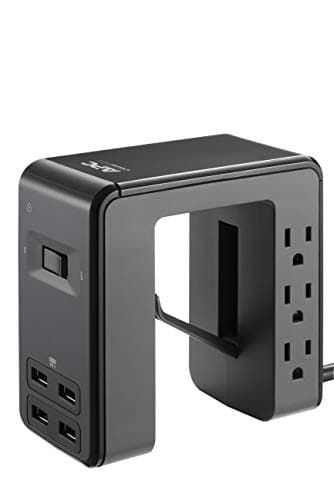
APC Desk Mount Power Station PE6U4
The one idea on this page as hardware: a strip built to mount under the desktop, so it rides up and down with the surface instead of tethering it to the floor.
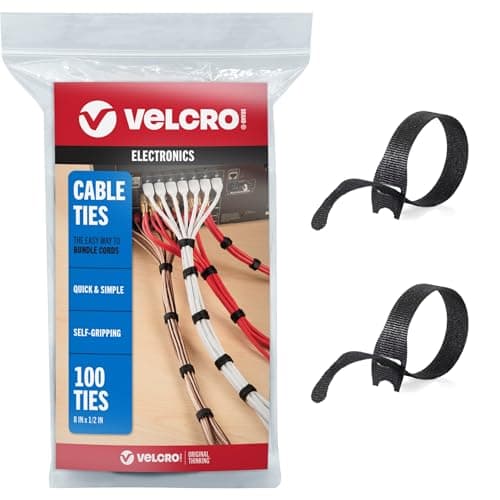
VELCRO Brand ONE-WRAP Cable Ties
Hook-and-loop rather than zip ties, for a bundle that flexes several times a day — with the caveat above intact: VELCRO rates cycle life as Medium and publishes no number.
Prices as of October 18, 2026, from Amazon’s API. They change; we show a live number or none at all. Why these are affiliate links.
Common questions
How much cable slack does a standing desk need?
At least as much as the desk travels, plus a margin so nothing is taut at full height. Work out your own number by subtracting your desk’s published minimum height from its maximum. Across the four desks we rank, that arithmetic gives between 19.2″ and 26.1″ — so “about 20 inches” is a reasonable planning figure for most desks, and a bad one to guess at. Those are our subtractions of the manufacturers’ published ranges, not measurements we took.
Why does my monitor flicker or disconnect when I stand up?
The usual mechanical explanation is that something is going taut at the top of the travel and pulling on a connector. A cable does not have to come fully out to break a link — tension on a display or USB connector can unseat it just enough to drop the signal, then let it recover when you sit back down. The tell is that it correlates with height rather than time. Run the desk to full extension slowly and watch the cables rather than the screen: something back there is straight.
Should the power strip go on the desk or on the floor?
On the desk — mounted to the underside of the desktop, or in a tray attached to it. This is the single highest-value decision on this page. If the strip is on the floor, every cable plugged into it has to span the travel independently, so you have ten or twelve separate slack problems. If the strip rides with the desktop, everything on the desk plugs into something that never moves relative to it, and exactly one cable has to cross the gap to the wall. One problem instead of twelve.
Can I zip-tie the cables to the desk leg?
Not to the leg, no — and this is the most common way people break their own desk. The legs are what telescope. Anchoring a bundle to a leg means the bundle is attached to two things moving relative to each other, so at full extension you are pulling the cable apart, and at full descent you are feeding slack into a mechanism that is closing. Anchor to the underside of the desktop or to the fixed frame crossbar, never to a telescoping section.
Will collision detection protect a snagged cable?
Do not rely on it. Collision detection is designed to notice a desk hitting a solid obstruction — a drawer, a windowsill — and its sensitivity is set for that. A cable going taut is a very different force profile: it may develop enough tension to unseat a plug or stress a socket well before the desk decides anything is wrong. We have never measured any desk’s collision threshold and cannot tell you where it trips. Treat it as a backstop for hitting furniture, not as cable protection.
Sources
Every figure on this page comes from one of these. If a manufacturer doesn’t publish a number, we print “—” rather than estimate it.
- UPLIFT V2-Commercial F600 C-Frame specification sheet (PDF) — 21.6–47.7" frame height range — read 2026-07-16
- Vari Electric Standing Desk 60x30 product page — 25–50.5" height range — read 2026-07-16
- Branch Duo Standing Desk product page — 28–47.3" height range — read 2026-07-16
- VIVO 1B-series 71" x 30" electric desk product page — 29.2–48.4" height range — read 2026-07-16
- VELCRO Brand General Use ONE-WRAP Fastener TDS (HTH 888 with Loop 3610) — "CYCLE LIFE: Medium"; data "should not be used for specification purposes" — read 2026-07-16
- D-Line Cable Tidy Unit (UK page) — "safety tested and certified to BS EN 60670-22:2006"; electrically-safe ABS — read 2026-07-16
Read next
Do you need a surge protector for a standing desk?
Mount the strip to the desk and only one cable has to absorb the travel. Which strips publish keyhole slots and how long their cords are.
Power strip vs surge protector
Only one of them actually protects the gear on your desk.
The best standing desks
The published height ranges this page's travel arithmetic comes from.
The best under-desk cable management
The ties for the bundle — and why nobody publishes a cycle count.
Trays vs sleeves vs clips
Which format holds the mass. On a moving desk this stops being optional.
The best cable management boxes
For the strip itself, if it ends up staying on the floor.