The best home office monitors under $400
Above this ceiling, stand travel is what separates good monitors from cheap ones. Inside it, that gap closes: all four of these publish at least 130 mm of height adjustment, and three publish a full 150. What they do not agree on is whether the USB-C port carries video and power at all — one of them is data only — and what three years of warranty actually buys you.
By Stephen V.Last reviewed
Compare the four under $400
The published figures this band turns on. Height travel is each maker's own maximum; panel-only weight is quoted as each maker labels it; the USB-C column is what the maker states the port does, not what the connector implies. Every cell is cited in the write-up below it.
| # | Monitor | Panel | Height travel | Panel-only weight | USB-C | Warranty | Price |
|---|---|---|---|---|---|---|---|
| 1 | 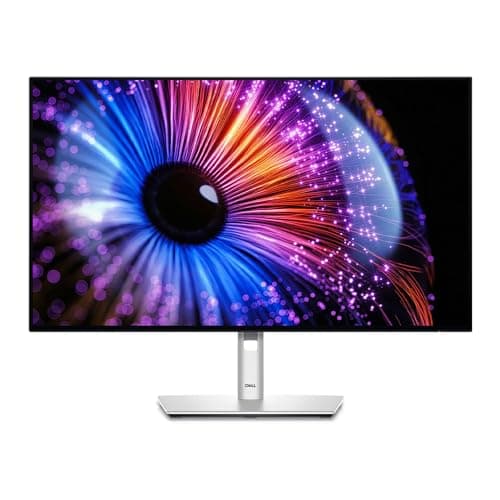 1. Dell UltraSharp 27 Monitor (U2724D) The strongest warranty under the ceiling
| 27" QHD 120 Hz | 150 mm | 9.90 lb | Data only | 3 yr adv. exchange | |
| 2 | 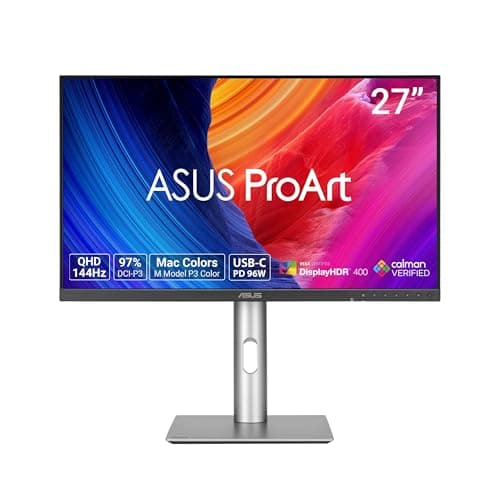 2. ASUS ProArt Display PA278CGRV One-cable laptop docking under the ceiling
| 27" QHD 144 Hz | 0–130 mm | 4.7 kg (10.36 lb) | 96 W PD | 3 yr ZBD | |
| 3 | 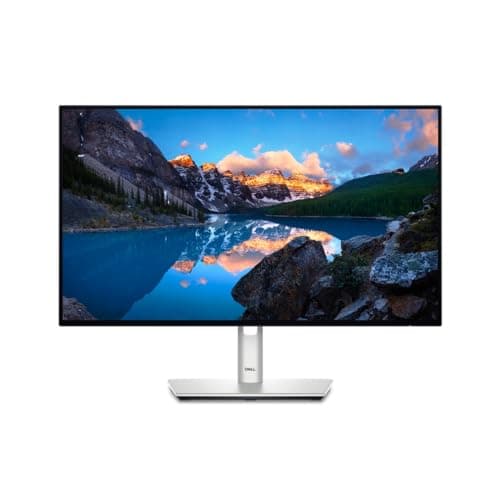 3. Dell UltraSharp 24 Monitor (U2424H) A shallow desk, or a cheap monitor arm
| 23.8" FHD 120 Hz | 150 mm | 7.76 lb | Not a charging dock | 3 yr adv. exchange | |
| 4 | 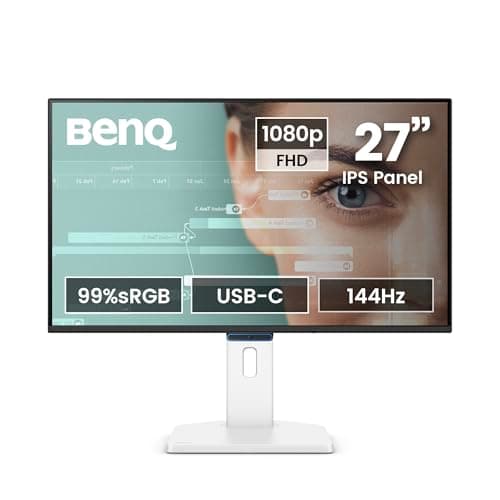 4. BenQ GW2790TC Budget pick — a real stand for the least money
| 27" FHD 144 Hz | 150 mm | 4.2 kg (no lb figure published) | 20 W PD | 3 yr parts, no adv. |
The height-travel column is the point of this page. Three of these four publish the full 150 mm and the fourth publishes 130 — so inside this band, unlike above it, the stand is not what the extra money buys. Read the USB-C and warranty columns instead. “Data only” is Dell’s own wordingfor the U2724D’s USB-C upstream port: no video and no laptop charging over it. Dell’s provision on the U2424H is likewise not a laptop-charging dock. The ASUS is the only screen under this ceiling that will power a laptop. Three years is not three years.Dell’s is Advanced Exchange with Premium Panel Exchange, ASUS’s is a zero-bright-dot term, and BenQ’s own warranty page says parts and labor only with no advance replacement. Same count, three different promises. Panel-only weight is each maker’s own label— Dell prints “panel only (for VESA mount)”, ASUS prints “net weight without stand” in both units, BenQ prints “without base” in kilograms and no pounds. We have not converted BenQ’s figure for the table. For reference, not as rows: the two monitors we rank above this ceiling are the Dell U2725QE (4K at 120 Hz, Thunderbolt with up to 140 W EPR, an 11.51 lb head) and the ASUS ProArt PA329CRV (31.5 inches at 4K, 96 W). Both are on the full monitor roundup with their own buy links. No prices appear in our prose; the live figures and their “as of” date sit under the picks, and the band is checked against them rather than against a number typed into this page.
Prices and stock as of November 18, 2026, from Amazon’s API. They change; we show a live number or none at all. #ad — we earn a commission.
Buy the Dell UltraSharp U2724D for the best warranty promise in the band on a 2560 x 1440 at 120 Hz panel with 150 mmof stand travel — as long as you know its USB-C port is data only. Buy the ASUS ProArt PA278CGRV if one cable to a laptop is the point, because its 96 W of USB-C power delivery is the only one under this ceiling that will do it. The Dell UltraSharp U2424H is the pick for a shallow desk and the lightest head here at 7.76 lb. And our budget pick, the BenQ GW2790TC, is the only cheap monitor we rank with a full 150 mm stand instead of a tilt-only base.
Which brings us to what is unusual about this price band.
The finding: in this band, the stand is not the gap
Our full monitor roundup ranks on three published numbers, in this order: how far the stand travels vertically, what the head weighs without the stand, and what the maker will do about it in three years. That order exists because stand travel is normally the first thing a cheap monitor gives up. A tilt-only base cannot raise the top of the screen to your eye line, and no amount of panel quality compensates for a screen you have to look down at for eight hours.
Under this ceiling, that stops being the differentiator. Three of these four publish the full 150 mm of height adjustment with tilt, swivel and pivot; the fourth publishes 130 mm. Every one of them can be set up properly. So the usual advice — spend more and get a real stand — has already been satisfied at the bottom of this band, and the question becomes what else you are choosing between.
Two things, as it turns out, and both are published plainly by the people who make them.
What the USB-C port actually does
This is the half of the band that costs people money, because a USB-C socket looks like a promise of one-cable docking and is frequently nothing of the kind.
Dell’s port list for the U2724D reads “1 x USB-Type C upstream port (data only)”. Data only: the port carries the monitor’s USB hub upstream to your computer, and that is all. No video. No laptop charging. The video goes in over HDMI or DisplayPort and the laptop charges from its own adapter, exactly as it would on a monitor with no USB-C at all. The 24-inch U2424H is the same story — its USB-C provision is not a laptop-charging dock either.
ASUS publishes 96 W for the ProArt PA278CGRV, which is a genuine one-cable setup for most 13- and 14-inch laptops: video in, power out, one cable. BenQ publishes 20 Wfor the GW2790TC — enough for a phone or a tablet, or to slow the drain on a laptop, not enough to run one.
Three monitors, three completely different answers, all of them stated on the manufacturer’s own spec page, and none of them inferable from the fact that there is a USB-C connector on the back. If docking is why you are buying a monitor, that single line is the whole decision.
Three years is not three years
Every monitor in this band carries a three-year warranty, and the column in our table would suggest they are the same promise. They are not, and the differences are published.
Dell describes three-year Advanced Exchange Service with Premium Panel Exchange. Advanced Exchange means the replacement unit ships to you before you return the failed one, so the failure costs you a day rather than a fortnight. Premium Panel Exchange is Dell’s stuck-pixel policy.
ASUS publishes a three-year LCD zero-bright-dot warranty: a strong, specific promise about bright stuck pixels for three years. It is not a statement about how quickly a replacement arrives.
BenQ publishes three years of parts and labor only, with no advance replacement— in those words, on its own warranty page, which is also the only reason we can print a term for that monitor at all, because its spec page states none.
None of this tells you which monitor will fail. It tells you what each company has written down about the week after it does, which is the part you can hold someone to. On a site whose third Spec Line slot is always the longevity number, that distinction is the one worth paying for.
How we ranked the four
1. Published stand travel. First, as on the parent page, because a screen you cannot raise to your eye line is the wrong screen at any price. In this band it is close to a tie, which is the finding rather than a reason to drop the criterion.
2. Published panel-only weight.Second, because it decides whether a monitor arm can take it, and because it is the figure makers label least consistently — Dell says “panel only (for VESA mount)”, ASUS says “net weight without stand”, BenQ says “without base” and publishes only kilograms. We quote each as given rather than converting silently.
3. What the maker will do in three years. The longevity slot. All four say three; only one of the three promises says the replacement arrives before the dead unit leaves.
What we did not rank on: color accuracy, contrast, response time or how the panel looks. We have not put a colorimeter on any of these and a verdict on a panel from someone who has not measured it is invented. The coverage figures the makers publish are theirs, labeled as theirs. Our methodology is explicit about where the published-spec evidence stops.
What to check on your own desk first
Your desk depth, before your screen size.OSHA’s own guidance puts the preferred viewing distance at 20 to 40 inches and says to place the monitor so the top line of the screen is at or below eye level. A 27-inch panel on a 24-inch-deep desk is closer than that window wants, which is the real argument for the 23.8-inch pick rather than anything on its spec sheet. How deep should a desk be is the measurement, and how far should a monitor be from your eyes is the same question from the other side.
Whether the stand or an arm is doing the lifting.Every monitor here publishes 100 x 100 mm VESA and a panel-only weight inside the window of the cheap gas-spring arms we rank, so an arm is a real option — and it buys back the desk area the stand’s base is standing on. Monitor arm vs monitor stand is the honest comparison, including the case for keeping the stand you already paid for.
What is plugging into it.Count the cables you want to land on the desk and then read the port list of the monitor you are about to buy, not the category. If the answer is “one cable from a laptop”, only one monitor in this band does that. Do you need an external monitor for a laptop covers whether the upgrade is worth it at all, and how to cable manage a laptop dock is what to do with the cables once it is.
What we can’t tell you
We have not used any of these four. We cannot tell you how the U2724D’s IPS Black contrast reads in a bright room, whether ASUS’s zero-bright-dot claim is easier to make good on than Dell’s advance exchange, or how the BenQ’s panel holds up in year four. Those need the monitors on a desk and the years to pass. What this page is: every stand, weight, port and warranty figure these three makers publish for the screens that sit under this ceiling, with the ones above it named rather than smuggled in.
The picks, in detail
1. The strongest warranty under the ceiling
Dell UltraSharp 27 Monitor (U2724D)
The best-warranted screen in the band and the only one with a QHD panel at 27 inches behind a full 150 mm stand. The catch is the port: Dell publishes its USB-C upstream as data only, so this does not run a laptop off one cable.
- Height adj
- 150 mm
- Panel wt
- 9.90 lb
- Warranty
- 3 yr + panel
First in the band, and for the same reasons it is first on the full roundup. The stand travels a published 150 mm with tilt, swivel and full pivot, the panel is 2560 x 1440 at 120 Hz on IPS Black across 27 inches, and the warranty is the strongest promise anyone in this band makes: three years of Advanced Exchange with Premium Panel Exchange. Advanced Exchange means the replacement ships before you send the dead one back, which is a materially different thing from “three years of parts and labor”.
Now the thing to get right, because it is the single most misread spec in this band. Dell’s own port list for this model reads “1 x USB-Type C upstream port (data only)”. Data only. No video over USB-C, and no charging a laptop from the monitor. If your plan was one cable from a MacBook to the screen, this is not the monitor that does it — the ASUS below is, at 96 W.
The other figure worth checking before you buy is the head weight. At a published 9.90 lb panel-only it is the second heaviest thing in this band, which matters only if you plan to put it on an arm. VESA and weight ratings explains how that figure interacts with an arm’s published window, and most arms under a hundred dollars will take it.
Good
- 150 mm (5.9″) of height travel, the most on this page alongside the other Dells and the BenQ — enough range that the top of the screen can be brought to or below your seated eye line instead of you adapting to it
- Dell publishes the number a monitor arm actually needs and labels it plainly: “weight (panel only - for VESA mount)” 9.90 lb, against 14.46 lb with the stand. Almost nothing else in the category is that explicit
- Full rotation set — -5°/+21° tilt, ±45° swivel, ±90° pivot — so it turns portrait without an arm, which matters if you read long documents or code
- 3-Year Advanced Exchange Service plus Premium Panel Exchange: Dell ships the replacement before you send the old one back, and the panel term is separate cover for the part most likely to fail visibly
- 2560 x 1440 at 120 Hz on an IPS Black panel, with an ambient light sensor Dell describes as “auto brightness and color temperature adjustment” — the same idea as the lamp half of a well-lit desk, handled by the screen
Not so good
- The USB-C upstream port is listed by Dell as “data only”. It will not carry video and it will not charge a laptop. If you want one cable to your laptop, this is the wrong model in the line and the U2725QE below is the right one
- QHD, not 4K. At 27 inches that is a visibly coarser pixel grid than the 4K picks here, and no amount of stand travel changes it
- Using the built-in USB hub means running a second cable to the computer alongside the DisplayPort or HDMI lead, because the upstream port is data only. “Fewer cables” is not one of the reasons to buy this one
- Dell's page states the panel is “certified by TÜV for 5-star eye comfort” but publishes no flicker specification of its own, so the eye-comfort claim rests on the certificate rather than on a figure you can compare
- It is a plain gray office monitor with no speakers worth the name. Nobody buys this one for the look of it
Don’t buy it if: you want to run your laptop down one cable. Dell marks this model's USB-C upstream port “data only”, so the video still has to come over DisplayPort or HDMI and the laptop still needs its own charger. Buy the U2725QE for that, or accept two cables and save the difference.
Price as of November 18, 2026. #ad — we earn a commission.
2. One-cable laptop docking under the ceiling
ASUS ProArt Display PA278CGRV
The only monitor in the band that will actually run a laptop off one cable — ASUS publishes 96 W of USB-C power delivery — with the same QHD resolution as the Dell and a three-year zero-bright-dot term.
- Height adj
- 0–130 mm
- Panel wt
- 4.7 kg
- Warranty
- 3 yr ZBD
Second, and the pick if the port matters more than the exchange policy. ASUS publishes 96 W of USB-C power delivery on its own technical specification page, which is enough to run and charge most 13- and 14-inch laptops from the monitor. In a band where the Dell above it is data-only and the BenQ below it publishes 20 W, that is the real differentiator rather than a line on a feature list.
The panel is 2560 x 1440 across 27 inches at a 144 Hz maximum refresh rate, with 100% sRGB and 97% DCI-P3published as coverage figures, plus a stated flicker-free and low-blue-light implementation. We have not measured any of that — coverage claims are ASUS’s, not ours — but they are published numbers rather than adjectives.
Two honest marks against it in this band. The stand travels 0–130 mm, which is the shortest range of the four here; 20 mm is not usually decisive, but it is the one spec where it loses to screens costing less. And the warranty is a three-year LCD zero-bright-dot term: a strong promise about dead pixels specifically, not the advance-replacement service Dell describes. Different promise, same number of years.
Good
- ASUS publishes the gamut numbers plainly — “Color Space (sRGB) : 100%” and “Color Space (DCI-P3) : 97%” — which is more than most makers in this bracket print anywhere
- 96W USB-C power delivery: one cable to a laptop, at a fraction of the Thunderbolt Dell's price
- “Net Weight without Stand : 4.7 kg (10.36 lbs)” — published in both units, unprompted, which is exactly the number an arm needs
- “Flicker-free : Yes” and “Low Blue Light : Yes” as explicit spec-sheet lines rather than marketing prose, and a 144 Hz maximum refresh rate that a 60 Hz office panel cannot match
- The LCD ZBD warranty is published as three years — zero bright dot, which is a stated panel-defect promise rather than a general hardware term
Not so good
- Height adjustment is “0~130mm”, 20 mm less travel than the Dells and the BenQ. On a tall desk or for a tall sitter that is the difference between reaching your eye line and not
- Swivel is +30°/-30° against the Dells' ±45°, so it turns less far toward a second person or a second screen
- QHD at 27 inches, same pixel density as the U2724D — this is not the pick if you want 4K text
- ASUS publishes the three-year term as an “LCD ZBD Warranty” on the spec sheet rather than spelling out a full advance-exchange service the way Dell does. Read what your retailer's service actually includes before you count on it
- At 6.6 kg with the stand it is a solidly heavy 27-inch monitor, and the color-work positioning means you are paying something for gamut coverage you may never use for spreadsheets
Don’t buy it if: you are tall, or your desk is fixed and high. 130 mm of travel is the shortest here, and on a desk you cannot lower, the stand is the only adjustment you have. Either take one of the 150 mm picks or budget for an arm on day one.
Price as of November 18, 2026. #ad — we earn a commission.
3. A shallow desk, or a cheap monitor arm
Dell UltraSharp 24 Monitor (U2424H)
The pick for a shallow desk and the lightest head in the band at a published 7.76 lb — the full UltraSharp stand and warranty on a 23.8-inch 1080p panel. You are paying UltraSharp money for a modest panel.
- Height adj
- 150 mm
- Panel wt
- 7.76 lb
- Warranty
- 3 yr + panel
Third, and it is the geometry pick rather than the panel pick. At 23.8 inchesit is the only screen in the band that suits a genuinely shallow desk: a 27-inch panel needs real viewing distance to take in without turning your head, and OSHA’s own guidance puts the preferred distance at 20 to 40 inches. If your desk is 24 inches deep, that sentence is about you. What size monitor for a home office works the geometry through properly.
It is also the lightest head here at a published 7.76 lbpanel-only, which puts it comfortably inside the range of even the cheapest gas-spring arms we rank — and it carries the same 150 mm of stand travel, the same full pivot and the same three-year Advanced Exchange with Premium Panel Exchange as the U2724D above it.
The thing we will not talk around: 1920 x 1080is a modest resolution at this price. At 23.8 inches it is a perfectly comfortable pixel density — the same resolution that looks coarse at 27 inches looks fine here — but you are buying the stand, the ports and the warranty, and the panel is the part you are not getting a bargain on. The QHD picks above cost more and give you more pixels for the money.
Good
- 7.76 lb panel-only weight — the lightest here, and inside the published range of every monitor arm this site ranks, though still above the 7 lb minimum an Ergotron LX needs to stay put. The minimum, not the maximum, is the spec people miss
- The full 150 mm of stand travel and the complete tilt/swivel/pivot set, on a screen small enough for a desk that cannot push a 27-inch panel far enough back
- 23.8 inches at 1920 x 1080 is a comfortable pixel density — the same panel resolution that looks coarse at 27 inches looks fine here
- 3-Year Advanced Exchange Service with Premium Panel Exchange, identical cover to the 27-inch UltraSharps
- Dell states it is “certified by TÜV for 4-star eye comfort” and ENERGY STAR certified, and the panel runs at 120 Hz rather than the 60 Hz an office monitor at this size often settles for
Not so good
- It is a 1080p monitor at a price where 1440p panels exist. You are buying the stand, the ports and the warranty, and the panel is the part you are not getting a bargain on
- 24 inches is genuinely small if you keep two documents side by side. Before you choose it over a 27, check the actual depth of your desk — the size question is a distance question first
- Only one screen's worth of space means you will likely want a second one eventually, and two 24s on one desk is a different purchase from one 27
- Like the U2724D, its USB-C provision is not a laptop-charging dock — if one-cable docking is the goal, this is not the model
- No speakers worth using, and the styling is pure corporate refresh-cycle
Don’t buy it if: your desk is 30 inches deep or more and you have the room. At that distance a 27-inch screen is the better use of the space, and OSHA's preferred viewing range tops out at 40 inches — you are not going to run out of room for the bigger panel. Buy the 24 when the desk, not the budget, is the constraint.
Price as of November 18, 2026. #ad — we earn a commission.
4. Budget pick — a real stand for the least money
BenQ GW2790TC
Budget pick, and by a wide margin the cheapest screen here — the only cheap monitor we rank with a full 150 mm stand rather than a tilt-only base. The panel is 1080p at 27 inches and the warranty is parts and labor with no advance replacement.
- Height adj
- 150 mm
- Panel wt
- 4.2 kg
- Warranty
- 3 yr parts
This is the budget pick, and the reason it is here rather than at the bottom of a list of cheap monitors is the stand. BenQ publishes 150 mm of height adjustmentwith tilt, swivel and a 90-degree pivot, on a monitor costing a fraction of the UltraSharps. Almost everything else at this price gives you a tilt-only base, and a tilt-only base cannot put the top of the screen at your eye line — which is the one thing a monitor has to do before anything else about it matters. The monitor height guide is the number to aim for.
It also publishes the certificate list: TUV Eye Comfort 3.0, EyeSafe 2.0, low blue light and flicker-free technology, plus 20 Wof USB-C power delivery — enough to charge a tablet or trickle a laptop, not enough to run one.
Two honest compromises. 1920 x 1080 across 27 inches is the coarsest pixel grid in this band by a distance, and no certificate list fixes that: text is simply softer than on the two QHD picks. And the warranty is where the money went — BenQ’s own warranty page states three years, parts and labor only, with no advance replacement. Same count of years as the Dells, a visibly different promise behind it.
Good
- 150 mm of height adjustment at the cheapest price on this page — the spec that usually disappears first when a monitor gets cheap, and the one that decides whether it fits you
- Tilt runs -5˚ to 35˚, a wider forward-and-back range than any Dell here, plus 45˚/45˚ swivel and 90˚ pivot
- TÜV certificates listed explicitly on the spec page — Eye Comfort 3.0, EyeSafe 2.0 and Low Blue Light — alongside “Flicker-free Technology”, which for a budget panel is more disclosure than the category norm
- Three years of parts and labor, published on BenQ's own US warranty page, on a monitor that costs a fraction of the UltraSharps
- 4.2 kg without the base — roughly 9.3 lb by our conversion — so a mid-range arm handles it comfortably
Not so good
- 1920 x 1080 across 27 inches. That is the coarsest pixel grid on this page by a distance, and no feature list compensates: text is simply softer than on the QHD and 4K picks
- USB-C power delivery is 20W. That charges a phone, not a laptop — do not buy this expecting one-cable docking
- BenQ's warranty page states “parts and labor only (No advance replacement)”, so a failure means being without your screen while it is repaired, unlike Dell's advance-exchange service
- BenQ publishes the weight without the base in kilograms only on the US spec page, so the pound figure you need for an arm's rating is a conversion you (or we) have to do
- The spec page publishes no warranty period at all — you have to go to a separate warranty page to find the three-year term, which is a documentation gap even though the answer is a good one
Don’t buy it if: you read text all day and you can stretch. 1080p at 27 inches is the compromise in this monitor, and it is the one you will look at for eight hours. The U2424H gives you the same resolution on a smaller, sharper screen; the U2724D gives you a sharper one at the same size.
$179.99 −17%
Price as of November 18, 2026. #ad — we earn a commission.
Where these numbers came from
- BenQ GW2790TC Specifications — BenQ's own US spec page (source of the 27″ IPS panel, 1920x1080 at 144 Hz, the “Height Adjustment : 150 mm”, the -5˚–35˚ tilt, 45˚/45˚ swivel and 90˚ pivot, the 100x100 mm VESA wall mount, the 6.7 kg net weight and 4.2 kg net weight without base, the 20W USB-C power delivery, the TÜV Eye Comfort 3.0 / EyeSafe 2.0 / Low Blue Light certificates and Flicker-free Technology; the spec page states no warranty period) — read 2026-09-15
- BenQ GW2790TC Warranty — BenQ's own US warranty page (“Three (3) year from the purchase date by the original retail purchaser”, “parts and labor only (No advance replacement)”) — read 2026-09-15
Common questions
Is $400 enough for a good home office monitor?
For the parts that decide whether you can work at it comfortably, yes. All four monitors here publish at least 130 mm of height adjustment, three of them the full 150 mm, plus tilt, swivel and pivot — which is the specification that lets you put the top of the screen at eye level, and the one cheap monitors normally skip. What the money does not buy under this ceiling is resolution plus docking plus the best warranty at once: every pick here is missing one of the three. Above the ceiling, the 4K panels and Thunderbolt docking start.
Which monitor under $400 will charge my laptop over USB-C?
Only the ASUS ProArt PA278CGRV, which publishes 96 W of USB-C power delivery. The BenQ publishes 20 W, which will charge a tablet or trickle a laptop but not run one. Dell publishes the U2724D’s USB-C upstream port as data only— no video, no power — and the U2424H’s USB-C provision is likewise not a laptop-charging dock. This is the trap in the band: a monitor having a USB-C socket tells you nothing about what the socket does, and all three makers state the answer plainly on their own spec pages if you look.
1440p or 1080p at this price?
Screen size decides it. At 27 inches, 1920 x 1080 is a visibly coarse pixel grid and the two QHD picks here are worth the difference if you read text all day. At 23.8 inchesthe same resolution is a comfortable density — which is why the smaller UltraSharp is a reasonable buy and the 27-inch 1080p panel is the compromise you look at for eight hours. If your desk is shallow, the 23.8-inch screen is the one that fits the geometry anyway; what size monitor for a home office has the distances.
Can I put these on a monitor arm?
All four publish a 100 x 100 mm VESA pattern, and the figure that decides it is the panel-only weight: a published 7.76 lb for the U2424H, 9.90 lb for the U2724D, 4.7 kg for the ASUS and 4.2 kg for the BenQ. Every one of those sits inside the published window of the arms we rank under a hundred dollars. The best monitor arms under $100 is the band to shop, and VESA and weight ratings explains why an arm’s minimum weight matters as much as its maximum.
Two monitors under $400, or one better one?
Two of the BenQ at this ceiling is a real option and plenty of people take it. The honest trade is that you are buying screen area with money that could have bought pixel density and a docking port, and a two-screen setup puts new demands on your desk depth and your neck angle. The best monitors for a dual setup ranks the same field for that specific job, and dual monitor ergonomics covers the geometry you have to get right first.
Sources
Every figure on this page comes from one of these. If a manufacturer doesn’t publish a number, we print “—” rather than estimate it.
- Dell UltraSharp 27 Monitor — U2724D, Dell's own US product page (source of the 2560 x 1440 at 120 Hz IPS Black panel, the 150 mm maximum adjustable height, the -5°/+21° tilt, -45°/+45° swivel and -90°/+90° pivot, the 100 mm x 100 mm VESA pattern, the 9.90 lb “weight (panel only - for VESA mount)” and 14.46 lb weight with stand, the port list including “1 x USB-Type C upstream port (data only)”, the ambient light sensor, the TÜV 5-star eye comfort certification, and the 3-Year Advanced Exchange Service with Premium Panel Exchange) — read 2026-09-15
- Dell UltraSharp 27 4K Thunderbolt Hub Monitor — U2725QE, Dell's own US product page (source of the 3840 x 2160 at 120 Hz IPS Black panel, the 5.91″ maximum adjustable height, the -5° to 21° tilt, -45° to 45° swivel and -90° to 90° pivot, the 100 x 100 VESA pattern, the “Weight (Approximate)” 11.51 lb and “Weight with Stand (Approximate)” 15.56 lb figures, Thunderbolt power delivery “up to 140W EPR”, and the 3 Years Limited Hardware and Advanced Exchange Service) — read 2026-09-15
- Dell UltraSharp 24 Monitor — U2424H, Dell's own US product page (source of the 23.8″ viewing size, the 1920 x 1080 at 120 Hz IPS panel, the 150 mm maximum adjustable height, the -5°/+21° tilt, -45°/+45° swivel and -90°/+90° pivot, the 100 mm x 100 mm VESA pattern, the 7.76 lb panel-only weight and 11.86 lb weight with stand, the TÜV 4-star eye comfort certification, and the 3-Year Advanced Exchange Service with Premium Panel Exchange) — read 2026-09-15
- ASUS ProArt Display PA278CGRV — ASUS's own US technical specification page (source of the 27″ IPS panel, 2560x1440 at a 144Hz maximum refresh rate, the “Color Space (sRGB) : 100%” and “Color Space (DCI-P3) : 97%” figures, the “Height Adjustment : 0~130mm”, the +23°/-5° tilt, +30°/-30° swivel and +90°/-90° pivot, the 100x100mm VESA pattern, the 6.6 kg (14.55 lbs) net weight and 4.7 kg (10.36 lbs) net weight without stand, the 96W USB-C power delivery, “Flicker-free : Yes”, “Low Blue Light : Yes”, and “LCD ZBD Warranty : Yes(3 yr)”) — read 2026-09-15
- ASUS ProArt Display PA329CRV — ASUS's own US technical specification page (source of the 31.5″ IPS panel, 3840x2160 at 60Hz, the “Color Space (sRGB) : 100%” and “Color Space (DCI-P3) : 98%” figures, the “Height Adjustment : 0~130mm”, the +23°/-5° tilt, +30°/-30° swivel and +90°/-90° pivot, the 100x100mm VESA pattern, the 9.9 kg (21.83 lbs) net weight and 6.7 kg (14.77 lbs) net weight without stand, the 96W USB-C power delivery, “Flicker-free : Yes”, “Low Blue Light : Yes (Hardware Solution)”, and “LCD ZBD Warranty : Yes(3 yr)”) — read 2026-09-15
- BenQ GW2790TC Specifications — BenQ's own US spec page (source of the 27″ IPS panel, 1920x1080 at 144 Hz, the “Height Adjustment : 150 mm”, the -5˚–35˚ tilt, 45˚/45˚ swivel and 90˚ pivot, the 100x100 mm VESA wall mount, the 6.7 kg net weight and 4.2 kg net weight without base, the 20W USB-C power delivery, the TÜV Eye Comfort 3.0 / EyeSafe 2.0 / Low Blue Light certificates and Flicker-free Technology; the spec page states no warranty period) — read 2026-09-15
- BenQ GW2790TC Warranty — BenQ's own US warranty page (“Three (3) year from the purchase date by the original retail purchaser”, “parts and labor only (No advance replacement)”) — read 2026-09-15
- OSHA — Computer Workstations eTool, Monitors — “Put monitor directly in front of you and at least 20 inches away”; “the preferred viewing distance is between 20 and 40 inches (50 and 100 cm)”; “Place monitor so top line of screen is at or below eye level”; the center “15 to 20 degrees below horizontal eye level”; “Monitors should not be farther than 35 degrees to the left or right” — read 2026-07-31
Read next
The best monitors for a home office
The full field, including the two 4K screens that sit above this ceiling and what they add for the money.
The best monitors for a dual setup
The same monitors judged for the two-screen job, where head weight and bezel matter more than resolution.
The best monitors for eye strain
If flicker, brightness control and blue-light certificates are what you are shopping for, start here instead.
What size monitor for a home office
Why a 27-inch panel needs more desk depth than most people have, with OSHA's own viewing distances.