BenQ ScreenBar Halo 2 vs ScreenBar Pro
Read BenQ's two spec tables next to each other and the answer falls out: the published light landing on your desk is identical, and the Halo 2's extra wattage is going somewhere else entirely. Here is what the premium actually buys, from BenQ's own figures.
By Stephen V.Last reviewed
The two spec tables, side by side
Every cell is BenQ's own published figure for that model, from the sources cited at the bottom of this page. The first two columns are the ones people assume differ.
| # | Light bar | Center illuminance | Coverage at 500 lux | Max power | Backlight | Named in the 50,000 hr FAQ | Price |
|---|---|---|---|---|---|---|---|
| 1 | 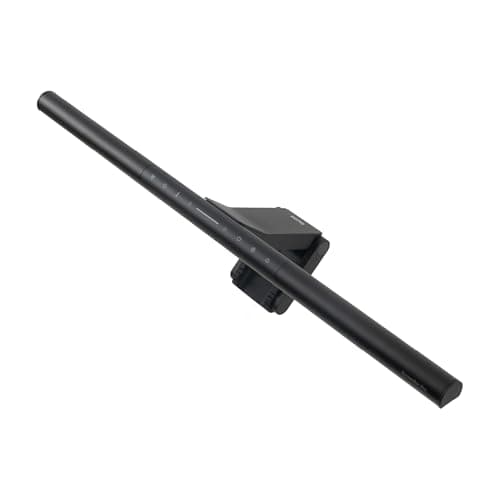 1. BenQ ScreenBar Pro Almost everyone comparing these two
| >1000 lux at 50cm | 85 × 50cm | 8.5W | No | Yes | $139.00 Check Price on Amazon |
| 2 | 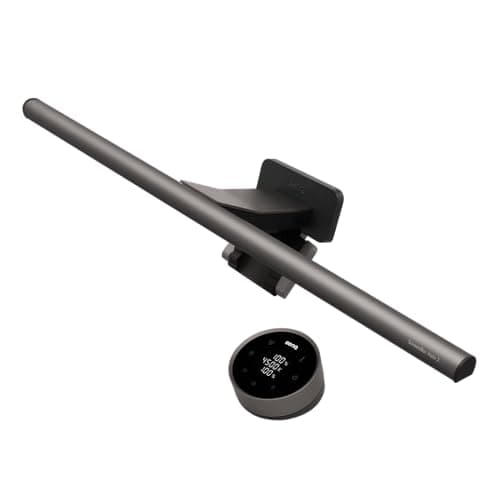 2. BenQ ScreenBar Halo 2 A dark room, and a glow behind the screen
| >1000 lux at 50cm | 85 × 50cm | 15W | Yes | No |
The first two columns are identical, and that is the page. BenQ publishes the same center illuminance and the same coverage area for both bars, so there is no published basis for saying the Halo 2 puts more light on your desk. The extra 6.5W is the rear backlight. Color: both publish 2700–6500K and Ra≥95; the Halo 2 additionally publishes Rf≥96, a TM-30 fidelity figure. The rated-life asymmetry: the 50,000-hour number comes from a BenQ FAQ that lists specific models. The Pro is on that list. The Halo 2 is not, and its own spec page does not carry the figure — so we print it for both in the Spec Line, where it is the published number for the range, and flag here which model it was actually attached to. Neither figure cites a standard: no L70, no LM-80. Warranty: 1 year in the US on both, which is the shortest term on anything we rank in this hub.
Prices and stock as of October 18, 2026, from Amazon’s API. They change; we show a live number or none at all. #ad — we earn a commission.
Buy the ScreenBar Pro. It publishes the same light on your desk as the Halo 2 — the same center illuminance, the same coverage area — at 8.5W instead of 15W and for less money. Buy the Halo 2only if you want the rear backlight or the wireless controller, because on BenQ’s own figures those are the two things the premium buys.
The finding: BenQ publishes the same light twice
Put the two spec tables side by side and the comparison resolves itself. For both bars, BenQ publishes >1000 lux of center illuminance measured at 50 cm, and an 85 × 50 cm area covered at 500 lux. Those are the figures that describe light reaching your keyboard, your notebook and your hands.
The Halo 2 draws up to 15W. The Pro draws up to 8.5W. Nearly twice the power for the same published output on the desk, which is only a paradox until you notice where the extra watts go: into the strip pointing at the wall behind your monitor.
This matters because the model names say the opposite. “Halo 2” against “Pro” reads like a straight upgrade, and the price supports that reading. The spec tables do not. It is the same pattern we found on Ergotron’s LX and LX Pro, where the “Pro” holds three pounds less.
What the extra money does buy
Three things, and they are real.
The backlight.A rear-facing strip, which is bias lighting integrated into the fitting. That solves a genuinely different problem from the front light — screen-against-dark-wall rather than screen-against-dark-desk — and our comparison of the two is the page to read before deciding you want it.
The wireless controller. A puck on the desk instead of touch pads on the bar. Small, and genuinely better: a touch control on a bar clipped to the top of a monitor is a reach over everything on the desk.
An Rf≥96 figure.The Halo 2 publishes a TM-30 fidelity index alongside the Ra≥95 both bars quote. It is a more modern color measure than CRI, as our CRI page explains, and it is the only published color difference between the two.
The asymmetry worth knowing about
Both bars appear with a 50,000-hour rated life in our Spec Lines, and that figure needs a caveat that neither product page gives it. It comes from a blanket BenQ FAQ which lists the models it applies to. The Pro is on that list. The Halo 2 is not, and the Halo 2’s own spec page does not carry the number.
We are not going to turn that into an accusation — a newer model missing from an older FAQ is the most boring explanation and probably the right one. But it is the kind of thing a buyer is entitled to notice, especially since neither figure cites a standard: no L70 threshold, no LM-80 test, nothing. Compare that with the lamp at the top of our desk lamp roundup, which publishes an L70 figure, and you can see what a properly specified rated life looks like.
The warranty is the other number to read: one year in the US, on both, which is the shortest term on anything we rank in this hub.
What we can’t tell you
We have not used either bar. We cannot tell you whether the Halo 2’s presence detection is helpful or irritating, whether the backlight is bright enough for your wall color, how either one clips onto your specific monitor bezel, or whether either is still working in year six of a 50,000-hour claim. Those need the objects and time. Our methodologyis explicit that this page is a reading of two spec tables — which is exactly the comparison the model names make hard to do yourself.
The picks, in detail
1. Almost everyone comparing these two
BenQ ScreenBar Pro
The same published light on your desk as the Halo 2, at 8.5W and less money. Unless you specifically want a glow behind the monitor, this is the BenQ to buy — and we would rather say that than earn the larger commission.
- Color temp
- 2700–6500K
- CRI
- Ra≥95
- Rated life
- 50,000 hr
BenQ publishes >1000 lux of center illuminance at 50 cm and an 85 × 50 cm coverage area at 500 lux for this bar. Those are the two numbers that describe light landing on your keyboard and your paperwork, and they are the same two numbers BenQ publishes for the Halo 2.
It draws 8.5W to do it. It covers 2700–6500K in eight segments, publishes Ra≥95, and carries a motion sensor with auto-dimming. It is also the model explicitly namedin BenQ’s 50,000-hour rated-life FAQ, which the Halo 2 is not.
What you give up is the controller and the backlight. The controls are touch pads on the bar itself, so you reach over the desk to change anything; most people change it twice and then never again.
Good
- Publishes the same >1000 lux at 50cm as the Halo 2, at 8.5W
- Eight color-temperature segments across 2700–6500K
- Motion sensor and auto-dimming
- Explicitly named in BenQ's 50,000 hr FAQ list, which the Halo 2 is not
Not so good
- Touch controls on the bar mean reaching over the desk
- No backlight
- Like every BenQ here, the rated-life figure cites no standard at all
Don’t buy it if: you sit in a room with good ambient light already. A light bar solves screen-versus-room contrast; if your room is already bright, you are solving a problem you do not have.
Price as of October 18, 2026. #ad — we earn a commission.
Where these numbers came from
- BenQ ScreenBar Pro specification page — read 2026-07-16
- BenQ FAQ — color temperature range of ScreenBar Pro — read 2026-07-16
2. A dark room, and a glow behind the screen
BenQ ScreenBar Halo 2
Buy it for the rear backlight and the wireless controller, because those are the only two things the extra money and the extra 6.5W demonstrably buy. The front-light figures are identical to the Pro's.
- Color temp
- 2700–6500K
- CRI
- Ra≥95
- Rated life
- 50,000 hr
The Halo 2 is the better object. A wireless controller that sits on the desk instead of touch pads you have to reach for, a rear backlight, presence detection on top of auto-brightness, and an Rf≥96TM-30 fidelity figure alongside the Ra≥95 everyone quotes — a modern color metric rather than the 1974 one.
It is second here because of what it does notbuy. Its published front-light figures are the Pro’s figures, exactly: >1000 lux at 50 cm, 85 × 50 cm at 500 lux. The 15Wmaximum draw against the Pro’s 8.5W is the backlight, not the desk. And the 50,000-hour figure quoted for it comes from a blanket BenQ FAQ that does not name this model.
If the glow behind the monitor is what you want — and it solves a different problem from the front light — this is the one bar that does both jobs from one fitting.
Good
- Wireless controller rather than a touch panel on the bar itself
- Rear backlight, which is the actual reason to pick this over the Pro
- Presence detection plus auto-brightness
- Publishes Rf≥96 alongside Ra≥95 — a modern TM-30 fidelity figure, not just the 1974 one
Not so good
- Draws max 15W against the Pro's 8.5W for the same published >1000 lux at 50cm
- The 50,000 hr figure comes from a blanket BenQ FAQ that does not name the Halo 2, not from its spec page
- 1-year US warranty, on the most expensive bar here
Don’t buy it if: you do not need the backlight. The Pro puts the same published light on your desk for less money and 6.5 fewer watts — the Halo 2's premium is almost entirely the glow behind the monitor.
Price as of October 18, 2026. #ad — we earn a commission.
Where these numbers came from
- BenQ ScreenBar Halo 2 specification page — read 2026-07-16
- BenQ FAQ — color temperature range of ScreenBar Halo 2 — read 2026-07-16
- BenQ FAQ — LED lifespan (the source of the 50,000 hr figure) — read 2026-07-16
Common questions
Is the ScreenBar Halo 2 brighter than the ScreenBar Pro?
Not according to BenQ. Both spec tables publish >1000 lux of center illuminance at 50 cm and the same 85 × 50 cm coverage area at 500 lux. There is no published figure that makes the Halo 2 brighter on the desk. The Halo 2 draws up to 15W against the Pro’s 8.5W, and that difference is the rear backlight. If what you want is more light on the work surface, more wattage in this case does not deliver it — see how many lumens a desk needs for the figure to aim at instead.
Is the Halo 2's backlight worth the extra money?
It depends entirely on whether you want bias lighting, because that is what the backlight is. Bias lighting solves the contrast between a bright screen and a dark wall behind it; a monitor light bar solves the contrast between a bright screen and a dark desk in front of it. They are two different problems and we have a page on exactly that distinction. If you want both, the Halo 2 does both from one fitting and that is a real convenience. If you want both cheaply, a Pro plus a dedicated strip from our bias lighting roundup is usually the less expensive combination and gives you independent control of each.
Do both BenQ bars have the same CRI?
Both publish Ra≥95, which is the figure most brands quote and the one our CRI page explains the limits of. The Halo 2 publishes one thing the Pro does not: Rf≥96, a TM-30 fidelity index, which is a more modern and more complete color measure than the 1974-vintage Ra. If color accuracy at the desk is your reason for buying, that is a genuine — if small — argument for the Halo 2, and it is the only published color difference between them.
Which BenQ ScreenBar should I buy?
The Pro, unless you specifically want the glow behind the monitor or the wireless puck rather than touch controls on the bar. It publishes the same light on the desk, draws 6.5W less, costs less, and is the model BenQ names in its own rated-life FAQ. Buy the Halo 2 if you work in a dark room in the evening and want front light and bias light from one fitting. Our full light bar roundup ranks both against cheaper bars from Xiaomi and Quntis on the same published figures.
Sources
Every figure on this page comes from one of these. If a manufacturer doesn’t publish a number, we print “—” rather than estimate it.
- BenQ ScreenBar Pro specification page — read 2026-07-16
- BenQ FAQ — color temperature range of ScreenBar Pro — read 2026-07-16
- BenQ ScreenBar Halo 2 specification page — read 2026-07-16
- BenQ FAQ — color temperature range of ScreenBar Halo 2 — read 2026-07-16
- BenQ FAQ — LED lifespan (the source of the 50,000 hr figure) — read 2026-07-16
Read next
The best monitor light bars
Where both of these are researched in full, against the cheaper Xiaomi and Quntis bars on the same published figures.
Bias lighting vs monitor light bar
The Halo 2's premium is a backlight. This is the page that says what a backlight is actually for.
What a monitor light bar actually does
Start here if you have not decided whether you want one of these at all.
How to position a monitor light bar
Both bars publish their figures at 50cm. This is how to get your desk to that geometry.
What CRI is and why it matters
Both publish Ra≥95; only one publishes an Rf figure. This explains the difference between those two numbers.