The best surge protectors for a home office desk
We have not plugged any of these in. What we did was read four manufacturers' own numbers and line up the three that decide the purchase — how much surge energy it absorbs, how many things it powers, and how long the maker backs the box, not just your gear.
By Stephen V.Last reviewed
Quick picks
Ranked, with the manufacturer’s own longevity figure next to each one. Tap a row to jump to the full write-up.
| # | Product | Best for | Longevity | Price |
|---|---|---|---|---|
| 1 | 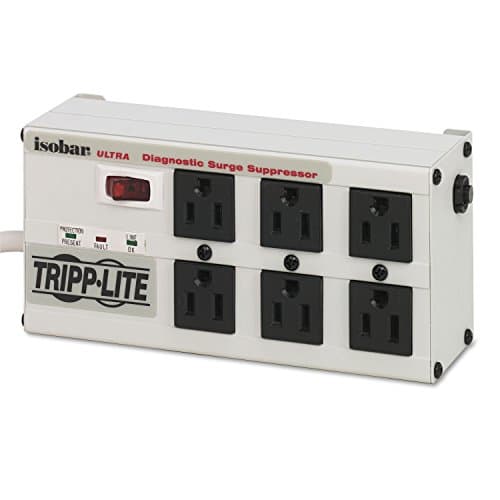 Tripp Lite Isobar ISOBAR6ULTRA A metal box that goes under the desk and stays there. The most protection here, the most solid build here, and a lifetime warranty — you pay for all three. | Buying once and mounting it | LifetimeWarranty | |
| 2 | 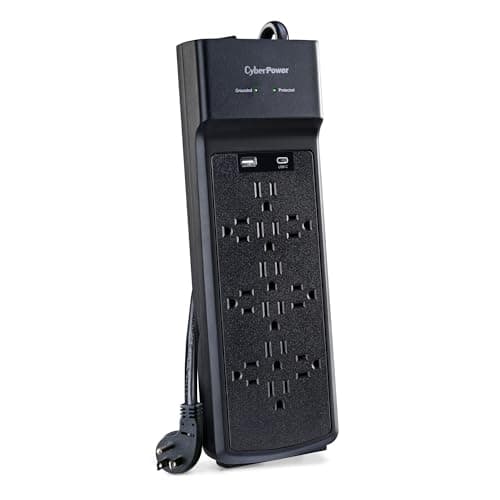 CyberPower CSP1206UC The most outlets, a modern USB-C port, and nearly the Isobar's protection for well under half the price. The catch is in the third column: one year on the strip itself. | A full desk of things to plug in | 1 yrWarranty | |
| 3 | 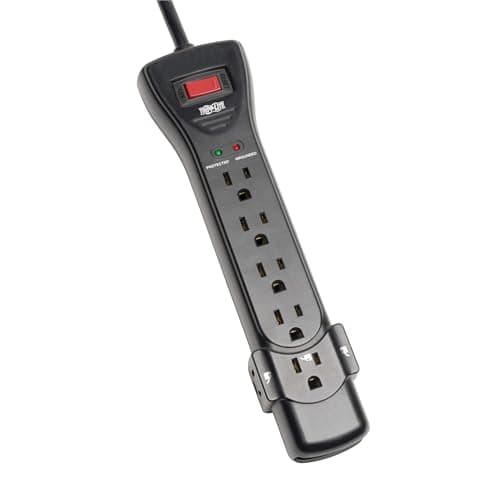 Tripp Lite Protect It SUPER7B The buy-it-for-life budget pick: the lowest price of the three full-size strips here, a lifetime warranty, and the biggest equipment insurance of any strip on the page. | Lifetime cover on a small budget | LifetimeWarranty | $28.99Amazon $42.00 −31% |
| 4 | 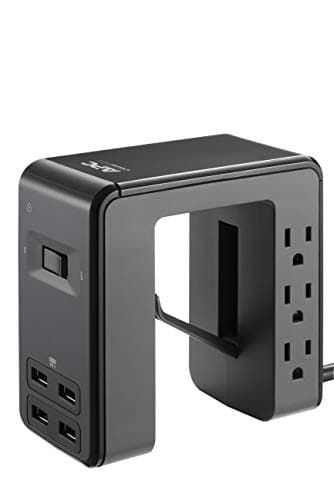 APC Desk Mount Power Station PE6U4 The one built for the desk rather than the floor: it clamps to the edge and puts four USB ports and six outlets at hand height. Just know it protects the least. | Charging within reach, on the desktop | LifetimeWarranty |
Prices as of Sep 19, 2026, from Amazon’s API. They change; we show a live number or none at all.
A surge protector is the cheapest insurance on your desk and the one people buy the most carelessly — usually the widest strip on the shelf, on price, in a hurry. So this page ranks four of them on the three numbers that actually decide the purchase, and every one is published by the maker: how much surge energy it can absorb, how many things it powers, and how long the manufacturer stands behind the box.
We have not plugged any of these in. We have not measured a clamping voltage or staged a surge. What we did was read each manufacturer’s own product page, spec sheet and warranty document, pull three numbers, and cite every one so you can check us — and where a maker does not publish something, we say so rather than borrow a figure from a shop. Our methodology page sets out the whole rule and what it cannot tell you.
What we ranked on, and why
Three specs, in order:
- Surge rating, in joules.This is how much surge energy the strip can absorb over its whole life before it stops protecting. It is both “how much of a hit can it take” and, because it depletes with use, “how long will it keep working”. The strips here run from 1080 to 3330 joules — a three-fold spread that mostly tracks what you’re protecting.
- Outlets (and USB). The practical spec: how many things it powers, and whether it charges phones and tablets directly. This is where a desk strip either fits your setup or leaves you daisy-chaining a second one, which is exactly what you should not do.
- Warranty.The longevity slot, as on every product page on this site. A surge protector is a wear item — it uses itself up protecting you — so how long the maker backs it is not a footnote. It runs from one year to lifetime on this page, on strips that look broadly similar in a photo.
What we did not rank on: how it feels, how it looks, or the size of the insurance sticker. Which brings us to the one number you should be most careful with.
The $300,000 number is not the warranty
Every surge protector advertises a connected-equipment guarantee— a dollar figure, here ranging from $50,000 to $300,000, promising to repair or replace your gear if a surge gets through while it is properly connected. It is the biggest number on the box, and it is the one shoppers anchor on.
It is also not the same thing as the warranty on the strip. The guarantee insures your equipment; the warranty covers the strip itself. And the strip is the part that wears out — every surge it absorbs uses up a little of the protection you paid for. So “how long is the box guaranteed” is a real question, and the guarantee figure does not answer it.
The CyberPower on this page is the clean illustration. It carries the largest equipment guarantee here by far — $300,000— sitting on top of a one-year product warranty. The two Tripp Lites carry smaller guarantees ($50,000 and $75,000) and lifetime warranties. Read only the big number and the CyberPower wins in a landslide. Read the number this site is built to weigh, and it is the shortest-backed strip on the page. Both facts are true, and you deserve to see which is which before you choose.
Get it off the floor
The best thing you can do with any of these has nothing to do with which one you pick: mount it under the desk. A surge strip lying on the floor collects dust, catches feet and the vacuum, sits in the path of any spill, and turns every device into a cable fished out from under your chair. Screwed or clamped to the underside of the desktop, the same strip puts every plug inches from where it’s used, and one cord leaves the desk instead of a nest of ten.
Three of the strips here are built for that. The Isobar has keyhole mounting tabs and a right-angle plug; the SUPER7B has keyhole slots on its underside for the same job in plastic; the APC clamps to the desk edgeand puts its outlets at hand height. Only the CyberPower needs a couple of adhesive-backed brackets or a saddle clip to get up there. Whichever you buy, the mounting is the step that actually tidies the desk — the strip is just what you mount. We set out the full sequence in how to hide a power strip under a desk, and if your desk lifts, the standing-desk version changes the run again.
Why the list is short, and who’s missing
Four strips, not fifteen, and the reason is the same one that keeps this whole site honest. Surge protectors are a sea of near-identical SKUs, and a single Amazon listing — “12 outlets, 3,780 joules” — can map to three different manufacturer models with three different published warranties. If we cannot tie a listing to one maker’s page and read what that exact model is warranted for, we cannot tell you what you are buying, so we do not rank it.
That rules out a lot of the big-name 12-outlet strips you will see topping other lists, not because they are bad — some are excellent — but because the listing and the spec sheet do not reliably describe the same object. The four here each name a model code (ISOBAR6ULTRA, CSP1206UC, SUPER7B, PE6U4) that resolves to a single page we could read and cite. It is the same standard that keeps spec-less marketplace brands off our under-desk cable roundup.
What we can’t tell you
We have not lived with any of these. We cannot tell you whether the Isobar’s LEDs are reassuring or annoying, whether the APC’s clamp fits your particular desk edge, how the CyberPower’s USB-C holds up over a couple of years, or — the question that matters most and that no spec sheet answers — how any of their warranty claims processes actually behave when you need them. Those need hands and time, and we have neither.
What we can do is line up four strips whose makers publish real numbers, keep the guarantee and the warranty in separate columns where they belong, and point out that the strip with the largest headline insurance is the one covered for the shortest time. Then the choice is yours: the metal box you mount and keep for a decade, the twelve-outlet workhorse with the honest warranty caveat, the cheap lifetime-backed floor, or the clamp-on charger for the top of the desk.
The picks, in detail
1. Buying once and mounting it
Tripp Lite Isobar ISOBAR6ULTRA
A metal box that goes under the desk and stays there. The most protection here, the most solid build here, and a lifetime warranty — you pay for all three.
- Surge rating
- 3330 J
- Outlets
- 6
- Warranty
- Lifetime
This is ranked first on the two things this whole site is about: how well it protects, and how long it lasts. The Isobar posts the highest joule rating on the page — 3330— and it is the only strip here in a metalhousing rather than molded plastic. Those are not the same claim, and both are on Tripp Lite’s own page.
The detail that earns it the top slot for this site, though, is the mounting. It has keyhole tabs on the back and a right-angle plug, which means it screws flat to the underside of the desk and disappears. That is the single change we recommend most often in how to hide desk cables — get the strip off the floor — and this is a strip built to do it rather than one you have to zip-tie into place.
The warranty is the third number. Lifetime on the unit itself, with a $50,000 equipment policy behind it. That policy is smaller than the CyberPower’s $300,000 headline — and we will come back to why that comparison is less flattering to CyberPower than it looks — but the productwarranty here is lifetime against CyberPower’s one year, and on a device whose whole job is to wear out slowly by taking hits for your gear, how long the maker backs the box matters.
Good
- 3330 joules — the highest surge-energy rating on this page
- A solid metal housing instead of the usual plastic, which is the single clearest build-quality difference in the category
- Keyhole mounting tabs and a right-angle plug, so it screws flat to the underside of a desk and gets off the floor — where a surge strip belongs
- Diagnostic LEDs for power, line fault and protection status, so you can see when the suppressor has actually worn out
- Lifetime limited warranty plus a $50,000 Ultimate Lifetime Insurance policy on connected equipment (US, Canada and Puerto Rico)
Not so good
- By far the most expensive strip here — several times the price of the others
- Only 6 outlets, fewer than the 12-outlet CyberPower at well under half the price
- No USB ports at all; every phone and dock needs its own brick in an AC outlet
- Its 6-ft cord is the shortest here — measure the run to your nearest wall socket first
- Availability on this exact model is thin: the live listing quotes a 4–5 week lead time rather than same-week shipping, so it is a plan-ahead purchase, not a next-day one
Don’t buy it if: you need a lot of outlets or any USB. This is a small, serious, expensive strip built to protect a few important things extremely well and last for decades. If your problem is 'I have eleven things to plug in', the CyberPower solves that for a fraction of the money — you are just trading the metal box and the lifetime warranty to do it.
Price as of Sep 19, 2026. #ad — we earn a commission.
Where these numbers came from
- Eaton Tripp Lite Isobar ISOBAR6ULTRA product page — 6 outlets, 3330 joules, metal housing, diagnostic LEDs, keyhole mounting tabs, right-angle plug — read 2026-08-05
- Eaton Tripp Lite Series warranty information — Ultimate Lifetime Insurance (connected equipment) and lifetime product warranty tiers by product family — read 2026-08-05
2. A full desk of things to plug in
CyberPower CSP1206UC
The most outlets, a modern USB-C port, and nearly the Isobar's protection for well under half the price. The catch is in the third column: one year on the strip itself.
- Surge rating
- 3000 J
- Outlets
- 12
- Warranty
- 1 yr
On the first two numbers, this is almost the Isobar for well under half the money. 3000 joules against 3330; 12 outlets against 6; a USB-A and a modern USB-Cport the Isobar doesn’t have at all. It even publishes a clamping voltage — 800Vacross normal and common mode — which is the number that tells you how much of a surge actually reaches your gear, and which most strips leave off entirely.
Then the third column. CyberPower’s own page states a One Year Limited Warranty on the product, and a $300,000 Connected Equipment Guaranteeon what’s plugged into it. Read those together, because the gap between them is the whole story. The $300,000 is the big, reassuring number, and it is real — but it protects your monitor and your PC, not the strip. The strip itself is covered for a year.
That is the same trap as a big CRI sticker on a desk lamp: the largest number is not answering the question you think it is. A surge protector is a wear item — every hit it takes uses up a little of the protection — so “how long is the box itself guaranteed” is not a footnote, it is the point. One year is short for that. It is why this excellent, cheap, well-specified strip is ranked below two plainer ones: it wins on everything except the number this site was built to weigh.
Good
- 12 outlets — the most here, and enough for a whole desk plus a monitor arm's worth of bricks
- 3000 joules, within a rounding error of the metal Isobar and well above the other two
- The only strip here with USB-C (15W) alongside a USB-A port (2.4A), so a laptop-adjacent phone or tablet charges without a brick
- Publishes an actual clamping voltage — 800V across all three modes — which most consumer strips never print
- $300,000 Connected Equipment Guarantee, the largest on the page
Not so good
- A one-year product warranty — the shortest here by a wide margin, against three lifetime warranties
- Plastic housing, like everything here except the Isobar
- The $300,000 guarantee covers your equipment, not the strip: after year one, a failed unit is your problem even though your gear is still notionally insured
- ETL listed rather than UL — an equivalent US safety mark, but not the UL 1449 most buyers look for by name
Don’t buy it if: 'buy it once' is the priority. The specs are excellent and the price is hard to argue with, but the one-year warranty is the honest reason this is second and not first. If you expect to own a surge strip for a decade — which is the whole premise of a good one — the lifetime-warranted Tripp Lites are backing a longer bet, and you should weigh that against the extra outlets.
Price as of Sep 19, 2026. #ad — we earn a commission.
3. Lifetime cover on a small budget
Tripp Lite Protect It SUPER7B
The buy-it-for-life budget pick: the lowest price of the three full-size strips here, a lifetime warranty, and the biggest equipment insurance of any strip on the page.
- Surge rating
- 2160 J
- Outlets
- 7
- Warranty
- Lifetime
The SUPER7B is here because it makes the same bet the Isobar does — lifetime warranty, real insurance — at the bottom of the price range instead of the top. It is the cheapest full-size strip on the page, and it still carries a lifetime product warranty and a $75,000equipment policy that is, oddly, larger than the more expensive Isobar’s $50,000.
What you give up for the price is protection headroom and build. At 2160 joulesit has the least surge-energy capacity of the three full-size strips here, and it is molded plastic rather than the Isobar’s metal. It also has no USB, which on a modern desk is a real omission the CyberPower and APC fill.
Three of the seven outlets are wide-spaced for transformers, which is a small, genuinely thoughtful touch: it means three fat wall-warts can go in without smothering the outlets next to them — the everyday reason a “7-outlet” strip often behaves like a 4-outlet one. It also has keyhole slots on the underside, so it screws up under the desktop rather than living on the floor, which is the change we recommend most often. For a desk that is mostly monitor, laptop dock and a couple of chargers, this is plenty of strip, and it is warranted to outlive several disposable ones.
Good
- The cheapest of the three full-size strips on this page, and it still carries a lifetime product warranty
- A $75,000 Ultimate Lifetime Insurance policy — larger than either the Isobar's or the APC's
- Three of its seven outlets are wide-spaced for bulky transformers, so three fat wall-warts fit without smothering their neighbors
- 7-ft cord — the longest here — plus a 15A circuit breaker, EMI/RFI line-noise filtering, and both UL Listed and UL Certified marks
- Keyhole slots on the underside, so this plastic strip mounts under the desk the same way the metal Isobar does
Not so good
- 2160 joules is the lowest of the three mains-only strips here (the APC is lower, but it is a different kind of product)
- Plastic housing and a flat plug, not the metal box of the Isobar — the mounting is the same idea, the build is not
- No USB ports at all, so every phone and dock still needs its own brick in an AC outlet
- A 'lifetime' warranty is only as good as the maker's claims process, which no spec sheet can show you
Don’t buy it if: you want the highest protection or any USB charging. This is the honest floor of the category: a cheap, lifetime-warranted, well-insured plastic strip that does the basic job and keeps doing it. If you want a metal box you can mount, that is the Isobar; if you want twelve outlets and USB-C, that is the CyberPower. This is the one you buy when the budget is the constraint and you still refuse to buy something disposable.
$42.00 −31%
Price as of Sep 19, 2026. #ad — we earn a commission.
Where these numbers came from
- Eaton Tripp Lite Series SUPER7B (B00AAHT8AQ) — Eaton's own listing copy, the only version of this model's spec sheet we can currently read (source of the 7 outlets, 2160 joules, 7-ft flat-plug cord, three wide-spaced transformer outlets, 15A circuit breaker, EMI/RFI filtering, diagnostic LEDs, keyhole mounting slots, UL Listed and UL Certified marks, Lifetime Limited Manufacturer's Warranty and $75,000 Ultimate Connected Equipment insurance). Eaton retired the tripplite.eaton.com model pages into eaton.com during the Tripp Lite integration and the replacement SKU pages return no content to automated access — same handling as APC below — read 2026-08-17
- Eaton Tripp Lite Series warranty information — lifetime product warranty and $75,000 Ultimate Lifetime Insurance on the Protect It line — read 2026-08-05
4. Charging within reach, on the desktop
APC Desk Mount Power Station PE6U4
The one built for the desk rather than the floor: it clamps to the edge and puts four USB ports and six outlets at hand height. Just know it protects the least.
- Surge rating
- 1080 J
- Outlets
- 6 + 4 USB
- Warranty
- Lifetime
Every other strip here is designed to live on the floor or under the desk. The PE6U4 is designed to live on the desk: a U-shaped block that clamps to the edge and puts six outlets and four USB-A ports (sharing 4.8A) up where your hand is. For the specific annoyance of reaching under a desk to find a charger, it is the neatest answer on the page.
The honest caveat is the first number. At 1080 joulesits surge rating is the lowest here by a wide margin — a third of the Isobar’s. That is not nothing, and for phones, earbuds and a laptop it is perfectly adequate. But it is not the number you want standing between a spike and a $600 monitor, and APC’s own lifetime warranty and $50,000 policy do not change the physics of a smaller MOV rating.
So this is a convenience product first and a surge protector second, and we rank it honestly as that. Its warranty is genuinely strong — lifetime, same $50,000 cover as the Isobar — but the protection headroom is thin. The right use for it is the charging you do with your hands, on the desktop, while something with more joules handles the expensive hardware plugged in below. One stock note: at the time of writing this exact model shows “only 17 left”, so if the buy button lands you on a search rather than the listing, that is why.
Good
- A U-shaped body that clamps onto the desk edge, so outlets and USB sit at hand height instead of under your feet
- Four USB-A ports sharing 4.8A — enough to keep a phone, earbuds and a tablet topped up without an AC brick each
- Lifetime warranty and a $50,000 connected-equipment policy, matching the far pricier Isobar's cover
- Genuinely solves the reach problem a floor strip creates: nothing to fish for under the desk
Not so good
- 1080 joules — by a wide margin the lowest surge rating on this page
- Only 4 USB-A and no USB-C; fast-charging a modern laptop or phone still needs a wall brick
- 'Only 17 left in stock' at the time of writing — availability on this exact ASIN is thin, so the buy link may fall back to a search
- The desk clamp fits a limited edge thickness; a thick or unusually shaped desktop may not take it
Don’t buy it if: surge protection is the actual job. 1080 joules is fine for phones and a laptop, but it is a third of the Isobar's rating, and if you are protecting an expensive monitor or a desktop tower you want more headroom than this. Buy the PE6U4 for the form factor — outlets and USB at your fingertips, clamped to the desk — and pair it with one of the higher-joule strips above for the gear that matters, rather than asking it to be your only line of defense.
Price as of Sep 19, 2026. #ad — we earn a commission.
Where these numbers came from
Common questions
How many joules do I need for a home office desk?
More than a phone charger, and it depends on what you are protecting. Joules measure how much surge energy the strip can absorb over its life before it stops protecting, so a higher number is both more protection now and a longer life. For a desk with a monitor, a PC or laptop dock and a few chargers, the strips on this page run from 1080 to 3330 joules— the higher end is what you want behind an expensive monitor or a desktop tower, while 1080 is fine for phones and a laptop. Whatever you buy, count what is actually going on the desk first with how many outlets do you need for a desk.
What's the difference between the connected-equipment guarantee and the warranty?
They are two different promises, and the bigger number is usually the one that matters less. The connected-equipment guarantee(the $50,000–$300,000 figures) is insurance on your gearif a surge gets through — a claim you hope never to file, with its own fine print. The product warranty is how long the maker backs the strip itself, which is a wear item that uses up protection every time it takes a hit. On this page the CyberPower pairs the largest guarantee ($300,000) with the shortest warranty (one year), while the two Tripp Lites carry lifetime warranties with smaller guarantees. This site’s third Spec Line slot is always the longevity number, so it shows the product warranty, not the insurance headline.
Should the surge protector go on the floor or under the desk?
Off the floor, ideally mounted under the desktop — it is the single best change most desks can make, and it is the whole argument of how to hide a power strip under a desk. A mounted strip keeps every plug inches from where it is used, so one cord leaves the desk instead of ten, and it stays clear of feet, vacuum cleaners and spills. The Isobar here has keyhole tabs for exactly this; the APC clamps to the edge instead. If your desk moves, the rules change — see cable management for a standing desk.
Is a power strip the same as a surge protector?
No, and it is the most common and most expensive mix-up in this category. A plain power strip just splits one outlet into several; a surge protector adds components (MOVs) that clamp voltage spikes before they reach your gear, and a joule rating that tells you how much it can absorb. Everything on this page is a surge protector. We walk through when the difference actually matters — and when a plain strip is genuinely fine — in power strip vs surge protector for a desk.
Why aren't the big-name Amazon 12-outlet strips on this list?
Because too many of them do not tie to a single readable spec. Search “12-outlet 3,780-joule surge protector” and you get one listing that maps to three different manufacturer models with different published warranties — so we cannot tell you which one you are actually buying, or what it is really warranted for. We only rank strips whose listing names a model code we can resolve to one maker’s page and read. It is the same rule that keeps spec-less marketplace brands off our under-desk cable roundup, and it is explained in full on our methodology page.
Do surge protectors wear out?
Yes — that is the part most people miss. The MOV components inside absorb a little damage with every surge, so a strip that has taken years of hits may still power your gear while no longer protecting it. That is why a protection status LED (the Isobar has one) is worth more than it looks, and why the product warranty matters as much as the joule rating: both are really asking the same question, which is how long this thing keeps doing its job. If yours is old, undated and has quietly survived a few storms, it is probably time to replace it regardless of what it cost.
Sources
Every figure on this page comes from one of these. If a manufacturer doesn’t publish a number, we print “—” rather than estimate it.
- Eaton Tripp Lite Isobar ISOBAR6ULTRA product page — 6 outlets, 3330 joules, metal housing, diagnostic LEDs, keyhole mounting tabs, right-angle plug — read 2026-08-05
- Eaton Tripp Lite Series warranty information — Ultimate Lifetime Insurance (connected equipment) and lifetime product warranty tiers by product family — read 2026-08-05
- CyberPower CSP1206UC product page (Specs/Downloads) — 3000 joules, 12 NEMA 5-15R outlets, 1 USB-A (2.4A) + 1 USB-C (15W), 800V clamping (H-N/H-G/N-G), One Year Limited Warranty, $300,000 Connected Equipment Guarantee — read 2026-08-05
- Eaton Tripp Lite Series SUPER7B (B00AAHT8AQ) — Eaton's own listing copy, the only version of this model's spec sheet we can currently read (source of the 7 outlets, 2160 joules, 7-ft flat-plug cord, three wide-spaced transformer outlets, 15A circuit breaker, EMI/RFI filtering, diagnostic LEDs, keyhole mounting slots, UL Listed and UL Certified marks, Lifetime Limited Manufacturer's Warranty and $75,000 Ultimate Connected Equipment insurance). Eaton retired the tripplite.eaton.com model pages into eaton.com during the Tripp Lite integration and the replacement SKU pages return no content to automated access — same handling as APC below — read 2026-08-17
- Eaton Tripp Lite Series warranty information — lifetime product warranty and $75,000 Ultimate Lifetime Insurance on the Protect It line — read 2026-08-05
- APC Desk Mount Power Station PE6U4 product page — 6 outlets, 4 USB-A (4.8A shared), 1080 joules, U-shaped desk-clamp form factor, lifetime warranty, $50,000 connected-equipment policy (page returns 403 to automated fetch; figures corroborated across APC/Schneider data and consistent retailer listings, and match the Amazon title) — read 2026-08-05
Read next
Power strip vs surge protector for a desk
The decision that comes before this page: whether you need surge protection at all, and when a plain strip is fine.
How many outlets do you need for a desk?
Count the load before you buy the strip — the inventory that decides outlet count and joules.
How to hide a power strip under a desk
Where the strip should actually live once you own it — mounted, off the floor, one cord out.
The best cable management boxes
If you'd rather box the strip than mount it — the one cable product on this site citing a named safety standard.
Cable management for a standing desk
A desk that moves needs the strip to travel with it — how the power run changes when the desk lifts.
The best under-desk cable management
Once the strip is mounted, this is how you dress the cables that leave it.