Do you need a surge protector for a standing desk?
The protection question has a short answer. The interesting question is where the strip lives — because a desk that travels two feet turns every cable into a length problem, and the specs that decide it are the two nobody reads: cord length and whether the thing can be mounted at all.
By Stephen V.Last reviewed
Quick picks
Ranked, with the manufacturer’s own longevity figure next to each one. Tap a row to jump to the full write-up.
| # | Product | Best for | Longevity | Price |
|---|---|---|---|---|
| 1 | 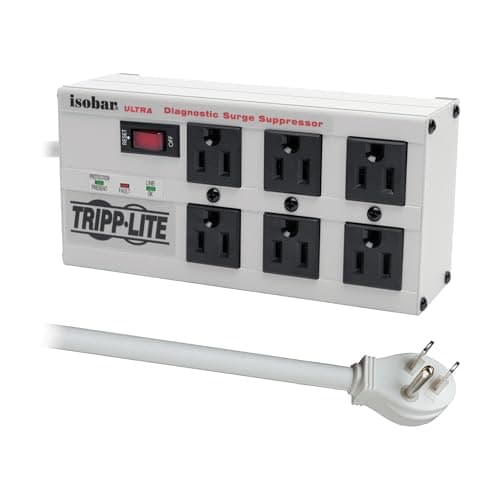 Tripp Lite Isobar ISOBAR6ULTRA A metal box with keyhole mounting tabs and a right-angle plug — built to screw to the underside of a desk and travel with it. 3330 joules, the highest here, and a lifetime product warranty. Its 6-ft cord is the shortest, so measure the run at full height first. | Mounting under a desk that moves | LifetimeWarranty | |
| 2 | 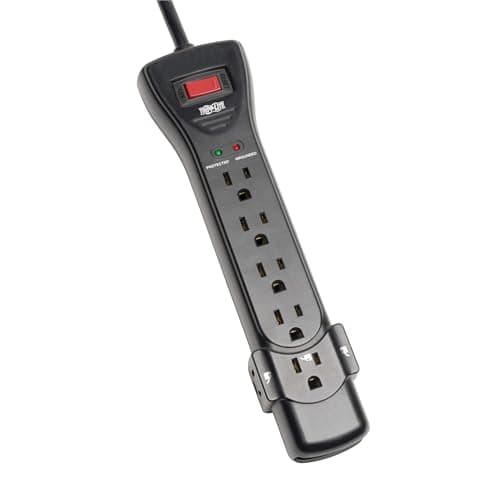 Tripp Lite Protect It SUPER7B Seven outlets, keyhole mounting slots and the longest cord here at 7 ft — the extra foot is the one that matters when a mounted strip has to reach the wall with the desk raised. Lifetime product warranty, 2160 joules. | The longest cord, and still mountable | LifetimeWarranty | |
| 3 | 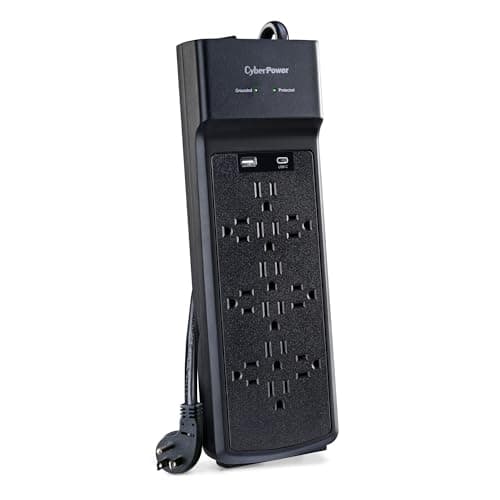 CyberPower CSP1206UC Twelve outlets and 3000 joules with a published 800V clamping voltage — the strip for a standing desk that is also a whole workstation. The one-year product warranty is the honest reason it is not first. | A desk with a lot plugged into it | 1 yrWarranty | |
| 4 | 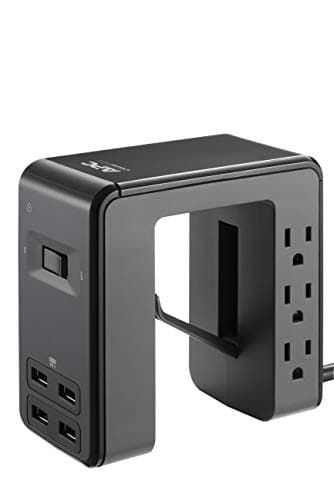 APC Desk Mount Power Station PE6U4 A U-shaped clamp that grips the desktop edge, so it travels with the desk by design and puts six outlets and four USB-A ports within reach while standing. The lowest energy rating here at 1080 joules — read it as a convenience hub with protection, not as the protection. | Charging within reach while you are standing | LifetimeWarranty |
Prices as of October 18, 2026, from Amazon’s API. They change; we show a live number or none at all.
The short answer: yes, but not for the reason people assume. We cannot find a single frame maker publishing a surge or protection requirement for its controller, so the case is not that desk motors are fragile. The case is that a standing desk concentrates expensive electronics on one surface — monitors, a dock, a laptop supply — and then moves them two feet. Which makes the specs that matter cord length and whether the strip can be mounted, not joules.
The spec a standing desk changes
On a fixed desk, a surge protector sits on the floor and nobody thinks about it again. On a sit-stand desk the floor is the wrong place for it, and for a reason that is obvious the moment you see it happen: every cable running from the floor to the desktop has to lengthen by the desk’s entire travel each time it rises.
That travel is bigger than people picture. It is just the difference between a frame’s own published floor and ceiling — UPLIFT publishes 21.6–47.7″, so 26.1″, a little over two feet. TOPSKY publishes 23.6–49.2″, about 25.6″. Those are subtractions you can redo yourself, not cable specs; no manufacturer publishes a slack figure.
Two feet, times every cable, every day. That is what pulls a monitor cable out of the back of a screen eight months in, and it is the actual problem a standing desk creates.
Mount the strip to the desk, and the problem collapses
Put the strip on the desk — screwed to the underside of the top — and exactly one cable has to absorb the travel: the one going to the wall. Everything else plugs in above and stays still relative to the desktop, which is where it already lives.
That is a published feature, not an improvisation. Of the four strips we rank, three can do it: the Isobar ISOBAR6ULTRA has keyhole mounting tabs and a right-angle plug, the Protect It SUPER7B has keyhole mounting slots, and the APC PE6U4 is a U-shaped clamp that grips the desktop edge by design. For the CyberPower, the source page we rely on does not give us a mounting provision, which is worth knowing if mounting is your plan.
Do not substitute tape, zip ties through a vent, or a basket that was not sold to carry a mains appliance. A mains strip above your knees wants a mechanical fixing that was designed to hold it. Our guide to hiding a power strip under a desk goes through the fixing options.
Then cord length becomes the deciding spec
Here is the consequence nobody mentions in a surge-protector review. Once the strip is mounted to the desk, its own cord has to reach the wall socket with the desk at its highest — because that is when the slack is gone.
So the two feet of travel come straight off the usable length of the cord. The 6-ft cord on the Isobar and the 7-ft flat-plug cord on the SUPER7B are a foot apart on paper and much further apart in practice, because both are spending about 26 inches on travel before the plug gets anywhere near the skirting board.
Measure the run before you buy: from the mounting point under the desk, down to the floor at full height, across to the socket. If that number is close to six feet, buy the seven. Never solve it with a second strip in series — and if you need an extension, it should be a single, appropriately rated one upstream of the protection, not another protected strip chained to the first.
Reach, which is the other thing standing changes
At 48 inches, the floor is a long way down. Anything you plug and unplug during the day — a phone, a headset, a laptop you carry between rooms — means stooping to the floor each time, which is a small annoyance that reliably turns into a trailing cable draped over the desk edge.
This is the case for the APC PE6U4, and it is worth being precise about what the case is not. At 1080 joules it is the lowest-rated strip on this page by a wide margin — roughly a third of the Isobar’s 3330. It is a convenience hub that happens to carry protection, not the protection. The sensible configuration on a busy sit-stand desk is both: a well-rated strip mounted underneath for the things that stay plugged in, and a clamp hub at the edge for the things that do not.
What a joule rating actually is
Worth a paragraph, because it is the number people shop on and it is widely misread. A surge protector absorbs energy and is consumed doing it: the rating is a budget, not a permanent property, and a strip that has eaten several surges may be passing power with no protection left. That is what the diagnostic LEDs on these units are for, and it is the strongest argument for the lifetime product warranties on the two Tripp Lites over the CyberPower’s one year.
Keep two numbers apart while you shop, as the roundup does. A connected-equipment figure — $50,000, $75,000, $300,000 here — is a dollar guarantee on your gear, with its own claim conditions. A product warranty is how long the strip itself is covered. A huge equipment figure on top of a one-year product warranty is a different offer from a lifetime term, and the two are easy to confuse deliberately.
What we can’t tell you
We have not surge-tested anything, and we have not run a desk through thousands of cycles to see which cable fails first. No frame maker we checked publishes an electrical protection requirement for its controller, so there is no manufacturer statement we can point you at saying a standing desk needs a surge protector — and we would rather say that than imply one exists.
What the published record does support is narrower and still decisive: the strips that can be mounted say so, the cords are 6 and 7 feet, the travel is a subtraction you can do yourself, and a mounted strip turns every-cable-moves into one-cable-moves. That is the part of this question a spec sheet can actually settle, and it is the part that determines whether your setup still works in a year. The rest of the routing job is in standing desk cable management.
The picks, in detail
1. Mounting under a desk that moves
Tripp Lite Isobar ISOBAR6ULTRA
A metal box with keyhole mounting tabs and a right-angle plug — built to screw to the underside of a desk and travel with it. 3330 joules, the highest here, and a lifetime product warranty. Its 6-ft cord is the shortest, so measure the run at full height first.
- Surge rating
- 3330 J
- Outlets
- 6
- Warranty
- Lifetime
On a desk that goes up and down, the question is not only how much protection a strip offers but whether it can live on the desk rather than on the floor. This one is built for exactly that: keyhole mounting tabs on the back and a right-angle plug, so it screws flat to the underside of the top and rides with it.
That is the whole point of mounting it. A strip bolted to the desk means one lead goes to the wall and everything else stays put as the desk rises; a strip on the floor means every single cable has to take up the desk’s full travel. It also posts the highest energy rating here, 3330 joules, in a metal housing, with a lifetime product warranty and a $50,000 connected equipment policy.
The catch is the one spec that matters most on this page: its 6-ft cord is the shortest of the four. On a standing desk you need that run to reach the socket with the desk at its highest, which is where the slack disappears. Six outlets and no USB, too — this is a small, serious strip for a few important things.
Good
- 3330 joules — the highest surge-energy rating on this page
- A solid metal housing instead of the usual plastic, which is the single clearest build-quality difference in the category
- Keyhole mounting tabs and a right-angle plug, so it screws flat to the underside of a desk and gets off the floor — where a surge strip belongs
- Diagnostic LEDs for power, line fault and protection status, so you can see when the suppressor has actually worn out
- Lifetime limited warranty plus a $50,000 Ultimate Lifetime Insurance policy on connected equipment (US, Canada and Puerto Rico)
Not so good
- By far the most expensive strip here — more than twice the price of the next strip up, and roughly three times the cheapest
- Only 6 outlets, fewer than the 12-outlet CyberPower at well under half the price
- No USB ports at all; every phone and dock needs its own brick in an AC outlet
- Its 6-ft cord is the shortest here — measure the run to your nearest wall socket first
Don’t buy it if: you need a lot of outlets or any USB. This is a small, serious, expensive strip built to protect a few important things extremely well and last for decades. If your problem is 'I have eleven things to plug in', the CyberPower solves that for a fraction of the money — you are just trading the metal box and the lifetime warranty to do it.
Amazon isn’t showing a buyable offer for this one right now.
Price as of October 18, 2026. #ad — we earn a commission.
Where these numbers came from
- Eaton Tripp Lite Isobar ISOBAR6ULTRA product page — 6 outlets, 3330 joules, metal housing, diagnostic LEDs, keyhole mounting tabs, right-angle plug — read 2026-08-05
- Eaton Tripp Lite Series warranty information — Ultimate Lifetime Insurance (connected equipment) and lifetime product warranty tiers by product family — read 2026-08-05
2. The longest cord, and still mountable
Tripp Lite Protect It SUPER7B
Seven outlets, keyhole mounting slots and the longest cord here at 7 ft — the extra foot is the one that matters when a mounted strip has to reach the wall with the desk raised. Lifetime product warranty, 2160 joules.
- Surge rating
- 2160 J
- Outlets
- 7
- Warranty
- Lifetime
This is the pick that reads differently on a standing desk than it does on a fixed one. Its 7-ft flat-plug cord is the longest of the four, and cord length is the standing-desk constraint — the lead has to make it to the socket at full extension, not at resting height.
It also has keyhole mounting slots, so it can go under the top like the Isobar, and the flat plug sits closer to the wall behind furniture. Seven outlets, three of them wide-spaced for transformers, which is the practical difference between a strip that holds seven things and one that holds four plus three blocked sockets. The product warranty is lifetime, with a $75,000 connected-equipment policy.
You give up energy rating: 2160 joules against the Isobar’s 3330 and the CyberPower’s 3000, the lowest of the three protective strips here. And Eaton has retired the tripplite.eaton.com model pages, so its own listing copy is the only version of the spec sheet we can currently read.
Good
- The cheapest of the three full-size strips on this page, and it still carries a lifetime product warranty
- A $75,000 Ultimate Lifetime Insurance policy — larger than either the Isobar's or the APC's
- Three of its seven outlets are wide-spaced for bulky transformers, so three fat wall-warts fit without smothering their neighbors
- 7-ft cord — the longest here — plus a 15A circuit breaker, EMI/RFI line-noise filtering, and both UL Listed and UL Certified marks
- Keyhole slots on the underside, so this plastic strip mounts under the desk the same way the metal Isobar does
Not so good
- 2160 joules is the lowest of the three mains-only strips here (the APC is lower, but it is a different kind of product)
- Plastic housing and a flat plug, not the metal box of the Isobar — the mounting is the same idea, the build is not
- No USB ports at all, so every phone and dock still needs its own brick in an AC outlet
- A 'lifetime' warranty is only as good as the maker's claims process, which no spec sheet can show you
Don’t buy it if: you want the highest protection or any USB charging. This is the honest floor of the category: a cheap, lifetime-warranted, well-insured plastic strip that does the basic job and keeps doing it. If you want a metal box you can mount, that is the Isobar; if you want twelve outlets and USB-C, that is the CyberPower. This is the one you buy when the budget is the constraint and you still refuse to buy something disposable.
Amazon isn’t showing a buyable offer for this one right now.
Price as of October 18, 2026. #ad — we earn a commission.
Where these numbers came from
- Eaton Tripp Lite Series SUPER7B (B00AAHT8AQ) — Eaton's own listing copy, the only version of this model's spec sheet we can currently read (source of the 7 outlets, 2160 joules, 7-ft flat-plug cord, three wide-spaced transformer outlets, 15A circuit breaker, EMI/RFI filtering, diagnostic LEDs, keyhole mounting slots, UL Listed and UL Certified marks, Lifetime Limited Manufacturer's Warranty and $75,000 Ultimate Connected Equipment insurance). Eaton retired the tripplite.eaton.com model pages into eaton.com during the Tripp Lite integration and the replacement SKU pages return no content to automated access — same handling as APC below — read 2026-08-17
- Eaton Tripp Lite Series warranty information — lifetime product warranty and $75,000 Ultimate Lifetime Insurance on the Protect It line — read 2026-08-05
3. A desk with a lot plugged into it
CyberPower CSP1206UC
Twelve outlets and 3000 joules with a published 800V clamping voltage — the strip for a standing desk that is also a whole workstation. The one-year product warranty is the honest reason it is not first.
- Surge rating
- 3000 J
- Outlets
- 12
- Warranty
- 1 yr
A sit-stand desk tends to accumulate: two monitors, a dock, a laptop supply, a monitor light, a bias strip, the desk’s own controller, and a phone charger. Twelve outlets plus a USB-A and a USB-C is the configuration that stops you daisy-chaining a second strip, which is the thing you should not do.
It is also genuinely well specified: 3000 joules, within a rounding error of the metal Isobar, and a published 800V clamping voltage across all three modes — a figure most consumer strips never print — plus a $300,000 connected-equipment guarantee, the largest here.
Two reasons it ranks third for this use. Its product warranty is one year against two lifetimes, which is the wrong direction for a strip you intend to mount once and forget. And the source page does not give us a cord length or a mounting provision for it, so if your plan is to bolt the strip to a moving desk, the two Tripp Lites are the ones that publish what you need to know.
Good
- 12 outlets — the most here, and enough for a whole desk plus a monitor arm's worth of bricks
- 3000 joules, within a rounding error of the metal Isobar and well above the other two
- The only strip here with USB-C (15W) alongside a USB-A port (2.4A), so a laptop-adjacent phone or tablet charges without a brick
- Publishes an actual clamping voltage — 800V across all three modes — which most consumer strips never print
- $300,000 Connected Equipment Guarantee, the largest on the page
Not so good
- A one-year product warranty — the shortest here by a wide margin, against three lifetime warranties
- Plastic housing, like everything here except the Isobar
- The $300,000 guarantee covers your equipment, not the strip: after year one, a failed unit is your problem even though your gear is still notionally insured
- ETL listed rather than UL — an equivalent US safety mark, but not the UL 1449 most buyers look for by name
Don’t buy it if: 'buy it once' is the priority. The specs are excellent and the price is hard to argue with, but the one-year warranty is the honest reason this is second and not first. If you expect to own a surge strip for a decade — which is the whole premise of a good one — the lifetime-warranted Tripp Lites are backing a longer bet, and you should weigh that against the extra outlets.
Price as of October 18, 2026. #ad — we earn a commission.
4. Charging within reach while you are standing
APC Desk Mount Power Station PE6U4
A U-shaped clamp that grips the desktop edge, so it travels with the desk by design and puts six outlets and four USB-A ports within reach while standing. The lowest energy rating here at 1080 joules — read it as a convenience hub with protection, not as the protection.
- Surge rating
- 1080 J
- Outlets
- 6 + 4 USB
- Warranty
- Lifetime
The standing-desk problem nobody mentions is reach: once the desk is at 48 inches, a strip on the floor is a long way down, and anything you plug in during the day — a phone, a headset, a laptop — means bending to the floor each time.
This solves it structurally. The U-shaped desk-clamp form factor grips the edge of the top, so it rides with the desk and sits at hand height whether you are seated or standing, with 6 outlets and 4 USB-A at 4.8A shared. The product warranty is lifetime, with a $50,000 connected-equipment policy.
Be clear about what it is not. 1080 joules is the lowest rating on this page by a wide margin — a third of the Isobar’s. Use it for the things you plug and unplug, and put the monitors and the dock on a strip with a real energy rating. APC’s own page also returns a 403 to automated fetch, so its figures are corroborated across APC/Schneider data and consistent retailer listings rather than read first-party.
Good
- A U-shaped body that clamps onto the desk edge, so outlets and USB sit at hand height instead of under your feet
- Four USB-A ports sharing 4.8A — enough to keep a phone, earbuds and a tablet topped up without an AC brick each
- Lifetime warranty and a $50,000 connected-equipment policy, matching the far pricier Isobar's cover
- Genuinely solves the reach problem a floor strip creates: nothing to fish for under the desk
Not so good
- 1080 joules — by a wide margin the lowest surge rating on this page
- Only 4 USB-A and no USB-C; fast-charging a modern laptop or phone still needs a wall brick
- 'Only 17 left in stock' at the time of writing — availability on this exact ASIN is thin, so the buy link may fall back to a search
- The desk clamp fits a limited edge thickness; a thick or unusually shaped desktop may not take it
Don’t buy it if: surge protection is the actual job. 1080 joules is fine for phones and a laptop, but it is a third of the Isobar's rating, and if you are protecting an expensive monitor or a desktop tower you want more headroom than this. Buy the PE6U4 for the form factor — outlets and USB at your fingertips, clamped to the desk — and pair it with one of the higher-joule strips above for the gear that matters, rather than asking it to be your only line of defense.
Price as of October 18, 2026. #ad — we earn a commission.
Where these numbers came from
Common questions
Can you plug a standing desk into a surge protector?
Yes. A sit-stand desk’s controller is a mains appliance with a standard plug, and nothing we can find in any frame maker’s published specification prohibits it — we checked the five frames we rank and none states a power requirement beyond a standard outlet. What we also could not find is any frame maker publishing a surge, inrush or protection requirement for its controller, so we are not going to tell you the motor needs protecting more than your monitor does. The real argument for a strip is everything else on the desk, and the real question is where the strip sits.
Should the surge protector be mounted to the desk or left on the floor?
Mounted to the desk, if the strip allows it — and that is a published feature, not something you can improvise safely with tape. The Isobar ISOBAR6ULTRA has keyhole mounting tabs and a right-angle plug; the Protect It SUPER7B has keyhole mounting slots; the APC PE6U4 is a U-shaped desk clamp by design. Mounted, exactly one cable has to absorb the desk’s travel: the one going to the wall. On the floor, every cable does — monitor power, dock, laptop supply, the desk’s own lead — and each of them is a separate chance to pull something tight at full height.
How much cable slack does a standing desk need?
At least its own travel distance, plus a margin so nothing is taut at the top. Travel is simple arithmetic you can do from the frame’s own published range: UPLIFT publishes 21.6–47.7″, which is 26.1″ — a little over two feet. TOPSKY publishes 23.6–49.2″, about 25.6″. Those are subtractions of two published numbers rather than cable specifications; no maker publishes a required slack figure. The practical consequence is that a mounted strip with a 6-ft cord has a materially shorter effective reach than one with a 7-ft cord, because two of those feet are spent on travel before the lead gets anywhere near the wall.
How many joules do you need for a desk?
More than the cheapest strip offers and less than the marketing suggests, and on a standing desk it is not the spec that should pick the product. For reference, the four here publish 3330 J, 3000 J, 2160 J and 1080 J. The thing worth knowing is that a joule rating is a budget that depletes: a surge protector absorbs energy and is consumed doing it, which is why the diagnostic LED matters and why a strip with a lifetime product warranty is a different proposition from one with a year. Power strip vs surge protector covers what separates the two categories.
Can I daisy-chain a second strip when the desk runs out of outlets?
No — and a sit-stand desk makes it tempting, because the desk itself takes an outlet before you have plugged in a single monitor. Chaining strips defeats the protection, puts an unknown load through one upstream device and is explicitly against the guidance on essentially every strip sold. The answer is one strip with enough outlets: how many outlets a desk needs counts it up, and the twelve-outlet CyberPower above exists for exactly this case.
Does a standing desk need a UPS rather than a surge protector?
Not for the desk. A UPS exists to keep something running through a power cut; a desk losing power mid-travel simply stops, and every frame we rank returns to normal operation when power comes back — several publish a reset procedure for exactly that situation, which we cover separately. If you want a UPS, want it for the computer. The desk is not the reason.
Sources
Every figure on this page comes from one of these. If a manufacturer doesn’t publish a number, we print “—” rather than estimate it.
- Eaton Tripp Lite Isobar ISOBAR6ULTRA product page — 6 outlets, 3330 joules, metal housing, diagnostic LEDs, keyhole mounting tabs, right-angle plug — read 2026-08-05
- Eaton Tripp Lite Series warranty information — Ultimate Lifetime Insurance (connected equipment) and lifetime product warranty tiers by product family — read 2026-08-05
- Eaton Tripp Lite Series SUPER7B (B00AAHT8AQ) — Eaton's own listing copy, the only version of this model's spec sheet we can currently read (source of the 7 outlets, 2160 joules, 7-ft flat-plug cord, three wide-spaced transformer outlets, 15A circuit breaker, EMI/RFI filtering, diagnostic LEDs, keyhole mounting slots, UL Listed and UL Certified marks, Lifetime Limited Manufacturer's Warranty and $75,000 Ultimate Connected Equipment insurance). Eaton retired the tripplite.eaton.com model pages into eaton.com during the Tripp Lite integration and the replacement SKU pages return no content to automated access — same handling as APC below — read 2026-08-17
- Eaton Tripp Lite Series warranty information — lifetime product warranty and $75,000 Ultimate Lifetime Insurance on the Protect It line — read 2026-08-05
- CyberPower CSP1206UC product page (Specs/Downloads) — 3000 joules, 12 NEMA 5-15R outlets, 1 USB-A (2.4A) + 1 USB-C (15W), 800V clamping (H-N/H-G/N-G), One Year Limited Warranty, $300,000 Connected Equipment Guarantee — read 2026-08-05
- APC Desk Mount Power Station PE6U4 product page — 6 outlets, 4 USB-A (4.8A shared), 1080 joules, U-shaped desk-clamp form factor, lifetime warranty, $50,000 connected-equipment policy (page returns 403 to automated fetch; figures corroborated across APC/Schneider data and consistent retailer listings, and match the Amazon title) — read 2026-08-05
- UPLIFT V3 Standing Desk Frame specification sheet (PDF, SP-FV3-200C-1.1) — UPLIFT’s own spec sheet for the FV3-200 C-frame (source of the "21.6″ - 47.7″" / "23.8″ - 49.9″ (with foot spacers)" height range, "355 lbs" lifting capacity, "2″ per second" travel speed, "<48 dB" noise level, "41.3″ - 72.2″ width adjustment", the ANSI/BIFMA X5.5-2021 and G1-2013 statement, and "15 year warranty on all UPLIFT Desk products") — read 2026-07-26
- UPLIFT Desk warranty page (corroborating the spec sheet’s own warranty line: "Enjoy peace of mind with a 15-year warranty included on nearly every product we sell.") — read 2026-07-26
Read next
The best surge protectors for a desk
All four strips ranked in full on joules, outlets and product warranty — where every figure here is cited.
Standing desk cable management
The full routing job once the strip is mounted: slack, bundling and the one cable that goes to the wall.
How to hide a power strip under a desk
Mounting it out of sight, and why keyhole slots are the feature to look for.
How many outlets do you need for a desk?
Count before you buy — a sit-stand desk takes one before anything else is plugged in.
Power strip vs surge protector for a desk
What separates the two, and why a joule rating is a budget rather than a permanent property.
How to set up a standing desk
Where the power step sits in the assembly order — before the first full-height test, not after.