The best laptop stands under $50
A laptop stand has exactly one job: put the top of the screen closer to your eye line. Inside this budget, only one of the three stands we rank publishes the height it actually lifts to — and it is the one you cannot adjust. That trade is the whole page.
By Stephen V.Last reviewed
Compare the three
Ranked on whether the maker publishes a screen lift at all, because that is the only figure a stand's job depends on. Every cell is the manufacturer's own stated number, cited in the write-up below it. An em-dash means they do not publish it — and two of these three rows have one in the first column.
| # | Stand | Screen lift | Fits up to | Adjustable | Warranty | Price |
|---|---|---|---|---|---|---|
| 1 | 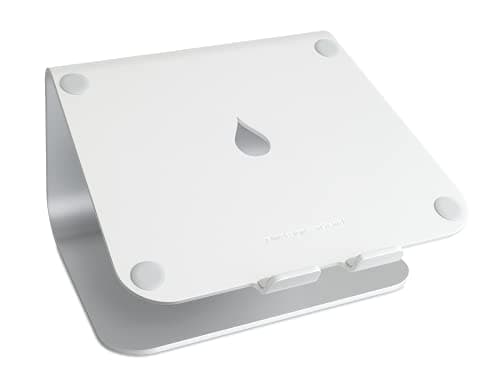 1. Rain Design mStand Laptop Stand (10032) A permanent desk, and a published lift
| 5.9" (fixed) | 16" | No | — | |
| 2 | 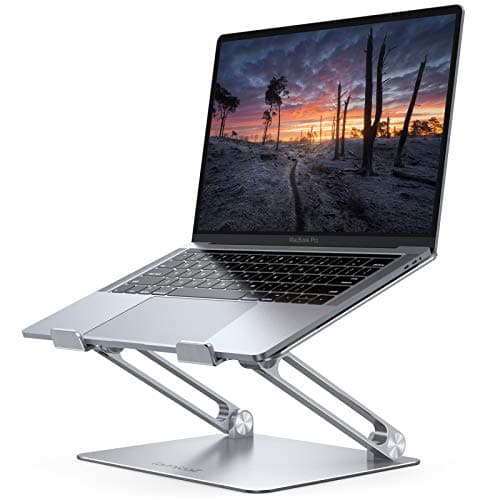 2. Lamicall Adjustable Aluminum Laptop Stand A 17-inch laptop, folded flat when done
| — | 17.3" | Angle, 4 modes | 1 yr | |
| 3 | 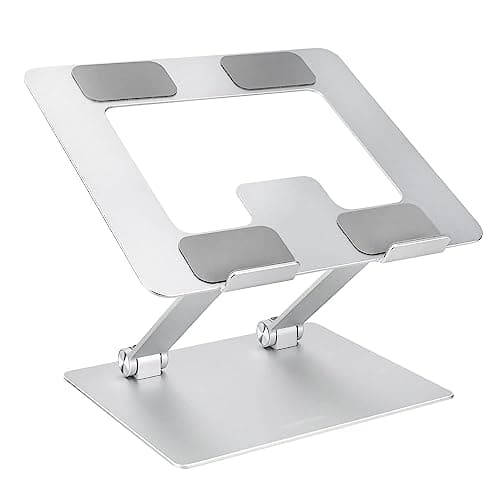 3. Amazon Basics Height-Adjustable Ergonomic Laptop Stand Budget pick — the cheapest warranted riser
| — | 15.6" | Stated, no range | 1 yr |
Two of the three lift cells are dashes, and that is the finding. Neither budget stand publishes how high it puts a screen, which is the one number the product exists to change. Both are sold as “height adjustable” or “ergonomic” without printing a single height, so you cannot check the fit against your own desk before it arrives. “Adjustable” does not mean the same thing in each row. Lamicall’s adjustment is the angle— a stated 90° across four modes — not a set of locked, repeatable heights; Amazon states adjustability with no range at all; the mStand does not adjust and says so. The mStand’s warranty dash is real too— Rain Design publishes no term on its own product page, and retailers listing one year are not the manufacturer. Every stand here needs an external keyboard and mouse. Raising the screen raises the keyboard with it, which is a second purchase this page’s prices do not include. The band was checked against our live price layer, dated under the picks; prose here carries no dollar figures.
Prices and stock as of November 8, 2026, from Amazon’s API. They change; we show a live number or none at all. #ad — we earn a commission.
Buy the Rain Design mStandif your desk stays put and your keyboard is already external: inside this budget it is the only stand that publishes the figure the category exists for — a fixed 5.9″ lift— in one piece of aluminum with nothing in it to wear out, rated to a stated 16″ laptop. Buy the Lamicall if your machine is larger than that or your desk has to clear: a stated 17.3″cap, an angle that adjusts across four modes, folds flat, and a published one-year warranty — with the catch that it states no lift at all. And the budget pick is the Amazon Basics ergonomic laptop stand: the cheapest stand we rank with a real published warranty behind it, which makes it the lowest-risk way to find out whether a stand helps you.
That is the page. What makes this band different from the full roundup is one missing number, repeated twice.
The finding: two of these three won’t tell you how high they lift
A laptop stand has one job. It raises the screen, because a laptop on a desk puts the display several inches below where OSHA’s own computer-workstation material describes a monitor sitting — at or slightly below eye level. Everything else about a stand is secondary to the height it reaches.
So the specification that matters is the lift, and under this ceiling two of the three makers do not publish it. Lamicall sells a stand whose selling point is adjustment and prints no height. Amazon Basics calls its stand “height-adjustable” and “ergonomic” and prints no range. Rain Design publishes 5.9″ and cannot change it. That is the band in one sentence: you can have the number, or you can have the adjustment, and not both.
We ranked the published number first, because a stand you cannot check against your own eye line before buying is a guess, and the whole reason to buy a stand is to hit a specific geometry.
How we ranked them
1. Whether the maker publishes a lift figure. For the reason above. A stand is bought to reach a height; a stand with no published height is bought on faith.
2. Published laptop size cap.Second because it is a hard limit rather than a preference — and the spread here is real: 15.6″, 16″ and 17.3″. A 17-inch machine fits exactly one of the three by the makers’ own statements.
3. Published warranty term. The longevity slot, and the place this ranking politely inverts itself: both budget stands publish a one-year warranty and the best-documented one publishes none at all. On a folding aluminum frame with hinges, a stated warranty is doing real work; on a single extruded billet with no moving parts, the metal is the argument.
A stand is always two purchases
This is the thing most worth saying on a budget page, because it is the cost nobody prices in. The moment you raise the laptop, you raise its keyboard and trackpad with it — to a height you cannot type at without lifting your shoulders. So every stand on this page implies an external keyboard and mouse, which on a budget band matters: the accessories can easily cost more than the stand.
That is not an argument against stands, it is an argument for budgeting honestly. How to set up a laptop workstation is the full arrangement, and an ergonomic home office on a budget is where a stand sits in the order of things worth buying first. If you are not going to add a keyboard, do not buy a stand — it will make your wrists worse to fix your neck.
Where this band runs out
At one specific figure: height. Nothing under this ceiling publishes a lift above 5.9″, and nothing under it offers locked, repeatable heights you can set and return to. If your laptop is your only screen and you need the top of it genuinely near your eye line, this band cannot do it — the stand that publishes seven settings up to 12.5″ sits above it, and the full roundup ranks it there. The other route is to stop asking the laptop to be the screen at all: do you need an external monitor for a laptop is that question, and monitor arm vs laptop stand is the hardware comparison.
What we can’t tell you
We have not used any of these three. We cannot tell you how much the Lamicall’s hinges loosen over three years, whether the Amazon frame flexes under a 15-inch machine, how either of the unpublished lifts actually measures on a desk, or how the mStand’s unstated warranty is handled if it ever matters. Those are years-long answers. What this page is, is every figure the three makers publish, ranked on the one the product exists to deliver, with the missing ones left visibly missing. Our methodology is explicit about where the published-spec evidence stops.
The picks, in detail
1. A permanent desk, and a published lift
Rain Design mStand Laptop Stand (10032)
The only stand under this ceiling that publishes the figure the category exists for: a fixed 5.9-inch lift, in one piece of extruded aluminum with no hinge to loosen. You know exactly what you are getting, and you cannot change it.
- Screen lift
- 5.9″ (fixed)
- Fits up to
- 16″
- Warranty
- —
This is first for a reason that only becomes visible once you draw a line at this price: it is the one stand inside the band whose maker states how high it lifts a screen. Rain Design publishes 5.9″, fixed, and the honesty of that figure is the product — you can measure your own desk and laptop against it before you buy, which you cannot do with either pick below. It fits laptops to a stated 16″, and it is one piece of extruded aluminum: no hinge to loosen, no plate to crack, nothing that wears. On a wide 10 × 7.5″ base it does not rock when you type on the keyboard in front of it.
Two honest limits. 5.9″ is modest and it is fixed: on a 13–14″ laptop the top of the screen still lands below OSHA’s at-or-near-eye-level target for most seated adults, so it improves the neck angle rather than solving it, and you get no say in the number. And Rain Design publishes no warranty termon its own product page — retailers list a year — so the longevity case rests on the metal rather than a stated promise, which is why that Spec Line slot is a dash. If you need the screen higher than this, the Roost sits above this band and climbs to a published 12.5″.
Good
- One piece of extruded aluminum — no hinge to loosen, no plate to crack, nothing that wears. In a category full of folding mechanisms, that is the whole longevity argument
- The open frame lifts the laptop's base 5.9″ and lets air move underneath, which is more than a laptop lying flat on a desk gets
- A genuinely wide 10″ x 7.5″ base, so it does not rock when you type on the keyboard in front of it — Rain Design's own point about stability, and it holds up
- Rain Design states it is “big enough for the 16″ MacBook Pro”, so it takes a large laptop where the budget stands here cap out lower
- The fixed height is a feature on a shared or permanent desk: there is nothing to knock out of adjustment, and it looks the same in year five as in week one
Not so good
- 5.9″ is fixed and modest. For a 13–14″ laptop the top of the screen still lands well below OSHA's at-or-near eye-level target for most seated adults — it improves the neck angle without solving it
- You cannot use the laptop's own keyboard at this height, so budget for an external keyboard and mouse. That is true of every stand here, but this one gives you no say in the height
- 3 lb and a 10″ footprint. This is desk furniture, not something you throw in a bag — the Roost below exists for that
- Rain Design publishes no warranty term on the product page (retailers list one year), so the longevity case rests on the aluminum rather than a stated promise, and the Spec Line says so with a dash
Don’t buy it if: you move between places, or your laptop is your only screen and you need it at eye level. A fixed 5.9-inch lift is the wrong tool for both — the Roost folds into a bag and climbs to 12.5 inches. Buy the mStand for a desk that does not move.
Price as of November 8, 2026. #ad — we earn a commission.
Where these numbers came from
2. A 17-inch laptop, folded flat when done
Lamicall Adjustable Aluminum Laptop Stand
Takes the biggest laptops in the band at a stated 17.3 inches, adjusts its angle across four modes, folds flat, and carries a published one-year warranty. It will not tell you how high it lifts the screen.
- Screen lift
- —
- Fits up to
- 17.3″
- Warranty
- 1 yr
Second, and the pick if your laptop is large or your desk has to clear. Lamicall states a cap of 17.3″— the biggest in the band, and above even the mStand’s 16″, so it takes a 17-inch desktop-replacement machine the others do not claim to. The angle adjusts across a stated 90° of travel in four working modes, so you can flatten it to type on in a pinch or tilt it up to read, and it folds flat into a drawer, which the fixed mStand does not. It publishes a 1-year warranty, which is more than Rain Design prints for the stand above it.
The gap is the one this page ranks on. Lamicall publishes no lift figure anywhere, so the height the screen actually reaches — the number that decides whether a stand fixes your neck angle at all — is exactly the one missing, and that Spec Line slot is a dash. There is no published load capacity either, so a heavy 17″ laptop is a leap rather than a check. And “adjustable” here means the angle, not a set of locked, repeatable heights.
Good
- Fits laptops up to 17.3″ — the largest capacity on this page, above even the mStand's 16″, so it takes a 17″ desktop-replacement laptop the others do not state they will
- The angle adjusts (Lamicall's page: 90° across four working modes), so you can flatten it to type on in a pinch or tilt it up to read
- Aluminum and folds flat into a drawer, which the fixed mStand does not do
- A stated one-year warranty — which, oddly, is more than either premium stand here publishes
- The cheapest way onto an aluminum, angle-adjustable stand rather than a bent-wire riser
Not so good
- Lamicall publishes no lift figure anywhere. The height the screen actually reaches is the number that decides whether a stand fixes your neck, and it is precisely the one missing from the spec block — so the first Spec Line slot is a dash
- No published load capacity either, so a heavy 17″ laptop is a leap of faith rather than a checked number
- “Adjustable” here means the angle, not a set of locked, repeatable heights the way the Roost's seven settings are
- Folding aluminum with hinges is more to loosen over the years than the mStand's single billet — the warranty is doing real work here
Don’t buy it if: the whole reason you are buying a stand is to get the screen to a particular height. Lamicall does not publish where its platform ends up, so you cannot check the fit before it arrives — buy the mStand or the Roost, which both print the number, if height is the point.
$35.99 −17%
Price as of November 8, 2026. #ad — we earn a commission.
Where these numbers came from
3. Budget pick — the cheapest warranted riser
Amazon Basics Height-Adjustable Ergonomic Laptop Stand
Budget pick. The cheapest stand in our registry with a real published one-year warranty behind it, on a ventilated aluminum frame — and the lowest-risk way to find out whether a stand helps you before spending more.
- Screen lift
- —
- Fits up to
- 15.6″
- Warranty
- 1 yr
This is the budget pick, and its actual argument is the warranty rather than the metal. Amazon publishes a One-Year Limited Warrantycovering defects in materials and workmanship on the cheapest stand we rank, with a returns desk behind it — which makes it the lowest-risk way to answer the prior question: does raising the screen help you enough to justify buying an external keyboard and mouse to go with it? The frame is ventilated aluminum, so air moves under the laptop instead of heat pooling against a desk, and it folds flat.
Three published limits. It publishes no lift figure, the same gap as the Lamicall and on the same critical number, so you cannot confirm it reaches your eye line before it arrives. Its cap is 15.6″, which rules out the 16″ and 17″ machines the two picks above state they take. And it is a commodity riser: the reason to prefer it over a no-name is the stated warranty, not the build, and it will not feel like the mStand.
Good
- An Amazon Basics One-Year Limited Warranty, published and enforceable, on the cheapest stand on this page — the warranty covers “defects in materials and workmanship” for a year
- Ventilated aluminum frame, so air moves under the laptop rather than trapping heat against a desk
- Folds flat and fits laptops up to 15.6″
- The lowest-risk way to find out whether a stand helps you at all before spending mStand or Roost money — and if it does not, there is a warranty and a returns desk behind it
Not so good
- The listing publishes no lift figure — the same gap as the Lamicall, on the same critical number, so the Spec Line slot is a dash
- “Height adjustable” with no stated range means you cannot confirm it reaches your eye line before it arrives
- The 15.6″ cap rules out the 16″ and 17″ laptops the mStand and Lamicall take
- It is a commodity riser — the reason to prefer it over a no-name is the warranty, not the build, and it will not feel like the mStand
Don’t buy it if: you have a 16-inch or larger laptop, or you need to know the exact height before you buy. The 15.6-inch cap and the missing lift figure are both hard limits, and neither is a matter of taste.
Price as of November 8, 2026. #ad — we earn a commission.
Where these numbers came from
- Amazon Basics Height-Adjustable Ergonomic Laptop Stand (B0BLRJ4R8F) — Amazon's product listing (source of the up-to-15.6″ laptop compatibility and the ventilated, foldable, height-adjustable aluminum design; the listing publishes no specific lift figure) — read 2026-07-26
- Amazon Basics One-Year Limited U.S. Warranty — Amazon's own warranty page (“warrants products against defects in materials and workmanship under ordinary consumer use for one year from the date of original retail purchase”) — read 2026-07-26
Common questions
Is a laptop stand under $50 worth it?
Yes, with one caveat that has nothing to do with price. A stand raises the screen, which improves the neck angle OSHA describes — and none of these three will get a 13-inch laptop screen fully to eye level, including the dearer ones above this band. The caveat is that raising the screen raises the built-in keyboard with it, so a stand is always really two purchases: the stand plus an external keyboard and mouse. If you are not willing to make the second one, a stand makes your typing posture worse rather than better. How to set up a laptop workstation is the whole arrangement, and ergonomic keyboards is the other half of the budget.
How high should a laptop stand lift the screen?
OSHA’s computer-workstation material describes a monitor positioned so the top of the screen is at or slightly below eye level, which for most seated adults a laptop on a desk is several inches short of. The useful consequence is that the lift figure is the spec you should be shopping on — and under this ceiling only one maker publishes it, at a fixed 5.9″. Measure your own seated eye height against your screen before you buy anything; our monitor height guide is where to get your number, and reducing neck pain at a desk covers the geometry. That is positioning, not medicine, and nobody here is a clinician.
Which laptop stand under $50 takes a 17-inch laptop?
The Lamicall, and it is the only one of the three that states it. Lamicall publishes a cap of 17.3″, above the mStand’s stated 16″and well above Amazon Basics’ 15.6″. The honest caveat is that Lamicall publishes no load capacity either, so a heavy 17-inch desktop-replacement machine is going onto a folding aluminum frame whose rated weight nobody has written down. The size cap is checkable; the load is not.
Is an adjustable laptop stand better than a fixed one?
Not inside this band, and the reason is counter-intuitive. The two adjustable stands here publish no height range at all, so their adjustability cannot be checked against your desk — and in the Lamicall’s case what adjusts is the anglerather than the height. The fixed stand publishes its one number. An adjustable stand is genuinely better when the range is published and repeatable, which is what the Roost above this band does with seven stated settings to 12.5″ — the full laptop stand roundup ranks it against these three.
Sources
Every figure on this page comes from one of these. If a manufacturer doesn’t publish a number, we print “—” rather than estimate it.
- Rain Design mStand Laptop Stand (10032) — Rain Design's own product page (source of the single-piece-aluminum construction, the 5.9″ (150 mm) stand height, the 10″ x 7.5″ base, the 3 lb / 1.46 kg weight, and the confirmation it is “big enough for the 16″ MacBook Pro”; Rain Design publishes no warranty term on this page) — read 2026-07-26
- Lamicall Adjustable Aluminum Laptop Stand — Lamicall's own store page (source of the 10″–17.3″ laptop compatibility, the aluminum construction, the 90° / four-mode angle adjustment, and the one-year warranty; it publishes no screen-lift figure and no load capacity) — read 2026-07-26
- Amazon Basics Height-Adjustable Ergonomic Laptop Stand (B0BLRJ4R8F) — Amazon's product listing (source of the up-to-15.6″ laptop compatibility and the ventilated, foldable, height-adjustable aluminum design; the listing publishes no specific lift figure) — read 2026-07-26
- Amazon Basics One-Year Limited U.S. Warranty — Amazon's own warranty page (“warrants products against defects in materials and workmanship under ordinary consumer use for one year from the date of original retail purchase”) — read 2026-07-26
Read next
The best laptop stands
The unbounded roundup — including the one stand that publishes seven locked heights up to 12.5 inches, above this band.
How to set up a laptop workstation
The arrangement a stand only makes sense inside: screen up, keyboard and mouse separate and down.
The monitor height guide
How to work out the eye-line figure you should be measuring these published lifts against.
Monitor arm vs laptop stand
If the lift figures here fall short of your eye line, this is the other way to solve the same geometry.