The best ergonomic keyboards
Two keyboards, because two is how many publish numbers you can verify. One carries a named external ergonomic certification — which, in a category built on unattributed claims, turns out to be unusual enough to lead with.
By Stephen V.Last reviewed
Quick picks
Ranked, with the manufacturer’s own longevity figure next to each one. Tap a row to jump to the full write-up.
| # | Product | Best for | Longevity | Price |
|---|---|---|---|---|
| 1 | 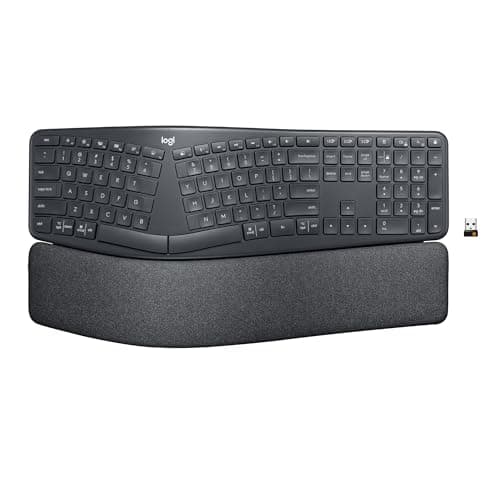 Logitech Ergo K860 The only product on this site carrying a named third-party ergonomic certification, and it publishes real negative-tilt angles. What it does not publish is the split angle everyone assumes it has. | Negative tilt, and a certification with a name on it | 24 mo battery / 1 yrBattery / warranty | $119.99Amazon $149.99 −20% |
| 2 | 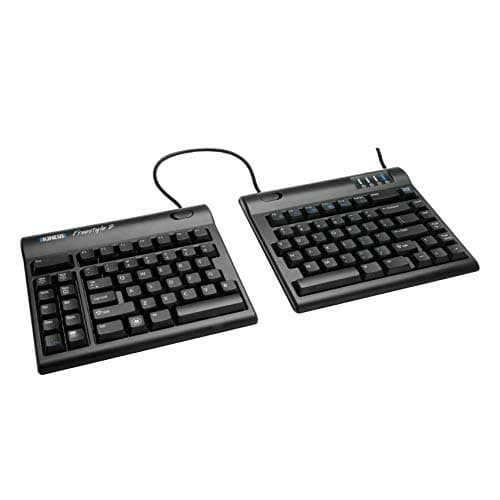 Kinesis Freestyle2 The only keyboard here whose halves actually come apart, which is the one problem the K860 cannot solve. Flat out of the box, though — the tenting everyone associates with it is a separate purchase. | Getting your hands genuinely far apart | 2 yrBattery / warranty | $94.00Amazon $100.48 −6% |
Prices as of October 18, 2026, from Amazon’s API. They change; we show a live number or none at all.
Two keyboards. That is not a shortlist we trimmed for readability — it is how many products in this category publish enough verifiable specification to rank honestly.
“Ergonomic keyboard” is close to an unregulated phrase. It gets applied to anything with a curve in it, a wrist rest glued on, or a gentle wave molded into the keyframe. Almost none of those come with a number attached, and a claim without a number is not something we can rank.
The certification that has a name on it
The Logitech K860 carries a line that is worth reading twice: “Certified ergonomic by United States Ergonomics™”.
A named third-party organization, publicly attached to a specific product. You can look it up. Someone put their name on it.
The reason that is remarkable is sitting one page over on this same site. Logitech’s MX Vertical mousemakes the most-repeated ergonomic claim on the internet — “reduces muscular strain by 10%” — and the only footnote Logitech attaches to it reads, in full: “As compared with a traditional non-vertical mouse.” No study named. No method. No sample size. No peer review.
Same company. One product gets a named external certifier; the other gets an unattributed percentage. That is not a gotcha, it is a useful measuring instrument. It demonstrates that Logitech knows perfectly well how to name a third party when a third party exists to be named. When they instead footnote only the comparison group, the most reasonable reading is that there was nobody external to cite.
Which is why the K860 ranks first. Not because a certification proves it works — it does not, and we will come back to that — but because it is the only product across both of our peripherals pages where somebody outside the marketing department is on the record.
The limits of that certification
We are not going to let this run away. “Certified ergonomic by United States Ergonomics” tells you a certifier exists and put its name to the product. It does not tell you:
- what the criteria were
- what threshold the keyboard had to clear
- what was measured, or on how many people
- whether any of it was published or reviewed by anyone
None of that is available. So the honest ranking of evidence quality here goes: a named certifier beats an anonymous in-house percentage, and both sit a long way below an actual national standard like ANSI/HFES 100-2007, which is the sort of document we build the desk height calculator on and which you can read for yourself.
Logitech also states the K860’s keyboard was “designed, developed, and tested with criteria established by leading ergonomists”. Which leading ergonomists? Unnamed. That is the vaguer sibling of the certification line, sitting in the same marketing copy, and it is the formulation Logitech uses on products where no certifier is named at all.
The number the K860 does not publish
Here is our own first pick’s biggest gap, and we would rather point at it than let you find it later.
Logitech does not publish the K860’s split or tenting angle in degrees. The keyboard’s entire visual identity is that curved, split keyframe. Every photograph is of the split. And there is no published figure for it.
What they do publish is the tilt: 0°, −4° and −7°, the leg angles. Real numbers, and useful ones — those minus signs are negative tilt, which is the direction that follows from OSHA’s “Hands, wrists, and forearms are straight, in-line and roughly parallel to the floor” once you notice that the flip-out feet on every ordinary keyboard tilt the far edge up. Very few keyboards let you go the other way at all.
But tilt and split are different axes, and only one of them has a number. You will find split-angle figures for this keyboard on other sites. None of them come from Logitech. We are not repeating them.
Where the Kinesis wins, and where it quietly does not
The Freestyle2 does the one thing the K860 structurally cannot: its halves actually separate. A fixed split keyframe angles your wrists inward. Separating halves let your hands sit as far apart as your shoulders are. Those solve different problems, and if yours is the second one, the K860 is not a smaller version of the answer — it is not an answer.
Two things to get right before you buy, both of which the internet routinely gets wrong. The 9″ and 20″ versions are separate models, not a range on one unit — you choose the linking cable at purchase and that is what you have. And it does not tent out of the box: it is flat at 0°, and the 5°/10°/15° angles need the separate VIP3 accessory, which brings palm supports along as part of the kit whether you want them or not.
The gap we cannot talk around: Kinesis publishes no keystroke life. Logitech rates its mice at 5 and 10 million clicks and puts out per-button durability tables. Kinesis, on a keyboard aimed at people who type for a living, publishes nothing about switch lifespan at all. They give a 45g key force and a 2-year warranty, and that is the extent of what you can check.
The warranty trap
This one is worth stating on its own, because it is the kind of error a careful writer makes.
Logitech’s business documentation gives the K860 a 2-year warranty. The consumerASIN — the one you buy on Amazon, the one we link — gets 1 year in the US.
Both numbers are Logitech’s and both are accurate. They describe different purchases. And the trap is that the B2B datasheet is the more authoritative-looking document: it is a PDF, it has a spec table, it looks exactly like the sort of source a careful writer would prefer to a retail page. Copy the 2 from it and you have published a wrong number while doing everything right.
Logitech is not consistent about flagging this. Their MX Vertical datasheet spells the split out — “U.S. & AP 1 year / EMEA & Japan 2 years” — while the Lift datasheet just says “2-year hardware limited warranty” with no regional note at all. Same company, same document template, different levels of care. It is a reminder that a spec sheet is a marketing document that happens to contain facts.
What we did instead of testing
We have not typed on either of these. No lab, no hands, no key-feel opinions. What we did was read Logitech’s and Kinesis’s own product pages and manuals, pull the numbers that decide the purchase, and cite each so you can check us. Our methodology page sets out what that can and cannot tell you.
It cannot tell you much about keyboards, honestly — more than for most categories. Whether a membrane switch feels dead to you, whether the K860’s curve suits your hands, whether you adapt to a split at all: those need fingers, and for that half, owner reviews beat us. What we can do is tell you that one of these has a named certifier and the other has separating halves, that neither publishes the number you probably assumed it did, and that the warranty you get is not the one on the datasheet.
Before you buy either
Try the free things first, because they outrank both products here and they cost nothing.
Put your keyboard’s feet down— they tilt it the wrong way, and that is the single most common wrong thing in the category. Center the keyboard on your sternum rather than on the desk. Move the mouse in toward your body. All three are geometry, all three are free, and wrist and keyboard position walks through the reasoning.
Then check the desk itself. A keyboard cannot fix a surface at the wrong height — and for the median adult, a standard 29″ desk sits above seated elbow height, which is a shoulder problem no keyboard geometry can undo. Run the desk height calculator first. If it tells you your desk is too tall, buy a keyboard tray before you buy either of these — a tray also gets you the backward tilt these boards mostly will not — and read the full setup order to see why keyboard position is step four rather than step one.
The picks, in detail
1. Negative tilt, and a certification with a name on it
Logitech Ergo K860
The only product on this site carrying a named third-party ergonomic certification, and it publishes real negative-tilt angles. What it does not publish is the split angle everyone assumes it has.
- Tilt / split
- 0°, −4°, −7°
- Geometry
- 3-layer pillowed rest
- Battery / warranty
- 24 mo battery / 1 yr
Here is the sentence that puts this keyboard first, and it is worth quoting exactly: “Certified ergonomic by United States Ergonomics™”.
A named third party. An organization with an address, that can be looked up, that attached its name to a specific product. Now hold that against the same company’s MX Vertical, whose famous “reduces muscular strain by 10%” carries exactly one footnote — “As compared with a traditional non-vertical mouse” — naming no study, no method and no sample size.
Same manufacturer. Two products. Two completely different standards of evidence. Logitech is plainly capable of naming an external certifier when it has one; on the mouse, it did not. That contrast is the most useful thing on this page, and it is the reason we rank the K860 first.
Now the honest limit on that certification, because we are not going to oversell it either. “Certified ergonomic” names a certifier. It does not publish the criteria, the threshold, or the method. It is not a peer-reviewed finding and it is not a national standard. It is meaningfully better provenance than an unattributed in-house percentage — a name you can chase beats no name at all — and it is still a manufacturer telling you someone approved of their product.
What we can verify plainly is the tilt: 0°, −4° and −7°, published as leg angles. Those minus signs are the point. Negative tilt drops the far edge below the near edge, which is the direction OSHA’s “straight, in-line and roughly parallel to the floor” implies once you notice that ordinary keyboard feet tilt the wrong way entirely. Almost no keyboard offers it. This one publishes three positions of it, and the geometry behind why that matters is free to understand and costs nothing to act on.
One number is missing, and it is the one everybody assumes is there: the split angle. Logitech publishes the tilt legs and says nothing about the degrees of the keyframe’s curve or tenting. You will find figures quoted elsewhere. They are not Logitech’s. We are not printing a number for the single most visually obvious feature of this keyboard, because its maker does not state one.
Good
- 'Certified ergonomic by United States Ergonomics™' — a NAMED external certifier, which is rarer in this category than you would think
- Publishes actual negative-tilt leg angles: 0°, −4° and −7°, so you can pick the geometry rather than guess at it
- Negative tilt is the direction OSHA's 'straight, in-line and roughly parallel to the floor' wording implies — very few keyboards offer it at all
- 24-month battery life on 2 AAA cells
- Integrated 3-layer pillowed wrist rest, not a removable afterthought
Not so good
- The split/tenting angle of the keyframe is NOT published in degrees — Logitech gives the tilt leg angles and nothing for the curve itself
- Logitech's B2B datasheet says 2-year warranty; the consumer ASIN gets 1 year in the US
- 'Certified ergonomic' names a certifier but publishes no criteria, threshold or method
- Fixed split — the halves do not separate, so it will not solve a shoulder-width problem the way the Kinesis can
- Large footprint; the integrated rest means it takes the desk space it takes
Don’t buy it if: you need the halves genuinely apart. The K860's split is a fixed curve in one keyframe — it addresses wrist angle, not shoulder width. If your hands need to be a foot apart, only the Kinesis does that.
$149.99 −20%
Price as of October 18, 2026. #ad — we earn a commission.
Where these numbers came from
- Logitech ERGO K860 for Business — Logitech's own product page (source of 'Certified ergonomic by United States Ergonomics™', the 0°/−4°/−7° tilt leg angles, 24-month battery life, and the 2-year BUSINESS warranty figure) — read 2026-07-16
- Logitech ERGO K860 Wireless Split Keyboard — consumer product page — read 2026-07-16
- Logitech Limited Hardware Warranty terms (the consumer term that applies to the ASIN we link, not the datasheet's business figure) — read 2026-07-16
2. Getting your hands genuinely far apart
Kinesis Freestyle2
The only keyboard here whose halves actually come apart, which is the one problem the K860 cannot solve. Flat out of the box, though — the tenting everyone associates with it is a separate purchase.
- Tilt / split
- 9″ or 20″ separation
- Geometry
- 0° flat; 5/10/15° w/ VIP3
- Battery / warranty
- 2 yr
Three things about this keyboard get repeated wrongly everywhere, and all three cost money to get wrong.
First: “9″ to 20″ separation” is not a range. It is two different products. You choose a 9″ or a 20″ linking cable at purchase, and that is the keyboard you own. Read it as an adjustable span — as a great many listings and comparison tables imply — and you will buy the 9″ expecting to pull it to 20″. It does not do that.
Second: it does not tent. Not out of the box. The Freestyle2 has a zero-degree slope, flat on the desk. The 5°/10°/15° angles that appear in every write-up belong to the VIP3, which is a separate accessory you buy separately. The keyboard in the photograph, tented, is the keyboard plus a thing that is not in the box.
Third: the VIP3 brings palm supports with it. They are part of the kit, not an option within it. If you want the tenting and not the palm rests, that is not a configuration Kinesis sells.
Now the reason it is here despite all that: the halves come apart, and nothing else on this page does. That is not the same feature as the K860’s curve. A fixed split keyframe angles your wrists; separating halves let your hands sit as far apart as your shoulders actually are. If you are broad across the chest, no amount of curve in a single keyframe fixes that, and this is the only answer here.
The honest gap is durability. Kinesis publishes no keystroke life figure. None. Not on the product page, not in the manual. Logitech rates its mice at 5 and 10 million clicks and publishes per-button tables; Kinesis, on a keyboard that costs real money and is aimed squarely at people who type all day, states nothing about how long the switches last. What they do publish is a 45g typical average maximum key force, which is a genuine spec, and a 2-year warranty. That is what there is.
One last thing worth knowing if you go shopping: the VIP3 is not compatible with the Freestyle Pro, which is a different Kinesis keyboard with a confusingly similar name. Check which body you are buying the accessory for.
Good
- Fully separating halves — the only product here that addresses shoulder width rather than just wrist angle
- Zero-degree slope out of the box, which is already better than the positive tilt of a standard keyboard
- VIP3 accessory adds three published tenting angles: 5°, 10° and 15°
- Low-force tactile membrane switches with a published 45g typical average maximum key force
- 2-year warranty, matching the K860's business term rather than its consumer one
Not so good
- 9″ and 20″ are two DIFFERENT MODELS (a linking-cable choice at purchase), not a range you adjust — pick wrong and you buy again
- Tenting is NOT built in. Flat 0° out of the box; the 5/10/15° angles need the separate VIP3 accessory
- The VIP3 includes palm supports as part of the kit — you cannot take the tenting without them
- Kinesis publishes NO keystroke life figure, where Logitech rates its mice at 5 and 10 million clicks
- Membrane switches, not mechanical, at a price where people expect otherwise
Don’t buy it if: you want negative tilt. The Freestyle2 is flat at 0° and the VIP3 only tilts it the other way — the angles are positive tenting, which is a different axis entirely. If wrist extension is your problem, the K860 is the one that publishes minus signs.
$100.48 −6%
Price as of October 18, 2026. #ad — we earn a commission.
Where these numbers came from
- Kinesis Freestyle2 Ergonomic Split Keyboard — Kinesis's own product page (9″/20″ linking cable variants; zero-degree slope; V3/VIP3 tenting at 5°/10°/15°; 2-year warranty; no keystroke life published) — read 2026-07-16
- Kinesis Freestyle2 for PC — product/shop page with the separation variants — read 2026-07-16
- Kinesis Freestyle2 (KB800PB) for PC — official manual (PDF) — read 2026-07-16
The small stuff that finishes the job
Inexpensive parts that make the main purchase work properly. They are not picks and they are not ranked — each one is here because this page describes the job it does, and each carries the same published-spec treatment as everything else we link.
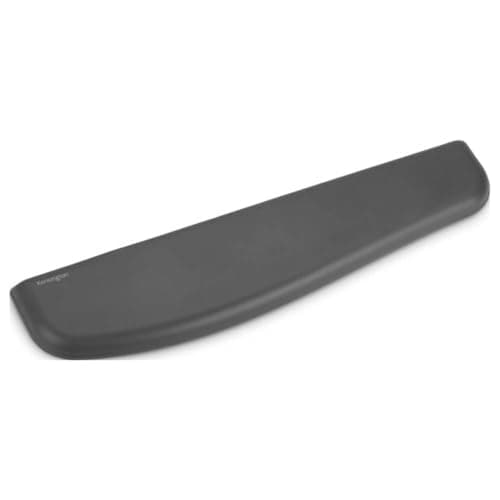
Kensington ErgoSoft Wrist Rest (K52799WW)
For the pauses between typing, not to press on while you type. Kensington publishes the keyboard front height it is built to match, which is the fit spec this category usually hides.
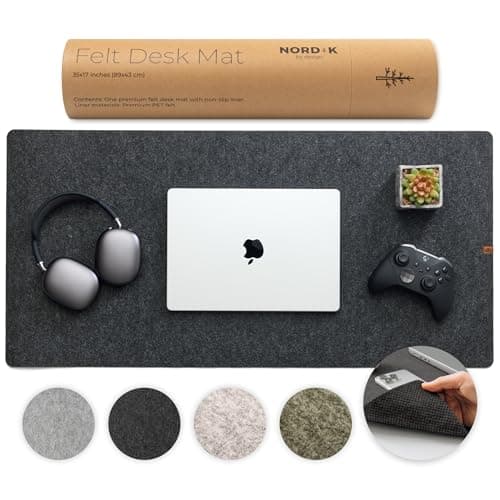
Nordik By Design Premium Felt Desk Mat
A large mat gives the keyboard and mouse one continuous surface, which is what stops a split board drifting apart on a hard desk.
$24.97Amazon$31.97 −22%
Prices as of October 18, 2026, from Amazon’s API. They change; we show a live number or none at all. Why these are affiliate links.
Common questions
Are ergonomic keyboards actually certified by anyone?
Occasionally, and the K860 is the reason this question is worth asking. It carries “Certified ergonomic by United States Ergonomics™” — a named external body. That is genuinely unusual: most “ergonomic” claims in this category are the manufacturer’s own, unattributed, and sometimes not even that specific. The Kinesis makes no third-party certification claim at all. Worth keeping the limit in view, though: naming a certifier is better provenance than not naming one, but the criteria and method behind the certification are not published either.
What is the split angle of the Logitech K860?
Logitech does not publish one, and we are not going to invent it. They publish the tiltleg angles — 0°, −4° and −7° — and nothing for the degrees of the split or tenting of the keyframe itself. Numbers do circulate online. None of them trace to Logitech. It is a slightly absurd gap given the split is the keyboard’s defining visual feature, and it is a real one.
Does the Kinesis Freestyle2 tent?
Not on its own. Out of the box it is flat, at 0°. The 5°/10°/15° tenting angles you see quoted everywhere require the VIP3, which is a separate accessory sold separately — and the VIP3 includes palm supports as part of the kit, so you cannot take the tenting without them. Also note the VIP3 is not compatible with the Freestyle Pro, which is a different keyboard with a very similar name.
Is the Kinesis Freestyle2 9 inch or 20 inch?
Both exist, and that is the trap: they are two separate models, distinguished by the linking cable you choose at purchase. It is not a range you adjust on one unit. Plenty of listings write it as “9″–20″ separation” as though it were adjustable. Buy the 9″ expecting to stretch it and you will be buying again.
What warranty do these actually have?
The Kinesis is 2 years. The K860 is where it gets slippery: Logitech’s business documentation says 2 years, but the consumer ASIN gets 1 yearin the US. Both figures are Logitech’s, both are accurate, and they describe different purchases. Anyone quoting a B2B datasheet at you about the keyboard on Amazon is quoting the wrong document — and it is an easy mistake, because the datasheet is the more authoritative-looking source.
Sources
Every figure on this page comes from one of these. If a manufacturer doesn’t publish a number, we print “—” rather than estimate it.
- Logitech ERGO K860 for Business — Logitech's own product page (source of 'Certified ergonomic by United States Ergonomics™', the 0°/−4°/−7° tilt leg angles, 24-month battery life, and the 2-year BUSINESS warranty figure) — read 2026-07-16
- Logitech ERGO K860 Wireless Split Keyboard — consumer product page — read 2026-07-16
- Logitech Limited Hardware Warranty terms (the consumer term that applies to the ASIN we link, not the datasheet's business figure) — read 2026-07-16
- Kinesis Freestyle2 Ergonomic Split Keyboard — Kinesis's own product page (9″/20″ linking cable variants; zero-degree slope; V3/VIP3 tenting at 5°/10°/15°; 2-year warranty; no keystroke life published) — read 2026-07-16
- Kinesis Freestyle2 for PC — product/shop page with the separation variants — read 2026-07-16
- Kinesis Freestyle2 (KB800PB) for PC — official manual (PDF) — read 2026-07-16
Read next
Wired vs wireless keyboard and mouse
What the connection changes, and what it doesn't, for office work.
Wrist and keyboard position
Why negative tilt matters, and the free fixes to try before buying either.
The best ergonomic mice
The same company's mouse, where the evidence is far thinner. The contrast is instructive.
The best under-desk keyboard trays
The tilt these boards mostly won't do, and the height fix they can't do at all.
The ergonomic desk setup
A keyboard cannot fix a surface at the wrong height. This is the order.
Desk height calculator
Work out whether your desk is the actual problem before spending here.