The best laptop stands for a home office
A laptop stand has one ergonomic job: raise the screen toward eye level. So we ranked on that — the screen lift — and found the two stands that publish it don't publish a warranty, and the two that publish a warranty won't tell you the lift.
By Stephen V.Last reviewed
Quick picks
Ranked, with the manufacturer’s own longevity figure next to each one. Tap a row to jump to the full write-up.
| # | Product | Best for | Longevity | Price |
|---|---|---|---|---|
| 1 | 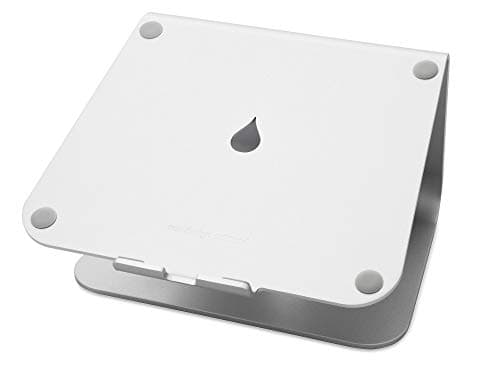 Rain Design mStand Laptop Stand (10032) One piece of aluminum, no moving parts, and a lift it never changes: 5.9 inches, fixed. It will not get a 13-inch laptop to eye level and it is not trying to — it is the stand you buy for a desk that stays put, when the keyboard is already external and you want a platform that outlasts the laptop on it. | A permanent desk, external keyboard | —Warranty | |
| 2 | 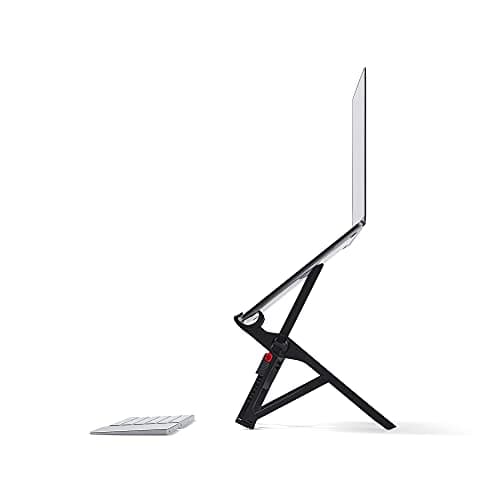 Roost V3 Laptop Stand The only stand here that actually reaches eye level — 6.5 to 12.5 inches across seven stops — and it folds to the size of an umbrella at six ounces. You pay a lot for that, and Roost publishes a 90-day money-back guarantee where a warranty term should be. | Eye level, and a bag | —Warranty | |
| 3 | 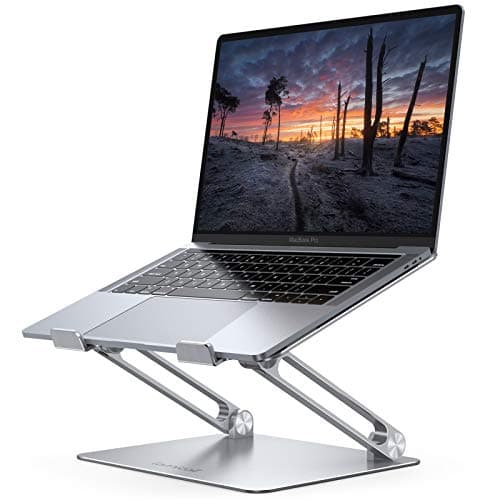 Lamicall Adjustable Aluminum Laptop Stand Aluminum, folds flat, takes the biggest laptops on the page at 17.3 inches, and carries a one-year warranty the two pricier stands do not. What Lamicall will not tell you is how high it lifts the screen — the single number that decides whether it helps. | The biggest laptops, cheaply | 1 yrWarranty | $29.98Amazon $35.99 −17% |
| 4 | 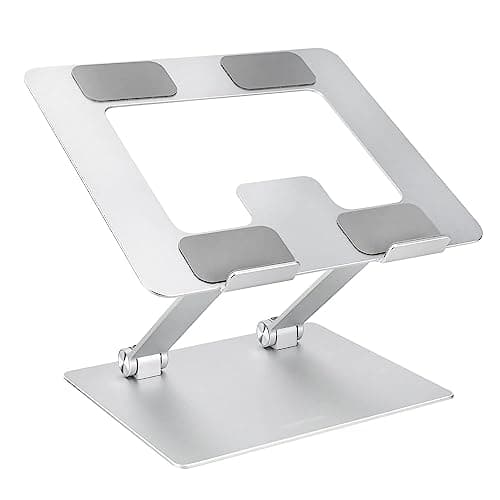 Amazon Basics Height-Adjustable Ergonomic Laptop Stand The cheapest riser here that comes with a real, published one-year warranty and a ventilated aluminum frame. Like the Lamicall, it sells “height adjustable” and “ergonomic” without printing a single height — so you are buying the promise, not the number. | A cheap, warranted riser | 1 yrWarranty |
Prices as of Sep 9, 2026, from Amazon’s API. They change; we show a live number or none at all.
A laptop is two ergonomic mistakes bolted together. The screen is too low, because it is attached to the keyboard, which is at the right height only if the screen is at the wrong one. You cannot fix both at once on the laptop itself, and that single fact is the reason laptop stands exist.
So a laptop stand has exactly one job: raise the screen. It lifts the display toward eye level and, in the same movement, lifts the built-in keyboard out of reach — which is why the stand is only ever half of the fix, and the external keyboard and mouse are the other half. Every stand on this page has that same shape, and we say so on every one of them, because it is the thing that most often surprises people the day the stand arrives.
Which makes the ranking criterion obvious. The spec that decides this purchase is how far up the screen actually goes— and whether you can set that height or have to accept a fixed one. Everything else, airflow and folded size and color, is secondary to whether the thing gets your screen where OSHA says it should be.
And that is where the category splits cleanly in half.
What we ranked on, and why
OSHA writes the target for us, on monitors: “The top of the monitor should be at or slightly below eye level”, with the center “15 to 20 degrees below horizontal eye level” and the screen “between 20 and 40 inches” away. A laptop, flat on a desk, is nowhere near it. So the criteria, in order:
- Screen lift. The published figure for how far up the stand raises the screen, and whether the height is fixed or adjustable. This is the ranking spec.
- Fit.The largest laptop the stand will take, so you can rule it out before you rule it in. A stand that lifts beautifully and does not fit your 17″ laptop is the wrong stand.
- Warranty, or the material behind it. The longevity slot, as on every product page here. A stand is a thing you lean a thousand-dollar laptop on every day; how long it stays trustworthy is the third number.
What we deliberately did not rank on: color, brand cachet, and how a stand photographs. Also not ranked: comfort or “feel”, because we have not typed at any of these, and a feel verdict from someone who has not is an invented one.
The split: who publishes what
Here is the finding, and it is the reason the page is shaped the way it is. No stand here publishes all three numbers. The category divides into two halves that each hide a different one.
The two documented stands publish the lift and hide the warranty. Rain Design states the mStand’s 5.9″height plainly and Roost states the V3’s 6.5–12.5″across seven settings — the number that actually decides the purchase — but neither publishes a warranty term on its product page. Roost offers a 90-day money-back guarantee, which is a return window, not longevity cover; Rain Design offers nothing you can read on the page.
The two budget stands publish the warranty and hide the lift. Lamicall and Amazon Basics each carry a stated one-year warranty — more than either premium stand puts in writing — and neither publishes a screen-lift figure of any kind. They sell “height adjustable” and “ergonomic” without printing a single height, which means the one number that decides whether “ergonomic” is true for you is the one you cannot check before buying.
You cannot line those four up in a single comparable column, and we have not pretended to. Where a manufacturer publishes a figure it is in the Spec Line; where one does not, the slot is an em-dash. Four of the twelve Spec Line slots here are dashes, and every one is a manufacturer’s silence, not ours.
The number nobody prints on the box: your keyboard
Every inch a stand lifts the screen is an inch it lifts the keyboard, and the keyboard was the part that was at the right height to begin with. This is the constraint the category never leads with, and it is not optional.
OSHA’s keyboard line is “elbows should be about the same height as the keyboard and hang comfortably to the side of the body”. A laptop screen at eye level puts the built-in keyboard a long way above your elbows, so typing on it means reaching up, which is the wrist-and-shoulder version of the neck problem you just solved. The fix is an external keyboard and mouse at your actual elbow height, set the way we describe on wrist and keyboard position. Budget for them alongside the stand, not later — a stand bought without a keyboard has moved the problem, not removed it.
This is also why the highest lift is not automatically the best buy. It is the best range. If your laptop is your only screen and it needs to reach eye level, the Roost’s 12.5″ is the point. If your keyboard is already external and you just want the screen off the desk and some air underneath, the mStand’s fixed 5.9″ is enough, and it will outlast everything else here.
What the money buys
Rigidity and documentation, mostly — and they do not track price the way you would expect. The most expensive stand here, the Roost, is the one that publishes no warranty term; the cheapest, the Amazon Basics, publishes a clear one-year warranty you can read in full. What the Roost’s price actually buys is portability: six ounces, folds to the size of an umbrella, goes in a bag. What the mStand’s price buys is the opposite — three pounds of single-piece aluminum that never moves, never folds, and has no hinge to loosen.
So the spend maps to a use, not to a quality tier. Pay Roost money for a stand that travels and reaches eye level. Pay mStand money for a permanent desk fixture with nothing to wear out. Pay budget money to find out whether a stand helps you at all before you commit — and read the warranty, because on the budget stands it is the best-documented thing about them.
What we did instead of testing
We have not stood a laptop on any of these. No screens were measured, no hinges were cycled, no thermals were logged. What we did was read each manufacturer’s own product page, pull the numbers that decide the purchase, and link every one so you can check us. Our methodology pagesets out what reading spec sheets does and does not buy you — and for laptop stands, a fair amount sits in the second category. Whether a folding joint stays rigid after a year of travel, whether an aluminum stand rings or damps under a hard-typing hand, whether a budget hinge holds its angle: none of that is in a product page, and for that half owner reviews will serve you better than we can.
Where a manufacturer does not publish a figure, the Spec Line shows a dash. Four of the twelve Spec Line slots are dashes, and every one is deliberate. We could have converted “height adjustable” into a plausible-looking inch figure and nobody would have queried it. That is exactly the reason not to.
How to actually choose
Do the free part first. Work out your seated eye line from the monitor height guide, and be honest about whether the laptop is your only screen. Those two answers pick the stand.
If the laptop is your only screen and has to reach eye level, or you carry it between places, buy the Roost— it is the one that publishes a lift high enough to get there, and it folds into the bag you carry the laptop in. If you have a permanent desk, an external keyboard already, and you want a platform that outlasts the laptop on it, buy the mStand— a fixed, rigid, single piece of aluminum with nothing to fail. If your laptop is a 17″ machine on a small budget, the Lamicall takes it and the angle adjusts, as long as you accept you cannot plan the height. And if you just want the cheapest riser with a real warranty behind it before you commit to anything nicer, the Amazon Basics is the sensible floor.
Then, whichever you choose, put a keyboard and mouse on the desk in front of it. A laptop stand is half of a fix. The half it does, it does well; the half it does not, it hands to a keyboard and a mouse— and the whole thing only works when you buy all three. If you are setting up the desk from scratch, the order to do it in is on the ergonomic desk setup page.
The picks, in detail
1. A permanent desk, external keyboard
Rain Design mStand Laptop Stand (10032)
One piece of aluminum, no moving parts, and a lift it never changes: 5.9 inches, fixed. It will not get a 13-inch laptop to eye level and it is not trying to — it is the stand you buy for a desk that stays put, when the keyboard is already external and you want a platform that outlasts the laptop on it.
- Screen lift
- 5.9″ (fixed)
- Fits up to
- 16″
- Warranty
- —
The reason this is the top pick is not that it lifts the highest. It does not. It is that it is the one stand here with nothing to go wrong.
Rain Design makes the mStand from “a single sturdy piece of aluminum”. There is no hinge, no adjustment knob, no folding plate. On a device you lean a laptop on for several thousand hours a year, the parts that fail are the moving ones, and this has none. That is the longevity slot on this page, and it is the reason the fixed height is a feature rather than a limitation: nothing drifts out of adjustment because there is no adjustment.
The published height is 5.9″ (150 mm), and it is worth being precise about what that measures. It is the height of the stand — how far it lifts the laptop’s base — not where the top of the screen ends up. On a 13–14″ laptop that puts the top of the display somewhere in the low teens above the desk, which is better than flat and still short of the line OSHA draws: “the top of the monitor should be at or slightly below eye level”. So the honest version is that the mStand improves the neck angle rather than fixing it. If your laptop is your only screen and you need it truly at eye level, read the monitor height guide and look at the adjustable Roost below.
The other half of the purchase is the part nobody puts on the box: once the screen is up, the built-in keyboard is up with it, and you cannot type at that height without your wrists paying for it. A laptop stand is therefore only ergonomic once you add an external keyboard and mouse at your own elbow height — OSHA’s line is “elbows should be about the same height as the keyboard”. Budget for a separate keyboard the same day you buy the stand, and set both from the wrist and keyboard position the height calls for.
Good
- One piece of extruded aluminum — no hinge to loosen, no plate to crack, nothing that wears. In a category full of folding mechanisms, that is the whole longevity argument
- The open frame lifts the laptop's base 5.9″ and lets air move underneath, which is more than a laptop lying flat on a desk gets
- A genuinely wide 10″ x 7.5″ base, so it does not rock when you type on the keyboard in front of it — Rain Design's own point about stability, and it holds up
- Rain Design states it is “big enough for the 16″ MacBook Pro”, so it takes a large laptop where the budget stands here cap out lower
- The fixed height is a feature on a shared or permanent desk: there is nothing to knock out of adjustment, and it looks the same in year five as in week one
Not so good
- 5.9″ is fixed and modest. For a 13–14″ laptop the top of the screen still lands well below OSHA's at-or-near eye-level target for most seated adults — it improves the neck angle without solving it
- You cannot use the laptop's own keyboard at this height, so budget for an external keyboard and mouse. That is true of every stand here, but this one gives you no say in the height
- 3 lb and a 10″ footprint. This is desk furniture, not something you throw in a bag — the Roost below exists for that
- Rain Design publishes no warranty term on the product page (retailers list one year), so the longevity case rests on the aluminum rather than a stated promise, and the Spec Line says so with a dash
Don’t buy it if: you move between places, or your laptop is your only screen and you need it at eye level. A fixed 5.9-inch lift is the wrong tool for both — the Roost folds into a bag and climbs to 12.5 inches. Buy the mStand for a desk that does not move.
Price as of Sep 9, 2026. #ad — we earn a commission.
Where these numbers came from
2. Eye level, and a bag
Roost V3 Laptop Stand
The only stand here that actually reaches eye level — 6.5 to 12.5 inches across seven stops — and it folds to the size of an umbrella at six ounces. You pay a lot for that, and Roost publishes a 90-day money-back guarantee where a warranty term should be.
- Screen lift
- 6.5–12.5″
- Fits up to
- Any size
- Warranty
- —
This is the stand that does the thing the category advertises and mostly cannot deliver: it gets the screen to eye level.
Roost publishes a screen lift of 6.5″ to 12.5″ across seven height settings. That top figure matters, because it is the only number on this page that clears OSHA’s “the top of the monitor should be at or slightly below eye level” for a typical seated adult — the others raise the screen a fixed, smaller amount and leave you looking down. Because it adjusts, you set it to your own eye line rather than hoping a fixed rise happens to land right. That is the whole geometry we work through in the monitor height guide, delivered by a stand instead of an arm.
The second number is the six ounces. It folds to roughly the size of an umbrella and weighs less than a phone, which is the reason it costs what it costs. If you carry a laptop between a desk, a kitchen table and an office, this is the stand that comes with you; the mStand is not going anywhere.
Now the honest part, because it is the more useful half. Roost’s own product page publishes a “90 Day Money-Back Guarantee”and, as far as we could read on it, no warranty length at all. A money-back guarantee is a return window — a fortnight-to-a-season to change your mind — not a promise about what happens in year three, which is the number the longevity slot on this page is supposed to hold. On the most expensive stand here, that is worth knowing before you buy. And the same eye-level height that makes it worth buying is the height that makes an external keyboard and mouse mandatory: you cannot type on a laptop that is a foot in the air.
Good
- 12.5″ at the top setting is the only lift on this page that gets a laptop screen into OSHA's at-or-slightly-below eye-level band for a seated adult — the actual ergonomic target, reached rather than approached
- Seven selectable heights, so you set it to your eye line instead of accepting a fixed rise
- 6 oz and folds to 1″ x 1.5″ x 13″ — it lives in a laptop bag, which is the entire reason to pay Roost money over the mStand
- Self-adjusting grips take “all makes and models”, Roost's own claim, so there is no size chart to check
- Sets up in seconds with no tools, and the folding structure is rigid once locked — not the wobble most travel stands settle into
Not so good
- It is roughly twice the price of the mStand and several times the budget stands here, and most of that premium buys portability you only use if you travel
- Roost publishes a “90 Day Money-Back Guarantee” but no warranty length on the product page. A return window is not longevity cover, and the Spec Line marks the warranty slot with a dash for that reason
- Fiberglass-reinforced construction with hinges and grips, not the single aluminum billet of the mStand — more parts, and the folding joint is the thing that takes the wear
- It supports the laptop's back edge rather than cradling the whole footprint, so a very front-heavy laptop is worth a check at the tallest, steepest settings
- Like every stand here it demands an external keyboard and mouse, and at 12.5″ that is not optional — you physically cannot reach the built-in keyboard
Don’t buy it if: you never leave your desk. The Roost's entire premium is portability and eye-level adjustment; if the stand is going to sit in one spot forever you are paying for a folding mechanism you will never fold, and the mStand gives you more rigidity for less money.
Price as of Sep 9, 2026. #ad — we earn a commission.
Where these numbers came from
3. The biggest laptops, cheaply
Lamicall Adjustable Aluminum Laptop Stand
Aluminum, folds flat, takes the biggest laptops on the page at 17.3 inches, and carries a one-year warranty the two pricier stands do not. What Lamicall will not tell you is how high it lifts the screen — the single number that decides whether it helps.
- Screen lift
- —
- Fits up to
- 17.3″
- Warranty
- 1 yr
This is the stand for the person with a 17-inch laptop and a small budget, and it is on the page as much for what it does not say as for what it does.
What it says is genuinely useful. Lamicall lists compatibility to 17.3″, the biggest here; the angle adjusts across four modes to 90°; it is aluminum and it folds flat. And it carries a one-year warranty, which is the quietly interesting bit — the two stands above it, at two and three times the price, publish no warranty term at all. On documentation of longevity, the cheap stand wins.
What it does not say is the number that matters most. Nowhere in Lamicall’s own spec block is there a screen-lift figure— how far up the platform actually raises the laptop. That is the number a laptop stand exists to deliver, the one you would check against where the screen should sit, and it is absent. So the first slot on its Spec Line is an em-dash, the same as it is on the two budget riser slots elsewhere on this site: where a manufacturer does not publish a number, we do not invent one. Our methodology page explains why a dash is the honest entry. Buy this one for the 17-inch capacity and the warranty, not for a height you can plan around — and, as with every stand here, add a keyboard.
Good
- Fits laptops up to 17.3″ — the largest capacity on this page, above even the mStand's 16″, so it takes a 17″ desktop-replacement laptop the others do not state they will
- The angle adjusts (Lamicall's page: 90° across four working modes), so you can flatten it to type on in a pinch or tilt it up to read
- Aluminum and folds flat into a drawer, which the fixed mStand does not do
- A stated one-year warranty — which, oddly, is more than either premium stand here publishes
- The cheapest way onto an aluminum, angle-adjustable stand rather than a bent-wire riser
Not so good
- Lamicall publishes no lift figure anywhere. The height the screen actually reaches is the number that decides whether a stand fixes your neck, and it is precisely the one missing from the spec block — so the first Spec Line slot is a dash
- No published load capacity either, so a heavy 17″ laptop is a leap of faith rather than a checked number
- “Adjustable” here means the angle, not a set of locked, repeatable heights the way the Roost's seven settings are
- Folding aluminum with hinges is more to loosen over the years than the mStand's single billet — the warranty is doing real work here
Don’t buy it if: the whole reason you are buying a stand is to get the screen to a particular height. Lamicall does not publish where its platform ends up, so you cannot check the fit before it arrives — buy the mStand or the Roost, which both print the number, if height is the point.
$35.99 −17%
Price as of Sep 9, 2026. #ad — we earn a commission.
Where these numbers came from
4. A cheap, warranted riser
Amazon Basics Height-Adjustable Ergonomic Laptop Stand
The cheapest riser here that comes with a real, published one-year warranty and a ventilated aluminum frame. Like the Lamicall, it sells “height adjustable” and “ergonomic” without printing a single height — so you are buying the promise, not the number.
- Screen lift
- —
- Fits up to
- 15.6″
- Warranty
- 1 yr
This is the try-it-cheaply pick, and its one real advantage over the Lamicall is the thing you would least expect to matter on the cheapest stand: a warranty you can actually read.
Amazon Basics products carry a One-Year Limited Warrantythat, in Amazon’s own words, “warrants products against defects in materials and workmanship under ordinary consumer use for one year”. On a sub-$30 aluminum riser that is more cover than most of the category offers, and it is the reason this earns a place over the dozens of near-identical no-name stands it shares a frame with. The rest is competent and unremarkable: a ventilated aluminum frame for airflow, a fold-flat design, laptops up to 15.6″.
And then the same silence as the Lamicall. The listing sells “height adjustable” and “ergonomic” and publishes no height — no lowest setting, no highest, no range. You are buying the adjective, not the number, which is why the lift slot is a dash. If you already know a stand helps you and you just want a warranted one for the least money, this is the sensible floor. If you are trying to hit a specific eye-line height, buy the Roost, which tells you exactly where it lands — and either way, put a keyboard on the desk in front of it.
Good
- An Amazon Basics One-Year Limited Warranty, published and enforceable, on the cheapest stand on this page — the warranty covers “defects in materials and workmanship” for a year
- Ventilated aluminum frame, so air moves under the laptop rather than trapping heat against a desk
- Folds flat and fits laptops up to 15.6″
- The lowest-risk way to find out whether a stand helps you at all before spending mStand or Roost money — and if it does not, there is a warranty and a returns desk behind it
Not so good
- The listing publishes no lift figure — the same gap as the Lamicall, on the same critical number, so the Spec Line slot is a dash
- “Height adjustable” with no stated range means you cannot confirm it reaches your eye line before it arrives
- The 15.6″ cap rules out the 16″ and 17″ laptops the mStand and Lamicall take
- It is a commodity riser — the reason to prefer it over a no-name is the warranty, not the build, and it will not feel like the mStand
Don’t buy it if: you have a 16-inch or larger laptop, or you need to know the exact height before you buy. The 15.6-inch cap and the missing lift figure are both hard limits, and neither is a matter of taste.
Price as of Sep 9, 2026. #ad — we earn a commission.
Where these numbers came from
- Amazon Basics Height-Adjustable Ergonomic Laptop Stand (B0BLRJ4R8F) — Amazon's product listing (source of the up-to-15.6″ laptop compatibility and the ventilated, foldable, height-adjustable aluminum design; the listing publishes no specific lift figure) — read 2026-07-26
- Amazon Basics One-Year Limited U.S. Warranty — Amazon's own warranty page (“warrants products against defects in materials and workmanship under ordinary consumer use for one year from the date of original retail purchase”) — read 2026-07-26
Common questions
Do laptop stands actually improve posture?
Only if you add an external keyboard and mouse. A laptop welds the screen to the keyboard, so you can have the screen at the right height or the keyboard at the right height, never both. A stand fixes the screen — it raises the display toward OSHA’s line that “the top of the monitor should be at or slightly below eye level” — and in doing so lifts the built-in keyboard out of reach. To get the benefit you set a separate keyboardat your elbow height, because OSHA’s other line is “elbows should be about the same height as the keyboard”. A stand on its own moves your neck problem to your wrists. A stand plus a keyboard fixes both.
How high should a laptop stand raise the screen?
Enough that the top of the screen sits at or just below your seated eye level, with the center “15 to 20 degrees below horizontal eye level” and the screen “between 20 and 40 inches”from your eyes — OSHA’s published figures. For most seated adults that is more lift than a fixed 5.9″ stand provides, which is exactly why the adjustable Roost, at up to 12.5″, reaches it and the fixed mStand does not. Work out your own eye line first; the monitor height guide shows the measurement, and it decides which stand on this page is enough.
Why is there a dash instead of a lift height for two of these stands?
Because Lamicall and Amazon Basics publish no screen-lift figure at all. Both sell “height adjustable” and “ergonomic” without stating a lowest or highest height, and a range with no numbers cannot be checked against your own eye line before you buy. The mStand (5.9″, fixed) and the Roost (6.5–12.5″) both print the number, so we print it. Where a manufacturer does not, the Spec Line shows an em-dash rather than a guess — our methodology page explains why an honest gap is worth more than an invented figure.
Do I still need a monitor arm if I have a laptop stand?
If the laptop is your only screen, no — a stand plus an external keyboard and mouse is the whole fix. A monitor armis for a separate external monitor: it does the same eye-level job the stand does for the laptop, for a screen the stand cannot hold. Plenty of people run both — laptop on a stand as a second screen, external monitor on an arm as the main one — and set them to the same eye line using the monitor height guide.
Fixed or adjustable laptop stand?
Fixed (the mStand) for a permanent desk where you want rigidity and nothing to knock out of alignment, and where your keyboard is already external so a modest 5.9″ lift is all you need. Adjustable or folding (the Roost) if the laptop is your only screen and has to reach eye level, or if you carry it between places. The trade is real: the fixed stand has no moving parts to wear, and the adjustable one has the reach the fixed one lacks. Decide which of those you actually need before you spend.
Does a laptop stand help with overheating?
The open and ventilated frames here lift the laptop off the desk and let air reach the underside, which is where most laptops pull their intake air — a laptop flat on a solid desk is working against its own cooling. That is a design difference we can see and describe. What we cannot give you is a measured temperature drop: we have not run any of these stands with a thermal probe, and any specific degree figure would be invented. Treat better airflow as a reasonable expectation of the geometry, not a tested number.
Sources
Every figure on this page comes from one of these. If a manufacturer doesn’t publish a number, we print “—” rather than estimate it.
- Rain Design mStand Laptop Stand (10032) — Rain Design's own product page (source of the single-piece-aluminum construction, the 5.9″ (150 mm) stand height, the 10″ x 7.5″ base, the 3 lb / 1.46 kg weight, and the confirmation it is “big enough for the 16″ MacBook Pro”; Rain Design publishes no warranty term on this page) — read 2026-07-26
- Roost V3 Laptop Stand — Roost's own product page (source of the 6.5– 12.5″ screen-lift range, the 7 selectable height settings, the 6 oz / 178 g weight, the 1″ x 1.5″ x 13″ folded size, the “Fits ALL makes and models” claim, and the “90 Day Money-Back Guarantee”; the page states no warranty length) — read 2026-07-26
- Lamicall Adjustable Aluminum Laptop Stand — Lamicall's own store page (source of the 10″–17.3″ laptop compatibility, the aluminum construction, the 90° / four-mode angle adjustment, and the one-year warranty; it publishes no screen-lift figure and no load capacity) — read 2026-07-26
- Amazon Basics Height-Adjustable Ergonomic Laptop Stand (B0BLRJ4R8F) — Amazon's product listing (source of the up-to-15.6″ laptop compatibility and the ventilated, foldable, height-adjustable aluminum design; the listing publishes no specific lift figure) — read 2026-07-26
- Amazon Basics One-Year Limited U.S. Warranty — Amazon's own warranty page (“warrants products against defects in materials and workmanship under ordinary consumer use for one year from the date of original retail purchase”) — read 2026-07-26
- OSHA Computer Workstations eTool — Monitors (“The top of the monitor should be at or slightly below eye level”; “The center of the computer monitor should normally be located 15 to 20 degrees below horizontal eye level”; “The preferred viewing distance is between 20 and 40 inches”) — read 2026-07-26
- OSHA Computer Workstations eTool — Keyboards and Input Devices (“Elbows should be about the same height as the keyboard and hang comfortably to the side of the body” — why a raised laptop needs a separate keyboard) — read 2026-07-26
Read next
Do you need an external monitor for a laptop?
When a stand is enough and when a second screen earns its place.
The best home office gifts
A laptop stand is one of the better gifts on the list — the full recipient-and-budget guide.
Monitor height guide
Where the screen should end up. A stand's whole job is to move the laptop toward this line, and it decides which stand here is tall enough.
Wrist and keyboard position
The other half of the purchase: raise the screen and the keyboard has to come off the laptop and down to your elbow height.
The best ergonomic keyboards
The external keyboard a raised laptop forces you to buy — the stand only works once you add one.
Ergonomic desk setup
Where the laptop and its stand fit in the whole setup, set in the right order from the desk height up.