The best video call lighting
A desk light and a face light are different products with different jobs. These five are ranked on what their makers actually publish — including the brightness figure that changes depending on what you plug it into, and the one number none of them will print.
By Stephen V.Last reviewed
Quick picks
Ranked, with the manufacturer’s own longevity figure next to each one. Tap a row to jump to the full write-up.
| # | Product | Best for | Longevity | Price |
|---|---|---|---|---|
| 1 | 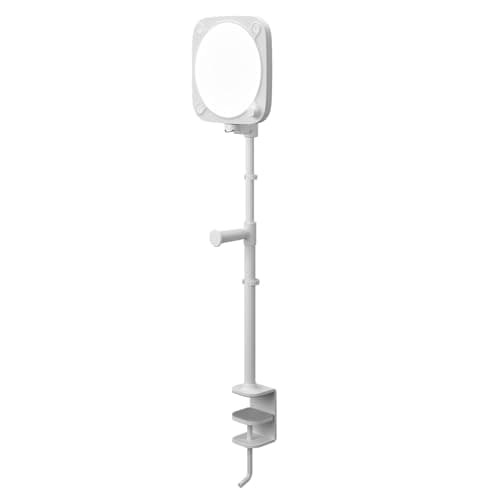 Elgato Key Light Neo with Clamp The best-documented light here for a normal desk: it clamps to the desk edge instead of standing on the desktop, publishes the widest color-temperature range in the group, and is the only one honest enough to tell you its brightness changes with what you plug it into. | A desk with no room for a stand | —Warranty | |
| 2 | 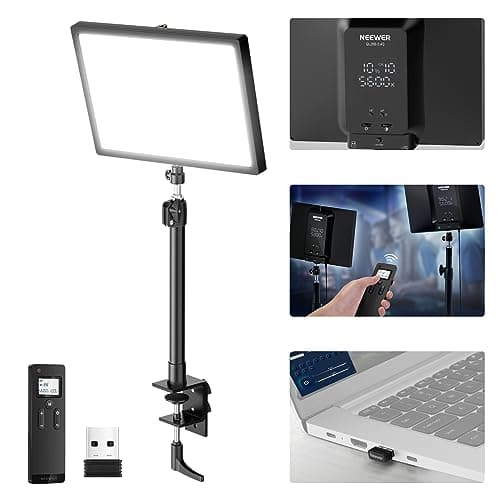 Neewer GL25B 12.9″ Streaming Key Light The most completely documented light in this roundup, and the only one that publishes an illuminance figure with a distance attached or a warranty term you can read before you buy. | The most published numbers per dollar | 2 yrWarranty | |
| 3 | 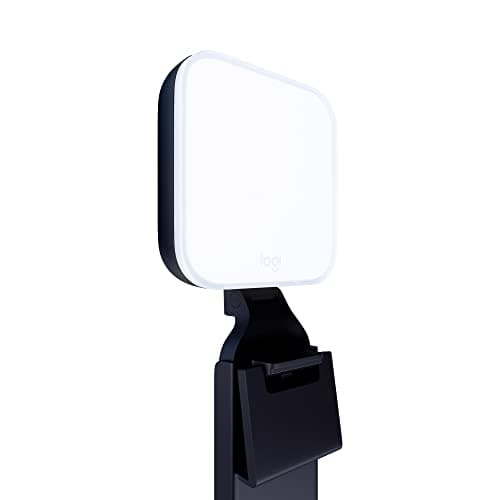 Logitech Litra Glow The smallest and cheapest light here from a maker that publishes a real specification page — and the dimmest by a wide margin, which is the whole trade. | A small desk and a dark room | —Warranty | $58.60Amazon $69.99 −16% |
| 4 | 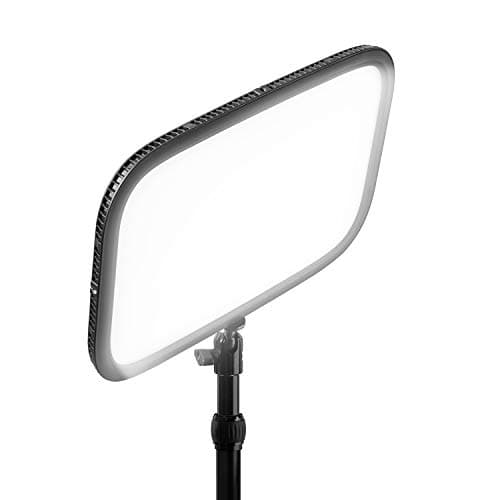 Elgato Key Light (2800 lumens) Nearly three times the published output of anything else here, on a desk clamp that puts it above and behind your monitor — and the lowest published CRI of the five. | A bright room, permanently set up | —Warranty | |
| 5 | 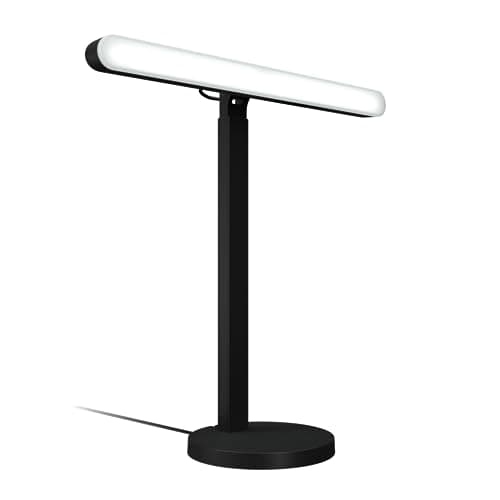 Logitech G Litra Beam A tall column on a weighted stand with the best aiming range here — and a published lumen figure that is 20% lower than the one everyone quotes for it. | Aiming a light exactly where you want it | —Warranty |
Prices as of October 18, 2026, from Amazon’s API. They change; we show a live number or none at all.
Everywhere else on this site, the lighting question is contrast: a bright screen in a dim room, and how to narrow the gap. On a video call the requirement inverts. Nobody on the other end can see your desk. They can see your face, and the camera can only record light that actually arrived there.
That makes this a different product category from a desk lamp or a monitor light bar, which is why it gets its own page. Below are five lights that are currently purchasable, ranked on what their makers publish. We have not switched any of them on and we have not put a camera in front of one — what we have done is read five specification pages properly, and two of them contain something worth telling you before you spend anything.
Do the free part first
Two changes improve a call more than any purchase, and both cost nothing. Get your main light source in front of you rather than behind you, and get it roughly at or slightly above eye level. A window you are facing does both for free; a window behind you turns you into a silhouette no light on this page can rescue.
There is a genuine tension there worth naming, because it pulls against the rest of this site. CCOHS’s guidance for screen work is to angle the monitor away from windows and bright lights so they do not glare off the panel. The camera wants the opposite. A window off to one side and slightly in front is usually the compromise that keeps both happy. The whole argument, including what a camera does that your eyes do not, is on lighting for video calls, and it is worth ten minutes before you buy a light you may not need.
What we ranked on
Five things, in this order, every one of them published by the manufacturer or marked absent.
1. Published output, and the power it needs to reach it. All five publish lumens. Only Elgato publishes what happens when you underfeed the light, and the difference is not small.
2. Whether any illuminance figure comes with a distance. Lumens describe the light leaving the fixture. Lux describes what lands on your face — but only if the distance is stated, because illuminance falls off with the square of it. One product here publishes that pair.
3. The color-temperature range.Not the headline number, the range — because the job is matching the light already in your room, not hitting some ideal Kelvin value.
4. Published CRI, and what it leaves out. All five print one. None prints R9.
5. A longevity term. Our third Spec Line slot is always the number that speaks to year three. In this category that is nearly always blank, and the section below explains exactly why.
What we did not rank on: how anyone looks under these lights. That is an outcome we have not observed, on a subject we cannot generalize about, and every “flattering skin tones” claim in this category is a manufacturer’s marketing line rather than a measurement.
The power-supply trap
This is the finding that reorders the page. Elgato publishes three brightness figures for the Key Light Neo, one per power source: 400 lm from a 4.5 W USB-A port, 700 lm from a 7.5 W USB-C port, and 1000 lm only from a 3 A supply. Buy it, plug it into the spare port on your dock, and you have a 400-lumen light that you chose for a 1000-lumen headline.
Logitech has the same physics and states it more quietly: the Litra Beam specification page says max brightness requires a “USB 3.1 gen 2 port or 5V 1.4A USB power adapter”. Anything less and the published 320 lm is not what you are running.
The practical rule is dull and worth following: if a light is USB-powered and you care about its brightest setting, give it its own adapter rather than a spare port. It is the cheapest upgrade on this page, because you already own the light.
Lumens tell you about the fixture, not about your face
Every product here publishes a lumen figure, which describes total light output. What you actually want to know is how much of it reaches you at the distance you sit — and that is illuminance, in lux, which is only meaningful with a distance attached.
One of the five publishes that pair: Neewer’s GL25B states 2300 lux at 0.5 m. That is a checkable claim. You can take a light meter, stand half a meter away, and hold the company to it. Nobody else here gives you anything to check against, and the practice we criticize on the light bar roundup — a lux number printed with no distance at all — is arguably worse than publishing nothing, because it looks like a specification.
The gap between the two ends of this page is large either way: 250 lm at the bottom, 2800 lm at the top, a factor of more than eleven. That range exists because the products are answering different rooms, not because some of them are underachieving.
The Kelvin ranges do not overlap the way you would expect
Two ranges appear on this page, and neither contains the other. Both Logitechs publish 2700–6500K. Both Elgatos and the Neewer publish 2900–7000K.
So the Logitechs go warmer and the others go cooler, and which matters depends entirely on your room. A home office lit by warm domestic bulbs after dark wants 2700K, and a light that stops at 2900K will read slightly cold against everything else in the frame. A desk beside a big north-facing window wants the cool end, and 6500K may not get there.
This is the same argument as color temperature for a home office, with one difference: your eyes adapt to a mismatch and a camera does not. It picks one white balance for the entire frame and something in the picture has to lose.
Everyone publishes CRI. Nobody publishes R9
The published figures here are CRI 98+ (Neewer), >94% (Key Light Neo), 93 (both Logitechs) and >92% (Key Light). Not one of the five publishes R9 — the deep-red test sample that the CRI average excludes, and the one that skin tone leans on most heavily.
That is not a small omission for a product whose entire purpose is lighting a face, and it is not a fringe complaint either: the CIE, the international body that defined CRI, has published a position statement saying Ra “does not agree well with overall perceived color rendering” for LED sources. The metric dates from 1965 and was last revised in 1974. We work through the full version of this on lighting for video calls — where, for what it is worth, the only product on this entire site that publishes an R9 figure turns out to be a desk lamp rather than a camera light.
Nobody publishes a rated life, and only one publishes a warranty
Here is the odd thing about this category, and the reason four of the five Spec Lines below end in a dash.
Every desk lamp and light bar we rank elsewhere on this site publishes a service-life figure — 25,000 hours, 40,000, 50,000. Not one of these five camera lights publishes any rated life at all. And of the five, only Neewer prints a warranty term (2 years) on the page you buy from. Elgato’s specification pages carry no term; Logitech’s support pages for the Litra Glow and Litra Beam link to a warranty page that states no duration, even though the equivalent Logitech pages for its mice publish “1 year limited hardware warranty”.
These companies obviously have warranty policies, and you will find a number if you dig into terms and conditions or ask support. Our rule is narrower than that: the Spec Line prints the manufacturer’s published figure or it prints a dash. We are not going to lift a warranty term out of a retailer listing and let it read as a fact forever after. The observation stands on its own anyway — the cheapest light in this roundup is the only one that tells you how long its maker will stand behind it.
How it mounts decides whether it fits your desk
Three mounting approaches are represented, and this is often the real constraint rather than any number above.
The monitor mount— Litra Glow — costs no desk space at all and puts the source at roughly screen height, which is close to correct. It also competes for the top edge of your monitor with a webcam and, if you have one, a light bar.
The weighted desk stand— Litra Beam, Neewer GL25B — can be aimed properly and raised above eye level (the Beam travels 370–615 mm), at the cost of real desk area. A 150 mm base or a 623 g panel is not nothing on a small desk.
The desk-edge clamp— the full-size Key Light on a Master Mount L adjusting 22 to 49 inches, and the Key Light Neo on Elgato’s own clamp adjusting 15.1 to 21.9 inches — keeps the light off the desktop entirely. The Master Mount L’s reach is also the only way here to get a light above and behind the monitor, which is the best position of the three. Both clamps want a free desk edge, and that edge may already be carrying a monitor arm. Check the clamp space before you buy, the same way you would check it for an arm.
What is missing, and why
Two Elgato products that would otherwise belong here are not ranked on availability rather than merit: the Key Light Air MK.2 was listed as shipping in one to two months when we checked on 15 August 2026, and the Key Light Mini did not surface as a live listing at all. We do not rank things you cannot currently buy.
The larger absence is deliberate. Search this category and most of what comes back is a very cheap ring light from a brand whose entire specification lives in its own marketplace listing — no manufacturer page, no CRI you can check, no warranty term, sometimes a lux figure with no distance attached. Some of them are certainly fine. They are not here because ranking them would mean printing numbers we cannot verify, which is the one thing this site will not do. It is the same rule that keeps the most-recommended cable tray off our cable management roundup.
What we cannot tell you
How you will look under any of these. We have not switched one on, we have not pointed a camera at one, and we are not going to imply that reading a specification page is the same as testing a light. The manufacturers’ own comfort and appearance claims — TrueSoft, cinematic color accuracy, flattering for all skin tones — are reported here as claims, because that is what they are.
What we can tell you is what is written down: that one of these lights publishes three different brightness figures depending on the plug, that exactly one publishes an illuminance figure you could check with a meter, that the two Kelvin ranges on offer do not contain one another, that none of the five publishes the one color metric that governs skin, and that four of them will not tell you how long they are warranted for. Our methodology sets out what that is worth and what it is not.
The picks, in detail
1. A desk with no room for a stand
Elgato Key Light Neo with Clamp
The best-documented light here for a normal desk: it clamps to the desk edge instead of standing on the desktop, publishes the widest color-temperature range in the group, and is the only one honest enough to tell you its brightness changes with what you plug it into.
- Max output
- 1000 lm
- Color temp
- 2900–7000K
- Warranty
- —
Ranked first for a slightly unfashionable reason: it is the only light here that refuses to give you a single flattering brightness number. Elgato publishes three— 400 lm on a 4.5 W USB-A port, 700 lm on a 7.5 W USB-C port, 1000 lm on a 3 A supply — because output is limited by the power you feed it, which is true of every USB-powered light on this page and stated by almost none of them.
That matters practically. Plug this into the spare USB-A port on a laptop dock and you own a 400-lumen light that you paid for as a 1000-lumen one. Nothing is broken and nothing was mis-sold; the number was on the page. It is the single most common way a camera light disappoints someone, and it is the kind of detail that decides where a product ranks on this site.
The trade against the Neewer below is straightforward: this one costs you no desktop space and publishes the same Kelvin range; that one is brighter, publishes an illuminance figure with a real distance attached, and prints a warranty term. If your desk has room for a stand, read both before deciding.
A note on the listing. When we first ranked the Neo, our link went to the version sold with Elgato’s monitor mount. Amazon now lists that version as unavailable, so the link is the same light bundled with Elgato’s desk-edge clamp instead. The light and its published numbers are unchanged; the mounting notes on this card describe the clamp.
Good
- Publishes three separate brightness figures for three power sources — 400 lm on USB-A, 700 lm on USB-C, 1000 lm on a 3 A supply — instead of one headline number you may never reach
- 2900–7000K is the widest published range in this roundup at the cool end, which is what you need to match a bright window
- CRI >94% is the second-highest published figure here
- Ships with Elgato's own desk-edge clamp, which grips a desktop up to 60 mm thick and holds the light 383 to 557 mm up, so it costs no desktop area at all
- 246 g and 38 mm deep — small enough that it does not become the thing you look at
- Runs over plain USB-C or over WiFi, so it does not require a proprietary hub or a dedicated app to turn on
Not so good
- You only get the 1000 lm headline with a 12 W supply. Plugged into a laptop USB-A port it publishes 400 lm — less than a third
- The 2900K warm floor cannot reach the 2700K that both Logitechs publish, so in a room lit entirely by warm bulbs it is the one that will not match
- No warranty term published anywhere on the product page, and no rated life either
- Publishes lumens but no illuminance at any distance, so you cannot work out what actually lands on your face
- Elgato sells the identical light with no mount for noticeably less — buying the clamp bundle when you already own an arm or a stand is money spent on hardware you will put in a drawer
- The clamp needs a free desk edge no thicker than 60 mm — the same edge a monitor arm or a mic boom wants
Don’t buy it if: your desk edge is already taken by a monitor arm clamp and a mic boom, or your desktop is thicker than 60 mm. The clamp needs exactly that edge, and a light fighting an arm for the same few inches is how a desk gets worse rather than better — the Neewer below sits on the desk instead.
Price as of October 18, 2026. #ad — we earn a commission.
Where these numbers came from
- Elgato Key Light Neo — technical specifications (brightness by power source: “USB-A (4.5 Watt): 400 lm”, “USB-C (7.5 Watt): 700 lm”, “3A power supply (max. 12 Watt): 1000 lm”; “2900 – 7000 K”; “CRI >94%”; 38 x 150 x 150 mm; 246 g; power consumption “up to 15 W”; monitor mount with 1/4-inch thread included in Elgato's standard bundle; “USB-C or WiFi”). No warranty term and no rated life are published on the page — read 2026-09-16
- Elgato Clamp for Key Light Neo — technical specifications (“Maximum Height: 55.7 cm | 21.9 in”; “Minimum Height: 38.3 cm | 15.1 in”; “Desk Clamp Opening: Up to 60 mm | 2.4 in”; “0.47 kg | 1 lb (without accessories)”; “Maximum Load: 0.5 kg | 1.1 lb”; 1/4-inch thread mount; headset holder in the box). This is the mount in the Key Light Neo + Clamp bundle we link. No warranty term is published on the page — read 2026-09-16
2. The most published numbers per dollar
Neewer GL25B 12.9″ Streaming Key Light
The most completely documented light in this roundup, and the only one that publishes an illuminance figure with a distance attached or a warranty term you can read before you buy.
- Max output
- 1400 lm
- Color temp
- 2900–7000K
- Warranty
- 2 yr
Second, and it beats the Elgato on almost every number that exists. The reason it is not first is entirely about where it has to sit: this is a 12.9-inch, 623 g panel on a desk stand, and on the small desks most home offices actually have, that is a real cost.
What it does better than anything else here is publish. 2300 lux at 0.5 mis the only illuminance figure in the roundup with a distance attached, which is the difference between a specification and a number — lux falls off with the square of distance, so a lux claim with no distance means nothing at all. We make the same point about a light bar that claims “≥700 lux” without saying from where on the monitor light bar roundup.
It is also the only one of the five that tells you how long the maker will stand behind it. Two years, printed on the product page, from the brand with the least premium positioning in the group. That is not a durability measurement and we are not presenting it as one — but it is written down, and four more expensive lights here have nothing written down at all.
Good
- Publishes 2300 lux at 0.5 m — the only figure on this page that tells you how much light actually arrives somewhere, because it comes with a stated distance
- 1400 lm luminous flux, the second-highest here and well ahead of both Logitechs
- CRI 98+, the highest published figure in the group
- The only product here that prints a warranty term (2 years) on its own product page
- Publishes its LED count (176), input voltage and physical dimensions — a full spec table rather than three marketing bullets
- A 12.9-inch panel is a physically larger source than the Logitech column or the Elgato Neo, and a larger source is a softer one
Not so good
- 623 g on a desk stand needs real desk area, which is exactly what a small home-office desk does not have
- Runs on a DC12V adapter rather than USB, so it occupies a wall socket and cannot be powered from a laptop or a dock
- No rated life published, same as everything else here
- Neewer's cheaper models publish far less than this one does, so the brand name alone is not a guarantee of a spec sheet — check the specific model
- Control is through a 2.4 GHz remote and Neewer's own desktop app rather than an ecosystem most people already run
Don’t buy it if: your desk is already full. This is the largest object in the roundup, and a 12.9-inch panel on a stand in front of a small desk is a genuine loss of working surface. If space is the constraint, the Elgato Neo on its desk-edge clamp or the monitor-mounted Litra Glow do the same job without touching the desktop.
Price as of October 18, 2026. #ad — we earn a commission.
Where these numbers came from
3. A small desk and a dark room
Logitech Litra Glow
The smallest and cheapest light here from a maker that publishes a real specification page — and the dimmest by a wide margin, which is the whole trade.
- Max output
- 250 lm
- Color temp
- 2700–6500K
- Warranty
- —
The honest case for the Litra Glow is that it is small, it is powered by the cable that also carries its data, and Logitech publishes a proper specification page for it — 250 lumens, 2700–6500K, CRI 93, with the mount’s travel given in inches. For a dim room and a small desk, that is a complete answer.
The dishonest case would be to call 250 lumens “enough” without qualifying it. It is enough when it is the brightest thing pointing at you. It is not enough when there is a window in the room. The arithmetic is unforgiving here and no review can wish it away.
Good
- 250 lm from a bus-powered USB connection — no wall socket, no power brick, one cable
- Reaches 2700K, warmer than either Elgato here, which is what you want if every other light in the room is a warm bulb
- CRI 93 published on Logitech's own specification page rather than in listing copy
- The monitor mount telescopes 4 inches vertically, extends 2 inches horizontally and swivels 360 degrees, so it can be aimed rather than just perched
- 99 g for the light itself — the least intrusive object in this roundup
Not so good
- 250 lm is a sixth of the Neewer's published flux and a quarter of the Key Light Neo's best case. In a room with daylight in it, that is not a key light, it is a fill
- Tops out at 6500K, so against a bright north-facing window it cannot match the color of the light already on your face
- No warranty term published on Logitech's product or specification pages, and no rated life
- No illuminance figure at any distance
- The monitor mount is the only mount — there is no stand in the box if your screen edge is already occupied
Don’t buy it if: you take calls in a room with real daylight. This is the dimmest light on the page by a factor of four or more, and a light that loses to the window is a light that changes nothing. In a bright room, look at the Neewer or the full-size Key Light.
$69.99 −16%
Price as of October 18, 2026. #ad — we earn a commission.
Where these numbers came from
4. A bright room, permanently set up
Elgato Key Light (2800 lumens)
Nearly three times the published output of anything else here, on a desk clamp that puts it above and behind your monitor — and the lowest published CRI of the five.
- Max output
- 2800 lm
- Color temp
- 2900–7000K
- Warranty
- —
This is the one to buy if the problem is a bright room. Every other light here is trying to add something to an existing lighting situation; at 2800 published lumens across a 350 × 250 mm panel, this one can be the lighting situation.
Two honest caveats. The first is that Elgato publishes a lowerCRI for this than for the much cheaper Key Light Neo — >92% against >94% — so more money is buying more light, not better light. The second is the mount: the Master Mount L is a desk-edge clamp, which is the correct way to get a light above and behind a monitor, and also one more thing competing for the same eight inches of desk edge as your monitor arm.
Good
- 2800 lm published, the most in this roundup by a wide margin — the only light here that can compete with daylight rather than fill around it
- A 350 x 250 mm panel is by far the largest emitting surface here, and size is what makes a source soft
- Master Mount L clamps to the desk edge and adjusts from 22 to 49 inches, so the light goes where a monitor mount cannot: above and behind the screen
- 2900–7000K, matching the Neo's range
- Wi-Fi control on 2.4 and 5 GHz, which means the panel can sit out of arm's reach and still be adjustable
Not so good
- CRI > 92% is the lowest published figure of the five, on the most expensive product
- Up to 45 W and 1.3 kg — this is a wall socket and a clamp on the desk edge, not a USB accessory
- Wi-Fi is the only control path. There is no cabled fallback if the network is having a bad day
- The clamp needs a free desk edge that is not already carrying a monitor arm and a mic boom
- No warranty term and no rated life published on the product page
Don’t buy it if: your calls are a couple of hours a day in a room you can dim. This is a studio fixture doing an office job — the setup cost is real, the clamp is permanent, and 2800 lumens is a lot of light to own because of four meetings a week.
Price as of October 18, 2026. #ad — we earn a commission.
Where these numbers came from
5. Aiming a light exactly where you want it
Logitech G Litra Beam
A tall column on a weighted stand with the best aiming range here — and a published lumen figure that is 20% lower than the one everyone quotes for it.
- Max output
- 320 lm
- Color temp
- 2700–6500K
- Warranty
- —
Last, and not because it is bad. The Litra Beam has the best aiming hardware here — a weighted stand that travels from 370 to 615 mm, so the source ends up above your eyeline without a clamp, which is the geometry that actually flatters a face.
It is last because of the number. Logitech’s own specification page publishes “320 lumen with 7W power input”. The figure quoted almost everywhere else — retailer listings, press coverage, comparison articles — is 400 lumens, and we could not find that number on any Logitech page we were able to read. It may be a different measurement condition. It may be a marketing figure. We print 320 because that is what the manufacturer publishes, and we are telling you the other number exists rather than quietly picking whichever suits the ranking.
One more disclosure. The listing we link is the Logitech G version; Logitech’s readable specification page covers the Litra Beam VR0031 (part 946-000006). They are sold as the same light in different liveries, and the numbers above are from that page. If Logitech publishes a separate spec sheet for the G-badged unit, we will use it.
Good
- The stand adjusts from 370 to 615 mm, which is the only mechanism here that lets you put the source above eye level without clamping anything
- A 400 mm-tall column is a long, narrow source — a different and often kinder shape of light than a small square panel
- 2700–6500K, so it can go as warm as a domestic bulb
- CRI 93 published on Logitech's own specification page
- Logitech publishes a UL verification of no photobiological hazard at 12 hours of exposure — a safety claim with a test behind it, which is rarer than it should be
Not so good
- Logitech's specification page says “320 lumen with 7W power input”. Retailers and press coverage widely quote 400 lumens. We print the published figure and we cannot reconcile the two
- Max brightness needs a USB 3.1 gen 2 port or a 5 V 1.4 A adapter — on an ordinary USB-A port you are not getting the published number
- The stand and light together weigh 1.26 kg and the base is 150 mm across, so it wants a real footprint on the desk
- The Amazon listing is the Logitech G-badged version; the only specification page we could read is Logitech's for the Litra Beam (VR0031 / 946-000006)
- No warranty term and no rated life published
Don’t buy it if: you want the most light for the money. At a published 320 lm it is dimmer than the Neewer by a factor of four and costs more. You are buying the stand and the column shape, and those are worth something — just be clear that is what you are buying.
Amazon isn’t showing a buyable offer for this one right now.
Price as of October 18, 2026. #ad — we earn a commission.
Where these numbers came from
- Logitech Support — Specification, Litra Beam (“320 lumen with 7W power input”; “2700K - 6500K (Kelvin)”; “Color Rendering Index 93”; light 400 x 30 x 30 mm and 185 g; desktop stand 370–615 mm with a 150 mm base, 1,078 g; requires a “USB 3.1 gen 2 port or 5V 1.4A USB power adapter for max brightness”; model VR0031, part 946-000006). No warranty term and no rated life are published on the page — read 2026-08-15
- Logitech press release, Litra Beam launch — “2700K-6500K”, TrueSoft described as “balanced, full-spectrum LED light with cinematic color accuracy”, and “UL Verified No Photobiological Hazard at 12 Hours of Exposure”. The release publishes no lumen figure and no CRI — read 2026-08-15
Common questions
How bright does a video call light actually need to be?
It depends entirely on what it is competing with, which is why we will not give you a single number. In a room lit only by lamps after dark, the 250 lm Litra Glow is genuinely enough — it is the brightest thing pointing at your face. In a room with a window in it, 250 lm disappears and you are looking at the 1400 lm Neewer or the 2800 lm Key Light. The useful test is free: sit where you sit, turn the camera on, and see whether your face is darker than the background. If it is, the light has a job. If it is not, you are about to spend money on a problem you do not have.
Why is the warranty column mostly blank?
Because only one of these five publishes a warranty term where a buyer can read it before purchase. Neewer prints “2-Year Warranty” on the GL25B product page. Elgato’s specification pages for both Key Lights carry no term at all, and Logitech’s support pages for the Litra Glow and Litra Beam link to a warranty page that states no duration — which is notable, because Logitech’s support pages for its mice do print “1 year limited hardware warranty”, as we quote on the trackball roundup. These companies certainly have warranty policies. They just do not put the number next to the product, so we print a dash rather than a figure we sourced from a retailer.
Ring light or panel?
Shape matters much less than position and size. A ring puts a characteristic circular catchlight in your eyes and lights your face very evenly from straight on; a panel or a column of the same area does essentially the same job from slightly off to one side, which most people find looks more natural. What actually decides the result is whether the source is large relative to your face and whether it sits at or slightly above eye level. A big soft panel badly placed loses to a small light in the right spot every time. We would settle the geometry using the video call lighting guide before choosing a form factor.
Can I just use my monitor light bar?
It is better than nothing and it is already in roughly the right place, but it was built for a different job: a bar aims down at your desk, and you are lit only by what bounces back up. That works passably on a pale desk and does very little on a dark one. If you want the full argument, it is on what a light bar actually does — and if you are choosing between the two categories, desk lamp vs monitor light bar is the page for that.
Warm light or cool light for calls?
Match the room rather than chase a number. A camera picks one white balance for the whole frame, so 2700K lamplight on one side of your face and 6500K daylight on the other forces it to choose, and the losing side goes orange or blue. That makes the published Kelvin range a real buying criterion: both Logitechs here go down to 2700K and stop at 6500K; both Elgatos and the Neewer run 2900–7000K, so they reach cooler but cannot go as warm. If your room is all warm bulbs, that difference decides the purchase.
Do any of them publish R9?
No. All five publish a CRI figure — 98+, >94%, 93, 93 and >92% — and not one publishes R9, the deep-red sample that CRI excludes and that skin tone depends on most. The CIE, the body that defined CRI, has published a position statement saying Ra “does not agree well with overall perceived color rendering” for LEDs. So every CRI number on this page is a real published figure that is structurally silent on the exact question a face-lighting product exists to answer. That argument, in full, is on lighting for video calls.
Sources
Every figure on this page comes from one of these. If a manufacturer doesn’t publish a number, we print “—” rather than estimate it.
- Elgato Key Light Neo — technical specifications (brightness by power source: “USB-A (4.5 Watt): 400 lm”, “USB-C (7.5 Watt): 700 lm”, “3A power supply (max. 12 Watt): 1000 lm”; “2900 – 7000 K”; “CRI >94%”; 38 x 150 x 150 mm; 246 g; power consumption “up to 15 W”; monitor mount with 1/4-inch thread included in Elgato's standard bundle; “USB-C or WiFi”). No warranty term and no rated life are published on the page — read 2026-09-16
- Elgato Clamp for Key Light Neo — technical specifications (“Maximum Height: 55.7 cm | 21.9 in”; “Minimum Height: 38.3 cm | 15.1 in”; “Desk Clamp Opening: Up to 60 mm | 2.4 in”; “0.47 kg | 1 lb (without accessories)”; “Maximum Load: 0.5 kg | 1.1 lb”; 1/4-inch thread mount; headset holder in the box). This is the mount in the Key Light Neo + Clamp bundle we link. No warranty term is published on the page — read 2026-09-16
- Neewer GL25B 12.9-inch streaming key light — product specifications (“Luminous Flux: 1400lm”; “Maximum Illuminance: 2300lux/0.5m”; “Color Temperature: 2900K-7000K”; “CRI: 98+”; “Maximum Power: 25W”; “Input Voltage: DC12V”; “Number of LEDs: 176”; 268 x 188 x 37.25 mm; 623 g; “2-Year Warranty”). No rated life is published on the page — read 2026-08-15
- Logitech Support — Specification, Litra Glow (“250 Lumen max output optimized for desktop streaming”; “2700K - 6500K (Kelvin)”; “93 CRI”; monitor mount with 4 in vertical telescoping, 2 in horizontal extension and 360-degree swivel; “4.92 ft (1.5 m) USB C to USB A cable”; model VU0061, part 946-000001). No warranty term and no rated life are published on the page — read 2026-08-15
- Elgato Key Light — technical specifications (“2800 Lumens, adjustable”; “2900 - 7000K, adjustable”; “CRI > 92%”; 30 x 350 x 250 mm; “2.86 lb / 1.3 kg”; “Up to 45W”; Master Mount L desk clamp expandable to 2.35 in with 22–49 in height; “Wi-Fi 2.4 GHz / 5 GHz”). No warranty term and no rated life are published on the page — read 2026-08-15
- Logitech Support — Specification, Litra Beam (“320 lumen with 7W power input”; “2700K - 6500K (Kelvin)”; “Color Rendering Index 93”; light 400 x 30 x 30 mm and 185 g; desktop stand 370–615 mm with a 150 mm base, 1,078 g; requires a “USB 3.1 gen 2 port or 5V 1.4A USB power adapter for max brightness”; model VR0031, part 946-000006). No warranty term and no rated life are published on the page — read 2026-08-15
- Logitech press release, Litra Beam launch — “2700K-6500K”, TrueSoft described as “balanced, full-spectrum LED light with cinematic color accuracy”, and “UL Verified No Photobiological Hazard at 12 Hours of Exposure”. The release publishes no lumen figure and no CRI — read 2026-08-15
- CIE Position Statement on CRI and Color Quality Metrics (2015) — the body that defined CRI, on why Ra “does not agree well with overall perceived color rendering” for LED sources — read 2026-08-15
- CCOHS: Office Ergonomics — Eye Discomfort in the Office (monitor placement relative to windows and overhead lights) — read 2026-08-15
Read next
Lighting for video calls
Read this first. The mechanism behind the ranking: why the camera makes CRI matter, and why R9 is the number nobody prints.
How to set up a home office for video calls
Camera height, background and the free changes that beat any light you can buy.
The best desk lamps
If you want one light that does calls and paperwork, the lamp roundup is the other half of this decision.
The best monitor light bars
The product that lights your desk rather than your face — and where the lux-without-a-distance complaint started.
How to light a home office
Layered lighting, from the ceiling down — where a camera light sits in the order of operations.
Color temperature for a home office
What the Kelvin ranges above actually mean, and why mixing two of them is the mistake.
What CRI is and why it matters
The 1974 formula behind every number in the spec lines here, and what it leaves out.
Our methodology
Why a blank Spec Line slot is a feature: what we publish, what we refuse to estimate, and how each number is sourced.