How to set up bias lighting behind a monitor
The strip itself is the easy part. What decides whether this works is four things nobody puts on the box: which surface the light hits, which way it faces, how long a run you actually need, and how dim you leave it. Get those wrong and you have added a second glare source behind the first one.
By Stephen V.Last reviewed
Quick picks
Ranked, with the manufacturer’s own longevity figure next to each one. Tap a row to jump to the full write-up.
| # | Product | Best for | Longevity | Price |
|---|---|---|---|---|
| 1 | 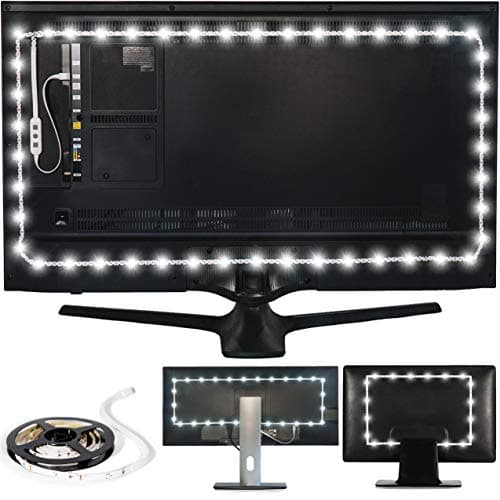 Luminoodle Bias Lighting, Backlight Kit for Monitors up to 24″ The kit whose own product name states the fit — a backlight kit for monitors up to 24 inches, at 6500K. If you want to do this without measuring or cutting anything, this is the one that was sized for the job. | Setting it up without cutting anything | —Warranty | |
| 2 | 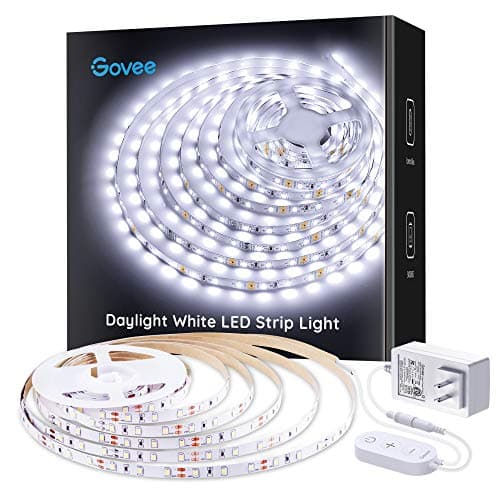 Govee Cool White LED Strip Lights 16.4ft, 6500K, Dimmable 16.4 ft of 6500K strip on a dimmable control box — enough to light a large panel with margin, or two screens from one run, and the only warranty in the category we could confirm on the maker's own live site. | A large monitor, or a run you will trim to fit | 1 yrWarranty | $16.99Amazon $19.99 −15% |
| 3 | 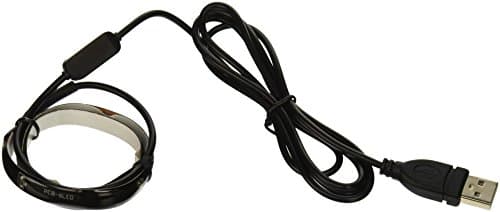 Antec Halo 6 LED Bias Lighting Kit A 14.6-inch strip on a 1300mm cable with a stated two-year parts-and-labor warranty — the best-documented kit in the category, and the one whose own requirement line describes this exact installation. | A single monitor, and a warranty on paper | 2 yrWarranty |
Prices as of October 18, 2026, from Amazon’s API. They change; we show a live number or none at all.
The short version: set the strip an inch or two in from the back edges of the panel on three sides, face it at the wall, use a 6500K white, and run it dim — the bias-lighting literature puts the ceiling at “should not exceed 10% of the display’s peak brightness”. Measure the three sides before you buy so the kit you order is long enough, and check what is behind the monitor, because the wall is part of the product.
What you are actually fixing
The problem is a contrast step, not darkness. OSHA states it directly: “high contrast between light and dark areas of the computer screen, horizontal work surface, and surrounding areas can cause eye fatigue and headaches.” A bright panel on a dark wall is that step. Every time your eyes leave the screen they re-adapt, and they do it hundreds of times an hour.
Bias lighting removes the step by lifting the wall behind the screen closer to the screen’s own brightness. That is the whole mechanism, and it explains every instruction below — including why the light must be dim, must be neutral, and must never face you.
Step 1: measure before you buy
Three sides of the back of the panel — top, left, right — plus the distance from where the strip ends to wherever the plug is going. That is the length you need. If you have not got a tape measure, 16:9 arithmetic gets close enough to shop with: a nominal 24-inch diagonal is about 20.9″ by 11.8″, so three sides is roughly 44″; a 27-inch panel is about 23.5″ by 13.2″, so about 50″. Those are divisions of a diagonal, not product specs.
Then hold that figure against what the kit prints. This is where most of the regret in this category comes from: a TV kit is sized for a 50-inch panel and a monitor kit for a 24-inch one, and those are not close to each other.
Step 2: clean the panel, then dry-fit it
Adhesive strip does not stick to dust, and the back of a monitor that has been on a desk for two years is dust. An alcohol wipe and two minutes to dry is the whole job.
Then lay the strip in position before peeling anything. You are checking three things: that the run reaches all three sides, that the corners turn where the panel’s own ribs and vents allow, and that the lead comes off at the side nearest the plug rather than the side furthest from it. None of these makers publishes an adhesive spec, a re-stick rating or a service temperature, so treat the first stick as the only one you get.
Step 3: set it in from the edge, facing the wall
An inch or two in from the outside edge, on the flat of the back panel, emitters pointing at the wall. This is the single most important instruction on the page and the one most installs get wrong.
A strip on the very edge spills light forward around the bezel. That light reaches your eye directly rather than by reflection, which makes it a small bright source in your peripheral vision — a glare source, exactly what you were removing. Set in from the edge, everything bounces first, and a reflected source is a soft one.
Three sides, not four. The bottom edge of a monitor usually sits within a few inches of the desk, where a strip lights the desktop instead of the wall. Skip it and keep the length for the top.
Step 4: get the color temperature right, and leave it there
The reference white for displays is D65, which is why the kits that print a figure at all print 6500K. The intent is that the wall reads as the same white the screen is trying to show, so your eyes are not switching between two whites.
This is the one layer of a home-office lighting setup you should not tune. Warming the room lighting in the evening is sensible and we recommend it in color temperature for a home office; warming the strip behind the monitor just puts a second white point next to the screen. If you bought an RGB strip, set it to its whitest white and accept that it is an approximation of one.
Step 5: turn it down
Then turn it down again. The published ceiling is “should not exceed 10% of the display’s peak brightness”, and almost every first install sits well above it because a new strip at full output looks impressive.
The test takes ten seconds. Turn the room lights off and look at the screen. The wall around the panel should read as present — you can tell where the monitor ends and the wall begins — without the strip’s glow being visible as a distinct bright band. If you can see the band, it is too bright, too close to the wall, or both.
Which is also the argument for buying a kit with a dimmer rather than one wired straight to USB at a fixed output. A strip you cannot turn down cannot be set correctly.
Step 6: look at the wall
Last, because it is the thing you cannot change by moving the strip. The wall is part of the optical path: the light you see has bounced off it, so its color is the light’s color. The literature recommends a neutral gray, “Munsell N5 or N7”, and Antec writes the requirement into its own product spec — “placed against light colored wall.”
You do not need to repaint a room over this. But you should know the two cases where the method underperforms no matter what you buy: a dark accent wall directly behind the monitor, which absorbs most of the output, and a strongly colored one, which tints it. If your monitor sits in front of a window or a glass partition instead of a wall, there is nothing for the light to reflect off at all, and a monitor light bar is the fitting that does work in that position.
What nobody publishes, and what we have not tested
No CRI figure exists for any bias strip we have found — zero out of the five in this hub — so nothing on this page says anything about their color accuracy. No power draw figure either, which is why the USB-port question above ends in “use a powered hub if the run is long” rather than a current calculation. And no adhesive or temperature spec, so the dry-fit step is advice born of the absence of data rather than of a published limit.
We have not measured any of these strips, their color temperature or their output, and we have not measured a wall before and after. The three setup numbers on this page — D65/6500K, the 10% ceiling, the neutral-gray wall — are cited to the bias-lighting literature below, and the mechanism is OSHA’s wording, quoted. Everything about which kit to buy is the manufacturer’s own published figures, dated.
The picks, in detail
1. Setting it up without cutting anything
Luminoodle Bias Lighting, Backlight Kit for Monitors up to 24″
The kit whose own product name states the fit — a backlight kit for monitors up to 24 inches, at 6500K. If you want to do this without measuring or cutting anything, this is the one that was sized for the job.
- Color temp (CCT)
- 6500K
- CRI
- —
- Warranty
- —
The single most common way this goes wrong is buying a TV strip and discovering it is twice the length of the back of a monitor. This kit is named for the job: monitors up to 24″, at 6500K true white — the color temperature the whole method depends on.
For a first install that is worth more than a spec sheet. There is nothing to trim, no leftover run to coil behind the stand, and the strip reaches the corners of a 24-inch panel because it was built to.
It publishes no length in feet, no warranty term we could find and no CRI — and Power Practical’s own site returned an HTTP 402 on every product URL we tried, so even the sizing above is quoted from an authorized reseller’s reproduction of the description.
Good
- Built and sized specifically for “monitors up to 24″” — not a TV strip you cut down and hope fits
- A single 6500K true white LED strip, described in its own materials as “true white light at six thousand five hundred Kelvin” — no RGB or color-cycling mode to accidentally leave switched on
- USB-powered directly from the monitor's own port where it has one, so there is no separate wall adapter to route
- 3M adhesive backing — no tools, no screws, comes off clean if you change monitors
Not so good
- Power Practical's own storefront (powerpractical.com) returned an HTTP 402 error on every product URL we tried, so there is no independent manufacturer spec page to cross-check — only the retail listing, which multiple resellers reproduce identically
- No CRI figure published anywhere we could find
- No rated-life or warranty figure published anywhere we could find
- Capped at 24″ monitors; a wider ultrawide or a small TV needs a longer strip from elsewhere on this page
Don’t buy it if: your screen is larger than 24″, or you specifically want a live manufacturer page to verify a spec against before buying — Power Practical's own site was down when we checked, and the Govee below at least has a warranty page we could load ourselves.
Price as of October 18, 2026. #ad — we earn a commission.
Where these numbers came from
- Luminoodle Bias Lighting, Backlight Kit for Monitors up to 24″ — product description as reproduced by an authorized reseller (Power Practical's own site, powerpractical.com, returned an HTTP 402 error on every product URL we tried and could not be independently read; source of the “monitors up to 24″” sizing and the 6500K true-white spec, quoted there as “true white light at six thousand five hundred Kelvin”) — read 2026-07-26
- Luminoodle Bias Lighting — Amazon product listing, ASIN B01LR3O8SI (title and sizing consistent with the reseller-reproduced description) — read 2026-07-26
2. A large monitor, or a run you will trim to fit
Govee Cool White LED Strip Lights 16.4ft, 6500K, Dimmable
16.4 ft of 6500K strip on a dimmable control box — enough to light a large panel with margin, or two screens from one run, and the only warranty in the category we could confirm on the maker's own live site.
- Color temp (CCT)
- 6500K
- CRI
- —
- Warranty
- 1 yr
If your panel is bigger than 24 inches, or there are two of them, this is the kit with the published length to cover it: 16.4 ft, 300 LEDs, 6500K, on a dimmable control box.
The dimmer is the part that matters for setup rather than for shopping. Every setup instruction below about running the light dim assumes you can actually turn it down, and a strip wired straight to USB at full output cannot be adjusted at all.
Govee publishes a length and no screen size, so the measuring, trimming and corner turns are yours. The 12-month term comes from Govee’s own returns policy — shorter than Antec’s two years, but the only one of the three we could read first-party. No CRI figure, like everything in this category.
Good
- Govee's own Returns & Refunds page lists “Strip lights - 12” months as the warranty term — the only warranty on this page we could confirm directly on a manufacturer's own live site, not a reseller mirror
- 16.4 ft of strip covers a large monitor, a two-monitor spread, or a small TV without buying a second kit — cut it down at the marked segments if you need less
- A plain 6500K white with a dimmable control box; no RGB or color-cycling mode to leave on by accident
- 300 LEDs across the run, for coverage that does not visibly dim toward the far end the way a shorter, sparser strip can
Not so good
- No CRI figure published anywhere we could find, on the listing or on Govee's own site
- No rated-life figure in hours specific to this product — Govee's blog discusses LED lifespan in general industry terms elsewhere, but that is not this product's own published spec, so we are not printing it
- Larger and more expensive than the Luminoodle if a single 24″ monitor is all you have
- A control box and power brick is bulkier than a USB-only strip — more to route behind the desk
Don’t buy it if: you only need to light one small monitor and would rather not deal with a control-box-and-brick setup — the Luminoodle is the tighter kit for exactly that job, at the cost of Govee's documented warranty.
$19.99 −15%
Price as of October 18, 2026. #ad — we earn a commission.
Where these numbers came from
- Govee Cool White LED Strip Lights 16.4ft, 6500K, Dimmable — Amazon product listing (source of the 6500K color temperature, the 300-LED count and the dimmable control box; ASIN B07XHLGSXN) — read 2026-07-26
- Govee US: Returns & Refunds Policy (source of the published warranty period — the policy's own table lists “Strip lights - 12” months, with the warranty period starting “on the date of delivery of the products to the customer”) — read 2026-07-26
3. A single monitor, and a warranty on paper
Antec Halo 6 LED Bias Lighting Kit
A 14.6-inch strip on a 1300mm cable with a stated two-year parts-and-labor warranty — the best-documented kit in the category, and the one whose own requirement line describes this exact installation.
- Color temp (CCT)
- —
- CRI
- —
- Warranty
- 2 yr
Antec’s own spec sheet states the installation requirement outright: “LCD monitor up to 24″ in size placed against light colored wall”. That is the method on this page, printed by a manufacturer, and it is the only kit here that names the wall as part of the product’s requirements.
The 1300 mm cable is the setup-relevant figure: it is long enough to reach a USB port on the far side of a desk rather than forcing you to use the nearest one on the monitor itself. And the 2-year parts-and-labor term is the only real warranty in the category.
It is also a 14.6″ strip, which is one edge of one screen — a second monitor needs a second kit. And Antec publishes no color temperature at all, which for a product whose job is to match display white is the one gap that keeps it out of first place.
Good
- Antec's own requirement line describes this page's exact use case: “LCD monitor up to 24″ in size placed against light colored wall”
- A 2-year parts-and-labor warranty, confirmed on a live retail listing carrying Antec's own part number — the longest documented coverage of any product on this page
- A compact 14.6″ strip on a 4′3″ cable, built to sit directly behind one monitor rather than wrap a TV
- Still selling and in stock more than a decade after launch, which is its own kind of longevity evidence even without a rated-hours figure
Not so good
- No color temperature published anywhere we could find — “white backlight” is as specific as Antec's own materials get, so you cannot check it against the 6500K/D65 standard MediaLight's own explainer describes
- No CRI figure published
- Only 14.6″ of strip, the shortest on this page — enough for one monitor, short for a wide one
- Antec's own product-specific page for this kit (formerly on store.antec.com) no longer resolves; the specs above come from retail listings that carry Antec's part number, not a live Antec.com page we could browse
Don’t buy it if: the exact color of white matters to you and you want it printed on a spec sheet before you buy — the Halo 6 doesn't publish a Kelvin number, so you're trusting an unstated “white” rather than a stated 6500K. Buy one of the three strips above it instead.
Price as of October 18, 2026. #ad — we earn a commission.
Where these numbers came from
- Antec Halo 6 LED Bias Lighting Kit — Newegg product listing carrying Antec's own part number (0-761345-77020-0) and spec sheet (source of the requirement line “LCD monitor up to 24″ in size placed against light colored wall,” the 14.6″ strip length, the 1300mm cable, and the 2-year parts-and-labor warranty; Antec's own store.antec.com product page for this kit no longer resolves) — read 2026-07-26
- Antec Halo 6 LED Bias Lighting Kit review, reproducing Antec's own spec sheet (confirms “Product Warranty: 2 years” and “Certifications/Safety: CE, RoHS”; no color temperature or CRI figure appears anywhere on the sheet) — read 2026-07-26
Common questions
Where exactly does the strip go on the back of a monitor?
On the back panel, set in from the outside edge by an inch or two, and facing the wall — never the room. Running it right on the edge is the most common error: the strip then spills light forward around the bezel and into your eyes, which is the opposite of the intent. Set in from the edge, every photon has to bounce off the wall before it reaches you, which is what makes the light soft. Three sides is enough — top and both verticals. The bottom edge usually sits close to the desk, where the strip lights the desk rather than the wall and adds nothing.
How bright should bias lighting be?
Dimmer than you will initially want it. The bias-lighting literature puts a ceiling on it: intensity “should not exceed 10% of the display’s peak brightness”. You are not lighting the room — you are lifting one dark rectangle of wall closer to the brightness of the screen in front of it. If you can see the strip’s own glow as a distinct bright band, it is too high or too close to the wall. The practical test: turn the room light off, look at the screen, and the wall around it should read as present rather than as lit.
How long a strip do I need for my monitor?
Measure the three sides you will run it along, then add the cable run to the USB port. As a sanity check, 16:9 arithmetic gets you close: a nominal 24-inch diagonal is about 20.9″ wide by 11.8″ high, so three sides is roughly 44″ — under 4 ft. A 27-inch panel is about 23.5″ by 13.2″, so about 50″. Those are divisions of a diagonal you can redo, not specifications. Then check the number against what the kit publishes: Antec’s Halo 6 is a 14.6″ strip, Govee’s is 16.4 ft, and Luminoodle publishes no length at all — only the “monitors up to 24″” sizing in its own name.
Does the wall color matter?
More than the strip does. Every one of these kits works by reflection, so the wall is part of the optical path: a magnolia wall warms a 6500K strip, a blue feature wall turns it blue, and a dark wall absorbs most of it. The bias-lighting literature recommends a neutral gray — “Munsell N5 or N7” — and Antec builds it into its own requirement line (“placed against light colored wall”). You do not need to repaint; you do need to know that a dark accent wall behind a monitor is the one situation where this method genuinely underperforms.
Can I use an RGB strip I already own?
You can light the wall with it, but you are not doing bias lighting in the sense the method means. The point is a neutral white close to the display’s own white point; an RGB strip set to “white” is three colored emitters approximating one, and one set to a color actively tints everything you are trying to judge on screen. We rank one RGB strip in the category specifically to say so. The roundup has the full argument.
Do I plug it into the monitor's USB port or the wall?
Either works and each has a trade. A monitor’s downstream USB port turns the strip on and off with the screen, which is tidy, but it is also the port most likely to be shared with a webcam or a keyboard and none of these makers publishes a current draw you could check it against. A wall adapter or a powered hub removes the question entirely and is the better choice for a long run. How to hide desk cables covers getting the lead there without a loop down the back of the desk.
Sources
Every figure on this page comes from one of these. If a manufacturer doesn’t publish a number, we print “—” rather than estimate it.
- Luminoodle Bias Lighting, Backlight Kit for Monitors up to 24″ — product description as reproduced by an authorized reseller (Power Practical's own site, powerpractical.com, returned an HTTP 402 error on every product URL we tried and could not be independently read; source of the “monitors up to 24″” sizing and the 6500K true-white spec, quoted there as “true white light at six thousand five hundred Kelvin”) — read 2026-07-26
- Luminoodle Bias Lighting — Amazon product listing, ASIN B01LR3O8SI (title and sizing consistent with the reseller-reproduced description) — read 2026-07-26
- Govee Cool White LED Strip Lights 16.4ft, 6500K, Dimmable — Amazon product listing (source of the 6500K color temperature, the 300-LED count and the dimmable control box; ASIN B07XHLGSXN) — read 2026-07-26
- Govee US: Returns & Refunds Policy (source of the published warranty period — the policy's own table lists “Strip lights - 12” months, with the warranty period starting “on the date of delivery of the products to the customer”) — read 2026-07-26
- Antec Halo 6 LED Bias Lighting Kit — Newegg product listing carrying Antec's own part number (0-761345-77020-0) and spec sheet (source of the requirement line “LCD monitor up to 24″ in size placed against light colored wall,” the 14.6″ strip length, the 1300mm cable, and the 2-year parts-and-labor warranty; Antec's own store.antec.com product page for this kit no longer resolves) — read 2026-07-26
- Antec Halo 6 LED Bias Lighting Kit review, reproducing Antec's own spec sheet (confirms “Product Warranty: 2 years” and “Certifications/Safety: CE, RoHS”; no color temperature or CRI figure appears anywhere on the sheet) — read 2026-07-26
- MediaLight (Bias Lighting.com): Bias Lighting Fundamentals — cited for the mechanism only; MediaLight is not sold on Amazon and is not a ranked product here (source of the D65/6500K standard, the note that intensity “should not exceed 10% of the display's peak brightness,” and the neutral-gray-wall recommendation, “Munsell N5 or N7”) — read 2026-07-26
- OSHA eTools: Computer Workstations — Workstation Environment (source of the contrast statement: “High contrast between light and dark areas of the computer screen, horizontal work surface, and surrounding areas can cause eye fatigue and headaches.”) — read 2026-07-26
Read next
The best bias lighting
Which kit to buy, ranked on the figures each maker publishes — and the five-for-five CRI gap in the category.
The best bias lighting for dual monitors
Two screens roughly double the run, and only one kit we cover publishes enough length to do both.
Bias lighting vs monitor light bar
Behind the screen or in front of it — they fix different problems, and a lot of people buy the wrong one.
How to reduce screen glare
If light is landing on the panel rather than behind it, bias lighting is not the fix you need first.
Lighting for eye strain
The honest scope of what a strip behind a monitor addresses, and the causes it does not touch.